1. บทนำ
ขอบคุณสำหรับการซื้อasing the Antec Sensio Pie Maker Model KP8104. This appliance is designed to simplify the process of making delicious pies. Please read this manual thoroughly before operating the pie maker to ensure safe and efficient use. Keep this manual for future reference.
2. คำแนะนำด้านความปลอดภัยที่สำคัญ
เมื่อใช้เครื่องใช้ไฟฟ้า ควรปฏิบัติตามข้อควรระวังด้านความปลอดภัยพื้นฐานเสมอ ซึ่งรวมถึงสิ่งต่อไปนี้:
- อ่านคำแนะนำทั้งหมดก่อนใช้งาน
- อย่าสัมผัสพื้นผิวที่ร้อน ใช้ที่จับหรือลูกบิด
- เพื่อป้องกันไฟฟ้าช็อต ห้ามจุ่มสายไฟ ปลั๊ก หรือเครื่องใช้ไฟฟ้าลงในน้ำหรือของเหลวอื่นๆ
- จำเป็นต้องมีการดูแลอย่างใกล้ชิดเมื่อมีเด็กหรือใช้งานเครื่องใช้ไฟฟ้าใดๆ ใกล้เด็ก
- ถอดปลั๊กออกเมื่อไม่ได้ใช้งานและก่อนทำความสะอาด ปล่อยให้เย็นลงก่อนใส่หรือถอดชิ้นส่วน
- ห้ามใช้งานเครื่องใช้ไฟฟ้าที่มีสายไฟหรือปลั๊กชำรุด หรือหลังจากที่เครื่องใช้ไฟฟ้าทำงานผิดปกติหรือได้รับความเสียหายในลักษณะใดๆ
- การใช้อุปกรณ์เสริมที่ไม่แนะนำโดยผู้ผลิตเครื่องใช้ไฟฟ้าอาจทำให้เกิดการบาดเจ็บได้
- ห้ามใช้กลางแจ้ง
- อย่าให้สายไฟห้อยออกจากขอบโต๊ะหรือเคาน์เตอร์ หรือสัมผัสพื้นผิวที่ร้อน
- ห้ามวางบนหรือใกล้เตาแก๊สหรือเตาไฟฟ้าที่ร้อน หรือในเตาอบที่อุ่น
- ต้องใช้ความระมัดระวังเป็นพิเศษเมื่อเคลื่อนย้ายเครื่องใช้ไฟฟ้าที่มีน้ำมันร้อนหรือของเหลวร้อนอื่นๆ
- เสียบปลั๊กเข้ากับเครื่องก่อนเสมอ จากนั้นเสียบสายไฟเข้ากับเต้ารับที่ผนัง หากต้องการยกเลิกการเชื่อมต่อ ให้เปิดส่วนควบคุมใดๆ ที่ "ปิด" จากนั้นถอดปลั๊กออกจากเต้ารับที่ผนัง
- ห้ามใช้เครื่องใช้ไฟฟ้าเพื่อวัตถุประสงค์อื่นนอกเหนือจากที่กำหนดไว้
3. การตั้งค่า
Before first use, ensure all packaging materials are removed. Wipe the cooking plates with a damp cloth and dry thoroughly. The appliance is ready for use.
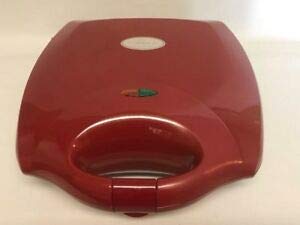
Figure 1: Antec Sensio Pie Maker Model KP8104. This image displays the compact red pie maker with its lid closed, ready for use.
4. คู่มือการใช้งาน
- การตระเตรียม: Prepare your pie crust and filling according to your recipe. Ensure the pie maker is clean and dry.
- การอุ่นเครื่องล่วงหน้า: Close the lid and plug the pie maker into a standard electrical outlet. The indicator light will illuminate, signaling that the appliance is preheating.
- Ready to Bake: Once the pie maker reaches the optimal baking temperature, the indicator light will turn off (or change color, depending on the model). This typically takes 3-5 minutes.
- เพิ่มส่วนผสม: Carefully open the lid. Place one pie crust into each cooking cavity. Add your desired filling, ensuring not to overfill. Place the top crusts over the filling.
- การอบ: Close the lid firmly. The indicator light will illuminate again as the appliance maintains its temperature. Bake for approximately 8-12 minutes, or until the crusts are golden brown and the filling is heated through. Baking time may vary based on recipe and desired crispness.
- การถอดออก: Using a non-metallic utensil (e.g., plastic or wooden spatula), carefully remove the cooked pies from the cavities.
- การระบายความร้อน: Allow pies to cool slightly before serving.
- เสร็จ: Unplug the pie maker from the outlet when finished baking.
5. การทำความสะอาดและการบำรุงรักษา
Proper cleaning and maintenance will extend the life of your pie maker.
- คลายความร้อน: ปล่อยให้เครื่องเย็นสนิทก่อนทำความสะอาดเสมอ
- ถอดปลั๊ก: Ensure the pie maker is unplugged from the electrical outlet.
- การทำความสะอาดจาน: เช็ดจานทำอาหารที่ไม่ติดด้วยโฆษณาamp cloth or sponge. For stubborn residue, use a small amount of cooking oil to soften it, then wipe clean. Do not use abrasive cleaners or metal scouring pads, as these can damage the non-stick coating.
- ภายนอก: เช็ดด้านนอกของเครื่องด้วย d . ที่อ่อนนุ่มamp cloth. Do not immerse the pie maker in water or any other liquid.
- พื้นที่จัดเก็บ: Store the pie maker in a clean, dry place.
6 การแก้ไขปัญหา
| ปัญหา | สาเหตุที่เป็นไปได้ | สารละลาย |
|---|---|---|
| เครื่องไม่เปิดขึ้น | ไม่ได้เสียบปลั๊ก; เต้าเสียบไฟมีปัญหา | ตรวจสอบให้แน่ใจว่าเสียบปลั๊กเข้ากับเต้ารับที่ใช้งานได้แน่นสนิทแล้ว ตรวจสอบเบรกเกอร์วงจรด้วย |
| Pies are not cooking evenly. | Uneven filling; appliance not fully preheated. | Ensure filling is evenly distributed. Allow the pie maker to fully preheat before adding ingredients. |
| Pies stick to the cooking plates. | Insufficient non-stick coating; plates not clean. | Ensure cooking plates are clean. A light spray of cooking oil can be used if needed, though typically not required for non-stick surfaces. |
7. ข้อมูลจำเพาะ
- ยี่ห้อ: แอนเทค
- แบบอย่าง: KP8104
- สี: สีแดง
- รูปร่าง: กลม
- ความจุ: 1 Kilogram (approximate)
- การดูแลผลิตภัณฑ์: Hand Wash (for removable parts, if applicable; main unit wipe clean)
- น้ำหนักสินค้า: 1 ปอนด์
- ยูพีซี: 704455690631
8. การรับประกันและการสนับสนุน
Antec provides a limited warranty for this product. For detailed warranty information, product support, or to inquire about replacement parts, please refer to the warranty card included with your purchase or visit the official Antec website. Please have your model number (KP8104) and proof of purchase available when contacting support.


