1. บทนำ
This manual provides essential instructions for the safe and effective use of your Unitech MS652 800mAh rechargeable battery. Please read this manual thoroughly before using the battery to ensure proper operation and to prevent damage or injury.
2. สินค้าหมดview
The Unitech MS652 800mAh battery is a genuine replacement or spare battery designed specifically for the Unitech MS652 ring scanner. It provides reliable power to ensure continuous operation of your device.
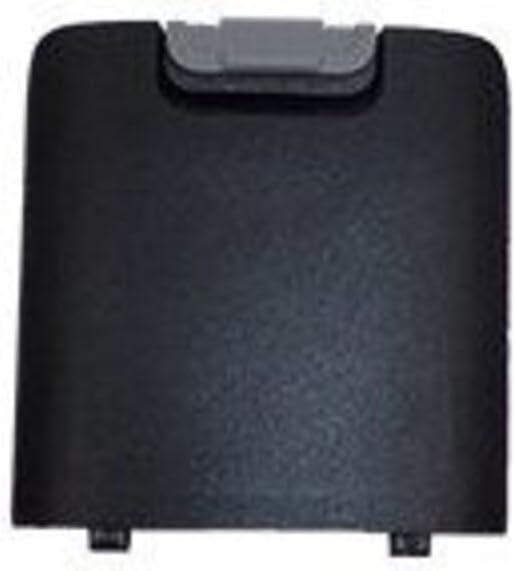
รูปที่ 1: Unitech MS652 800mAh Battery. This image shows the black rectangular battery pack with a grey latch mechanism at the top, designed to fit into the Unitech MS652 ring scanner.
3. การตั้งค่าและการติดตั้ง
Follow these steps to install the battery into your Unitech MS652 ring scanner:
- ปิดอุปกรณ์: Ensure your Unitech MS652 ring scanner is completely powered off before attempting battery installation or removal.
- ค้นหาช่องใส่แบตเตอรี่: Identify the battery compartment on your MS652 scanner. Refer to your scanner's user manual for exact location if unsure.
- ช่องเปิด: Carefully open the battery compartment cover. This may involve sliding a latch or unscrewing a small screw, depending on the scanner model.
- ใส่แบตเตอรี่: Align the battery with the contacts inside the compartment. Gently push the battery into place until it clicks or sits securely. Ensure the grey latch mechanism on the battery aligns with the scanner's locking mechanism.
- ปิดช่อง: ปิดฝาช่องใส่แบตเตอรี่กลับเข้าที่และขันให้แน่น
- ค่าใช้จ่ายเริ่มต้น: เพื่อให้ได้ประสิทธิภาพสูงสุด ควรชาร์จแบตเตอรี่ให้เต็มก่อนใช้งานครั้งแรก
4. คู่มือการใช้งาน
The Unitech MS652 800mAh battery is designed for seamless integration with your MS652 ring scanner.
- การชาร์จ: Use only the charger supplied or approved by Unitech for the MS652 scanner. Connect the scanner with the installed battery to the charger. The charging indicator on the scanner will typically show the charging status.
- การใช้ครั้งแรก: It is recommended to fully charge the battery before its initial use to calibrate the battery meter and ensure maximum capacity.
- การใช้งานปกติ: The battery will power your MS652 scanner during operation. Monitor the battery level indicator on your scanner to determine when recharging is necessary.
- อายุการใช้งานแบตเตอรี่: Battery life varies depending on usage patterns, scanner settings, and environmental conditions.
5. การบำรุงรักษา
การบำรุงรักษาอย่างถูกวิธีสามารถยืดอายุการใช้งานของแบตเตอรี่ได้:
- การชาร์จปกติ: Avoid completely draining the battery frequently. Recharge it when the device indicates low power.
- พื้นที่จัดเก็บ: If storing the battery for an extended period, charge it to approximately 50% and store it in a cool, dry place (between 0°C and 25°C or 32°F and 77°F). Avoid extreme temperatures.
- การทำความสะอาด: Keep battery contacts clean. Use a dry, soft cloth to wipe away any dust or debris.
- หลีกเลี่ยงความเสียหายทางกายภาพ: อย่าทำตก เจาะ หรือถอดแยกชิ้นส่วนแบตเตอรี่
6 การแก้ไขปัญหา
หากคุณพบปัญหาเกี่ยวกับแบตเตอรี่ โปรดพิจารณาสิ่งต่อไปนี้:
- แบตเตอรี่ไม่ชาร์จ:
- Ensure the charger is properly connected to both the power source and the scanner.
- Verify that the charger is the correct one for your Unitech MS652 scanner.
- ตรวจสอบดูว่าแบตเตอรี่หรือที่ชาร์จมีร่องรอยความเสียหายใดๆ หรือไม่
- Clean the battery contacts on both the battery and the scanner.
- อายุการใช้งานแบตเตอรี่สั้น:
- ตรวจสอบให้แน่ใจว่าแบตเตอรี่ชาร์จเต็มแล้วก่อนใช้งาน
- Reduce screen brightness or disable unnecessary features on the scanner to conserve power.
- If the battery is old, its capacity may have degraded over time. Consider replacing it.
- อุปกรณ์ไม่ได้เปิดเครื่อง:
- Confirm the battery is correctly installed and fully charged.
- Try a different, known-good battery if available.
If problems persist, contact Unitech customer support for assistance.
7. ข้อมูลจำเพาะ
| คุณสมบัติ | รายละเอียด |
|---|---|
| ยี่ห้อ | ยูนิเทค |
| ความเข้ากันได้ของรุ่น | Unitech MS652 Ring Scanner |
| ประเภทแบตเตอรี่ | ชาร์จไฟได้ |
| ความจุ | 800 mAh (มิลลิamp ชั่วโมง) |
| หมายเลขชิ้นส่วน | 1400-900050G |
| น้ำหนักสินค้า | ประมาณ 3.92 ออนซ์ |
| จำนวนหน่วย | 1 จำนวน |
8. ข้อมูลด้านความปลอดภัย
ปฏิบัติตามข้อควรระวังด้านความปลอดภัยต่อไปนี้เพื่อป้องกันการบาดเจ็บหรือความเสียหาย:
- ใช้ที่ชาร์จที่ได้รับอนุมัติ: Only use chargers specifically designed and approved for the Unitech MS652 scanner and its battery. Using incompatible chargers can cause fire, explosion, or other hazards.
- หลีกเลี่ยงอุณหภูมิที่สูงหรือต่ำเกินไป: Do not expose the battery to extreme heat (e.g., direct sunlight, near heaters) or cold. High temperatures can cause the battery to overheat, swell, or explode. Low temperatures can significantly reduce battery performance.
- ห้ามถอดประกอบ: Never attempt to disassemble, puncture, or modify the battery. This can lead to short circuits, fire, or exposure to hazardous materials.
- การกำจัดที่ถูกต้อง: Do not dispose of batteries in household waste. Follow local regulations for proper disposal of rechargeable batteries. Many retailers and recycling centers offer battery recycling programs.
- เก็บให้ห่างจากน้ำ: ห้ามจุ่มแบตเตอรี่ลงในน้ำหรือให้แบตเตอรี่สัมผัสกับความชื้นมากเกินไป
- เก็บให้ห่างจากเด็ก: เก็บแบตเตอรี่ให้พ้นมือเด็ก
- จัดการด้วยความระมัดระวัง: Avoid dropping the battery or subjecting it to strong impacts.
9. การรับประกันและการสนับสนุน
For warranty information or technical support regarding your Unitech MS652 800mAh battery or compatible device, please refer to the documentation provided with your Unitech MS652 ring scanner or visit the official Unitech website. You may also contact Unitech customer service directly for assistance.
Unitech Official Webเว็บไซต์: www.unitech.com


