การแนะนำ
ขอบคุณสำหรับการซื้อasing the Caliber Alarm Clock with QI Charging Station. This device combines a digital alarm clock with a convenient wireless charging pad and a USB charging port, designed to simplify your bedside setup. It also features an adjustable night light and a large LED display for clear visibility.
This manual provides detailed instructions on how to set up, operate, maintain, and troubleshoot your new alarm clock. Please read it thoroughly before use to ensure optimal performance and longevity of the product.
การตั้งค่า
การแกะกล่อง: นำนาฬิกาปลุกออกจากบรรจุภัณฑ์อย่างระมัดระวัง ตรวจสอบให้แน่ใจว่ามีอุปกรณ์ครบทุกชิ้น ได้แก่ นาฬิกาปลุกและอะแดปเตอร์แปลงไฟ
การเชื่อมต่อไฟฟ้า: Connect the provided power adapter to the DC input port on the back of the alarm clock. Plug the other end of the adapter into a standard wall outlet. The display will illuminate.
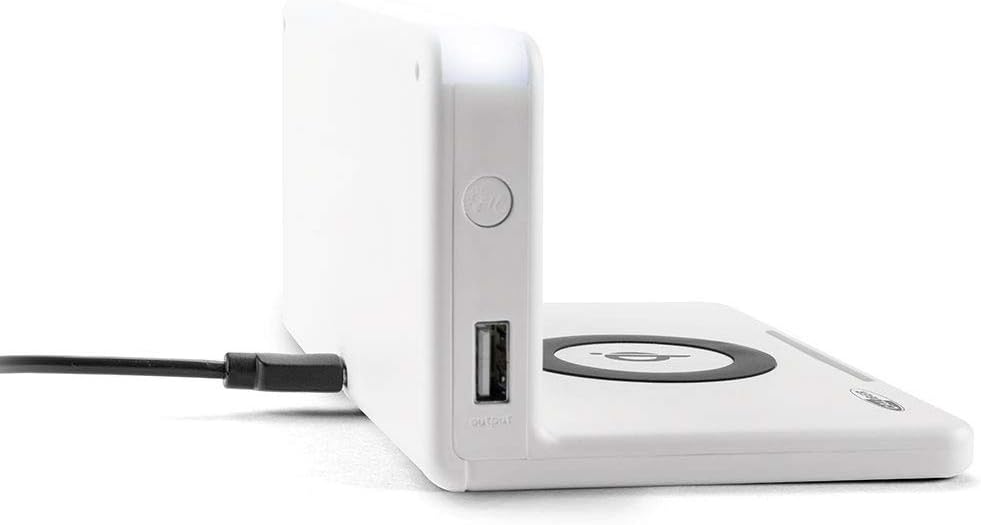
ภาพ: ด้านข้าง view of the alarm clock, illustrating the power input port (left) and the USB output port (right).
Battery Installation (Backup): The unit includes 1 Lithium Ion battery for backup. This battery maintains time settings during power outages. No user installation is typically required for this pre-installed battery.
การตั้งเวลาเริ่มต้น: Upon first power-up, the clock may display a default time or require manual setting. Refer to the "Operating" section for detailed instructions on setting the time.
คำแนะนำการใช้งาน
การตั้งเวลาและวันที่
- กดปุ่มค้างไว้ ตั้งเวลา button (location may vary, typically on the back or top) until the hour digits flash.
- ใช้ + or - ปุ่มเพื่อปรับชั่วโมง
- กด ตั้งเวลา อีกครั้งเพื่อเปลี่ยนเป็นนาที จากนั้นปรับด้วย + or -.
- Repeat for year, month, and day if applicable.
- กด ตั้งเวลา one last time to confirm and exit.
การตั้งค่าสัญญาณเตือน
- กดปุ่มค้างไว้ ตั้งปลุก button (or similar) until the alarm hour digits flash.
- Adjust the alarm hour and minutes using the + or - ปุ่ม
- กด ตั้งปลุก เพื่อยืนยัน.
- หากต้องการเปิด/ปิดสัญญาณเตือน ให้กดปุ่ม เปิด / ปิดนาฬิกาปลุก กดปุ่ม ไอคอนแจ้งเตือนจะปรากฏ/หายไปบนหน้าจอ
- เมื่อเสียงปลุกดัง ให้กด เลื่อน button for a temporary pause, or any other button to turn it off for the day.
Using the QI Wireless Charging Station
The alarm clock features a built-in QI wireless charging pad for compatible devices.
- ตรวจสอบให้แน่ใจว่านาฬิกาปลุกเปิดอยู่
- Place your QI-compatible smartphone or device directly onto the charging pad, centering it over the โลโก้ QI.
- A charging indicator (e.g., an LED light or on-screen icon) will illuminate to confirm charging has begun. If charging does not start, reposition your device.

Image: A smartphone placed on the QI charging pad of the alarm clock, showing the charging interface on the phone screen.

Image: The alarm clock with a phone positioned on its wireless charging surface, indicating active charging.
การใช้พอร์ตชาร์จ USB
A USB output port is available on the side of the unit for charging non-QI compatible devices or for faster wired charging.
- เสียบสายชาร์จ USB ของอุปกรณ์ของคุณเข้ากับพอร์ต USB บนนาฬิกาปลุก
- ต่อปลายอีกด้านของสายเคเบิลเข้ากับอุปกรณ์ของคุณ การชาร์จจะเริ่มต้นโดยอัตโนมัติ
Adjusting Display Brightness and Night Light
- The alarm clock features adjustable display brightness. Look for a หรี่ไฟ or ความสว่าง button, typically on the back or top. Press it repeatedly to cycle through brightness levels.
- To activate or adjust the night light, locate the dedicated ไฟกลางคืน button. Press it to turn the light on/off or cycle through different brightness settings if available.
การซ่อมบำรุง
- การทำความสะอาด: Disconnect the power adapter before cleaning. Use a soft, dry cloth to wipe the surface of the alarm clock. Do not use abrasive cleaners, waxes, or solvents as they may damage the finish.
- พื้นที่จัดเก็บ: หากจะจัดเก็บเครื่องเป็นเวลานาน ควรถอดปลั๊กออกและเก็บไว้ในที่แห้งและเย็น
- การจัดการ: Avoid dropping the unit or subjecting it to strong impacts. Keep it away from water and high humidity.
การแก้ไขปัญหา
| ปัญหา | สาเหตุที่เป็นไปได้ | สารละลาย |
|---|---|---|
| หน้าจอแสดงผลนาฬิกาว่างเปล่า | ไม่มีการเชื่อมต่อสายไฟ | ตรวจสอบให้แน่ใจว่าได้เสียบอะแดปเตอร์แปลงไฟเข้ากับตัวเครื่องและเต้ารับไฟฟ้าที่ใช้งานได้สนิทแล้ว |
| QI charging not working. | Device not QI-compatible; device not properly aligned; foreign objects on pad; phone case too thick. | Verify device compatibility. Reposition device on the center of the pad. Remove any foreign objects. Remove thick phone cases. |
| สัญญาณเตือนภัยไม่ดัง | สัญญาณเตือนไม่ทำงาน; ระดับเสียงเบาเกินไป; เวลาปลุกไม่ถูกต้อง | Ensure the alarm icon is displayed. Check alarm volume settings. Verify the alarm time is set correctly. |
| เวลาไม่ถูกต้อง | เวลาไม่ได้ตั้งค่าอย่างถูกต้อง ไฟฟ้าดับ | Reset the time manually. If power was interrupted, the backup battery should maintain time, but a manual check is recommended. |
ข้อมูลจำเพาะ
| คุณสมบัติ | รายละเอียด |
|---|---|
| ยี่ห้อ | ขนาดเส้นผ่าศูนย์กลาง |
| หมายเลขรุ่น | HCG018QI/W |
| สี | สีขาว |
| ประเภทจอภาพ | ดิจิตอล |
| คุณสมบัติพิเศษ | Night light, QI charging station, USB charging port |
| แหล่งพลังงาน | สายไฟ |
| ขนาดสินค้า | 7.09 x 4.25 x 3.86 นิ้ว |
| น้ำหนักสินค้า | 7.9 ออนซ์ (225 กรัม) |
| แบตเตอรี่ | 1 Lithium Ion battery (included, for backup) |
| GTIN | 08714505047157 |
การรับประกันและการสนับสนุน
This Caliber product is designed for reliability and performance. For information regarding warranty coverage, please refer to the warranty card included with your purchase or visit the official Caliber webเว็บไซต์.
Should you encounter any issues not covered in the troubleshooting section, or require further assistance, please contact Caliber customer support. Contact details can typically be found on the product packaging or the manufacturer's official webเว็บไซต์.


