1. บทนำ
ขอบคุณสำหรับการซื้อasing the OREI DVD-Z9H Region Free HDMI DVD Player. This manual provides essential information for the proper setup, operation, and maintenance of your new device. Please read these instructions thoroughly before use and retain them for future reference.
The OREI DVD-Z9H is designed to play DVDs from any region (0-6) and supports both PAL and NTSC formats, with built-in conversion. It offers 1080p upscaling for enhanced video quality and includes a USB input for media playback.
2. ข้อมูลด้านความปลอดภัย
- แหล่งจ่ายไฟ: Ensure the player is connected to a power source within the specified voltagช่วงอี (100-240V)
- การระบายอากาศ : Do not block ventilation openings. Allow adequate space around the player for proper airflow.
- ความชื้น: Keep the player away from water or excessive moisture. Do not operate with wet hands.
- การทำความสะอาด: Use a soft, dry cloth for cleaning. Avoid liquid or aerosol cleaners.
- การบริการ: Do not attempt to service the player yourself. Refer all servicing to qualified personnel.
- ความปลอดภัยของเลเซอร์: This product utilizes a laser. Do not open the player casing as it may expose you to invisible laser radiation.
3. เนื้อหาบรรจุภัณฑ์
ตรวจสอบว่ามีรายการทั้งหมดอยู่ในแพ็คเกจ:
- 1 x OREI DVD-Z9H HDMI DVD Player
- 1 x รีโมทคอนโทรล (ไม่รวมแบตเตอรี่)
- 1 x AV Cable (RCA)
- 1 x คู่มือการใช้งาน (เอกสารนี้)
Note: An HDMI cable is not included and must be purchased separately for HDMI connectivity.
4. สินค้าหมดview
4.1. แผงด้านหน้า
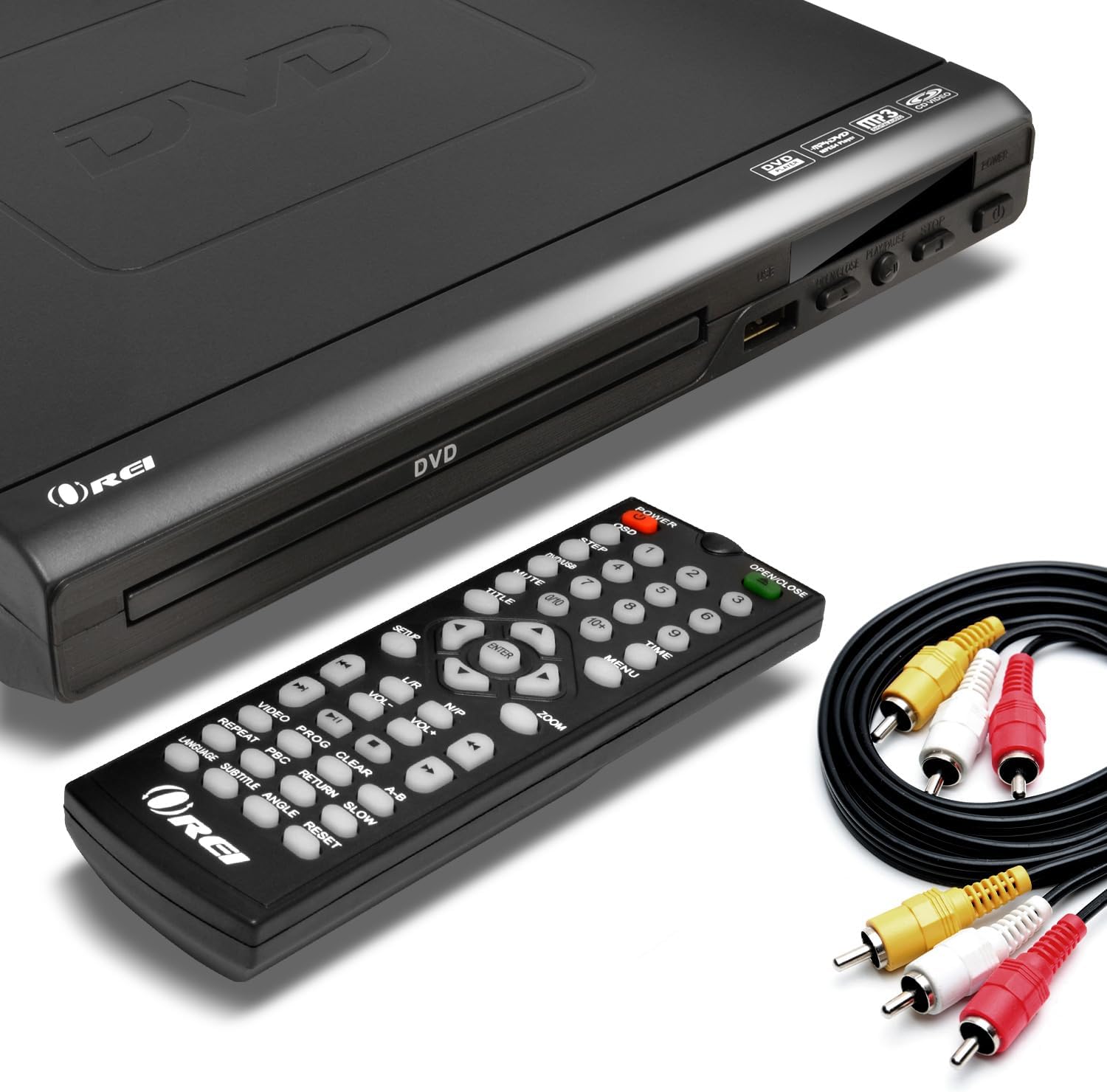
Image: The OREI DVD-Z9H DVD player, its remote control, and included AV cables. The player features a disc tray, power button, and USB port on the front.
- ถาดใส่แผ่นดิสก์: ใส่แผ่นดีวีดีหรือซีดีที่นี่
- พอร์ต USB: Connect a USB flash drive for media playback.
- ปุ่มเปิด/ปิด: เปิดหรือปิดเครื่องเล่น
- Play/Pause, Stop, Open/Close Buttons: Basic control functions.
4.2. แผงด้านหลัง

Image: The rear panel of the OREI DVD-Z9H DVD player, displaying the HDMI output, composite video/audio (RCA) outputs, coaxial audio output, and power input. Labels indicate model number DVD-Z9H and power specifications.
- เอาท์พุต HDMI: Connects to a TV or display for high-definition video and audio.
- Composite Video/Audio Output (RCA x3): Connects to older TVs using red, white, and yellow RCA cables.
- เอาต์พุตเสียงแบบโคแอกเซียล: For digital audio connection to a compatible receiver.
- กำลังไฟเข้า: Connect the power cord here.
4.3. รีโมทคอนโทรล

Image: The OREI DVD-Z9H DVD player with its remote control positioned above it. The remote features numerous buttons for playback, menu navigation, volume, and special functions.
The remote control provides full functionality for the DVD player. Insert two AAA batteries (not included) into the remote before use. Key functions include:
- พลัง: เปิด/ปิด.
- เปิดปิด: เปิดและปิดถาดใส่ดิสก์
- ปุ่มตัวเลข (0-9): For direct track selection.
- Navigation (Up/Down/Left/Right, Enter): สำหรับการนำทางเมนู
- Play, Pause, Stop, Fast Forward, Rewind: Playback controls.
- ระดับเสียง +/-: ปรับระดับเอาท์พุตเสียง
- การตั้งค่า: เข้าถึงเมนูการตั้งค่าระบบ
- Subtitle, Audio, Angle: Controls for DVD features.
- ซูม: Adjusts screen zoom level.
5. การตั้งค่า
5.1. การเชื่อมต่อกับโทรทัศน์
เลือกวิธีการเชื่อมต่อวิธีใดวิธีหนึ่งต่อไปนี้:
- HDMI Connection (Recommended for HD):
- Connect one end of an HDMI cable (not included) to the HDMI OUT port on the back of the DVD player.
- Connect the other end of the HDMI cable to an HDMI IN port on your television.
- เลือกช่องต่อ HDMI ที่ตรงกับทีวีของคุณโดยใช้รีโมทคอนโทรล

Image: A diagram illustrating how to connect the OREI DVD-Z9H DVD player to a TV using an HDMI cable and how to connect a USB flash drive to the player.
- Composite Video/Audio Connection (Standard Definition):
- Connect the yellow plug of the supplied AV cable to the VIDEO OUT port on the DVD player.
- Connect the red and white plugs of the AV cable to the AUDIO OUT (R/L) ports on the DVD player.
- Connect the other ends of the AV cable to the corresponding VIDEO IN and AUDIO IN ports on your television.
- เลือกช่องรับสัญญาณ AV ที่ตรงกันบนทีวีของคุณ
5.2. การเชื่อมต่อไฟฟ้า
- Plug the power cord into the power input on the rear of the DVD player.
- เสียบปลายอีกด้านของสายไฟเข้ากับเต้ารับไฟฟ้าทั่วไป
5.3. การตั้งค่าเริ่มต้น
After connecting and powering on the player, you may need to configure basic settings:
- กดปุ่ม การตั้งค่า ปุ่มบนรีโมทคอนโทรล
- Navigate through the menu to set preferences such as:
- ภาษา: Select your preferred menu and audio language.
- ระบบทีวี: Choose between NTSC or PAL based on your region (the player has built-in conversion).
- อัตราส่วนภาพ: Select 16:9 for widescreen TVs or 4:3 for standard TVs.
- คุณภาพวิดีโอ: Adjust brightness, contrast, etc.
- กด การตั้งค่า อีกครั้งเพื่อออกจากเมนู
6. คู่มือการใช้งาน
6.1. การเล่น DVD/CD
- กดปุ่ม พลัง ปุ่มสำหรับเปิดเครื่องเล่น
- กดปุ่ม เปิด/ปิด ปุ่มเพื่อเปิดถาดใส่แผ่นดิสก์
- วางแผ่น DVD หรือ CD ลงในถาดใส่แผ่นโดยให้ด้านที่มีฉลากหันขึ้นด้านบน
- กดปุ่ม เปิด/ปิด ปุ่มอีกครั้งเพื่อปิดถาด
- The player will automatically begin playback or display the disc menu.
- Use the remote control's navigation and playback buttons (PLAY, PAUSE, STOP, FF, REW) เพื่อควบคุมการเล่น

Image: The OREI DVD-Z9H DVD player and its remote control in front of a television displaying a movie scene, illustrating the player's ability to play DVDs from any region.
6.2 การเล่นสื่อ USB
The player supports playback of video, picture, and music fileจากแฟลชไดรฟ์ USB
- Insert a USB 2.0 flash drive (up to 16GB) into the USB port on the front of the player.
- The player should automatically detect the USB drive and display a menu for file selection. If not, press the ยูเอสบี button on the remote (if available) or navigate to the USB input source.
- Use the navigation buttons to browse files และกด เข้า to select and play.
รูปแบบที่รองรับ: DVD, AVI, CD, CD-R/RW, DVD-R/RW, DVD+R/RW, Vc1, MPEG1, MPEG-2, MP3.
Note: The HDMI DVD player can only support USB 2.0 Flash drives up to 16 GB and plays video files up to 720p via USB. Blu-ray discs are not supported.

Image: The OREI DVD-Z9H DVD player positioned below a TV displaying a high-definition image. Icons represent various supported media formats including DVD, AVI, CD, CD-R/RW, DVD-R/RW, VCI, MPEG1, MPEG-2, and MP3, highlighting its 1080p upscaling capability.
7. การบำรุงรักษา
7.1. Cleaning the Player
- Unplug the player from the power outlet before cleaning.
- Use a soft, dry, lint-free cloth to wipe the exterior of the player.
- Do not use liquid cleaners, abrasive pads, or chemical solvents, as these can damage the finish.
7.2. การดูแลแผ่นดิสก์
- จับแผ่นดิสก์โดยจับที่ขอบเพื่อหลีกเลี่ยงรอยนิ้วมือบนพื้นผิวการเล่น
- Keep discs clean and free from scratches. Wipe discs gently from the center outwards with a soft, dry cloth if cleaning is necessary.
- เก็บแผ่นดิสก์ไว้ในกล่องเมื่อไม่ใช้งาน
8 การแก้ไขปัญหา
If you encounter issues with your OREI DVD-Z9H player, refer to the following common problems and solutions:
| ปัญหา | สาเหตุที่เป็นไปได้ | สารละลาย |
|---|---|---|
| ไม่มีไฟฟ้า | ไม่ได้เสียบสายไฟ; ปลั๊กไฟไม่ทำงาน | Ensure power cord is securely plugged into player and outlet; Test outlet with another device. |
| ไม่มีภาพในทีวี | Incorrect TV input selected; Loose video cable connection | Select the correct HDMI or AV input on your TV; Check that HDMI or AV cables are securely connected. |
| ไม่มีเสียง | TV/player volume too low; Loose audio cable connection; Incorrect audio settings | Increase volume on TV and player; Check audio cable connections; Verify audio settings in the player's setup menu. |
| แผ่นดิสก์ไม่เล่น / แสดงข้อผิดพลาด "ไม่มีแผ่นดิสก์" | ใส่แผ่นไม่ถูกต้อง; แผ่นสกปรกหรือมีรอยขีดข่วน; รูปแบบแผ่นไม่รองรับ | Insert disc with label side up; Clean disc with a soft cloth; Ensure disc is a supported format (not Blu-ray). |
| รีโมตคอนโทรลไม่ทำงาน | แบตเตอรี่หมดหรือใส่ไม่ถูกต้อง; มีสิ่งกีดขวางระหว่างรีโมทและเครื่องเล่น | Replace batteries with new ones, ensuring correct polarity; Remove any objects blocking the remote's signal path to the player's sensor. |
| ปัญหาการเล่นไฟล์ผ่าน USB | Unsupported USB drive size/type; Unsupported file format; Video resolution too high | Use a USB 2.0 flash drive up to 16GB; Ensure files are in supported formats (e.g., AVI, MPEG); Video resolution should not exceed 720p. |
9. ข้อมูลจำเพาะ
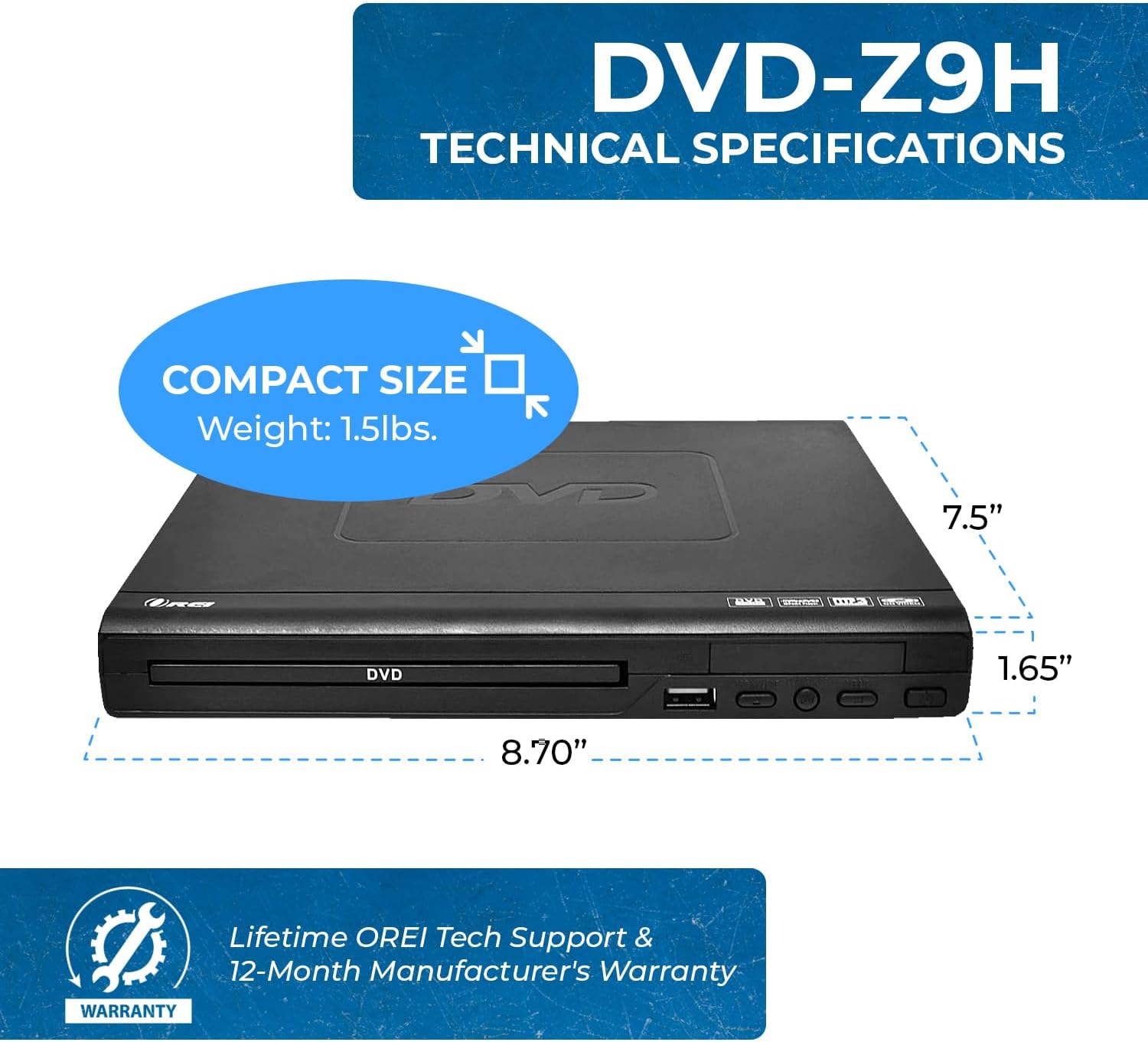
Image: The OREI DVD-Z9H DVD player shown with its compact dimensions: 8.70 inches (length), 7.5 inches (width), and 1.65 inches (height), and a weight of 1.5 lbs.
- แบบอย่าง: DVD-Z9H
- ขนาด (ยาว x กว้าง x สูง): ประมาณ 8.70 x 7.5 x 1.65 นิ้ว (22.1 x 19.05 x 4.19 ซม.)
- น้ำหนัก: ประมาณ 1.5 ปอนด์ (0.68 กก.)
- ประเภทสื่อ : CD, DVD (Does not support Blu-ray discs)
- รูปแบบที่รองรับ: DVD, AVI, CD, CD-R/RW, DVD-R/RW, DVD+R/RW, Vc1, MPEG1, MPEG-2, MP3
- ปณิธาน: 1080p (upscaling)
- การเชื่อมต่อ: HDMI, RCA (Composite Video/Audio), Coaxial Audio, USB 2.0
- รองรับ USB: Up to 16GB USB 2.0 flash drives, video files up to 720p
- เล่มที่tage: ฉบับคู่ทั่วโลกtagอี (100-240V)
- คุณสมบัติพิเศษ: Region Free (0-6), Built-in PAL/NTSC Converter
10. การรับประกันและการสนับสนุน
The OREI DVD-Z9H comes with a การรับประกันจากผู้ผลิต 1 ปี from the date of purchase. OREI also offers a 30-day money-back guarantee.
For technical support, warranty claims, or any product-related inquiries, please contact OREI customer service. Refer to the contact information provided with your purchase or visit the official OREI webเว็บไซต์เพื่อขอความช่วยเหลือ


