สินค้าเกินview
This manual provides instructions for the Elekpia Replacement Remote Control, designed for use with various MAG IPTV Linux Set-Top Box models. This remote offers a direct replacement solution, requiring no complex programming or pairing.
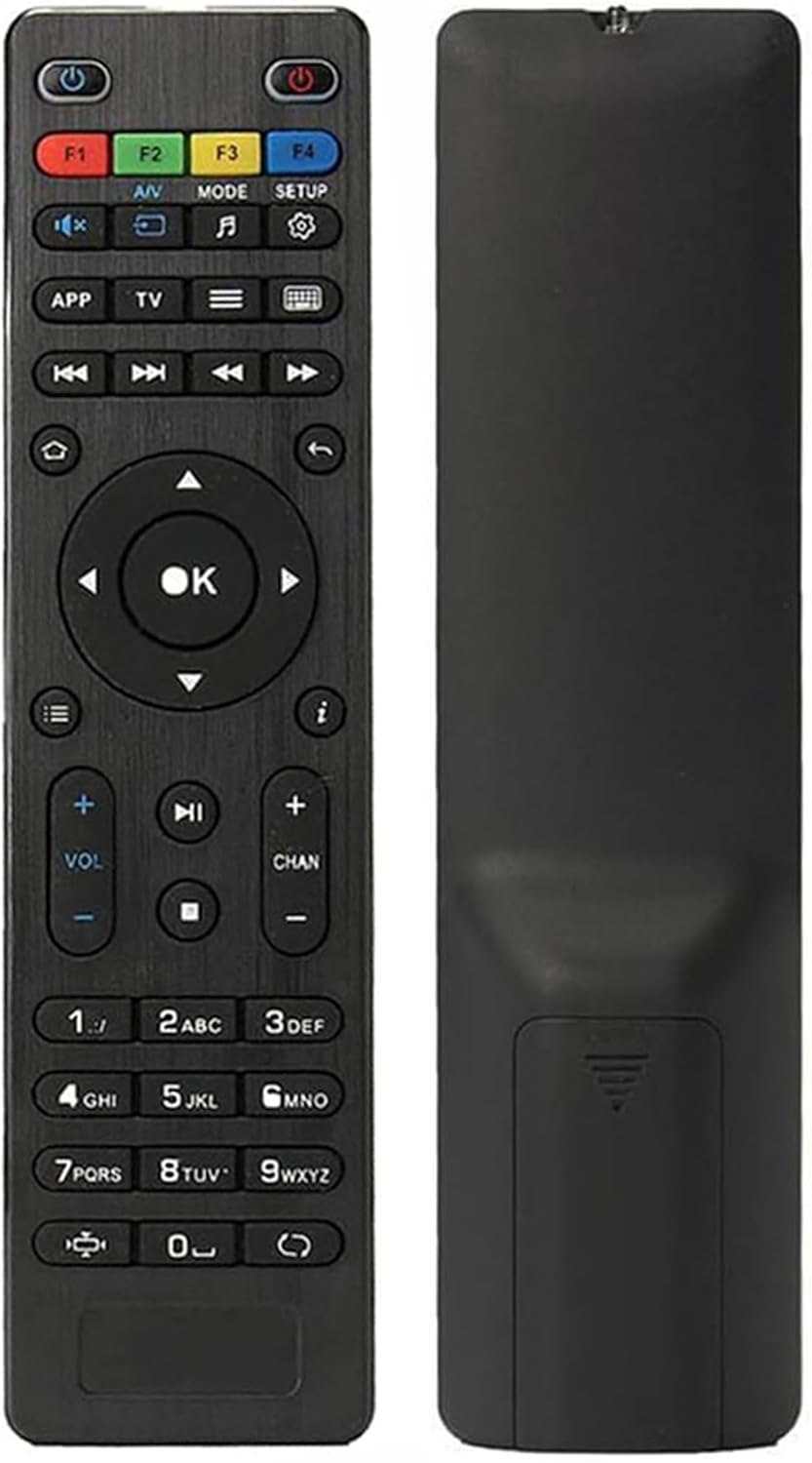
ภาพ: ด้านหน้าและด้านหลัง view of the Elekpia replacement remote control. The remote is black with clearly labeled buttons on the front, and a smooth, ergonomic back.
คุณสมบัติหลัก:
- Compatible with a wide range of MAG IPTV Linux Set-Top Box models, including MAG250, MAG254, 255, 256, 257, 260, 275, 349, 350, 351, 352, and MAG322W1.
- No programming or pairing required; functions immediately upon battery installation.
- Powered by two AAA batteries (not included).

Image: The remote control is shown alongside a list of compatible MAG models, emphasizing its broad compatibility with various MAG IPTV Linux Set-Top Boxes.
การตั้งค่า
Setting up your new Elekpia remote control is a straightforward process. Follow these steps to begin using your remote.
1. การติดตั้งแบตเตอรี่
- ค้นหาช่องใส่แบตเตอรี่ที่ด้านหลังของรีโมทคอนโทรล
- เลื่อนเปิดฝาครอบช่องใส่แบตเตอรี่
- ใส่แบตเตอรี่ AAA สอง (2) ก้อน โดยตรวจสอบให้แน่ใจว่าขั้วบวก (+) และขั้วลบ (-) ตรงกับตัวบ่งชี้ภายในช่องใส่แบตเตอรี่อย่างถูกต้อง
- ปิดฝาช่องใส่แบตเตอรี่ให้แน่น
2. การใช้งานครั้งแรก
This remote control is designed to work directly with compatible MAG IPTV Linux Set-Top Boxes without the need for programming or pairing. Once batteries are installed, point the remote at your set-top box and begin using it.
คำแนะนำการใช้งาน
Familiarize yourself with the functions of each button on your Elekpia remote control to effectively navigate and control your MAG IPTV Linux Set-Top Box.

Image: A detailed diagram illustrating the layout and function of each button on the remote control, including power, navigation, volume, channel, and media playback controls.
ฟังก์ชันปุ่มควบคุมระยะไกล| ปุ่ม | การทำงาน |
|---|
| ปุ่มเปิดปิด (⏻) | Turns the Media Player On/Off. |
| เอฟ1, เอฟ2, เอฟ3, เอฟ4 | Additional functions (may vary by device). |
| เสียง/วี | Changes audio mode. |
| โหมด | Accesses setup menu. |
| การตั้งค่า | Accesses setup menu. |
| แอป | เมนูบริบท |
| TV | Quick TV access. |
| เมนู (☰) | คู่มือทีวี |
| แป้นพิมพ์ (⌨) | Virtual keyboard. |
| ลูกศรนำทาง (Up, Down, Left, Right) | นำทางผ่านเมนูและตัวเลือก |
| ปุ่มตกลง | ยืนยันการเลือก |
| กลับ/กลับ (↩) | กลับไปยังหน้าจอที่แล้ว |
| บ้าน (⌂) | กลับไปที่หน้าจอหลัก |
| ข้อมูล (ⓘ) | แสดงข้อมูล |
| เพิ่ม/ลดระดับเสียง (VOL + / -) | ปรับระดับเสียง |
| ช่องขึ้น/ลง (CHAN + / -) | Switches channels. |
| ปิดเสียง (🔇) | สลับเปิด/ปิดเสียง |
| เล่น/หยุดชั่วคราว (▶⏸) | เล่นหรือหยุดสื่อชั่วคราว |
| หยุด (⏹) | หยุดการเล่นสื่อ |
| ข้ามไปข้างหน้า/ย้อนกลับ (⏭⏮) | Skips to the next/previous track or chapter. |
| เล่นเร็ว (⏩) | ส่งต่ออย่างรวดเร็วผ่านสื่อ |
| ปุ่มกดตัวเลข (0-9) | Direct input for channel numbers or other numerical data. |
| อัตราส่วนภาพ (◧) | เปลี่ยนอัตราส่วนภาพ |
| อัปเดต (↻) | Initiates an update (functionality may vary). |
การซ่อมบำรุง
การบำรุงรักษาอย่างถูกวิธีจะช่วยให้รีโมทคอนโทรลของคุณใช้งานได้ยาวนานและทำงานได้อย่างมีประสิทธิภาพสูงสุด
1. การเปลี่ยนแบตเตอรี่
Replace batteries when the remote's responsiveness decreases or it stops functioning. Always use new AAA batteries and dispose of old batteries responsibly according to local regulations.
2. การทำความสะอาด
To clean the remote, gently wipe its surface with a soft, dry cloth. For stubborn dirt, slightly dampen the cloth with water or a mild, non-abrasive cleaner. Avoid using excessive liquid or harsh chemicals, as these can damage the remote's electronics or finish.
3. การจัดเก็บ
When not in use for extended periods, it is recommended to remove the batteries to prevent potential leakage and damage to the remote.
การแก้ไขปัญหา
If you encounter issues with your remote control, refer to the following common problems and their solutions.
ปัญหาทั่วไปและแนวทางแก้ไข| ปัญหา | สาเหตุที่เป็นไปได้ | สารละลาย |
|---|
| รีโมตไม่ตอบสนอง | Dead or incorrectly installed batteries. Obstruction between remote and set-top box. Remote out of range. | Replace batteries with new AAA batteries, ensuring correct polarity. Remove any obstructions. Ensure you are within effective range of the set-top box. |
| ปุ่มกดติดขัดหรือกดได้ยาก | Accumulation of dirt or debris under the buttons. Internal mechanism issue. | Gently clean around the buttons with a soft, dry cloth or a cotton swab. If the issue persists, it may indicate internal wear. |
| การทำงานระยะไกลมีเป็นระยะๆ | Low battery power. Infrared sensor on remote or set-top box is dirty or obstructed. | Replace batteries. Clean the infrared sensor on both the remote and the set-top box. Ensure a clear line of sight. |
| Remote does not control the set-top box. | Incompatible set-top box model. | Verify that your MAG IPTV Linux Set-Top Box model is listed as compatible (MAG250, MAG254, 255, 256, 257, 260, 275, 349, 350, 351, 352, MAG322W1). |
ข้อมูลจำเพาะ
ข้อมูลจำเพาะผลิตภัณฑ์| คุณสมบัติ | รายละเอียด |
|---|
| หมายเลขรุ่น | Elekpia mag 254 remote |
| อุปกรณ์ที่รองรับ | MAG250, MAG254, 255, 256, 257, 260, 275, 349, 350, 351, 352 IPTV Linux Set-Top Box, MAG322W1 |
| แหล่งพลังงาน | 2 x แบตเตอรี่ AAA (ไม่รวม) |
| ขนาด (กว้าง x ยาว x สูง) | 7 x 1.8 x 0.6 นิ้ว (โดยประมาณ) |
| น้ำหนักสินค้า | 1.76 ออนซ์ (โดยประมาณ) |
| สี | สีดำ |
| คุณสมบัติพิเศษ | การออกแบบตามหลักสรีรศาสตร์ |
การรับประกันและการสนับสนุน
Information regarding product warranty and customer support is not provided within this instruction manual. For warranty details or technical assistance, please refer to the product packaging or contact the retailer/manufacturer directly.
Manufacturer: Elekpia Factory


