1. สินค้าหมดview
The EARISE M37 is a portable 100W PA system designed for various audio applications, including home parties, small events, and karaoke. It features a wooden cabinet for enhanced acoustics, built-in Bluetooth connectivity, and comes with two wireless microphones for immediate use. The system supports multiple audio inputs including AUX and USB, offering versatile playback options.

Image: The EARISE M37 PA system, showcasing its wooden box design and two included wireless microphones.
2. ข้อมูลด้านความปลอดภัย
- อย่าให้เครื่องโดนฝนหรือความชื้นเพื่อป้องกันไฟไหม้หรือไฟฟ้าช็อต
- Do not open the cabinet. There are no user-serviceable parts inside. Refer all servicing to qualified personnel.
- ตรวจสอบให้แน่ใจว่ามีการระบายอากาศที่เหมาะสมรอบ ๆ เครื่อง อย่าปิดกั้นช่องระบายอากาศ
- ควรหลีกเลี่ยงการวางเครื่องไว้ใกล้แหล่งความร้อน เช่น เครื่องทำความร้อน ช่องระบายความร้อน เตา หรืออุปกรณ์อื่นๆ (รวมถึง) ampเครื่องให้ความร้อน) ที่ผลิตความร้อน
- ปกป้องสายไฟไม่ให้ถูกเหยียบหรือถูกหนีบ โดยเฉพาะที่ปลั๊ก เต้ารับไฟฟ้า และจุดที่สายไฟออกจากเครื่อง
- ถอดปลั๊กอุปกรณ์นี้ในระหว่างพายุฝนฟ้าคะนองหรือเมื่อไม่ได้ใช้งานเป็นเวลานาน
3. เนื้อหาบรรจุภัณฑ์
กรุณาตรวจสอบแพ็คเกจสำหรับรายการต่อไปนี้:
- EARISE M37 PA System Unit
- 2 x ไมโครโฟนไร้สาย
- รีโมทคอนโทรล
- อะแดปเตอร์แปลงไฟ
- คู่มือการใช้งาน (เอกสารนี้)

Image: A visual representation of key features and included accessories: wireless microphone, Bluetooth 4.2, USB auto-play, and remote controller.
4. คุณสมบัติและส่วนประกอบของผลิตภัณฑ์
Familiarize yourself with the main components and controls of your EARISE M37 PA System.

Image: The control panel of the EARISE M37, showing various inputs and adjustment knobs. Key controls include: Mode, Previous/Next Track, Play/Pause, Record, EQ, Light, Mic 1/2 inputs, AUX In/Out, USB, TF card slot, DC Power In, ON/OFF switch, Charging indicator, ECHO, DELAY, MIC VOL, MASTER VOL, TREBLE, EXTRA BASS, and BASS.
ฟังก์ชั่นแผงควบคุม:
- เส้นทาง: Switches between input modes (Bluetooth, AUX, USB, TF Card).
- เพลงก่อนหน้า/ถัดไป: Navigates tracks during media playback.
- เล่น/หยุดชั่วคราว: ควบคุมการเล่นสื่อ
- บันทึก: Initiates or stops recording (requires USB/TF storage).
- EQ: Adjusts equalization settings.
- แสงสว่าง: Controls the integrated LED lighting.
- ไมค์ 1 / ไมค์ 2: Inputs for wired microphones (if used).
- AUX IN / AUX OUT: Audio input and output jacks for external devices.
- ยูเอสบี: USB port for media playback or recording.
- TF: TF (MicroSD) card slot for media playback or recording.
- DC Power IN: อินพุตพลังงานสำหรับการชาร์จและการทำงาน
- เปิดปิด: สวิตช์เปิด/ปิดสำหรับตัวเครื่อง
- ไฟแสดงสถานะการชาร์จ: ไฟแสดงสถานะการชาร์จ
- เสียงสะท้อน: ปรับค่าเอฟเฟ็กต์เสียงสะท้อนสำหรับไมโครโฟน
- ล่าช้า: Adjusts the delay effect for microphones.
- MIC ฉบับ: Adjusts the volume of the microphones.
- มาสเตอร์ โวล: Controls the overall master volume of the system.
- เสียงแหลม: ปรับระดับเสียงความถี่สูง
- เบสพิเศษ: ปรับปรุงเอาต์พุตเสียงความถี่ต่ำ
- เบส: ปรับระดับเสียงความถี่ต่ำ
5. การตั้งค่า
5.1 การชาร์จระบบเสียง PA
Before first use, fully charge the PA system. Connect the provided power adapter to the "DC Power IN" port on the unit and plug it into a standard wall outlet. The charging indicator light will show the charging status. A full charge provides up to 7 hours of play time.

Image: Illustration highlighting the 3600mAh battery capacity, providing up to 7 hours of continuous play time.
5.2 การตั้งค่าไมโครโฟนไร้สาย
The two wireless microphones are pre-paired with the PA system. Insert AA batteries (not included) into each microphone. Turn on the microphones using their respective power switches. They should automatically connect to the PA system.
5.3 การเชื่อมต่อแหล่งเสียง
การเชื่อมต่อบลูทู ธ :
- Turn on the EARISE M37 PA system.
- กดปุ่ม โหมด button until the display shows "Bluetooth" or a Bluetooth icon.
- บนอุปกรณ์เคลื่อนที่ของคุณ (สมาร์ทโฟน แท็บเล็ต ฯลฯ) เปิดใช้งานบลูทูธและค้นหาอุปกรณ์ที่มีอยู่
- Select "EARISE M37" from the list. Once connected, you will hear a confirmation sound.

Image: A hand holding a smartphone displaying a Bluetooth connection screen, indicating the ease of pairing with the EARISE M37 PA system.
การเล่นการ์ด USB/TF:
เสียบแฟลชไดรฟ์ USB หรือการ์ด TF (MicroSD) ที่มีไฟล์เสียง MP3 files into the respective port. The system will automatically detect and begin playing music. Use the Previous/Next Track and Play/Pause buttons to control playback.
อินพุต AUX:
เชื่อมต่ออุปกรณ์เสียงภายนอก (เช่น เครื่องเล่น MP3, คอมพิวเตอร์) เข้ากับ AUX IN port using a 3.5mm audio cable (not included). Press the โหมด button until AUX input is selected.
6. คู่มือการใช้งาน
6.1 เปิด/ปิดเครื่อง
To turn the unit on or off, use the เปิด/ปิด สวิตช์ที่อยู่บนแผงควบคุม
6.2 การปรับระดับเสียงและเอฟเฟ็กต์
- มาสเตอร์ โวล: Rotate this knob to adjust the overall volume of the PA system.
- MIC ฉบับ: ปรับระดับเสียงของไมโครโฟนที่เชื่อมต่ออยู่
- ECHO / DELAY: Use these knobs to add or reduce echo and delay effects to the microphone sound.
- TREBLE / BASS / EXTRA BASS: Adjust these knobs to fine-tune the high and low frequencies of the audio output.
6.3 Using Microphones
Once the wireless microphones are powered on and connected, speak into them. Adjust the ไมค์โวล, เสียงสะท้อน, และ ล่าช้า knobs on the PA system to achieve the desired sound. For optimal performance, hold the microphone a few inches from your mouth.

Image: Two individuals enjoying karaoke with the EARISE M37 PA system and its wireless microphones, demonstrating typical usage.
6.4 ฟังก์ชั่นการบันทึก
To record audio (e.g., microphone input or music playback), ensure a USB flash drive or TF card is inserted into the corresponding slot. Press the บันทึก button to start recording. Press it again to stop. Recorded files will be saved to the inserted storage device.
7. การบำรุงรักษา
- ทำความสะอาดตัวเครื่องด้วยผ้าแห้งเนื้อนุ่ม ห้ามใช้สารทำความสะอาดที่มีฤทธิ์กัดกร่อนหรือตัวทำละลาย
- เก็บระบบเสียง PA ไว้ในที่แห้งและเย็น หลีกเลี่ยงแสงแดดโดยตรงและอุณหภูมิที่สูงหรือต่ำเกินไป
- If the unit will not be used for an extended period, fully charge the battery before storage and recharge it every few months to maintain battery health.
8 การแก้ไขปัญหา
| ปัญหา | สาเหตุที่เป็นไปได้ | สารละลาย |
|---|---|---|
| ไม่มีไฟฟ้า | แบตเตอรี่หมด สายไฟไม่ได้เชื่อมต่อ | ชาร์จอุปกรณ์ ตรวจสอบให้แน่ใจว่าเสียบสายไฟแน่นดีแล้ว |
| ไม่มีเสียงจากไมโครโฟน | Microphones off; Batteries low/dead; MIC VOL too low. | Turn on microphones; Replace batteries; Increase MIC VOL. |
| บลูทูธไม่เชื่อมต่อ | PA system not in Bluetooth mode; Device too far; Interference. | Press MODE button to select Bluetooth; Move device closer; Restart both devices. |
| ไม่สามารถเล่น USB/TF การ์ดได้ | ไม่ถูกต้อง file รูปแบบไม่ถูกต้อง; เสียบการ์ด/ไดรฟ์ไม่ถูกต้อง; ไฟล์เสียหาย files. | ทำให้มั่นใจ files are MP3; Reinsert card/drive; Try different files/device. |
9. ข้อมูลจำเพาะ
| คุณสมบัติ | รายละเอียด |
|---|---|
| ยี่ห้อ | หู |
| แบบอย่าง | M37 |
| เอาท์พุต วัดtage | 100 วัตต์ |
| แหล่งพลังงาน | ใช้พลังงานจากแบตเตอรี่ |
| เทคโนโลยีการเชื่อมต่อ | บลูทูธ, USB, AUX |
| เวอร์ชันบลูทูธ | 4.2 (จากภาพ) |
| อินพุตเสียง | Wireless Microphone, AUX |
| จำนวนช่องสัญญาณ | 2 |
| น้ำหนักสินค้า | 11.62 ปอนด์ |
| ขนาดแพ็คเกจ | 18.7 x 12 x 11.9 นิ้ว |
| ขนาดสินค้า (โดยประมาณ) | 32.5 cm (12.8 in) H x 25.5 cm (10 in) W x 23.8 cm (9.4 in) D |
| สี | สีดำ |
| ประเภทการติดตั้ง | โต๊ะวางของ |
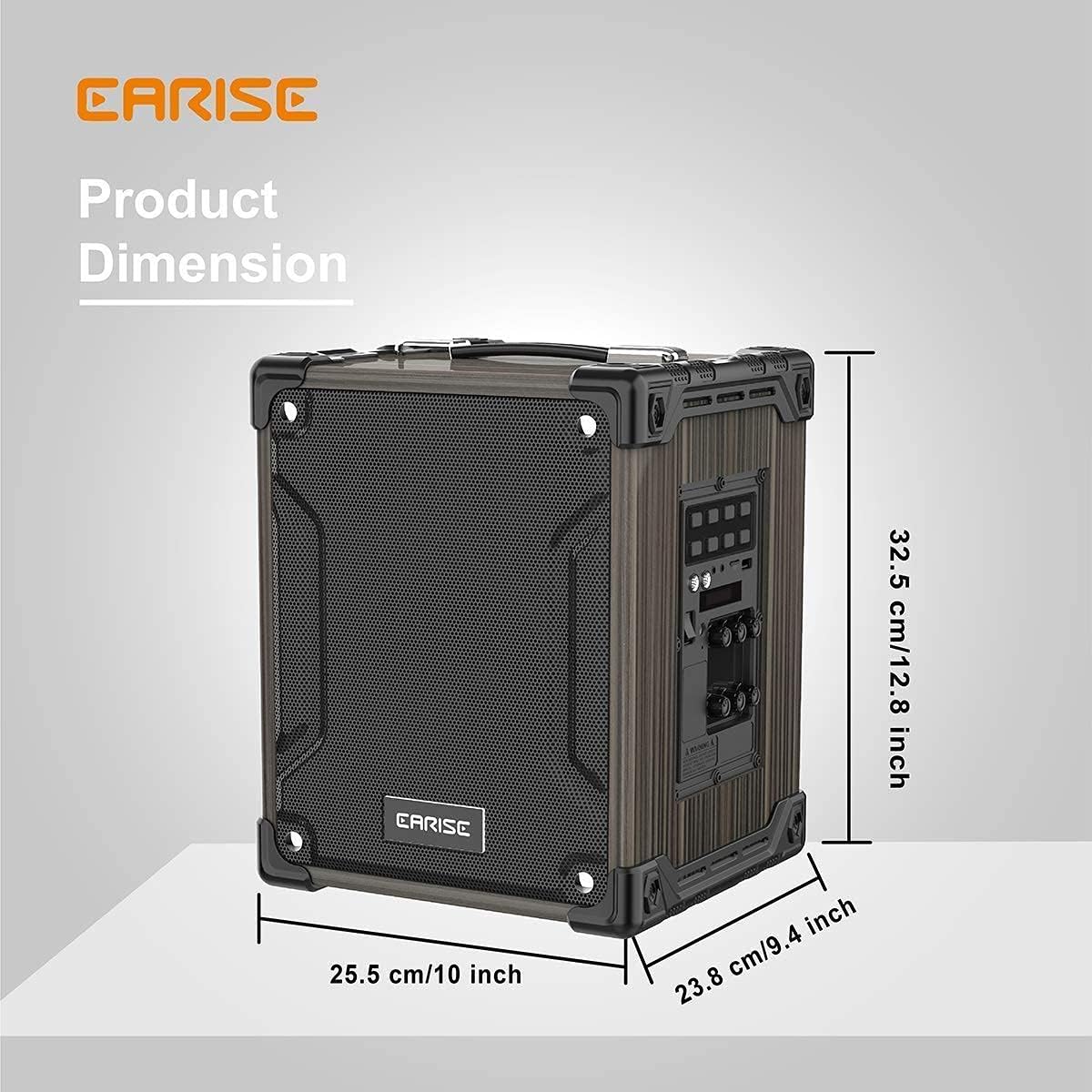
Image: Product dimensions of the EARISE M37, measuring approximately 32.5 cm (12.8 inches) in height, 25.5 cm (10 inches) in width, and 23.8 cm (9.4 inches) in depth.
10. การรับประกันและการสนับสนุน
For warranty information or technical support, please refer to the contact details provided with your purchase or visit the official EARISE webไซต์นี้ โปรดเก็บหลักฐานการซื้อไว้เพื่อใช้ยืนยันการรับประกัน


