คู่มือผู้ใช้คีย์บอร์ดเกมมิ่ง HXSJ V100 35 ปุ่ม
รุ่น : V100
1. บทนำ
Thank you for choosing the HXSJ V100 35 Keys Gaming Keyboard. This compact, single-hand membrane keyboard is designed to enhance your gaming experience with its ergonomic design, programmable features, and vibrant LED backlighting. This manual provides detailed instructions on how to set up, operate, and maintain your keyboard to ensure optimal performance.
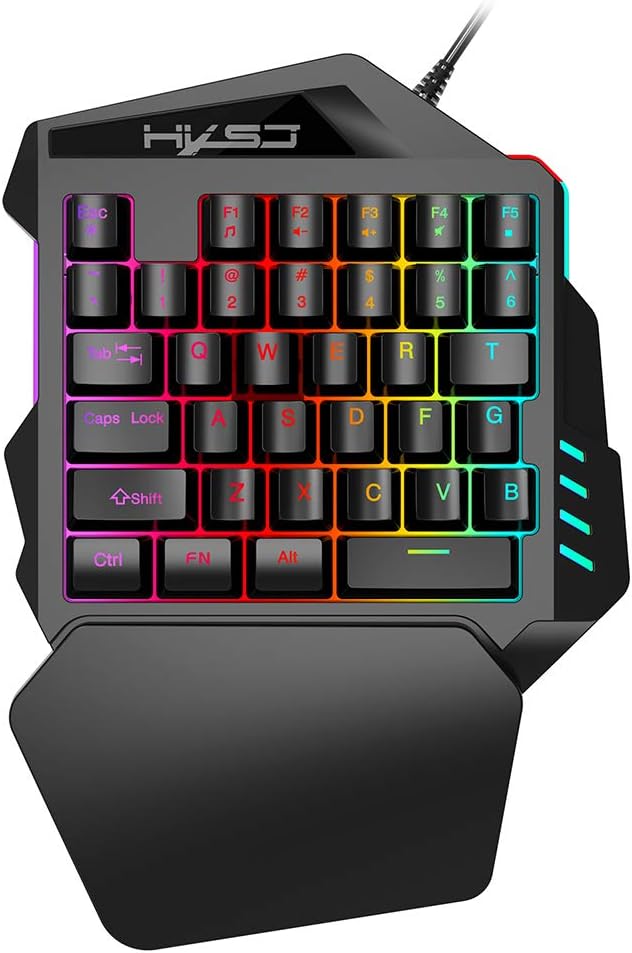
Figure 1: HXSJ V100 35 Keys Gaming Keyboard Overview
The HXSJ V100 is engineered for precision and comfort, making it an ideal companion for games like PUBG, LOL, and CS. Its mini design allows for easy single-hand operation, while the integrated wrist rest provides support during extended gaming sessions.
2. คุณสมบัติหลัก
- Luminous LED Backlight: Features vibrant LED color backlighting for an immersive gaming atmosphere, especially in low-light conditions.
- Programmable Advanced Control: Offers customizable lighting and key functions for a personalized gaming setup.
- การออกแบบพกพาขนาดเล็ก: Compact 35-key layout provides a super easy single-hand operating experience, optimizing desk space.
- ที่วางข้อมือตามหลักสรีรศาสตร์: Designed to fit your hand and wrist comfortably, simplifying complex operations and reducing fatigue.
- ความเข้ากันได้กว้าง: Supports various operating systems including Win 2000, Win XP, Win ME, Vista, Win7, Win8, Android, Linux, and Apple.

Figure 2: Ergonomic Hand Rest for Enhanced Comfort
3. เนื้อหาบรรจุภัณฑ์
กรุณาตรวจสอบสิ่งของภายในบรรจุภัณฑ์เมื่อแกะกล่องเพื่อให้แน่ใจว่ามีสินค้าครบทั้งหมด:
- 1 x HXSJ V100 35 Keys Gaming Keyboard
- 1 x คู่มือผู้ใช้
4. คู่มือการติดตั้ง
Setting up your HXSJ V100 Gaming Keyboard is straightforward. Follow these steps to get started:
- เชื่อมต่อกับอุปกรณ์: Locate an available USB 2.0 port on your computer, laptop, or compatible gaming device.
- เสียบปลั๊ก: Insert the USB connector of the keyboard into the USB port.
- การติดตั้งอัตโนมัติ: ระบบปฏิบัติการของคุณควรตรวจจับและติดตั้งไดรเวอร์ที่จำเป็นโดยอัตโนมัติ กระบวนการนี้อาจใช้เวลาสักครู่
- พร้อมใช้งาน: Once the drivers are installed, the keyboard's LED backlight will illuminate, indicating it is ready for use.

Figure 3: Connecting the HXSJ V100 Keyboard to a Device
5. คู่มือการใช้งาน
The HXSJ V100 keyboard is designed for intuitive use. Here are the primary functions and special key combinations:
5.1 ฟังก์ชันปุ่มมาตรฐาน
The keyboard features 35 standard keys, including alphanumeric keys, function keys (F1-F5), and modifier keys (Ctrl, Shift, Alt, FN). These keys operate as standard input devices for your computer or gaming system.

Figure 4: HXSJ V100 Keyboard Key Layout
5.2 FN Combination Functions
The FN key allows access to multimedia functions. Press and hold the FN key, then press the corresponding function key:
- FN+F1: เครื่องเล่นเพลง
- FN+F2: Volume Decrement
- FN+F3: Volume Increment
- FN+F4: ปิดเสียง
- FN+F5: หยุดชั่วคราว/เล่น
บันทึก: This keyboard features a single backlight color mode as depicted in the product images. The backlight is not customizable to different colors, but provides a consistent, vibrant illumination.
6. การบำรุงรักษาและการดูแล
To ensure the longevity and optimal performance of your HXSJ V100 Gaming Keyboard, follow these maintenance guidelines:
- การทำความสะอาด: ใช้ผ้าแห้งนุ่มเช็ดทำความสะอาดพื้นผิวแป้นพิมพ์ สำหรับคราบสกปรกที่ติดแน่น ให้ใช้ผ้าชุบน้ำหมาดๆ เช็ดเบาๆampชุบผ้าด้วยน้ำหรือน้ำยาทำความสะอาดอ่อนๆ ที่ไม่กัดกร่อน หลีกเลี่ยงความชื้นที่มากเกินไป
- การกำจัดฝุ่น: ใช้ลมอัดเพื่อกำจัดฝุ่นละอองและเศษต่างๆ ออกจากระหว่างปุ่ม
- หลีกเลี่ยงของเหลว: ห้ามทำของเหลวหกใส่แป้นพิมพ์ หากเกิดการหก ให้ถอดปลั๊กแป้นพิมพ์ทันทีและปล่อยให้แห้งสนิทก่อนเสียบปลั๊กใหม่
- พื้นที่จัดเก็บ: เก็บแป้นพิมพ์ไว้ในที่แห้งและเย็น หลีกเลี่ยงแสงแดดโดยตรงและอุณหภูมิที่สูงหรือต่ำเกินไปเมื่อไม่ได้ใช้งานเป็นเวลานาน
- จัดการด้วยความระมัดระวัง: ควรหลีกเลี่ยงการทำแป้นพิมพ์ตกหรือการกระแทกอย่างแรง เพราะอาจทำให้ชิ้นส่วนภายในเสียหายได้
7 การแก้ไขปัญหา
If you encounter issues with your HXSJ V100 Gaming Keyboard, please refer to the following common problems and solutions:
| ปัญหา | สาเหตุที่เป็นไปได้ | สารละลาย |
|---|
| แป้นพิมพ์ไม่ตอบสนอง | การเชื่อมต่อ USB หลวม, พอร์ต USB ชำรุด, มีปัญหากับไดรเวอร์ | ตรวจสอบให้แน่ใจว่าเสียบสาย USB แน่นดีแล้ว ลองเปลี่ยนพอร์ต USB รีสตาร์ทคอมพิวเตอร์ ตรวจสอบ Device Manager เพื่อหาปัญหาเกี่ยวกับไดรเวอร์ |
| แสงไฟไม่ทำงาน | Keyboard not powered, backlight setting. | Ensure keyboard is properly connected and receiving power. The backlight is always on when powered. If not, try reconnecting. |
| กุญแจไม่ลงทะเบียน | Dust/debris under keys, software conflict. | Use compressed air to clean around and under the affected keys. Test the keyboard on another computer to rule out software issues. |
| FN multimedia keys not working | Incorrect key combination, software conflict. | Ensure you are pressing and holding the FN key before pressing the desired F key. Check if other multimedia software is interfering. |
8. ข้อมูลจำเพาะผลิตภัณฑ์
Detailed technical specifications for the HXSJ V100 Gaming Keyboard:
| พารามิเตอร์ | ค่า |
|---|
| ชื่อสินค้า | One-handed Gaming Keyboard |
| รุ่นสินค้า | วี100 |
| ส่วนต่อประสานผลิตภัณฑ์ | ยูเอสบี 2.0 |
| แป้นพิมพ์มาตรฐาน | มินิคีย์บอร์ด |
| รูปแบบการดำเนินงาน | เมมเบรน |
| จำนวนคีย์ | 35 คีย์ |
| ความยาวสายผลิตภัณฑ์ | 1.6 เมตร |
| กระแสไฟฟ้าทำงาน | 100มิลลิแอมป์ |
| น้ำหนักสุทธิของผลิตภัณฑ์ | 350กรัม |
| ขนาดสินค้า (กว้าง*ยาว*สูง) | 26 x 18 x 4 ซม. |
| น้ำหนักแพ็คเกจ | 415กรัม |
| ขนาดบรรจุภัณฑ์ | 26 x 19 x 4 ซม. |
| ระบบปฏิบัติการที่รองรับ | Win 2000, Win XP, Win ME, Vista, Win7, Win8, Android, Linux, Apple |
| สีแบ็คไลท์ | RGB (fixed mode) |

Figure 5: Product Label on the Bottom of the Keyboard
9. การรับประกันและการสนับสนุน
HXSJ products are manufactured to high-quality standards. For information regarding warranty coverage, technical support, or service inquiries, please refer to the warranty card included with your product or visit the official HXSJ webไซต์ โปรดเก็บหลักฐานการซื้อไว้เพื่อใช้ในกรณีเรียกร้องการรับประกันใดๆ


