การแนะนำ
This manual provides comprehensive instructions for assembling, operating, and maintaining your CaDA C51058W Remote Controlled Wheel Loader. Please read this manual carefully before beginning assembly or operation to ensure proper use and longevity of the product.
The CaDA C51058W is a remote-controlled front loader/wheel loader building set consisting of 491 parts. It features two motors, a rechargeable battery pack, and a 2.4 GHz remote control. The model is designed to be compatible with building blocks and parts from the Lego Technic series.

Image: The complete CaDA C51058W Remote Controlled Wheel Loader, showcasing the assembled model, its packaging, and the included remote control unit.
ข้อมูลด้านความปลอดภัย
WARNING: This product contains small parts and is a toy. Adult supervision is highly recommended, especially for children under the age of 6, to prevent choking hazards and ensure safe operation.
- เก็บชิ้นส่วนเล็ก ๆ ให้ห่างจากเด็กเล็ก
- Do not operate the model near water or in wet conditions.
- ตรวจสอบให้แน่ใจว่าการเชื่อมต่อทั้งหมดแน่นหนาดีก่อนดำเนินการ
- ใช้เฉพาะแบตเตอรี่และวิธีการชาร์จที่ระบุไว้เท่านั้น
- Avoid direct impact or dropping the model.
เนื้อหาแพ็คเกจ
ตรวจสอบว่าส่วนประกอบทั้งหมดอยู่ครบก่อนเริ่มประกอบ:
- 491 Building Blocks and Parts
- 2 x Motors
- 1 x Rechargeable Battery Pack (500 mAh)
- รีโมทคอนโทรล 1 x 2.4 GHz
- สายชาร์จ Micro-USB 1 เส้น
- 1 x Printed Instruction Manual (47 pages)

Image: The front of the product box, displaying the CaDA C51058W Wheel Loader, indicating 491 pieces and suitable for ages 6+.
การติดตั้งและการประกอบ
The CaDA C51058W comes with a detailed 47-page printed instruction manual. Follow the step-by-step diagrams in the manual for proper assembly.
- แกะส่วนประกอบ: Carefully remove all parts from the packaging. Organize them by type or color to facilitate assembly.
- Review คู่มือ: Before starting, familiarize yourself with the assembly steps outlined in the included instruction booklet.
- Battery Installation (Remote Control):
- ค้นหาช่องใส่แบตเตอรี่บนรีโมทคอนโทรล
- ใส่แบตเตอรี่ AA 2 ก้อน โดยตรวจสอบให้แน่ใจว่าขั้วบวก/ลบถูกต้อง
- ปิดช่องใส่แบตเตอรี่ให้แน่น

ภาพ: รายละเอียด view of the 2.4 GHz remote control unit for the CaDA C51058W Wheel Loader, showing its various controls.
- การชาร์จแบตเตอรี่:
- Connect the included micro-USB cable to the battery pack.
- ต่อปลายอีกด้านของสายเคเบิลเข้ากับแหล่งจ่ายไฟ USB ที่เหมาะสม (เช่น พอร์ต USB ของคอมพิวเตอร์ อะแดปเตอร์ติดผนัง USB)
- Allow the battery pack to fully charge before first use. Charging time may vary.
- ขั้นตอนการประกอบ: Follow the visual instructions in the manual. The manual guides you through connecting the 491 building blocks, motors, and battery pack to form the complete wheel loader.
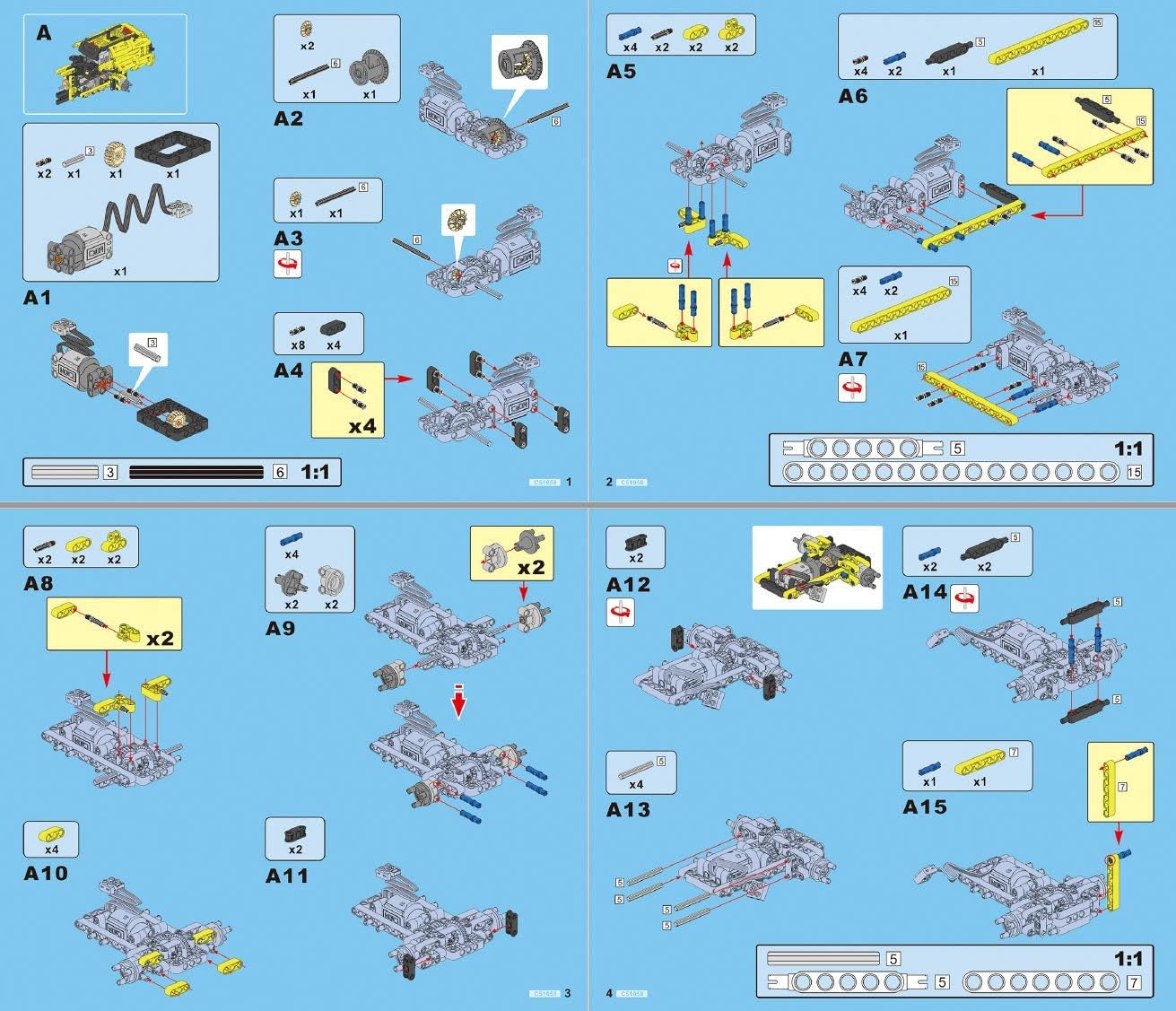
Image: A page from the instruction manual illustrating early assembly steps, detailing how to connect various building components.
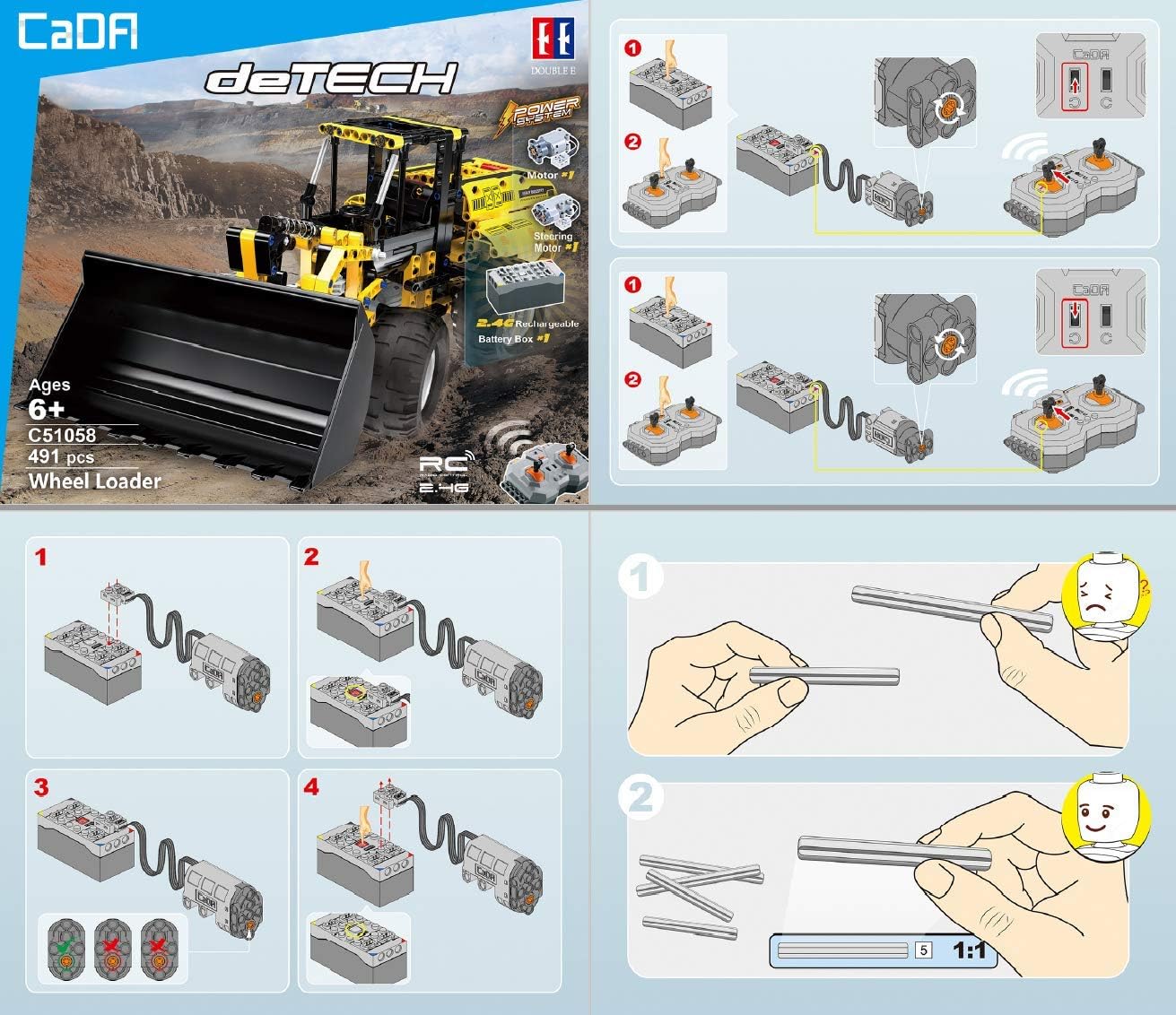
Image: A section of the instruction manual demonstrating the correct wiring and connection of the motors, battery box, and remote control receiver.

Image: A page from the instruction manual displaying various views of the assembled model and a comprehensive parts list.
คำแนะนำการใช้งาน
Once assembled and powered, your CaDA C51058W Wheel Loader is ready for operation.
- เปิดเครื่อง: Ensure the battery pack is connected to the wheel loader and fully charged. Turn on the power switch on the battery pack/loader. Turn on the remote control.
- การจับคู่: The remote control and the wheel loader should automatically pair. If not, refer to the manual for specific pairing instructions.
- การควบคุมการขับขี่:
- Use the left joystick/lever on the remote control to move the wheel loader forward and backward.
- Use the right joystick/lever to steer the wheel loader left and right.
- Bucket and Arm Controls: The wheel loader features mechanisms for controlling the bucket and arm.
- Specific levers or buttons on the remote control operate the raising and lowering of the bucket arm.
- Additional controls allow for tilting and rotating the bucket.

ภาพ: ด้านหนึ่ง view of the CaDA C51058W Wheel Loader, demonstrating the bucket in a raised position, highlighting its operational range.

Image: The rear of the product box, illustrating key operational features such as controllable bucket, raise/lower bucket arm, switching engine compartment, and controllable steering wheel.
- ห้องเครื่องยนต์: The model includes a switching engine compartment for added realism and access.
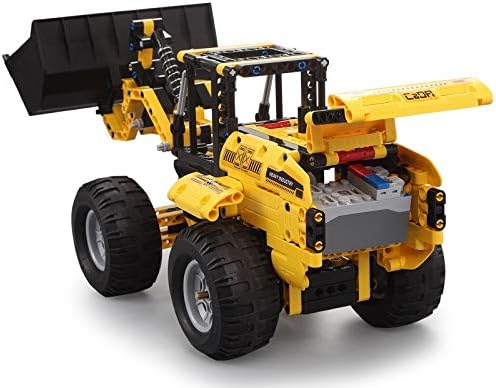
ภาพ: ด้านหลัง view of the CaDA C51058W Wheel Loader, showing the detailed engine compartment area, which can be opened for access.
การซ่อมบำรุง
Regular maintenance ensures the longevity and optimal performance of your CaDA C51058W Wheel Loader.
- การทำความสะอาด: Use a soft, dry cloth to wipe down the model. Avoid using water or cleaning solutions that could damage the electronic components or plastic.
- พื้นที่จัดเก็บ: เก็บโมเดลไว้ในที่แห้งและเย็น หลีกเลี่ยงแสงแดดโดยตรงและอุณหภูมิที่สูงหรือต่ำเกินไป
- การดูแลแบตเตอรี่
- Fully charge the battery pack before long-term storage.
- Remove AA batteries from the remote control if not in use for an extended period to prevent leakage.
- การตรวจสอบชิ้นส่วน: Periodically check for any loose or damaged parts. Replace broken components as needed.
การแก้ไขปัญหา
If you encounter issues with your CaDA C51058W, refer to the following common problems and solutions:
| ปัญหา | สาเหตุที่เป็นไปได้ | สารละลาย |
|---|---|---|
| โมเดลไม่ตอบสนองต่อรีโมทคอนโทรล |
|
|
| Motors are weak or slow. |
|
|
| Parts are breaking easily. |
|
ข้อมูลจำเพาะ
| คุณสมบัติ | รายละเอียด |
|---|---|
| หมายเลขรุ่น | C51058W |
| ยี่ห้อ | ซีเอเอ |
| จำนวนชิ้นส่วน | 491 |
| ขนาดสินค้า (กว้าง x ยาว x สูง) | 424 x 160 x 174 mm (assembled) |
| น้ำหนักผลิตภัณฑ์ | 1.41 กก. |
| วัสดุ | 100% ABS Plastic |
| สี | สีเหลือง |
| มอเตอร์ | 2 (drive and steering) |
| แบตเตอรี่แพ็ค | 500 mAh Rechargeable (via Micro-USB) |
| ประเภทรีโมทคอนโทรล | 2.4 กิกะเฮิรตซ์ |
| แบตเตอรี่รีโมทคอนโทรล | 2 x AA (ไม่รวม) |
| อายุที่แนะนำ | อายุ 6 ปีขึ้นไป |
| เป้าหมายด้านการศึกษา | Building skills, Logical thinking, Motor skills, Problem-solving skills, Technical skills |
| จำเป็นต้องประกอบ | ใช่ |
การรับประกันและการสนับสนุน
For warranty information, replacement parts, or technical support, please contact CaDA customer service. Refer to the product packaging or the official CaDA webเว็บไซต์สำหรับรายละเอียดการติดต่อ
Official building instructions can also be found at www.doubleeagle.cc.


