การแนะนำ
Thank you for choosing the Ksix Fitness Band GPS. This manual provides essential information for setting up, operating, and maintaining your device. Please read it carefully to ensure optimal performance and longevity of your fitness band.
The Ksix Fitness Band GPS is designed to monitor your physical activity comprehensively, featuring integrated GPS for route tracking, a dynamic 24-hour heart rate monitor, and a multi-sport mode to enhance your training sessions.
สินค้าเกินview
The Ksix Fitness Band GPS is a versatile smartband equipped with advanced features to support your fitness journey. Its lightweight design and 1.3-inch TFT color screen offer a comfortable and clear user experience.
- จีพีเอสในตัว: Records your route during outdoor activities.
- 24-Hour Dynamic Heart Rate Monitor: ตรวจสอบอัตราการเต้นของหัวใจอย่างต่อเนื่อง
- โหมดมัลติสปอร์ต: Monitors various types of workouts.
- ความต้านทานน้ำ: IP68 rated, waterproof up to 3 meters for 1 hour.
- การเชื่อมต่อ: Bluetooth 4.0 for seamless connection with your smartphone.
- ความเข้ากันได้: Works with Android 4.4 and later, and iOS 8.0 and later.
- อายุการใช้งานแบตเตอรี่: Up to 7-8 hours with GPS and real-time heart rate monitoring, and up to 30 days in standby mode.

Image 1: Ksix Fitness Band GPS displaying time and date.
คู่มือการติดตั้ง
1. การชาร์จอุปกรณ์
Before first use, fully charge your Ksix Fitness Band GPS. Connect the charging cable to the designated port on the device and a USB power source. The screen will indicate charging status.
2. Installing the Hi Move App
- ค้นหา "Hi Move" in your smartphone's app store (Google Play Store for Android or Apple App Store for iOS).
- ดาวน์โหลดและติดตั้งแอปพลิเคชัน
- เปิดแอปและทำตามคำแนะนำบนหน้าจอเพื่อสร้างบัญชีและตั้งค่าบัญชีโปรของคุณfile.
3. การจับคู่กับสมาร์ทโฟนของคุณ
- ตรวจสอบให้แน่ใจว่าได้เปิดใช้งาน Bluetooth บนสมาร์ทโฟนของคุณแล้ว
- Open the Hi Move app.
- เข้าไปที่ส่วนการจับคู่อุปกรณ์ภายในแอป
- The app will search for available devices. Select "Ksix Fitness Band GPS" from the list.
- Confirm the pairing request on both your smartphone and the fitness band, if prompted.
- Once paired, the time and date on your fitness band will synchronize with your phone.
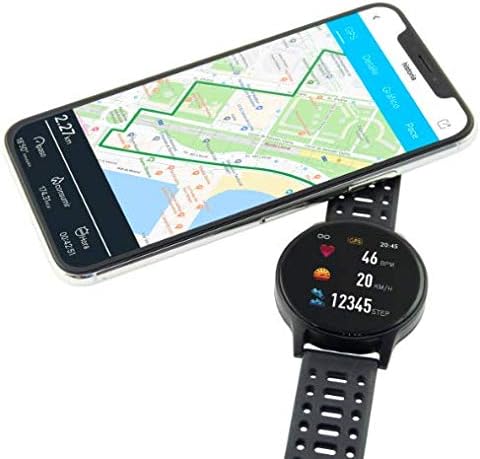
Image 2: Ksix Fitness Band GPS connected to a smartphone displaying a GPS-tracked route.
คำแนะนำการใช้งาน
การนำทางอินเทอร์เฟซ
The fitness band features a touch-sensitive screen. Swipe left/right or up/down to navigate through different functions and menus. Tap to select an option or confirm an action.
ระบบติดตาม GPS
For accurate GPS tracking, ensure you are in an open outdoor area with a clear view of the sky. Start your activity from the multi-sport mode, and the device will automatically attempt to acquire a GPS signal. Your route will be recorded and can be viewed in the Hi Move app after synchronization.
การตรวจวัดอัตราการเต้นของหัวใจ
The fitness band continuously monitors your heart rate. Wear the band snugly on your wrist, about one finger's width above your wrist bone, for accurate readings. You can view your current heart rate on the device and detailed historical data in the Hi Move app.
โหมดมัลติสปอร์ต
Access the multi-sport mode from the main menu to select specific activities such as running, walking, cycling, etc. Selecting an activity will initiate tracking of relevant metrics like duration, distance, calories burned, and heart rate. End the activity when finished to save the data.

Image 3: Ksix Fitness Band GPS showing a person running, highlighting features like pedometer, multi-sport mode, heart rate monitoring, and distance tracking.
การซ่อมบำรุง
การทำความสะอาด
Regularly clean your fitness band and strap to prevent skin irritation and maintain device hygiene. Use a soft, damp ใช้ผ้าเช็ดทำความสะอาดอุปกรณ์ หลีกเลี่ยงการใช้สารเคมีรุนแรงหรือวัสดุที่มีฤทธิ์กัดกร่อน
ความต้านทานต่อน้ำ
The device is IP68 waterproof, meaning it can withstand immersion in water up to 3 meters deep for a maximum of 1 hour. It is suitable for swimming in shallow water but not recommended for diving, high-pressure water activities, or prolonged immersion. Ensure the charging port is dry before charging.
พื้นที่จัดเก็บ
When not in use for extended periods, store the fitness band in a cool, dry place. Avoid extreme temperatures and direct sunlight.
การแก้ไขปัญหา
- อุปกรณ์ไม่เปิด: Ensure the device is fully charged. Connect it to the charger and wait a few minutes.
- ไม่สามารถจับคู่กับสมาร์ทโฟนได้:
- ตรวจสอบให้แน่ใจว่าเปิดใช้งาน Bluetooth บนโทรศัพท์ของคุณแล้ว
- Make sure the fitness band is within Bluetooth range of your phone.
- Restart both your phone and the fitness band.
- Try unpairing and re-pairing the device through the Hi Move app.
- การอ่านค่าอัตราการเต้นของหัวใจไม่แม่นยำ:
- ตรวจสอบให้แน่ใจว่าสายรัดข้อมือกระชับพอดีกับข้อมือ ไม่หลวมหรือแน่นเกินไป
- Clean the sensor on the back of the device.
- ควรหลีกเลี่ยงการเคลื่อนไหวมากเกินไปขณะทำการวัด
- GPS ไม่รับสัญญาณ:
- ให้แน่ใจว่าคุณอยู่ในพื้นที่กลางแจ้งที่เปิดโล่งและมีน้ำใส view ของท้องฟ้า
- รอสักครู่เพื่อให้เครื่องรับสัญญาณ
- Ensure the device's firmware is up to date via the Hi Move app.
- ข้อมูลไม่ซิงค์กับแอป:
- Ensure the fitness band is connected to your phone via Bluetooth.
- Open the Hi Move app and manually initiate a sync if available.
- ตรวจสอบการเชื่อมต่ออินเทอร์เน็ตของโทรศัพท์ของคุณ
ข้อมูลจำเพาะ
| หมายเลขรุ่น | BXBZGPS01 |
| ยี่ห้อ | เคซิกซ์ |
| ขนาดหน้าจอ | 1.3 นิ้ว |
| ประเภทหน้าจอ | TFT Color |
| ความจุของแบตเตอรี่ | 230 mAh (ลิเธียมไออน) |
| Battery Life (GPS + HR) | 7-8 ชั่วโมง |
| อายุการใช้งานแบตเตอรี่ (สแตนด์บาย) | นานถึง 30 วัน |
| ความต้านทานต่อน้ำ | IP68 (up to 3 meters for 1 hour) |
| การเชื่อมต่อ | บลูทูธ 4.0 |
| ความเข้ากันได้ | แอนดรอยด์ 4.4+ / iOS 8.0+ |
| น้ำหนัก | 38 กรัม |
| วัสดุ | พลาสติก, พีวีซี |
| สี | สีดำ |
การรับประกันและการสนับสนุน
For warranty information and technical support, please refer to the documentation provided with your purchase or visit the official Ksix webไซต์นี้ โปรดเก็บหลักฐานการซื้อไว้เพื่อใช้ยืนยันการรับประกัน
ผู้ผลิต: เคเอสไอเอ็กซ์
ติดต่อ: Please refer to the Ksix official webเว็บไซต์สำหรับรายละเอียดการติดต่อฝ่ายบริการลูกค้า


