1. บทนำ
This manual provides detailed instructions for the installation, operation, and troubleshooting of the TESmart 8x8 HDMI Matrix Switcher, Model HMA808-L23. This device allows for the routing of 8 HDMI source devices to any of 8 HDMI display devices, supporting resolutions up to 4K@30Hz. It is designed for various applications including control rooms, meeting rooms, bars, and gyms.
2. ข้อมูลด้านความปลอดภัย
- ตรวจสอบให้แน่ใจว่ามีการระบายอากาศที่เหมาะสมรอบๆ อุปกรณ์
- อย่าให้เครื่องโดนน้ำหรือความชื้นมากเกินไป
- ใช้เฉพาะอะแดปเตอร์ที่ให้มาเท่านั้น
- หลีกเลี่ยงการวางของหนักบนอุปกรณ์
- อย่าพยายามถอดประกอบหรือซ่อมแซมอุปกรณ์ด้วยตนเอง โปรดติดต่อช่างผู้ชำนาญการ
3. เนื้อหาบรรจุภัณฑ์
ตรวจสอบว่ามีรายการทั้งหมดอยู่ในแพ็คเกจ:

Image: Contents of the TESmart 8x8 HDMI Matrix Switcher package, including the main unit, IR remote control, IR extension cable, rack-ears, DC 12V power adapter, and user manual.
- TESmart 8x8 HDMI Matrix Switcher Unit
- IR Remote Control (Note: Batteries not included. Requires CR2025 batteries.)
- สายต่อขยาย IR
- Rack-mount Ears (2 pieces) with screws
- อะแดปเตอร์ไฟ DC 12V
- คู่มือการใช้งาน
4. สินค้าหมดview
4.1 แผงด้านหน้า

Image: Front panel of the TESmart 8x8 HDMI Matrix Switcher, showing the LCD display, input/output selection buttons, save/load buttons, lock, IR receiver, power switch, and power status indicator.
- จอแสดงผล LCD: Shows real-time input and output connection status.
- Output Selection Buttons (A-H): Selects the desired output port.
- ปุ่มเลือกข้อมูลเข้า (1-8): Selects the desired input source for the chosen output.
- ปุ่มบันทึก: Saves current connection settings as a preset.
- ปุ่มโหลด: Recalls a saved preset connection setting.
- LOCK/ENTER Button: Locks the front panel buttons or confirms a selection.
- ตัวรับสัญญาณ IR: รับสัญญาณจากรีโมทคอนโทรลอินฟราเรด
- สวิตช์เพาเวอร์: เปิดหรือปิดอุปกรณ์
- POWER Status Indicator: ไฟจะสว่างขึ้นเมื่ออุปกรณ์เปิดอยู่
- FUN (Function) Button: Used for advanced settings or special functions.
- ปุ่มย้อนกลับ: Used to navigate menus or exit settings.
4.2 แผงด้านหลัง

Image: Rear panel of the TESmart 8x8 HDMI Matrix Switcher, displaying 8 HDMI input ports, 8 HDMI output ports, DC 12V power input, RS232 control port, and LAN control port.
- กระแสตรง 12V: พอร์ตอินพุตไฟ
- อาร์เอส232: Serial control port for PC connection.
- LAN: Ethernet port for TCP/IP control.
- อินพุต HDMI (1-8): Connect HDMI source devices (e.g., PC, game console, Blu-ray player).
- HDMI Outputs (A-H): Connect HDMI display devices (e.g., TV, monitor, projector).
5. การตั้งค่าและการเชื่อมต่อ
Follow these steps to set up your TESmart 8x8 HDMI Matrix Switcher:
- ปิดอุปกรณ์ทั้งหมด: Before making any connections, ensure all HDMI source devices, display devices, and the matrix switcher are powered off.
- เชื่อมต่อแหล่งสัญญาณ HDMI: Connect your 8 HDMI source devices (e.g., PS4, Xbox, TV box, Blu-ray player, DVR, Webcam, PC) to the HDMI Input ports (Input 1 to Input 8) on the rear panel of the matrix switcher using high-quality HDMI cables.
- เชื่อมต่อจอแสดงผล HDMI: Connect your 8 HDMI display devices (e.g., Monitor, HDTV, Projector) to the HDMI Output ports (Output A to Output H) on the rear panel of the matrix switcher using high-quality HDMI cables.
- Connect Control Cables (Optional):
- For RS232 control, connect a serial cable from your PC to the RS232 port on the matrix switcher.
- For TCP/IP (LAN) control, connect an Ethernet cable from your network router/switch to the LAN port on the matrix switcher.
- For IR remote control, ensure the IR receiver is unobstructed.
- เชื่อมต่อพลังงาน: Connect the DC 12V power adapter to the DC 12V port on the matrix switcher, then plug the adapter into a power outlet.
- เปิดอุปกรณ์: Power on the matrix switcher first, then power on your HDMI display devices, and finally your HDMI source devices.

Image: Connection diagram illustrating HDMI input sources (PS3/4, Xbox, Apple TV, Blu-ray player, DVR, Webcam, PC) connected to the matrix switcher's input ports, and HDMI output displays (Monitor, HDTV, Projector) connected to the output ports. Control options via PC (RS232/LAN) are also shown.
HDMI Cable Length Guidelines:
- For 4K@30Hz: Input HDMI cable length MAX 5 meters (196.85 inches), Output HDMI cable length MAX 10 meters (393.7 inches).
- For 1080P@60Hz: Input HDMI cable length MAX 10 meters (393.7 inches), Output HDMI cable length MAX 20 meters (787.4 inches).
6. คู่มือการใช้งาน
6.1 การสลับพื้นฐาน
The TESmart 8x8 HDMI Matrix Switcher allows you to route any of the 8 HDMI input sources to any of the 8 HDMI output displays. This can be done using the front panel buttons, IR remote control, RS232, or TCP/IP control.
Image: Illustration of the matrix switcher's flexibility, showing scenarios where all screens display the same input (e.g., Input 8 to all outputs) or screens display different inputs (e.g., Input 5 to Output A, Input 8 to Output B).
- To select an output: Press one of the Output buttons (A-H) on the front panel or remote.
- To select an input for that output: Press one of the Input buttons (1-8) on the front panel or remote.
- The LCD display will show the current routing status (e.g., "OUTPUT A: INPUT 1").
6.2 Multiple Control Methods

Image: Visual representation of the four control methods available for the matrix switcher: IR remote control, front panel buttons, LAN (TCP/IP) port, and RS232 port.
- ปุ่มที่แผงด้านหน้า: Direct control using the buttons on the device.
- รีโมทคอนโทรล IR: Use the included remote for convenient wireless control. Ensure CR2025 batteries are installed.
- การควบคุม RS232: Connect to a PC via the RS232 port for command-line control. Refer to the official TESmart website for the TCP/IP protocol and RS232 commands.
- TCP/IP (LAN) Control: Connect to a network and control the device via TCP/IP commands from a computer. Refer to the official TESmart website for the TCP/IP protocol and software.
6.3 ฟังก์ชั่นที่ตั้งไว้ล่วงหน้า
The matrix switcher supports saving and loading up to 4 preset connection scenarios.

Image: Workflow for using the preset function, showing how to set up a desired input-to-output configuration, save it to a numbered slot, and then recall it quickly at any time.
- วิธีบันทึกค่าที่ตั้งไว้ล่วงหน้า:
- Configure your desired input-to-output routing.
- กดปุ่ม บันทึก button. The LCD will prompt for a preset number (1-4).
- Press the corresponding Input button (1-4) to save the current configuration to that preset slot.
- ในการโหลดพรีเซ็ต:
- กดปุ่ม โหลด button. The LCD will prompt for a preset number (1-4).
- Press the corresponding Input button (1-4) to recall the saved configuration.
6.4 Power Off Memory Function
The device retains the last active connection status even after being powered off. Upon restarting, it will automatically restore the previous matrix configuration.
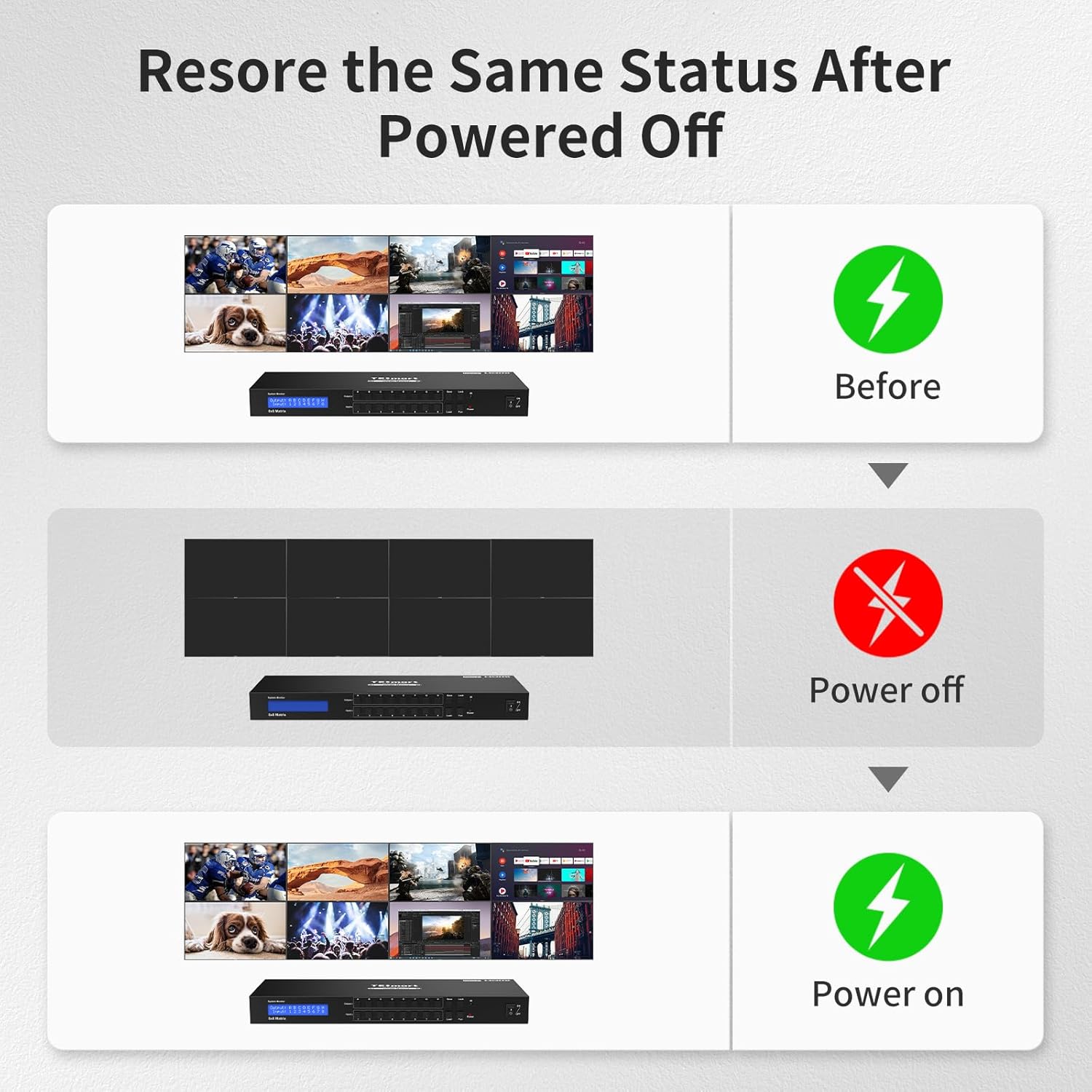
Image: Illustration of the power off memory function, demonstrating that the display configuration before power-off is automatically restored upon power-on.
7. คุณสมบัติขั้นสูง
7.1 การจัดการ EDID
The TESmart 8x8 HDMI Matrix Switcher features smart EDID management. This function ensures compatibility between various source and display devices by allowing the HDMI source to output the best possible resolution and audio format supported by all connected displays.
7.2 Audio Format Support
The matrix switcher supports various audio formats, including PCM, Dolby AC3, DTS5.1, DTS7.1, and DSD.
7.3 Multiple Display Modes

Image: Visual explanation of different display modes: Matrix Mode (each output can show a different input), Splitter Mode (one input shown on multiple outputs), and Hybrid Mode (a combination of both).
- โหมดเมทริกซ์: Each output can display a different input source.
- โหมดแยก: One input source can be displayed on multiple output devices simultaneously.
- โหมดไฮบริด: A combination of matrix and splitter modes, allowing flexible routing.
8 การแก้ไขปัญหา
หากคุณพบปัญหา โปรดดูปัญหาทั่วไปและวิธีแก้ไขต่อไปนี้:
| ปัญหา | สาเหตุที่เป็นไปได้ | สารละลาย |
|---|---|---|
| ไม่มีภาพแสดงผลบนหน้าจอ |
|
|
| ไม่มีเอาต์พุตเสียง |
|
|
| รีโมทคอนโทรลไม่ทำงาน |
|
|
| Buzzer sound is too loud. | การตั้งค่าเริ่มต้น | The buzzer sound can be turned off by sending TCP/IP commands. Refer to the official TESmart webเว็บไซต์สำหรับคำแนะนำ |
| Switching takes too long or doesn't work. |
|
|
9. ข้อมูลจำเพาะ
| หมายเลขรุ่น | HMA808-L23 |
| อินพุต HDMI | 8 |
| เอาต์พุต HDMI | 8 |
| ความละเอียดสูงสุด | 3840x2160@30Hz (4K@30Hz) |
| การปฏิบัติตาม HDCP | HDCP1.4 ขึ้นไป |
| รูปแบบเสียง | PCM, Dolby AC3, DTS5.1, DTS7.1, DSD |
| วิธีการควบคุม | Front Panel Buttons, IR Remote, RS232, TCP/IP (LAN) |
| แหล่งจ่ายไฟ | กระแสตรง 12V 2A |
| ขนาดสินค้า (กว้าง x ยาว x สูง) | 440 x 150 x 45 มม. (17.32 x 5.91 x 1.77 นิ้ว) |
| น้ำหนักสินค้า | 2 กก. (5.33 ปอนด์) |
10. การรับประกันและการสนับสนุน
TESmart provides a รับประกัน 1 ปี from the date of purchase for this product. Free technical support is also available. If you encounter any issues or require assistance, please contact TESmart customer service.
For the latest drivers, software (e.g., TCP/IP protocol, RS232 commands), and support resources, please visit the official TESmart webเว็บไซต์.
11. วิดีโอผลิตภัณฑ์view
Video: An official TESmart product video demonstrating the features and functionality of the 8x8 HDMI Matrix Switcher, including its various control methods and application scenarios. This video provides a visual guide to the product's capabilities.


