1. บทนำ
This user manual provides comprehensive instructions for the installation, operation, and maintenance of your Immergas CARV2 Wireless Chronothermostat. Please read this manual thoroughly before using the device to ensure proper functionality and safety. This device is designed for precise temperature control in HVAC systems.
2. ข้อมูลด้านความปลอดภัย
ปฏิบัติตามข้อควรระวังเพื่อความปลอดภัยต่อไปนี้เสมอ:
- Installation should only be performed by qualified personnel in accordance with local electrical codes.
- Disconnect power before performing any installation or maintenance.
- อย่าให้เครื่องโดนน้ำหรือความชื้นมากเกินไป
- อย่าพยายามซ่อมแซมอุปกรณ์ด้วยตนเอง โปรดส่งต่ออุปกรณ์ไปยังช่างผู้ชำนาญการด้านการซ่อมแซม
- Ensure the power supply matches the device's specifications (230 Volts).
3. สินค้าหมดview
The Immergas CARV2 is a wireless digital chronothermostat designed for efficient heating and cooling management. It features a clear display and intuitive controls for setting desired temperatures and programming schedules.
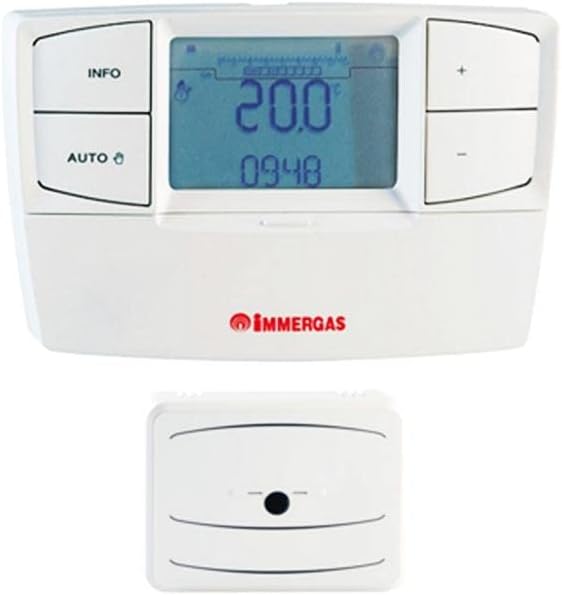
Figure 3.1: Immergas CARV2 Wireless Chronothermostat (top) showing the display with temperature and time, and control buttons (INFO, AUTO, +, -). Below it is the wireless receiver unit (bottom) with a small indicator light.
3.1 ส่วนประกอบ
- Thermostat Unit: The main control unit with display and buttons.
- หน่วยรับสัญญาณไร้สาย: Connects to the HVAC system and communicates wirelessly with the thermostat unit.
3.2 การแสดงผลและปุ่มต่างๆ
The thermostat unit features a digital display showing current temperature, set temperature, time, and operating mode. Control buttons include:
- ปุ่มข้อมูล: Accesses information screens.
- ปุ่มอัตโนมัติ: Toggles between automatic and manual operating modes.
- + ปุ่ม: Increases temperature setting or navigates menus.
- - ปุ่ม: Decreases temperature setting or navigates menus.
4. การตั้งค่าและการติดตั้ง
Proper installation is crucial for optimal performance. Refer to the detailed wiring diagrams provided with the product packaging for specific connections.
4.1 Receiver Unit Installation
- Ensure power to the HVAC system is turned off at the main breaker.
- Mount the receiver unit near your boiler or heating system, ensuring it is within wireless range of the thermostat unit.
- Connect the receiver unit to your HVAC system's control wiring according to the provided wiring diagram. This typically involves connecting to the boiler's thermostat terminals.
- Secure the receiver unit to the wall or mounting surface.
4.2 Thermostat Unit Placement
- Place the thermostat unit in a central location within the heated area, away from direct sunlight, drafts, or heat sources (e.g., lampส,เครื่องใช้ไฟฟ้า).
- Ensure the location allows for accurate room temperature sensing.
- The thermostat unit is battery-powered (batteries not included, typically AA or AAA). Insert fresh batteries before initial use.
4.3 Initial Pairing (if required)
Some units may require initial pairing between the thermostat and receiver. Refer to the quick start guide for specific pairing instructions. Generally, this involves pressing a pairing button on both units within a short timeframe.
5. คู่มือการใช้งาน
5.1 Power On and Initial Display
Once batteries are inserted and the receiver is powered, the thermostat display will illuminate, showing the current room temperature and time.
5.2 การตั้งเวลาและวันที่
Access the settings menu (often by holding the INFO button) to set the correct time and date. Use the + and - buttons to adjust values and the INFO or AUTO button to confirm and move to the next setting.
5.3 โหมดการทำงาน
- Automatic Mode (AUTO): The thermostat follows the programmed weekly schedule. Press the AUTO button to activate this mode.
- โหมดแมนนวล: Allows you to set a constant desired temperature that overrides the schedule. Press the AUTO button until the manual mode indicator appears. Use + and - to adjust the temperature.
- โหมดปิด: Turns off heating/cooling. Consult the manual for specific steps to enter this mode, often by setting a very low temperature or a dedicated off setting.
5.4 การปรับอุณหภูมิ
In manual mode, or during a temporary override in auto mode, use the + และ - buttons to increase or decrease the desired temperature. The new setpoint will be displayed.
5.5 Programming Weekly Schedule
The CARV2 allows for a detailed weekly programming schedule. This typically involves setting different temperatures for various times of the day across each day of the week.
- Enter programming mode (refer to your specific model's manual, often by holding INFO or AUTO for several seconds).
- Select the day of the week you wish to program.
- Set the desired temperature for specific time intervals (e.g., 6:00 AM - 8:00 AM, 8:00 AM - 5:00 PM, etc.).
- Repeat for all desired time intervals and days.
- Save and exit programming mode.
6. การบำรุงรักษา
6.1 การทำความสะอาด
Clean the thermostat unit with a soft, dry cloth. Do not use abrasive cleaners, solvents, or spray directly onto the unit. Ensure no moisture enters the device.
6.2 การเปลี่ยนแบตเตอรี่
When the low battery indicator appears on the display, replace the batteries immediately. Use high-quality alkaline batteries (e.g., AA or AAA, depending on model). Open the battery compartment on the back of the thermostat unit, remove old batteries, and insert new ones, observing polarity.
7 การแก้ไขปัญหา
| ปัญหา | สาเหตุที่เป็นไปได้ | สารละลาย |
|---|---|---|
| จอแสดงผลว่างเปล่า | No power to thermostat unit (dead batteries). | เปลี่ยนแบตเตอรี่ |
| Thermostat not controlling heating/cooling. | Receiver unit not powered or not paired. Incorrect wiring. | Check power to receiver. Re-pair thermostat and receiver. Verify wiring connections. |
| การอ่านอุณหภูมิดูเหมือนจะไม่แม่นยำ | Thermostat placed in an unsuitable location (direct sunlight, draft). | Relocate thermostat to a more central and stable temperature area. |
| Scheduled program not running. | Thermostat is in manual mode. Program not saved correctly. | Switch to AUTO mode. Re-enter and save the program. |
8. ข้อมูลจำเพาะ
| คุณสมบัติ | รายละเอียด |
|---|---|
| ยี่ห้อ | แช่น้ำ |
| หมายเลขรุ่น | 7ต.81.0.000.2301 |
| สี | สีขาว |
| น้ำหนักสินค้า | 1 กิโลกรัม |
| เล่มที่tage | 230 โวลต์ |
| เทคโนโลยีการเชื่อมต่อ | ไร้สาย |
| แหล่งพลังงาน | Electric Cable (for receiver), Battery (for thermostat unit) |
| ประเภทตัวควบคุม | ปุ่มกด |
| ประเภทการควบคุมอุณหภูมิ | Manual / Programmable |
| การใช้งานเฉพาะของผลิตภัณฑ์ | ระบบปรับอากาศและระบายอากาศ |
9. การรับประกันและการสนับสนุน
For warranty information and technical support, please refer to the documentation included with your product or contact Immergas customer service directly. Spare parts availability information is not provided at this time.
หมายเหตุ: ข้อมูลจำเพาะและคุณสมบัติของผลิตภัณฑ์อาจมีการเปลี่ยนแปลงโดยไม่ต้องแจ้งให้ทราบล่วงหน้า


