การแนะนำ
This manual provides detailed instructions for the Bluedio Bluetooth 5.0 Over-Ear Headphones. It covers product features, setup, operation, maintenance, and troubleshooting to ensure optimal performance and user experience.
มีอะไรอยู่ในกล่อง
- Bluedio HT wireless headphones
- สายชาร์จไมโคร USB
- สายสัญญาณเสียง 3.5 มม
- คู่มือการใช้งาน
สินค้าเกินview
Familiarize yourself with the various components and controls of your Bluedio headphones.

Figure 1: Headset Overview โดยมีส่วนประกอบที่ระบุไว้ชัดเจน
- ปุ่มเพิ่มระดับเสียง: เพิ่มระดับเสียง
- ปุ่มลดระดับเสียง: ลดระดับเสียง
- ไฟแสดงสถานะ LED: Displays device status (e.g., pairing, connected, charging).
- Power/MF Button (Multi-Function Button): Powers on/off, controls playback, answers/ends calls.
- สวิตช์ล้อ: Used for previous/next track selection.
- ช่องเสียบชาร์จ USB: สำหรับการชาร์จหูฟัง
- ไมโครโฟน: Built-in for calls and voice commands.
- แจ็คเสียง (3.5 มม.): สำหรับการเชื่อมต่อเสียงแบบมีสาย
การตั้งค่า
การชาร์จหูฟัง
Before first use, fully charge your headphones. Use the provided Micro USB charging cable to connect the headphones to a power source.

Figure 2: Long Working Time and Battery.
- ความจุแบตเตอรี่: 650 มิลลิแอมป์
- เวลาในการชาร์จ: ประมาณ 1 ชั่วโมงสำหรับการชาร์จเต็ม
- เวลาการเล่นเพลง: ใช้งานได้นานสูงสุด 40 ชั่วโมงเมื่อชาร์จเต็ม
- เวลาสนทนา: ใช้งานได้นานสูงสุด 45 ชั่วโมงเมื่อชาร์จเต็ม
- เวลาสแตนด์บาย: นานถึง 30 วัน
Pairing with Your Mobile Phone
Follow these steps to pair your Bluedio headphones with your device via Bluetooth:

Figure 3: Bluetooth Pairing Guide.
- รักษาระยะห่างระหว่างชุดหูฟังและโทรศัพท์มือถือของคุณภายใน 1 เมตร ยิ่งใกล้ยิ่งดี
- When the headset is off (if not, turn off the headphones first), press and hold the Power/MF Button for 5 seconds or so, only when you see the blue light stays on (instead of blinking), can you release the button. The headset is in pairing mode.
- เปิดบลูทู ธ ของโทรศัพท์มือถือของคุณเพิ่ม / ค้นหาอุปกรณ์
- When "H" or "Bluedio" appears, select it. If asked for a pass code: Enter "0000".
ความสนใจ:
If pairing is not successful within 60 seconds, the LED goes out and the headset is out of pairing mode. Repeat the pairing procedure.
คำแนะนำการใช้งาน
การเล่นเพลง
The headphones feature a Hurricane turbine housing design for powerful bass resonance and CD lossless sound with SNR up to 98dB for crystal-clear audio.

Figure 4: High-Fidelity Audio Experience.
- เล่น/หยุดชั่วคราว: กดปุ่ม Power/MF Button ครั้งหนึ่ง.
- เพลงถัดไป: ใช้ สวิตช์ล้อ ซึ่งไปข้างหน้า.
- แทร็กก่อนหน้า: ใช้ สวิตช์ล้อ ถอยหลัง.
- การควบคุมระดับเสียง: ใช้ปุ่มเพิ่ม/ลดระดับเสียง
- การแบ่งปันเพลง: Connect another headphone (e.g., Bluedio Shooting Brake) via the 3.5mm audio cable to share music instantly. (Recommended to use earphones with impedance of at least 32Ω).
การจัดการการโทร
The built-in microphone and echo suppression ensure clear communication during calls.
- รับ/วางสาย: กดปุ่ม Power/MF Button ครั้งหนึ่ง.
- ปฏิเสธสาย: กดปุ่มค้างไว้ Power/MF Button เป็นเวลา 2 วินาที
- โทรซ้ำหมายเลขล่าสุด: กดสองครั้ง Power/MF Button.
Voice Prompts and Smart Features
The headphones offer voice prompts in multiple languages and integrate with cloud services for enhanced functionality.

Figure 5: Voice Prompt and Bluetooth 5.0 Features.
- Voice Prompt Languages: English, Chinese, Spanish, French. Switch by pressing the Power/MF Button และ ปุ่มลดระดับเสียง พร้อมกัน
- การผสานรวมบริการคลาวด์: Supports Baidu Cloud Engine and Amazon Cloud. Download the Bluedio APP to access your AWS account for music, weather, news, and agenda.
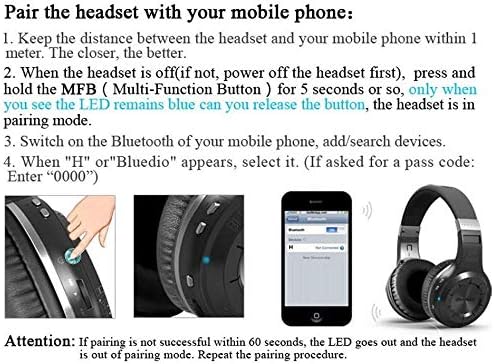
Figure 6: Smart Features with Cloud Service.
ข้อมูลจำเพาะ
| คุณสมบัติ | รายละเอียด |
|---|---|
| เวอร์ชันบลูทูธ | 5.0 |
| สนับสนุนโปรfiles | A2DP, AVRCP, HTSP, HTFP |
| ระยะห่างการสื่อสาร | 10 เมตร |
| ช่วงไดนามิค | 118 เดซิเบล |
| ไดรฟ์หน่วย | 57 มม. |
| อิมพีแดนซ์ของฮอร์น | 16 โอห์ม |
| ความเพี้ยนฮาร์มอนิกรวม (THD) | <0.5% |
| ความจุของแบตเตอรี่ | 650 มิลลิแอมป์ |
| เวลาเล่นเพลง | 40 ชั่วโมง |
| เวลาสนทนา | 45 ชั่วโมง |
| เวลาสแตนด์บาย | 30 วัน |
| เวลาในการชาร์จ | 1 ชั่วโมง |
| ขนาด | 7.09 x 6.69 x 1.97 นิ้ว |
| น้ำหนักสินค้า | 15.5 ออนซ์ |
| การควบคุมเสียงรบกวน | ระบบตัดเสียงรบกวนแบบแอคทีฟ |
| แจ็คหูฟัง | แจ็ค 3.5 มม. |
| ประเภทการควบคุม | การควบคุมสื่อ, เสียง |
การซ่อมบำรุง
การดูแลรักษาอย่างถูกวิธีจะช่วยให้หูฟังของคุณมีอายุการใช้งานยาวนานและรักษาประสิทธิภาพการทำงานได้ดี
- การทำความสะอาด: เช็ดทำความสะอาดที่ครอบหูและแถบคาดศีรษะเบาๆ ด้วยผ้าแห้งเนื้อนุ่ม ห้ามใช้สารเคมีรุนแรงหรือวัสดุที่มีฤทธิ์กัดกร่อน
- พื้นที่จัดเก็บ: Store the headphones in a cool, dry place away from direct sunlight and extreme temperatures. When not in use, it is recommended to store them in a protective case to prevent damage.
- การดูแลแบตเตอรี่ Avoid fully discharging the battery frequently. For long-term storage, charge the battery to about 50% every few months.
- การจัดการสายเคเบิล: Handle the charging and audio cables carefully to prevent kinks or damage.
การแก้ไขปัญหา
หากคุณพบปัญหาเกี่ยวกับหูฟังของคุณ โปรดดูวิธีแก้ไขทั่วไปต่อไปนี้:
- ไม่สามารถจับคู่ได้:
- ตรวจสอบให้แน่ใจว่าหูฟังชาร์จเต็มแล้ว
- Make sure the headphones are in pairing mode (blue LED stays on).
- ปิดและเปิดบลูทูธบนอุปกรณ์ของคุณ
- ล้างการเชื่อมต่อบลูทูธก่อนหน้านี้บนอุปกรณ์ของคุณ
- ลองจับคู่กับอุปกรณ์อื่นเพื่อตัดปัญหาเฉพาะอุปกรณ์ออกไป
- ไม่มีเสียง:
- ตรวจสอบระดับเสียงทั้งบนหูฟังและอุปกรณ์ที่เชื่อมต่อของคุณ
- ตรวจสอบให้แน่ใจว่าหูฟังได้รับการจับคู่และเชื่อมต่ออย่างถูกต้อง
- If using a wired connection, ensure the 3.5mm audio cable is fully inserted into both the headphones and the audio source.
- ลองรีสตาร์ททั้งหูฟังและอุปกรณ์ต้นทางเสียงดู
- คุณภาพเสียงไม่ดี:
- Move closer to your connected device to avoid interference or being out of range.
- Ensure there are no physical obstructions between the headphones and the device.
- ตรวจสอบว่าคุณภาพแหล่งเสียงอยู่ในระดับสูงหรือไม่
- หูฟังไม่เปิด:
- ตรวจสอบให้แน่ใจว่าหูฟังชาร์จเต็มแล้ว
- Press and hold the Power/MF button for a longer duration (e.g., 5-7 seconds).
การรับประกันและการสนับสนุน
Bluedio offers a comprehensive warranty and support for your product.
- นโยบายการคืนสินค้า: 30 days with no reason to return for your Bluedio Bluetooth headphone.
- การรับประกัน: 12 Months worry-free warranty.
- For further assistance or warranty claims, please refer to the contact information provided in your product packaging or visit the official Bluedio support webเว็บไซต์.