1. สินค้าหมดview
The Benss Portable Digital Radio (Model BRBD05) is a compact and versatile multi-band receiver designed for clear reception and ease of use. It supports AM, FM, and SW bands, features a digital LCD display with backlight, an alarm clock, and a sleep timer. Its portable design makes it ideal for both indoor and outdoor use.

รูปที่ 1.1 : ด้านหน้า view of the Benss Portable Digital Radio.
This radio is equipped with a built-in loudspeaker for clear audio and a 3.5mm earphone jack for private listening. The telescopic antenna ensures optimal signal reception, and the device is powered by two AA batteries, making it highly portable.
2. ข้อมูลด้านความปลอดภัย
- อย่าวางวิทยุไว้ในที่ที่มีอุณหภูมิสูงหรือต่ำเกินไป แสงแดดโดยตรง หรือความชื้นสูง
- ควรหลีกเลี่ยงการทำวิทยุตกหรือกระแทกอย่างแรง
- ห้ามถอดประกอบหรือดัดแปลงวิทยุด้วยตนเอง การกระทำดังกล่าวจะทำให้การรับประกันเป็นโมฆะและอาจทำให้เกิดความเสียหายได้
- ใช้เฉพาะแบตเตอรี่ชนิดที่ระบุ (แบตเตอรี่ AA 2 ก้อน) ตรวจสอบให้แน่ใจว่าใส่แบตเตอรี่ถูกขั้ว
- ถอดแบตเตอรี่ออกหากจะไม่ได้ใช้งานวิทยุเป็นเวลานานเพื่อป้องกันการรั่วไหล
- ควรเก็บวิทยุให้ห่างจากน้ำและของเหลวอื่นๆ
- ทำความสะอาดวิทยุด้วยผ้านุ่มและแห้ง ห้ามใช้น้ำยาทำความสะอาดที่มีฤทธิ์กัดกร่อนหรือตัวทำละลาย
3. เนื้อหาบรรจุภัณฑ์
กรุณาตรวจสอบแพ็คเกจสำหรับรายการต่อไปนี้:
- 1 x Benss Pocket Radio
- 1 x คู่มือผู้ใช้
- หมายเหตุ: ไม่รวมแบตเตอรี่และต้องซื้อแยกต่างหาก
4. การตั้งค่า
4.1 การติดตั้งแบตเตอรี่
- ค้นหาฝาปิดช่องใส่แบตเตอรี่ที่ด้านหลังวิทยุ
- เลื่อนฝาลงเพื่อเปิดช่อง
- Insert two AA size batteries, ensuring the correct positive (+) and negative (-) polarity as indicated inside the compartment.
- ปิดฝาช่องใส่แบตเตอรี่โดยเลื่อนขึ้นด้านบนจนกระทั่งล็อคเข้าที่

Figure 4.1: Battery installation process for the Benss radio.
4.2 การปรับเสาอากาศ
For optimal reception, especially for FM and SW bands, extend the telescopic antenna fully. The antenna can be rotated 360 degrees to find the best signal direction.

Figure 4.2: The radio's telescopic antenna can be rotated for optimal signal.
5. คู่มือการใช้งาน
5.1 เปิด/ปิดเครื่อง
กดปุ่ม เปิด/ปิด button located on the front panel to turn the radio on or off. The LCD display will illuminate when the radio is powered on.
5.2 การตั้งเวลาและสัญญาณเตือน
- การตั้งเวลา: กดปุ่ม ตั้งเวลา ปุ่ม ใช้ปุ่ม P- และ P+ buttons to adjust the hour and minute. Press ตั้งเวลา again to confirm. You can switch between 12-hour and 24-hour display formats.
- การตั้งปลุก: กดปุ่ม อัล.เซ็ต ปุ่ม ใช้ปุ่ม P- และ P+ กดปุ่มเพื่อตั้งเวลาปลุกที่ต้องการ อัล.เซ็ต again to confirm. The alarm sound will gradually increase in volume.

Figure 5.1: The radio supports both 12-hour and 24-hour time display.
5.3 Tuning Radio Stations (AM/FM/SW)
- การเลือกวงดนตรี: Use the slide switch on the front panel to select between FM, AM, or SW (Shortwave) bands.
- การสแกนอัตโนมัติ: กดปุ่ม สแกน ปุ่มสำหรับค้นหาและบันทึกสถานีที่ว่างอยู่โดยอัตโนมัติ
- การปรับด้วยตนเอง: ใช้ P- และ P+ ปุ่มสำหรับปรับความถี่ด้วยตนเองไปยังความถี่ที่ต้องการ
- Shortwave (SW) Reception: The radio supports multiple shortwave bands (SW1-SW7), allowing reception of international broadcasts.
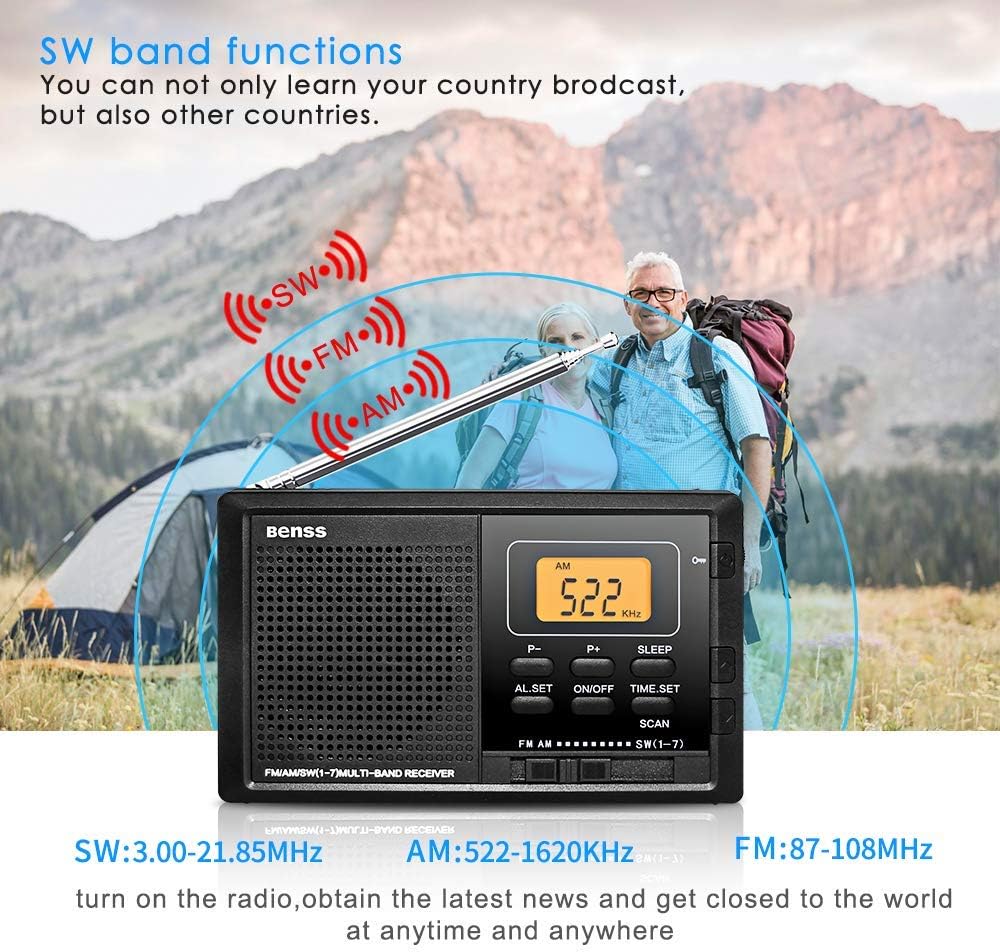
Figure 5.2: The radio supports AM, FM, and SW bands for diverse listening options.
5.4 การควบคุมระดับเสียง
Adjust the volume using the rotary knob located on the right side of the radio. Rotate upwards to increase volume and downwards to decrease.
5.5 ฟังก์ชันตั้งเวลาปิดเครื่องอัตโนมัติ
กดปุ่ม นอน button to activate the sleep timer. You can set the radio to automatically turn off after a specified duration (e.g., 10-90 minutes), allowing you to fall asleep to your favorite station without wasting battery power.

Figure 5.3: The sleep timer allows the radio to turn off automatically.
5.6 ปุ่มล็อค
The lock button prevents accidental button presses. Slide the ล็อค switch (usually on the side or top) to the locked position to disable all buttons. Slide it back to unlock.
5.7 แจ็คหูฟัง
Connect standard 3.5mm earphones to the earphone jack on the side of the radio for private listening. The built-in speaker will automatically mute when earphones are connected.
6. การบำรุงรักษา
- การทำความสะอาด: Wipe the radio's surface with a soft, dry cloth. Do not use liquid cleaners or aerosols.
- การเปลี่ยนแบตเตอรี่: Replace batteries when the display dims or audio quality deteriorates. Always replace both batteries at the same time.
- พื้นที่จัดเก็บ: หากจะเก็บวิทยุไว้เป็นเวลานาน ควรถอดแบตเตอรี่ออกเพื่อป้องกันการกัดกร่อน และเก็บไว้ในที่แห้งและเย็น
7 การแก้ไขปัญหา
| ปัญหา | สาเหตุที่เป็นไปได้ | สารละลาย |
|---|---|---|
| วิทยุไม่เปิด | แบตเตอรี่หมดหรือใส่ไม่ถูกต้อง | เปลี่ยนแบตเตอรี่ใหม่โดยตรวจสอบให้แน่ใจว่าใส่ขั้วถูกต้อง |
| สัญญาณไม่ดี/มีเสียงรบกวน | เสาอากาศไม่ได้ยืดออกหรืออยู่ในตำแหน่งที่ถูกต้อง ส่งผลให้สัญญาณอ่อน | Fully extend and rotate the telescopic antenna. Try moving to a different location. |
| สัญญาณเตือนภัยไม่ดัง | ไม่ได้ตั้งปลุกหรือระดับเสียงเบาเกินไป | Ensure alarm time is set correctly. Increase the volume. |
| ปุ่มต่างๆ ไม่ตอบสนอง | ฟังก์ชั่นล็อคเปิดใช้งานแล้ว | Slide the LOCK switch to the unlocked position. |
8. ข้อมูลจำเพาะ
| คุณสมบัติ | รายละเอียด |
|---|---|
| หมายเลขรุ่น | BRBD05 |
| ช่วงความถี่ FM | 87-108 เมกะเฮิรตซ์ |
| ช่วงความถี่ AM | 522-1620 กิโลเฮิรตซ์ |
| ช่วงความถี่ SW | 3.00-21.85 เมกะเฮิรตซ์ |
| แหล่งจ่ายไฟ | DC 3V (2 x AA Batteries) |
| ขนาด (กว้าง x ยาว x สูง) | 122 x 69 x 22 มม. (4.7 x 2.7 x 0.8 นิ้ว) |
| น้ำหนัก (ไม่รวมแบตเตอรี่) | 142 กรัม |
| เทคโนโลยีการเชื่อมต่อ | ไวไฟ (Note: This seems to be an error in the source data, as typical portable radios do not have Wi-Fi. The radio functions via radio waves.) |
| คุณสมบัติพิเศษ | พกพาได้ |
| ส่วนประกอบที่รวมอยู่ | คู่มือของเจ้าของ |
9. การรับประกันและการสนับสนุน
This Benss product is manufactured with high-quality standards. For any issues or support inquiries, please refer to the contact information provided at the point of purchase or visit the official Benss webเว็บไซต์.
Please retain your proof of purchase for warranty claims. Specific warranty terms and conditions may vary by region and retailer.
