1. บทนำ
Thank you for choosing the STAYER S L20 Cordless Oscillating Multi-Tool. This versatile 18V battery-powered tool is designed for a wide range of applications, including cutting, sanding, scraping, and grinding. Its powerful 775 motor and high-quality gearbox ensure efficient performance, while the variable speed control allows for adaptation to various materials and tasks. This manual provides essential information for safe operation, setup, maintenance, and troubleshooting to ensure optimal performance and longevity of your tool.
2. คำแนะนำด้านความปลอดภัยทั่วไป
Always follow basic safety precautions when using electric tools to reduce the risk of fire, electric shock, and personal injury. Read all instructions carefully before operating the tool.
- ความปลอดภัยในพื้นที่ทำงาน: รักษาพื้นที่ทำงานให้สะอาดและมีแสงสว่างเพียงพอ พื้นที่ที่รกหรือมืดอาจก่อให้เกิดอุบัติเหตุได้ ห้ามใช้เครื่องมือไฟฟ้าในสภาพแวดล้อมที่อาจเกิดการระเบิด เช่น ในบริเวณที่มีของเหลวไวไฟ ก๊าซ หรือฝุ่น
- ความปลอดภัยทางไฟฟ้า: หลีกเลี่ยงการสัมผัสร่างกายกับพื้นผิวที่ต่อสายดินหรือต่อสายดิน (เช่น ท่อ หม้อน้ำ เตา ตู้เย็น) อย่าให้เครื่องมือไฟฟ้าโดนฝนหรือเปียกชื้น
- ความปลอดภัยส่วนบุคคล: Always wear eye protection. Use dust mask, non-skid safety shoes, hard hat, or hearing protection for appropriate conditions. Dress properly. Do not wear loose clothing or jewelry. Keep hair, clothing, and gloves away from moving parts.
- การใช้และการดูแลเครื่องมือ: อย่าฝืนใช้เครื่องมือไฟฟ้า ใช้เครื่องมือไฟฟ้าที่เหมาะสมกับงาน อย่าใช้เครื่องมือไฟฟ้าหากสวิตช์ไม่สามารถเปิดและปิดได้ ถอดปลั๊กออกจากแหล่งจ่ายไฟและ/หรือชุดแบตเตอรี่ออกจากเครื่องมือไฟฟ้าก่อนทำการปรับแต่ง เปลี่ยนอุปกรณ์เสริม หรือจัดเก็บเครื่องมือไฟฟ้า
- การใช้และการดูแลแบตเตอรี่: ชาร์จด้วยเครื่องชาร์จที่ผู้ผลิตกำหนดเท่านั้น ใช้เครื่องมือไฟฟ้าที่มีแบตเตอรี่เฉพาะรุ่นที่กำหนดเท่านั้น
- บริการ: ให้ช่างซ่อมที่มีคุณสมบัติมาซ่อมเครื่องมือไฟฟ้าของคุณโดยใช้เฉพาะชิ้นส่วนทดแทนที่เหมือนกันเท่านั้น วิธีนี้จะช่วยให้เครื่องมือไฟฟ้าของคุณปลอดภัย
3. สินค้าหมดview
Familiarize yourself with the components of your STAYER S L20 Multi-Tool before operation.
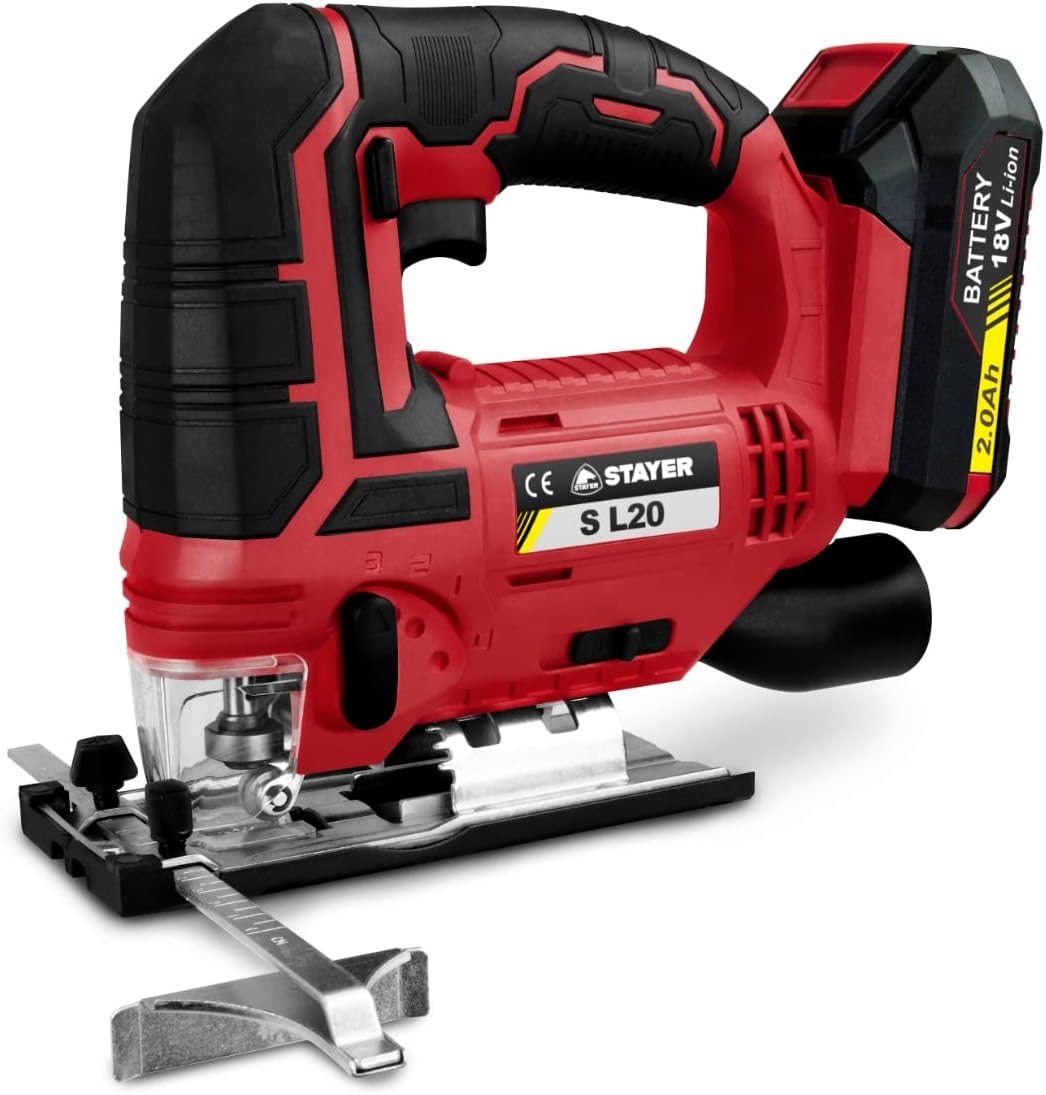
รูปที่ 3.1 : ด้านหน้า view of the STAYER S L20 Cordless Oscillating Multi-Tool, showing the main body, handle, battery slot, and accessory attachment point.
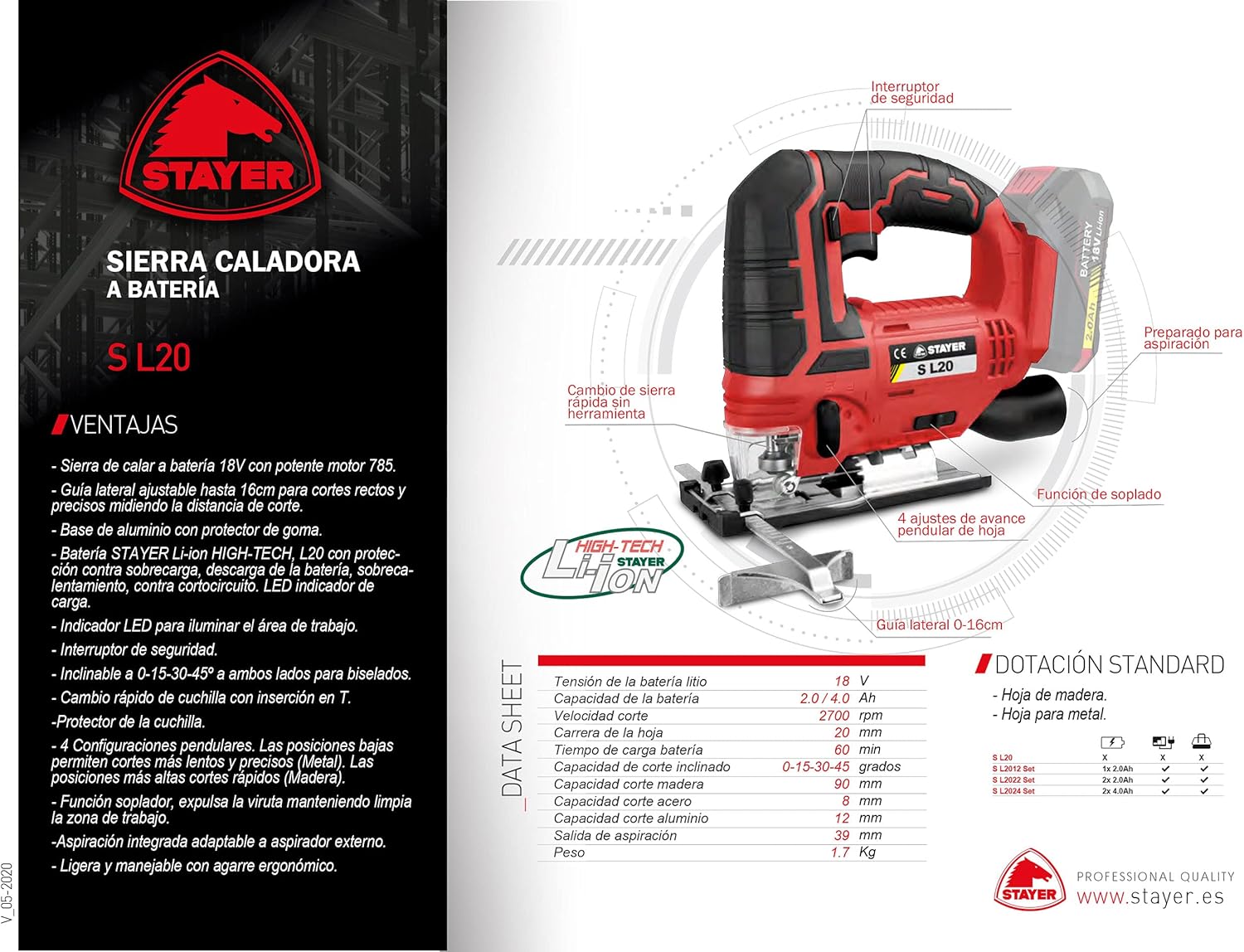
Figure 3.2: Diagram illustrating key features of the STAYER S L20, including the safety switch, quick blade change mechanism, oscillation angle, and LED work light.
คุณสมบัติหลัก:
- 18V Cordless Operation
- Powerful 775 Motor
- Variable Speed Control (5,000 - 20,000 OPM)
- STAYER Li-ion HIGH-TECH L20 Battery with comprehensive protection (overload, discharge, overheating, short-circuit) and LED charge indicator.
- Quick, Tool-Free Accessory Change System
- Integrated Work LED Light
- 3° Oscillation Angle
- High-Quality Gearbox
- Depth Adjustment Feature
4. การตั้งค่า
4.1. การติดตั้งและการชาร์จแบตเตอรี่
- โปรดตรวจสอบให้แน่ใจว่าได้ปิดเครื่องมือแล้วก่อนที่จะติดตั้งหรือถอดแบตเตอรี่
- จัดวางชุดแบตเตอรี่ให้ตรงกับช่องใส่แบตเตอรี่บนเครื่องมือ
- เลื่อนชุดแบตเตอรี่เข้าไปในช่องจนกระทั่งล็อคเข้าที่อย่างแน่นหนา
- หากต้องการถอด ให้กดปุ่มปลดแบตเตอรี่แล้วเลื่อนแบตเตอรี่ออก
- Charge the battery using a compatible STAYER charger. The LED indicator on the battery will show the charge status.
4.2. การติดตั้งอุปกรณ์เสริม
The S L20 features a quick, tool-free accessory change system.
- ตรวจสอบให้แน่ใจว่าเครื่องมือปิดอยู่และถอดแบตเตอรี่ออก
- Locate the quick-release lever or mechanism on the tool head.
- Open the lever to release the accessory clampกลไกการทำงานของไอเอ็นจี
- Align the accessory (e.g., saw blade, sanding pad) with the accessory mount on the tool. Ensure it fits snugly.
- Close the quick-release lever firmly until it locks the accessory in place.
- Gently pull on the accessory to ensure it is securely fastened before operation.
4.3. Adjusting Depth (if applicable)
For applications requiring precise depth control, utilize the depth adjustment feature.
- Identify the depth adjustment mechanism, typically a guide or stop.
- Loosen the locking screw or lever for the depth guide.
- Adjust the guide to the desired cutting or sanding depth.
- Tighten the locking screw or lever to secure the depth guide in position.
5. คู่มือการใช้งาน
5.1. การเปิด/ปิดเครื่อง
- To turn on the tool, press the power switch. Some models may have a safety lock button that needs to be pressed first.
- To turn off the tool, release the power switch.
5.2. การควบคุมความเร็วแบบแปรผัน
The S L20 features a 6-position speed regulator, allowing you to adjust the oscillation rate from 5,000 to 20,000 oscillations per minute (OPM) to match the material and accessory.
- Use lower speeds for softer materials, delicate work, or when greater control is needed.
- Use higher speeds for harder materials or when faster material removal is desired.
- Adjust the speed dial or switch to the desired setting before starting work.
5.3. เคล็ดลับการใช้งานทั่วไป
- Always secure your workpiece firmly to prevent movement during operation.
- Apply light, consistent pressure. Do not force the tool, let the tool do the work.
- For cutting, allow the blade to reach full speed before engaging the workpiece.
- When sanding, move the tool in a consistent pattern to ensure even material removal.
- Utilize the integrated LED work light for improved visibility in dimly lit areas.
- For applications generating significant dust, consider using an external dust extraction system if the tool supports it, or wear appropriate respiratory protection.
6. การบำรุงรักษา
Regular maintenance ensures the longevity and safe operation of your STAYER S L20 Multi-Tool.
6.1. การทำความสะอาด
- ควรถอดแบตเตอรี่ออกทุกครั้งก่อนทำความสะอาด
- ทำความสะอาดช่องระบายอากาศของเครื่องมืออย่างสม่ำเสมอเพื่อป้องกันความร้อนสูงเกินไป ใช้แปรงขนนุ่มหรือลมเป่าทำความสะอาด
- เช็ดตัวเครื่องเครื่องมือด้วยผ้านุ่มๆamp ผ้า. อย่าใช้สารเคมีที่รุนแรงหรือน้ำยาทำความสะอาดที่มีฤทธิ์กัดกร่อน
- Remove any accumulated dust or debris from the accessory mount area.
6.2. การจัดเก็บ
- เก็บเครื่องมือไว้ในที่แห้งและปลอดภัยให้พ้นมือเด็ก
- Ensure the battery is partially charged (not fully depleted or fully charged) before long-term storage to preserve battery life.
- Store the tool and accessories in their original case or a suitable storage container to protect them from damage.
6.3. การดูแลแบตเตอรี่
- อย่าให้แบตเตอรี่สัมผัสกับอุณหภูมิที่สูงเกินไปหรือถูกแสงแดดโดยตรง
- ห้ามลัดวงจรขั้วแบตเตอรี่
- ทิ้งแบตเตอรี่เก่าด้วยความรับผิดชอบตามข้อบังคับท้องถิ่น
7 การแก้ไขปัญหา
This section addresses common issues you might encounter with your STAYER S L20 Multi-Tool.
| ปัญหา | สาเหตุที่เป็นไปได้ | สารละลาย |
|---|---|---|
| เครื่องมือไม่เริ่มทำงาน | แบตเตอรี่ไม่ได้ชาร์จหรือติดตั้งไม่ถูกต้อง Power switch faulty. | ตรวจสอบให้แน่ใจว่าแบตเตอรี่ชาร์จเต็มและใส่เข้าไปอย่างถูกต้อง หากปัญหายังคงมีอยู่ โปรดติดต่อฝ่ายสนับสนุนลูกค้า |
| กำลังหรือประสิทธิภาพลดลง | แบตเตอรี่ต่ำ อุปกรณ์เสริมหมองคล้ำหรือชำรุด ความร้อนสูงเกินไป | ชาร์จแบตเตอรี่ เปลี่ยนอุปกรณ์เสริม ปล่อยให้เครื่องมือเย็นลง ทำความสะอาดช่องระบายอากาศ |
| การสั่นสะเทือนหรือเสียงรบกวนมากเกินไป | Accessory not securely fastened. Damaged accessory. ปัญหาทางกลไกภายใน | Check and re-secure accessory. เปลี่ยนอุปกรณ์เสริม ยุติการใช้งานและติดต่อฝ่ายสนับสนุนลูกค้า |
| Battery LED indicator not working. | แบตเตอรี่มีปัญหา | Try another charged battery if available. Contact customer support if the battery is faulty. |
8. ข้อมูลจำเพาะ
| ข้อมูลจำเพาะ | ค่า |
|---|---|
| หมายเลขรุ่น | 1.2136 |
| ผู้ผลิต | ผู้เข้าพัก |
| แหล่งพลังงาน | ใช้พลังงานจากแบตเตอรี่ (ลิเธียมไอออน) |
| เล่มที่tage | 18 โวลต์ |
| วัดtage | 18 วัตต์ |
| ความเร็วการสั่น | 5,000 - 20,000 OPM (รอบต่อนาที) |
| มุมการสั่น | 3° |
| น้ำหนัก | 1.65 กิโลกรัม |
| วัสดุใบมีด | High-speed steel (for included tools) |
| คุณสมบัติพิเศษ | การปรับความลึก |
| ส่วนประกอบที่รวมอยู่ | Tools (accessories) |
9. การรับประกันและการสนับสนุน
The STAYER S L20 Multi-Tool comes with a limited warranty. Please refer to the warranty card included with your product for specific terms and conditions. Spare parts availability is indicated for 2 years from the date of purchase.
For technical support, warranty claims, or to inquire about spare parts, please contact STAYER customer service through their official webไซต์หรือผู้ค้าปลีกที่คุณซื้อผลิตภัณฑ์มา
หมายเหตุ: อาจต้องแสดงหลักฐานการซื้อเพื่อขอรับบริการตามการรับประกัน


