การแนะนำ
This manual provides essential information for setting up, operating, maintaining, and troubleshooting your VAIO SX12 laptop. Please read this manual thoroughly to ensure proper use and to maximize the performance and longevity of your device.

รูปที่ 1 : ด้านหน้า view of the VAIO SX12 laptop with the screen open.
การตั้งค่า
1. การแกะกล่องและการตรวจสอบเบื้องต้น
โปรดนำส่วนประกอบทั้งหมดออกจากบรรจุภัณฑ์อย่างระมัดระวัง ตรวจสอบให้แน่ใจว่าสิ่งของทั้งหมดที่ระบุไว้ในส่วน 'สิ่งที่มีอยู่ในกล่อง' นั้นครบถ้วนและไม่เสียหาย หากมีสิ่งของใดขาดหายหรือเสียหาย โปรดติดต่อฝ่ายบริการลูกค้า
- VAIO SX12 Laptop
- อะแดปเตอร์ AC
- ผ้าเช็ดทำความสะอาด
2. การเชื่อมต่ออะแดปเตอร์ AC
Connect the AC adapter to the power input port on the laptop and then plug the adapter into a wall outlet. The battery will begin charging automatically.
3. เปิดเครื่องครั้งแรก
Press the power button located on the top right of the keyboard. The laptop will boot up and guide you through the initial Windows 10 Pro setup process.
การดำเนินงาน
1. คีย์บอร์ดและทัชแพด
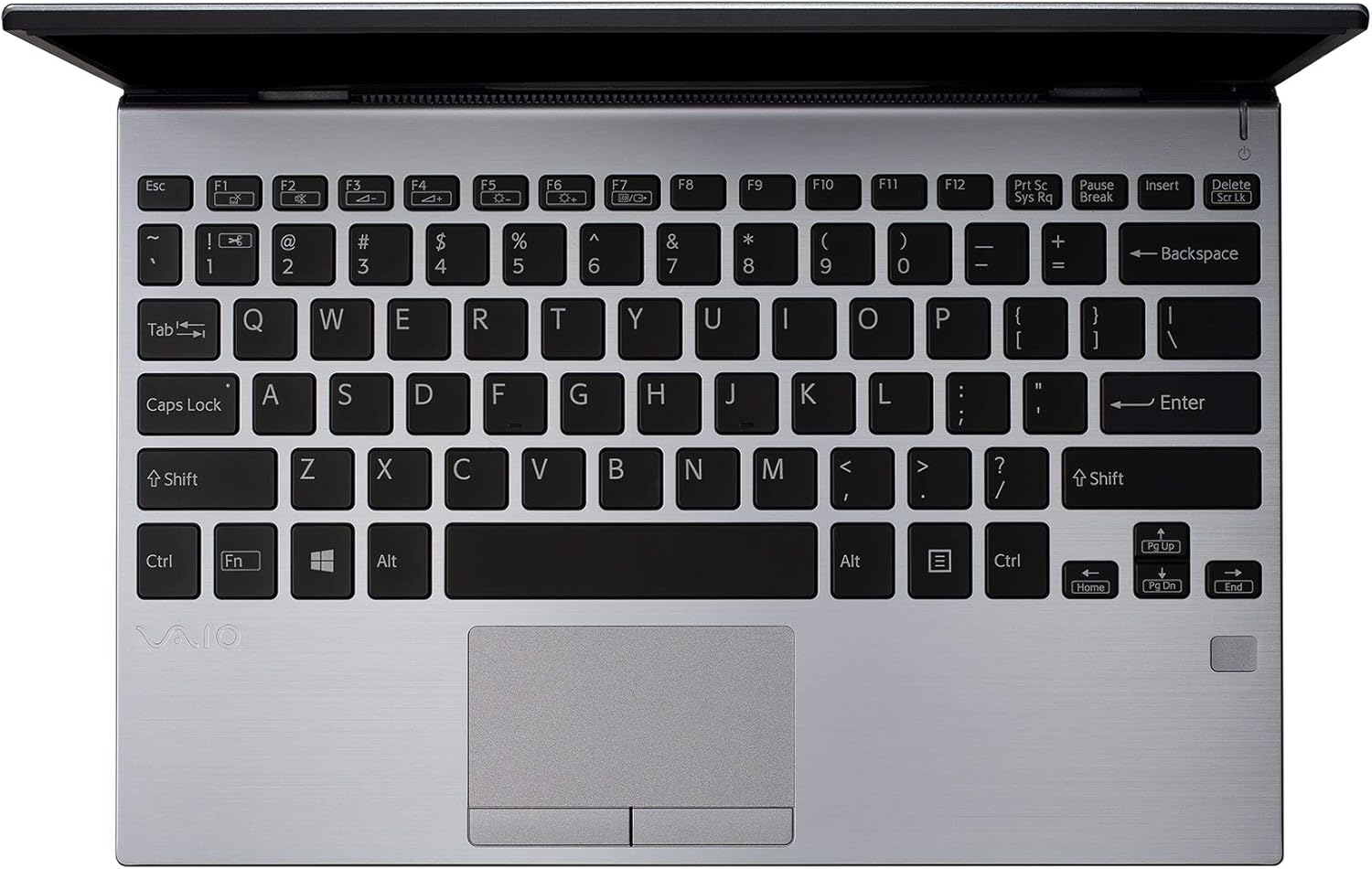
รูปที่ 2: จากบนลงล่าง view of the VAIO SX12 keyboard and touchpad.
The VAIO SX12 features a full-sized keyboard and a precision touchpad. Familiarize yourself with the function keys (F1-F12) which control various system settings such as screen brightness, volume, and wireless connectivity.
- ปุ่มฟังก์ชัน: Use the 'Fn' key in combination with F1-F12 for secondary functions.
- ทัชแพด: Supports multi-touch gestures for scrolling, zooming, and navigating.
2. การเชื่อมต่ออุปกรณ์ต่อพ่วง
The VAIO SX12 offers a variety of ports for connecting external devices.

รูปที่ 3 : ด้านซ้าย view of the VAIO SX12, showing the power input, USB ports, HDMI, Ethernet, and VGA ports.

รูปที่ 4: ด้านขวา view of the VAIO SX12, showing the SD card slot, USB ports, and audio jack.
- พอร์ต USB: เชื่อมต่ออุปกรณ์ USB เช่น ฮาร์ดไดรฟ์ภายนอก คีย์บอร์ด หรือเมาส์
- พอร์ต HDMI: เชื่อมต่อกับจอแสดงผลภายนอกหรือโปรเจ็กเตอร์
- พอร์ต VGA: Connect to older external displays or projectors.
- พอร์ตอีเธอร์เน็ต: เชื่อมต่อกับเครือข่ายแบบมีสาย
- ช่องเสียบการ์ด SD: ใส่การ์ด SD เพื่อถ่ายโอนข้อมูล
- แจ็คเสียง: เชื่อมต่อหูฟังหรือลำโพงภายนอก
การซ่อมบำรุง
1. การทำความสะอาดแล็ปท็อป
- Use the provided cleaning cloth or a soft, lint-free cloth to wipe the screen and exterior surfaces.
- ห้ามใช้สารเคมีรุนแรง น้ำยาทำความสะอาดที่มีฤทธิ์กัดกร่อน หรือตัวทำละลาย
- ตรวจสอบให้แน่ใจว่าแล็ปท็อปปิดอยู่และถอดปลั๊กออกก่อนทำความสะอาด
2. การดูแลแบตเตอรี่
- เพื่อยืดอายุการใช้งานแบตเตอรี่ ควรหลีกเลี่ยงการปล่อยแบตเตอรี่จนหมดบ่อยครั้ง
- เก็บแล็ปท็อปไว้ในที่แห้งและเย็นหากไม่ได้ใช้งานเป็นเวลานาน
- The battery is internal and not user-replaceable. Contact authorized service for battery replacement.
3. การอัปเดตซอฟต์แวร์
ตรวจสอบและติดตั้งการอัปเดตระบบปฏิบัติการและไดรเวอร์เป็นประจำเพื่อให้มั่นใจถึงประสิทธิภาพและความปลอดภัยที่เหมาะสมที่สุด
การแก้ไขปัญหา
1. แล็ปท็อปไม่สามารถเปิดเครื่องได้
- ตรวจสอบให้แน่ใจว่าอะแดปเตอร์ AC เชื่อมต่อกับแล็ปท็อปและเต้ารับไฟฟ้าที่ใช้งานได้แน่นหนา
- ตรวจสอบว่าเต้ารับไฟฟ้าใช้งานได้โดยเสียบอุปกรณ์อื่น
- หากแบตเตอรี่หมด ให้ชาร์จอย่างน้อย 30 นาทีก่อนลองเปิดเครื่อง
2. ปัญหาการแสดงผล
- หากหน้าจอว่างเปล่า ให้ลองปรับความสว่างโดยใช้ปุ่มฟังก์ชัน
- If an external monitor is connected, ensure the display output is correctly configured (e.g., duplicate, extend).
- รีสตาร์ทแล็ปท็อป
3. Peripheral Not Recognized
- ตรวจสอบให้แน่ใจว่าอุปกรณ์ต่อพ่วงเชื่อมต่อกับพอร์ตที่ถูกต้องแล้ว
- Try connecting the peripheral to a different port or another computer to rule out device malfunction.
- ตรวจสอบตัวจัดการอุปกรณ์ใน Windows เพื่อดูปัญหาไดรเวอร์
ข้อมูลจำเพาะ
| คุณสมบัติ | ข้อมูลจำเพาะ |
|---|---|
| ชื่อรุ่น | VAIO SX12 |
| หมายเลขรุ่นสินค้า | VJS121C11L |
| โปรเซสเซอร์ | Intel Core i5-8265U (3.9 GHz max) |
| แรม | 8GB LPDDR3 ความจุ |
| ฮาร์ดไดรฟ์ | 512GB PCIe SSD ความจุ |
| ระบบปฏิบัติการ | วินโดวส์ 10 โปร |
| ขนาดหน้าจอ | 12.5 นิ้ว |
| ความละเอียดหน้าจอ | 1920 x 1080 พิกเซล (ฟูลเอชดี) |
| การ์ดจอ | แบบบูรณา Intel Graphics |
| การเชื่อมต่อแบบไร้สาย | 802.11a/b/g/n/ac, บลูทูธ |
| พอร์ต USB 3.0 | 4 |
| น้ำหนักสินค้า | 1.97 ปอนด์ |
| ขนาดสินค้า | 11.3 x 8 x 0.62 นิ้ว |
| สี | เงิน |
| แบตเตอรี่ | แบตเตอรี่ลิเธียมไอออน 1 ก้อน (รวมอยู่ด้วย) |
การรับประกันและการสนับสนุน
For warranty information and technical support, please refer to the documentation included with your product or visit the official VAIO support webไซต์ โปรดเก็บใบเสร็จรับเงินไว้เป็นหลักฐานการซื้อสำหรับการเรียกร้องการรับประกัน


