คำแนะนำด้านความปลอดภัยที่สำคัญ
- Read these instructions thoroughly before operating the unit.
- เก็บคำแนะนำเหล่านี้ไว้เพื่อใช้อ้างอิงในอนาคต
- ปฏิบัติตามคำเตือนทั้งหมดเกี่ยวกับผลิตภัณฑ์และในคู่มือการใช้งาน
- ปฏิบัติตามคำแนะนำทั้งหมด
- ห้ามใช้อุปกรณ์นี้ใกล้น้ำ
- ทำความสะอาดด้วยผ้าแห้งเท่านั้น
- อย่าปิดกั้นช่องระบายอากาศใดๆ ติดตั้งตามคำแนะนำของผู้ผลิต
- ห้ามติดตั้งใกล้แหล่งความร้อน เช่น หม้อน้ำ เครื่องทำความร้อน เตา หรืออุปกรณ์อื่น ๆ (รวมถึง ampเครื่องให้ความร้อน) ที่ผลิตความร้อน
- ปกป้องสายไฟไม่ให้ถูกเหยียบหรือถูกหนีบ โดยเฉพาะที่ปลั๊ก เต้ารับไฟฟ้า และจุดที่สายไฟออกจากเครื่อง
- ใช้เฉพาะอุปกรณ์เสริม/สิ่งที่แนบตามที่ผู้ผลิตกำหนดเท่านั้น
- ถอดปลั๊กอุปกรณ์นี้ในระหว่างพายุฝนฟ้าคะนองหรือเมื่อไม่ได้ใช้งานเป็นเวลานาน
- แจ้งบริการทั้งหมดให้ช่างที่ผ่านการรับรองทราบ จำเป็นต้องให้บริการเมื่ออุปกรณ์ได้รับความเสียหายในลักษณะใดก็ตาม เช่น สายไฟหรือปลั๊กชำรุด ของเหลวหกหรือมีวัตถุตกลงไปในอุปกรณ์ อุปกรณ์โดนฝนหรือความชื้น ไม่สามารถทำงานได้ตามปกติ หรือตกหล่น
สินค้าเกินview
The Victrola VBB-25-SLV is a compact boombox designed for versatile audio playback. It features a classic design combined with modern functionalities.

รูปที่ 1: ด้านหน้า view of the Victrola VBB-25-SLV Mini Bluetooth Boombox, showing the radio tuner, cassette compartment, speaker, and control buttons.
คุณสมบัติหลัก:
- การเชื่อมต่อบลูทูธไร้สาย: Stream audio wirelessly from compatible devices.
- วิทยุ AM/FM: Analog tuner for local radio stations.
- เครื่องเล่นและบันทึกเทปคาสเซ็ต: Play your favorite cassette tapes and record new audio.
- พอร์ต USB: For MP3 playback from USB storage devices.
- แจ็คหูฟัง: สำหรับการฟังส่วนตัว
- ตัวเลือกพลังงานคู่: Operates via AC power or batteries for portability.
สินค้าเกินview วีดีโอ:
คำอธิบายวิดีโอ: สั้นๆview of the Victrola VBB-25-SLV Mini Bluetooth Boombox, highlighting its features and design.
การตั้งค่า
Powering Your Boombox
The Victrola VBB-25-SLV can be powered using either AC power or C-size batteries.
การทำงานด้วยไฟฟ้ากระแสสลับ:
- Ensure the unit is switched OFF.
- เสียบสายไฟ AC เข้ากับช่องเสียบ AC IN ที่อยู่ด้านหลังตัวเครื่อง
- Plug the other end of the AC power cord into a standard wall outlet (120V ~ 60Hz).
การทำงานของแบตเตอรี่:
For portable use, the boombox requires 4 x 1.5V "C" size batteries (not included).
- Ensure the unit is switched OFF and disconnected from AC power.
- เปิดฝาปิดช่องใส่แบตเตอรี่ที่อยู่ด้านหลังของตัวเครื่อง
- Insert four "C" size batteries, ensuring correct polarity (+/-) as indicated inside the compartment.
- ปิดฝาช่องใส่แบตเตอรี่ให้แน่น
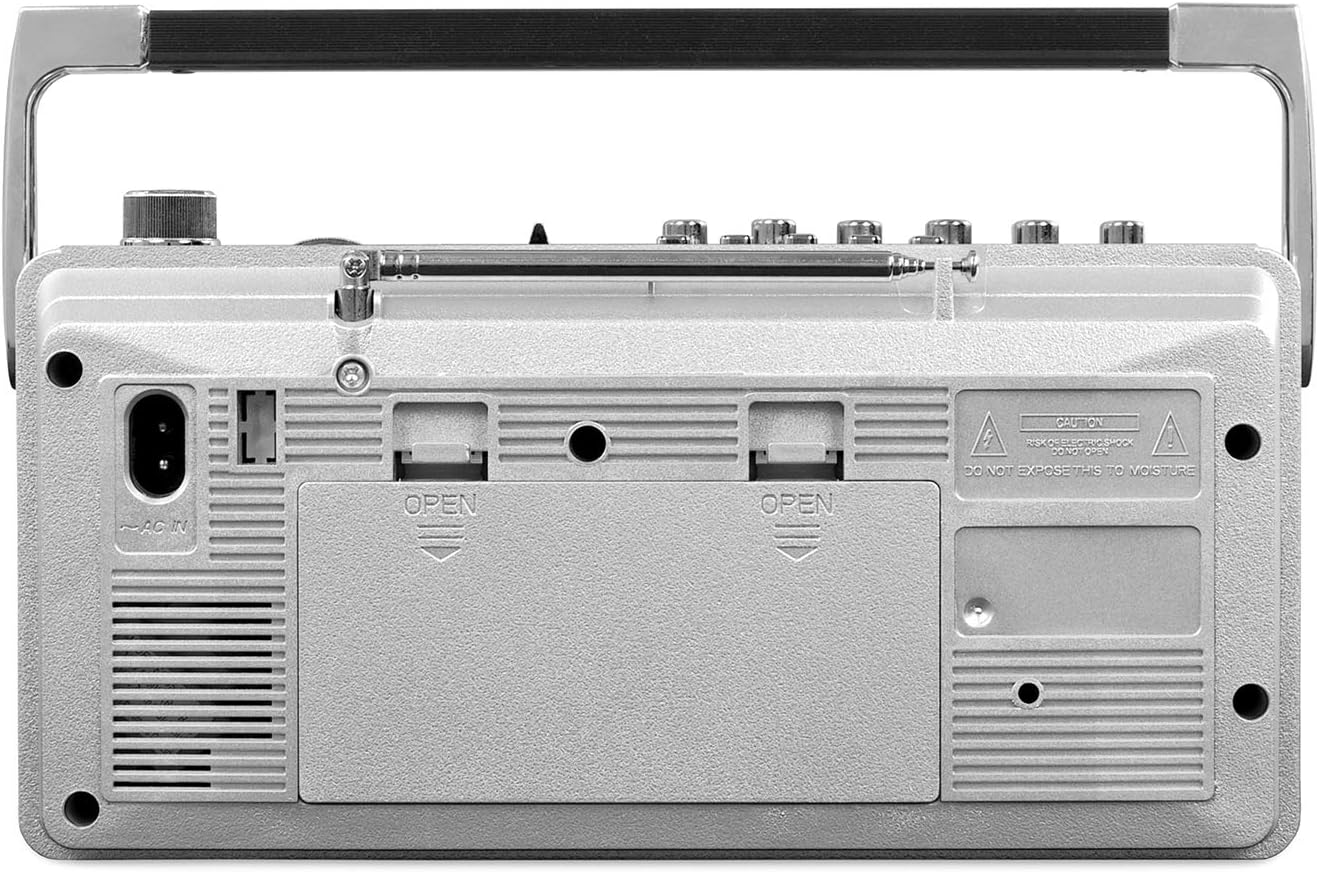
รูปที่ 2: หลัง view of the boombox, showing the AC IN port and the battery compartment.
บันทึก: When the AC power cord is connected, battery power is automatically disconnected. Remove batteries if the unit will not be used for an extended period to prevent leakage.
คำแนะนำการใช้งาน
การเปิด/ปิดเครื่อง
To turn the unit ON, slide the Function Selector switch to any desired mode (BT, FM, AM, TAPE). To turn the unit OFF, slide the Function Selector switch to the "OFF" position.
การใช้งานวิทยุ (AM/FM)
- Slide the Function Selector switch to "FM" or "AM".
- Extend the telescopic antenna for optimal FM reception. For AM, rotate the unit for best reception.
- Rotate the TUNING knob to select your desired radio station.
- ปรับปุ่ม VOLUME เป็นระดับการฟังที่คุณต้องการ
การใช้งานเครื่องเล่น/เครื่องบันทึกเทปคาสเซ็ต

รูปที่ 3: ด้านข้าง view of the boombox with the cassette compartment open, showing the tape mechanism.
การเล่นเทปคาสเซ็ต:
- Slide the Function Selector switch to "TAPE".
- กดปุ่ม STOP/EJECT เพื่อเปิดฝาตลับ
- ใส่เทปคาสเซ็ตโดยให้ด้านที่แกะเทปแล้วหันขึ้นด้านบน
- ปิดฝาตลับเทป
- กดปุ่มเล่นเพื่อเริ่มเล่น
- Use the F.FWD (Fast Forward) and REW (Rewind) buttons to navigate the tape.
- Press PAUSE to temporarily stop playback, and press again to resume.
- กดปุ่ม STOP/EJECT เพื่อหยุดการเล่นและนำเทปออก
การบันทึกลงเทปคาสเซ็ต:
You can record from the built-in microphone, radio, or Bluetooth source onto a blank cassette tape.
- Insert a blank, recordable cassette tape into the cassette compartment.
- Select the desired input source (FM, AM, or BT).
- Press the REC (Record) button. The PLAY button will also engage automatically.
- Recording will begin. Ensure the volume of the source is appropriate.
- หากต้องการหยุดบันทึกให้กดปุ่ม STOP / EJECT
การใช้งานบลูทูธ
- Slide the Function Selector switch to "BT" (Bluetooth). The Bluetooth indicator light will flash.
- เปิดใช้งาน Bluetooth บนอุปกรณ์ภายนอกของคุณ (เช่น สมาร์ทโฟน แท็บเล็ต)
- ค้นหา "Victrola VBB-25-SLV" in your device's Bluetooth settings and select it to pair.
- เมื่อจับคู่เสร็จแล้ว ไฟแสดงสถานะบลูทูธจะหยุดกะพริบและติดสว่างค้าง
- You can now play audio from your Bluetooth device through the boombox.
- Adjust the volume on both your Bluetooth device and the boombox for optimal sound.
การเล่นผ่าน USB
- ใส่แฟลชไดรฟ์ USB ที่มีไฟล์เสียง MP3 fileลงในพอร์ต USB
- The unit should automatically switch to USB playback mode. If not, cycle through modes until USB is active.
- Use the playback control buttons (Play, Pause, Skip) on the boombox to control your music.
การใช้หูฟัง
For private listening, plug standard 3.5mm headphones into the HEADPHONE jack located on the side of the unit. The main speaker will be muted automatically.
การซ่อมบำรุง
การทำความสะอาดหน่วย:
- เช็ดภายนอกตัวเครื่องด้วยผ้าแห้งและนุ่ม
- ห้ามใช้สารเคมีรุนแรง น้ำยาทำความสะอาด หรือสารซักฟอกชนิดเข้มข้น
การดูแลรักษาเทปคาสเซ็ต:
- To ensure optimal sound quality and prevent tape damage, regularly clean the tape heads, capstan, and pinch roller.
- Use a cotton swab lightly moistened with isopropyl alcohol or a specialized tape head cleaning fluid.
- หลีกเลี่ยงการสัมผัสหัวเทปด้วยมือเปล่า
การดูแลแบตเตอรี่
- Remove batteries if the unit will not be used for an extended period to prevent potential leakage and damage.
- อย่าใช้แบตเตอรี่เก่าและใหม่ผสมกัน หรือแบตเตอรี่ประเภทต่างๆ
การแก้ไขปัญหา
| ปัญหา | สาเหตุที่เป็นไปได้ | สารละลาย |
|---|---|---|
| ไม่มีไฟฟ้า | สายไฟ AC ต่อไม่ถูกต้อง; แบตเตอรี่หมดหรือใส่ไม่ถูกต้อง | ตรวจสอบการเชื่อมต่อสายไฟ AC เปลี่ยนแบตเตอรี่หรือตรวจสอบให้แน่ใจว่าขั้วถูกต้อง |
| การรับสัญญาณวิทยุไม่ดี | เสาอากาศไม่ได้ยืดออก (FM); ตำแหน่งเครื่อง (AM); สัญญาณอ่อน | Fully extend the FM antenna. Rotate the unit for better AM reception. Try moving the unit to a different location. |
| Cassette tape not playing or sounds distorted. | ใส่เทปไม่ถูกต้อง; หัวอ่านเทปสกปรก; เทปชำรุด | Ensure tape is inserted correctly. Clean tape heads, capstan, and pinch roller. Try a different tape. |
| อุปกรณ์บลูทูธไม่จับคู่ | Boombox not in BT mode; Device's Bluetooth is off; Device too far. | Ensure Function Selector is on "BT". Turn on Bluetooth on your device. Move device closer to the boombox (within 30 feet). |
| การเล่น USB ไม่ทำงาน | ไม่ได้เสียบไดรฟ์ USB อย่างถูกต้อง ไม่เข้ากัน file ฟอร์แมตแล้ว; ไดรฟ์ USB เสียหาย | ใส่ไดรฟ์ USB กลับเข้าไป ตรวจสอบให้แน่ใจว่า files are MP3 format. Try a different USB drive. |
| Low volume with headphones. | Headphone volume setting; Headphone impedance. | Adjust volume on the boombox. Ensure headphones are functioning correctly. |
ข้อมูลจำเพาะ
- แบบอย่าง: วีบีบี-25-สลวี
- แหล่งจ่ายไฟ: AC 120V ~ 60Hz or 4 x 1.5V "C" size batteries
- การเชื่อมต่อ: บลูทูธ, ยูเอสบี
- ความถี่วิทยุ: FM 87.5 - 108 MHz, AM 520 - 1710 KHz
- ประเภทลำโพง: สเตอริโอ
- ขนาดสินค้า (กว้าง x ยาว x สูง) : 9.8 x 3.35 x 6.3 นิ้ว
- น้ำหนักสินค้า: 2.94 ปอนด์
- ผู้ผลิต: วิคโทรล่า
- สี: เงิน
ข้อมูลการรับประกัน
For detailed warranty information, please refer to the warranty card included with your product or visit the official Victrola webเว็บไซต์.
สนับสนุน
If you encounter any issues or have questions regarding your Victrola VBB-25-SLV Mini Bluetooth Boombox, please contact Victrola Customer Support:
- Webเว็บไซต์: www.victrola.com/support
- โทรศัพท์: Refer to your product packaging or the Victrola webเว็บไซต์สำหรับหมายเลขติดต่อในภูมิภาค


