1. บทนำ
The Laserliner DigiLevel Laser G80 is a digital electronic spirit level designed for precise horizontal and vertical alignment, as well as accurate angle transfer. This device features an integrated green laser line for extending the measuring surface, a magnetic base for hands-free operation on metallic structures, and acoustic guidance for convenient use. Its 80 cm length makes it suitable for a wide range of applications in various trades.
2. คำแนะนำด้านความปลอดภัย
Please read these safety instructions carefully before using the device. Failure to follow these instructions may result in injury or damage to the device.
- รังสีเลเซอร์: This device uses a Class 2 laser. Do not look directly into the laser beam or direct it towards other people. Eye protection is recommended when working with lasers.
- แบตเตอรี่: Ensure correct battery polarity when inserting. Do not mix old and new batteries or different types of batteries. Remove batteries if the device will not be used for an extended period.
- การซ่อมบำรุง: ห้ามเปิดหรือดัดแปลงอุปกรณ์ด้วยตนเอง การซ่อมแซมควรดำเนินการโดยบุคลากรที่ได้รับอนุญาตเท่านั้น
- สิ่งแวดล้อม: Use the device within the specified operating temperature range (0°C to 40°C). Avoid exposure to extreme temperatures, moisture, or strong vibrations.
3. สินค้าหมดview
3.1 ส่วนประกอบ
The DigiLevel Laser G80 consists of the following main components:
- จอแสดงผลแบบดิจิตอล
- Control Buttons (UNIT, REF, CAL, HOLD, Power/Backlight)
- Horizontal and Vertical Vials
- Green Laser Output
- ฐานแม่เหล็ก
- ช่องใส่แบตเตอรี่

รูปที่ 1: เกินview of the Laserliner DigiLevel Laser G80.

Figure 2: The DigiLevel Laser G80, its protective carrying bag, and AAA batteries.
3.2 การแสดงผลและปุ่มต่างๆ
The digital display provides clear readings and indicators. The buttons allow for various functions and settings.

Figure 3: Close-up of the backlit digital display, showing angle measurement and battery status.

Figure 4: The automatic 180° flip display feature for convenient overhead measurements.
- ปุ่ม UNIT: Press to cycle through measurement units (degrees, %, mm/m).
- REF Button: Press to set the current angle as a reference (0°) for relative measurements.
- ปุ่ม CAL: Press and hold to enter calibration mode for maintaining accuracy.
- ปุ่มถือ: Press to freeze the current measurement on the display.
- ปุ่มเปิด/ปิด (⑂): Press to turn the device on/off. Short press to activate/deactivate backlight.
4. การตั้งค่า
4.1 การติดตั้งแบตเตอรี่
- หาฝาปิดช่องใส่แบตเตอรี่บนอุปกรณ์
- เปิดฝาครอบ
- Insert two (2) 1.5V LR03 (AAA) batteries, ensuring correct polarity (+/-).
- ปิดฝาช่องใส่แบตเตอรี่ให้แน่น
5. คู่มือการใช้งาน
5.1 เปิด/ปิดเครื่อง
Press the Power button (⑂) to turn the device on. Press and hold the Power button to turn it off.
5.2 การวัดพื้นฐาน
Place the DigiLevel Laser G80 on the surface to be measured. The digital display will show the angle of inclination. The display automatically rotates 180° for overhead measurements.
5.3 การเลือกหน่วย
กดปุ่ม หน่วย button to switch between different measurement units: degrees (°), percentage (%), and mm/m.
5.4 Reference Function (REF)
To measure relative angles, place the device on a surface and press the อ้างอิง button. The display will show 0.0°, and subsequent measurements will be relative to this set reference angle. Press อ้างอิง again to return to absolute measurement.
5.5 Calibration (CAL)
For sustained accuracy, periodic calibration is recommended. Refer to the full user manual for detailed calibration steps. Generally, this involves placing the device on a level surface, initiating calibration, rotating 180°, and confirming.
5.6 ฟังก์ชันเลเซอร์
The integrated green laser line extends the measuring surface, allowing for precise alignment over longer distances. Activate the laser by pressing the dedicated laser button (often integrated with the power button or a separate button). The laser module is located at one end of the level.

Figure 5: The green laser module projecting a line for extended measurement.

Figure 6: The DigiLevel Laser G80 in use, projecting a green laser line onto a wall for alignment.
5.7 Acoustic Guidance
The device provides acoustic signals to assist with alignment at specific angles (0°, 45°, 90°). Three different tones indicate these angles, allowing for hands-free alignment without constantly watching the display.
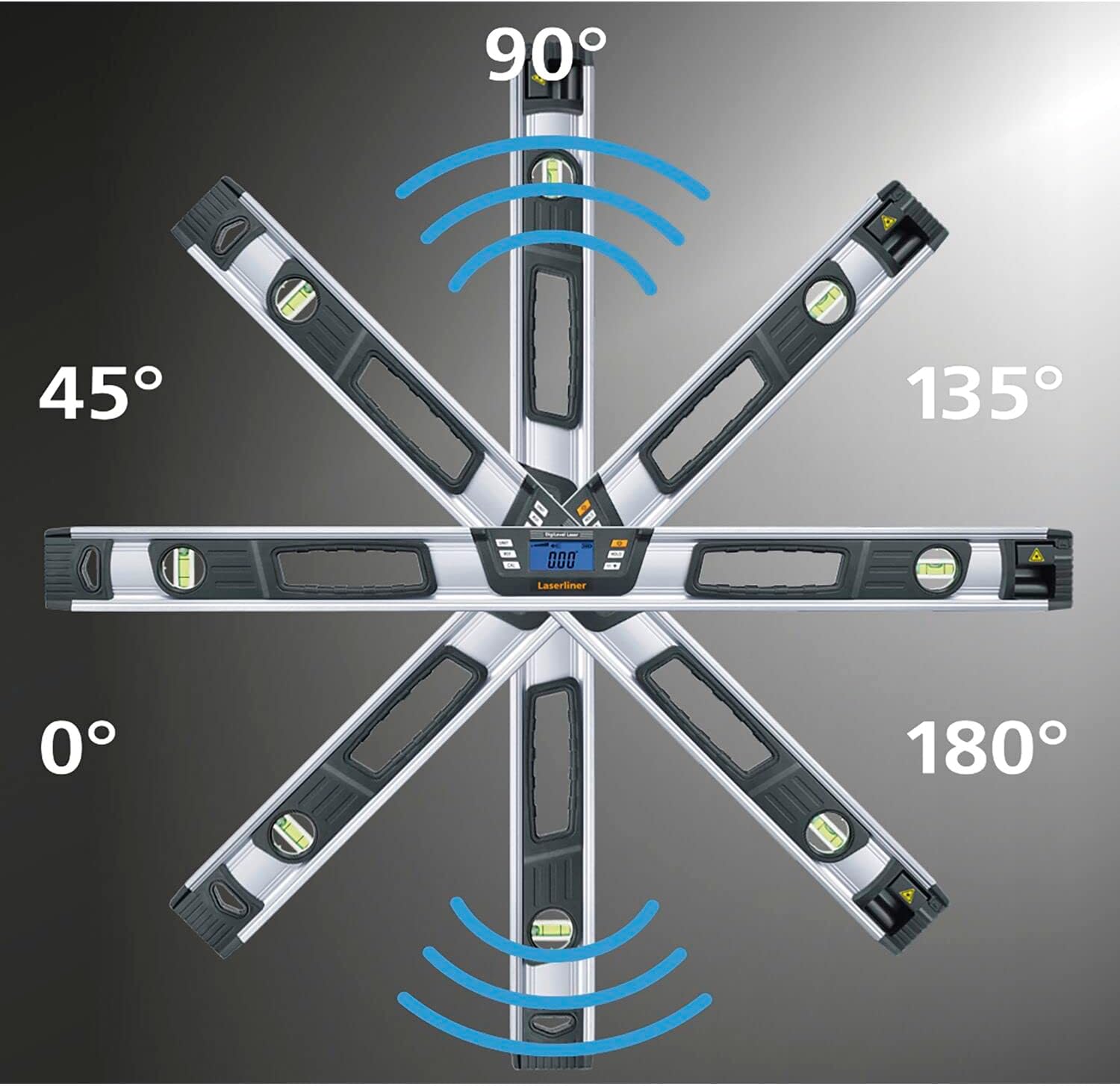
Figure 7: Illustration of 360° angle measurement and acoustic signals at key angles (0°, 45°, 90°, 135°, 180°).
5.8 ฟังก์ชั่นค้าง
กดปุ่ม ถือ button to freeze the current measurement on the display. This is useful for taking readings in difficult-to-view ตำแหน่ง กด ถือ again to release the measurement.

Figure 8: The 'Hold Angle' function, allowing the current measurement to be frozen on the display.
5.9 ฐานแม่เหล็ก
The integrated magnetic base allows the device to be securely attached to metallic surfaces, enabling hands-free operation for increased convenience and precision.

Figure 9: The magnetic base provides secure attachment to metal surfaces.
6. การสมัคร
The Laserliner DigiLevel Laser G80 is suitable for a variety of professional and DIY applications, including:
- Carpentry and Joinery: Precise alignment of wooden structures, frames, and furniture.
- การติดตั้งผนังยิปซั่ม: Ensuring level and plumb surfaces for wall and ceiling panels.
- หลังคา: Measuring and transferring roof pitches and angles.
- จิตรกรรม: Establishing level lines for decorative elements or wall preparation.
- การก่อสร้างทั่วไป: Any task requiring accurate horizontal, vertical, or angle measurements.

Figure 10: Using the laser line to align multiple picture frames on a wall.
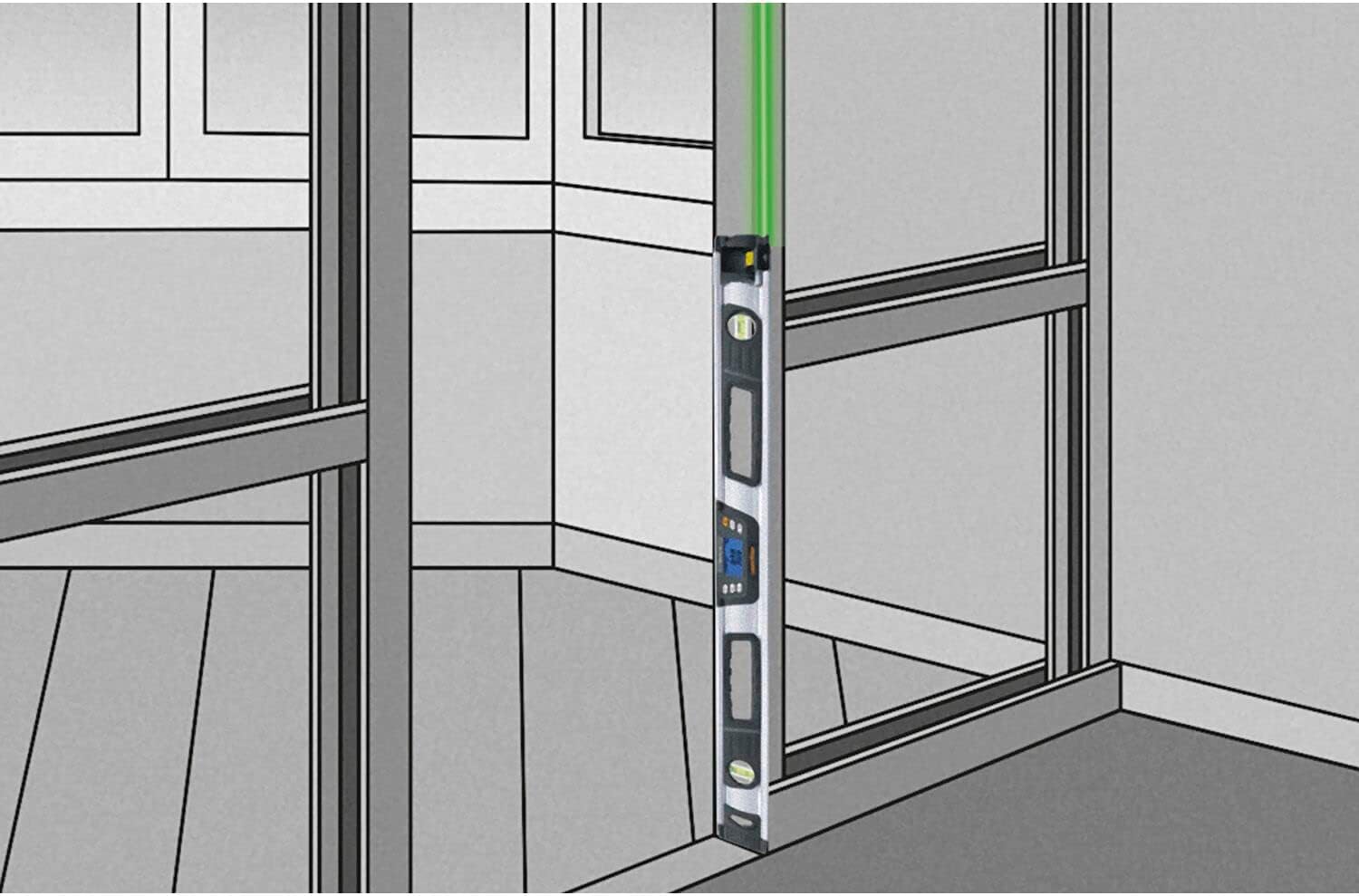
Figure 11: The spirit level used for vertical alignment, ensuring plumb surfaces.

Figure 12: Measuring and aligning on an angled ceiling or sloped surface.

Figure 13: Acoustic guidance assists in leveling shelves, indicated by sound waves.

Figure 14: Acoustic feedback helps in precisely aligning cabinets during installation.
7. การบำรุงรักษา
- การทำความสะอาด: เช็ดเครื่องเบาๆงamp ผ้า ห้ามใช้สารทำความสะอาดที่มีฤทธิ์กัดกร่อนหรือตัวทำละลาย
- พื้นที่จัดเก็บ: Store the device in its carrying bag in a dry, dust-free environment when not in use. Remove batteries if storing for extended periods.
- การตรวจสอบ: ตรวจสอบอุปกรณ์เป็นประจำเพื่อดูว่ามีสัญญาณความเสียหายใดๆ หรือไม่
8 การแก้ไขปัญหา
- อุปกรณ์ไม่เปิด: ตรวจสอบการติดตั้งแบตเตอรี่และให้แน่ใจว่าแบตเตอรี่ไม่หมด เปลี่ยนแบตเตอรี่หากจำเป็น
- การอ่านค่าที่ไม่ถูกต้อง: Perform a calibration as described in the full user manual. Ensure the device is placed on a stable surface.
- ไม่เห็นแสงเลเซอร์: Check battery level. Ensure the laser output is not obstructed.
9. ข้อมูลจำเพาะ
| หมายเลขรุ่น | 081.257เอ |
| ความยาว | 80 ซม. |
| ประเภทเลเซอร์ | Green Line Laser, Class 2, <1 mW |
| ความยาวคลื่นเลเซอร์ | 515 นาโนเมตร |
| Electronic Measurement Accuracy | ± 0.1° at 0°…1° and 89°…90°, ± 0.2° at 1°…89° |
| Vial Accuracy | ± 0.5 มม./ม. |
| ความแม่นยำในการแสดงผล | ทศนิยมหนึ่งตำแหน่ง |
| แหล่งจ่ายไฟ | 2 x 1.5V LR03 (AAA) batteries |
| อุณหภูมิในการทำงาน | 0°C ถึง 40°C |
| วัสดุ | อลูมิเนียม |
| น้ำหนัก | 966 กรัม |
10. เนื้อหาบรรจุภัณฑ์
The Laserliner DigiLevel Laser G80 package includes:
- DigiLevel Laser G80 Digital Electronic Spirit Level
- แบตเตอรี่ LR03 (AAA) ขนาด 1.5 โวลต์ จำนวน 2 ก้อน
- กระเป๋าใส่ของ
11. การรับประกันและการสนับสนุน
Warranty information for the Laserliner DigiLevel Laser G80 is typically provided with the product at the time of purchase or can be obtained directly from the manufacturer, Laserliner. For technical support, please refer to the contact information provided in your product packaging or visit the official Laserliner webเว็บไซต์.


