1. บทนำ
This manual provides detailed instructions for the safe and efficient operation of your Auna Sarah Ann multi-functional audio system. Please read this manual thoroughly before using the device and retain it for future reference.
The Auna Sarah Ann is a versatile audio system featuring a 3-speed turntable, CD player, cassette player, DAB+ and FM radio, Bluetooth connectivity, USB and SD card playback, AUX input, and headphone output. It also includes integrated stereo speakers and a remote control for convenient operation.
2. คำแนะนำด้านความปลอดภัย
- อ่านคำแนะนำทั้งหมดอย่างละเอียดก่อนใช้งาน
- เก็บเครื่องให้ห่างจากแหล่งความร้อน แสงแดดโดยตรง ความชื้น น้ำ และของเหลวอื่นๆ
- ห้ามใช้งานเครื่องหากโดนน้ำ ความชื้น หรือของเหลวอื่นๆ เพื่อป้องกันไฟฟ้าช็อต การระเบิด และ/หรือการบาดเจ็บต่อตัวคุณเองและความเสียหายต่อตัวเครื่อง
- อย่าใช้อุปกรณ์หากทำตกหรือเสียหายในลักษณะใดๆ
- การซ่อมแซมอุปกรณ์ไฟฟ้าควรทำโดยช่างไฟฟ้าที่มีคุณสมบัติเท่านั้น การซ่อมแซมที่ไม่เหมาะสมอาจทำให้ผู้ใช้ตกอยู่ในความเสี่ยงร้ายแรง
- ห้ามใช้เครื่องขณะที่มือเปียก
- ห้ามใส่สิ่งของเข้าไปในช่องเปิดใดๆ
- รักษาเครื่องให้ปราศจากฝุ่น เศษผ้า เส้นผม ฯลฯ
- ห้ามใช้หน่วยนี้เพื่อวัตถุประสงค์อื่นใดนอกเหนือจากที่กำหนดไว้
- เก็บอุปกรณ์ให้พ้นจากมือเด็ก
3. เนื้อหาบรรจุภัณฑ์
- Auna Sarah Ann Multi-functional Audio System
- รีโมทคอนโทรล
- อะแดปเตอร์ 45 RPM
- คู่มือการใช้งาน (เอกสารนี้)
4. สินค้าหมดview
The Auna Sarah Ann combines classic audio playback with modern connectivity options.

ภาพที่ 4.1: ด้านหน้า view of the Auna Sarah Ann audio system, displaying the turntable, control panel, CD tray, and integrated speakers. A remote control and a smartphone connected via Bluetooth are also shown.
4.1 คุณสมบัติหลัก
- เครื่องเล่นแผ่นเสียงแบบ 3 ความเร็ว: Supports 33 1/3, 45, and 78 RPM records. Includes a 45 RPM adapter.
- ลำโพงสเตอริโอในตัว: Provides clear audio output.
- การเชื่อมต่อบลูทูธ: Wirelessly stream audio from compatible devices.
- เครื่องเล่นซีดี: For playback of audio CDs.
- เครื่องเล่นเทปคาสเซ็ท: For playback of audio cassettes.
- วิทยุ DAB+ และวิทยุ FM: Digital and analog radio reception.
- ช่องเสียบ USB และการ์ด SD: For MP3 playback and recording.
- อินพุต AUX: Connect external audio sources via 3.5mm jack.
- เอาท์พุตหูฟัง: For private listening via 3.5mm jack.
- อาร์ซีเอ ไลน์เอาท์: เชื่อมต่อกับภายนอก amplifiers หรือลำโพงขับเคลื่อน
- รีโมทคอนโทรล: ใช้งานได้สะดวกจากระยะไกล
- ฟังก์ชั่นหยุดอัตโนมัติ: Protects vinyl records by stopping the turntable when a record finishes.
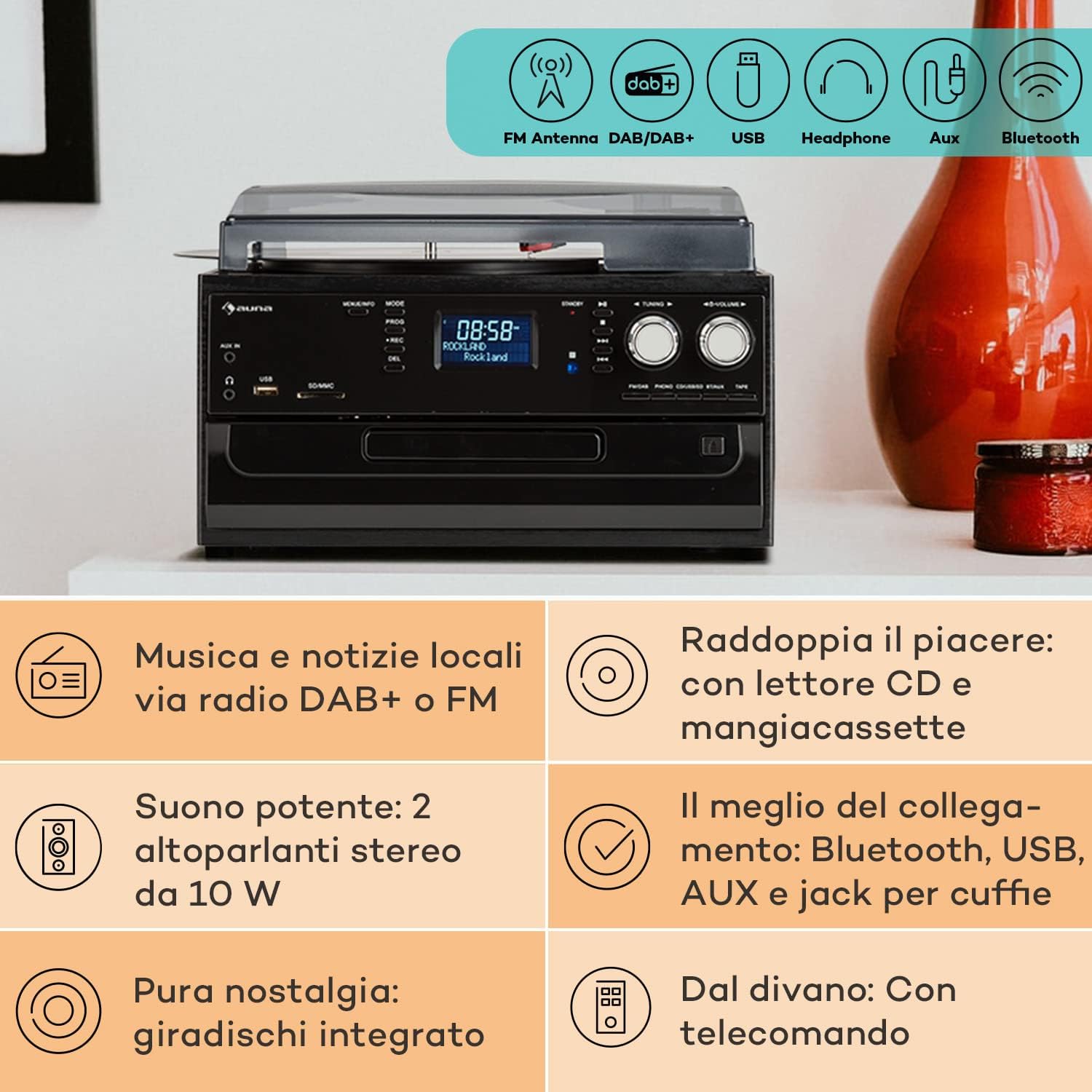
Image 4.2: Visual representation of the various connectivity options available on the Auna Sarah Ann, including FM/DAB+ radio, USB, headphone jack, AUX input, and Bluetooth.
5. การตั้งค่า
5.1 การแกะและการจัดวาง
- นำเครื่องออกจากบรรจุภัณฑ์อย่างระมัดระวัง
- Place the unit on a stable, level surface, away from direct sunlight, heat sources, and excessive dust or moisture.
- ให้แน่ใจว่ามีการระบายอากาศเพียงพอรอบๆ เครื่อง
5.2 การเชื่อมต่อสายไฟ
Connect the power cable to the AC inlet on the back of the unit and then to a standard 230V, 50Hz wall outlet.
5.3 การติดตั้งแบตเตอรี่รีโมทคอนโทรล
The remote control requires 2 x AAA batteries (not included). Open the battery compartment on the back of the remote control, insert the batteries according to the polarity indicators, and close the compartment.
5.4 การเชื่อมต่อเสาอากาศ
The unit features an integrated FM antenna. For optimal DAB+ and FM radio reception, ensure the unit is placed in an area with good signal strength. Adjust the unit's position if reception is poor.
5.5 การเชื่อมต่ออุปกรณ์ภายนอก (ไม่บังคับ)
- หูฟัง: Plug 3.5mm headphones into the headphone jack on the front panel.
- External Audio Source (AUX IN): Connect an external audio device (e.g., MP3 player, smartphone) to the AUX IN jack on the front panel using a 3.5mm audio cable.
- ภายนอก Amplifier/Speakers (RCA LINE OUT): Connect the RCA LINE OUT jacks on the rear of the unit to the audio input of an external amplifier or powered speakers using an RCA cable.
6. คู่มือการใช้งาน
6.1 การทำงานพื้นฐาน
- กดปุ่ม พลัง ปุ่มเพื่อเปิดหรือปิดเครื่อง
- ใช้ โหมด button on the unit or remote control to select the desired function (PHONO, CD, TAPE, USB, SD, AUX, FM, DAB, Bluetooth).
- ปรับระดับเสียงโดยใช้ปุ่ม ปริมาณ ปุ่มหมุนบนตัวเครื่องหรือ ฉบับ+/- ปุ่มบนรีโมทคอนโทรล
6.2 Turntable Operation (PHONO)

ภาพที่ 6.1: รายละเอียด view of the turntable section, showing the platter, tonearm, and a vinyl record in place, highlighting the classic playback functionality.
- ยกฝาครอบกันฝุ่นขึ้น
- วางแผ่นเสียงไวนิลบนแผ่นเสียง
- Select the appropriate speed (33, 45, or 78 RPM) using the speed selector switch. Use the 45 RPM adapter for singles if needed.
- ปลดล็อคโทนอาร์ม
- Gently lift the tonearm and position the stylus over the desired track of the record.
- ค่อยๆ ลดโทนอาร์มลงบนแผ่นเสียง การเล่นจะเริ่มขึ้น
- The automatic stop function will stop the turntable when the record finishes. To disable/enable this, refer to the specific switch on the unit (if present, usually labeled "AUTO STOP").
- At the end of playback, gently lift the tonearm, return it to its rest, and engage the tonearm lock.
6.3 CD Player Operation (CD)
- กดปุ่ม โหมด ปุ่มเพื่อเลือกโหมดซีดี
- กดปุ่ม เปิด/ปิด ปุ่มเพื่อเปิดถาดซีดี
- วางแผ่นซีดีโดยให้ด้านที่มีฉลากหงายขึ้นในถาด
- กดปุ่ม เปิด/ปิด button again to close the tray. The unit will read the CD.
- กด เล่น/หยุดชั่วคราว เพื่อเริ่มหรือหยุดการเล่นชั่วคราว
- ใช้ SKIP FORWARD/BACKWARD ปุ่มสำหรับการนำทางเพลง
- กด หยุด เพื่อสิ้นสุดการเล่น
6.4 Cassette Player Operation (TAPE)
- กดปุ่ม โหมด button to select TAPE mode.
- Insert a cassette tape into the side cassette slot.
- Use the cassette control buttons (PLAY, STOP/EJECT, FWD, REW) to operate the cassette player.
6.5 การใช้งานวิทยุ (DAB+/FM)
- กดปุ่ม โหมด ปุ่มเพื่อเลือกโหมด FM หรือ DAB
- ในโหมด FM ให้กด . ค้างไว้ การปรับแต่ง +/- buttons for automatic station search, or press briefly for manual tuning.
- In DAB mode, the unit will automatically scan for available stations. Use the การปรับแต่ง +/- buttons to navigate through the station list.
- To save a station, refer to the manual's specific instructions for preset functions (usually involving a "PROG" or "MEMORY" button).
6.6 การทำงานของบลูทูธ

Image 6.2: Demonstrates wireless music streaming via Bluetooth from a smartphone to the audio system, and the use of a USB drive for digital media playback.
- กดปุ่ม โหมด button to select Bluetooth mode. The display will show "BT" or "Bluetooth" and the unit will enter pairing mode, indicated by a flashing Bluetooth icon.
- บนอุปกรณ์ที่รองรับ Bluetooth ของคุณ (สมาร์ทโฟน แท็บเล็ต ฯลฯ) ให้เปิดใช้งาน Bluetooth และค้นหาอุปกรณ์ที่มีอยู่
- Select "Auna Sarah Ann" (or similar name) from the list of devices.
- Once paired, the Bluetooth icon will stop flashing, and you can play music from your device through the Auna Sarah Ann.
6.7 USB/SD Card Operation
- Insert a USB flash drive into the USB port or an SD card into the SD/MMC slot.
- กดปุ่ม โหมด button to select USB or SD mode. The unit will automatically detect and begin playing MP3 files.
- ใช้ SKIP FORWARD/BACKWARD ปุ่มสำหรับการนำทางเพลง
- ใช้ โฟลเดอร์ button on the remote to navigate through folders (if applicable).
- MP3 Recording: The unit supports recording from other sources (e.g., vinyl, CD, radio) to USB/SD. Press the บันทึก button to start recording. Manual title division is available during recording. Refer to the full manual for detailed recording instructions.
6.8 การใช้งานอินพุต AUX
- Connect your external audio device to the AUX IN jack using a 3.5mm audio cable.
- กดปุ่ม โหมด ปุ่มเพื่อเลือกโหมด AUX
- Control playback from your external device. The volume can be adjusted on the Auna Sarah Ann unit.
7. การบำรุงรักษา
7.1 การทำความสะอาดหน่วย
- ถอดปลั๊กเครื่องออกจากเต้ารับก่อนทำความสะอาดทุกครั้ง
- ใช้ผ้าแห้งนุ่มเช็ดพื้นผิวภายนอก
- ห้ามใช้สารทำความสะอาดที่มีฤทธิ์กัดกร่อน ขี้ผึ้ง หรือตัวทำละลาย เพราะอาจทำให้พื้นผิวเสียหายได้
- For the dust cover, use a soft cloth and a mild, non-abrasive cleaner if necessary.
7.2 Turntable Stylus Care
- The stylus (needle) is a delicate component. Handle it with extreme care.
- ทำความสะอาดสไตลัสเป็นระยะๆ โดยใช้แปรงขนนุ่มปัดเบา ๆ จากด้านหลังไปด้านหน้า
- A worn stylus can damage records and degrade sound quality. Replace the stylus when signs of wear are apparent (e.g., distorted sound, skipping).
7.3 การดูแลรักษาเอกสาร
- Keep records clean and free of dust. Use a record brush before each play.
- Store records vertically in their sleeves, away from heat and direct sunlight.
8 การแก้ไขปัญหา
If you experience problems with your Auna Sarah Ann, please consult the following table before seeking professional service.
| ปัญหา | สาเหตุที่เป็นไปได้ | สารละลาย |
|---|---|---|
| ไม่มีไฟฟ้า | สายไฟไม่ได้เชื่อมต่อ เต้าเสียบไฟฟ้าไม่ทำงาน | ตรวจสอบให้แน่ใจว่าสายไฟเชื่อมต่ออย่างแน่นหนา ลองใช้เต้ารับไฟฟ้าอื่น |
| ไม่มีเสียง | ระดับเสียงต่ำเกินไป เลือกโหมดไม่ถูกต้อง เชื่อมต่อหูฟังแล้ว | Increase volume; Select correct input mode; Disconnect headphones if using speakers. |
| เครื่องเล่นแผ่นเสียงไม่หมุน | Unit not in PHONO mode; Auto-stop engaged and no record playing. | Select PHONO mode; Place a record and lower the tonearm. |
| การรับสัญญาณวิทยุไม่ดี | Weak signal; Antenna position. | Adjust unit position for better signal; Perform a new auto-scan for DAB+ stations. |
| การจับคู่บลูทูธล้มเหลว | อุปกรณ์อยู่ไกลเกินไป; ไม่ได้เปิดใช้งาน Bluetooth บนอุปกรณ์ภายนอก; หน่วยไม่ได้อยู่ในโหมดจับคู่ | Ensure devices are within range; Enable Bluetooth on your device; Select Bluetooth mode on the Auna Sarah Ann. |
| รีโมตคอนโทรลไม่ทำงาน | Batteries depleted or incorrectly inserted; Obstruction between remote and unit. | Replace batteries; Check battery polarity; Remove any obstructions. |
หากปัญหายังคงมีอยู่หลังจากลองวิธีแก้ไขเหล่านี้แล้ว โปรดติดต่อฝ่ายสนับสนุนลูกค้า
9. ข้อมูลจำเพาะ
| คุณสมบัติ | รายละเอียด |
|---|---|
| ยี่ห้อ | อาน่า |
| ชื่อรุ่น | Sarah Ann |
| ขนาดสินค้า (กว้าง x ยาว x สูง) | 30 x 32.5 x 21.5 ซม. |
| น้ำหนัก | 4.55 กก. |
| แหล่งจ่ายไฟ | 230V, 50Hz |
| ความเร็วของแผ่นเสียง | 33 1/3, 45, 78 รอบต่อนาที |
| ประเภทมอเตอร์ | ไดรฟ์ตรง |
| เครื่องรับวิทยุ | ตบเบา ๆ +, เอฟเอ็ม |
| รองรับบลูทูธ | ใช่ |
| การเชื่อมต่อ | USB Input, SD Input, AUX Input (3.5mm), Headphone Output (3.5mm), RCA Line Out |
| โหมดเอาต์พุตเสียง | สเตอริโอ |
| แบตเตอรี่รีโมทคอนโทรล | 2 x AAA (ไม่รวม) |

Image 9.1: Visual representation of the unit's dimensions (length, width, height) and a summary of its various input/output connections.
10. การรับประกันและการสนับสนุน
10.1 ข้อมูลการรับประกัน
Your Auna Sarah Ann audio system comes with a manufacturer's warranty. Please refer to the warranty card or documentation included with your purchase for specific terms, conditions, and duration of the warranty. Keep your proof of purchase for warranty claims.
10.2 การสนับสนุนลูกค้า
For technical assistance, troubleshooting beyond this manual, or warranty inquiries, please contact Auna customer support. Contact details can typically be found on the Auna webไซต์หรือบนบรรจุภัณฑ์ผลิตภัณฑ์


