การแนะนำ

Figure 1: Amazon Basics Programmable Bread Maker. This image shows the black bread maker from an angled front view, highlighting its compact design, control panel with LCD display, and program settings listed on the top surface.
ขอบคุณสำหรับการซื้อasing the Amazon Basics Programmable Bread Maker. This appliance is designed to simplify the process of making fresh bread, doughs, and jams at home. Please read this instruction manual thoroughly before first use to ensure safe operation and optimal performance. Keep this manual for future reference.
คำแนะนำด้านความปลอดภัยที่สำคัญ
- อ่านคำแนะนำทั้งหมดก่อนใช้เครื่องใช้ไฟฟ้า
- อย่าสัมผัสพื้นผิวที่ร้อน ใช้ที่จับหรือลูกบิด
- เพื่อป้องกันไฟฟ้าช็อต ห้ามจุ่มสายไฟ ปลั๊ก หรือเครื่องใช้ไฟฟ้าลงในน้ำหรือของเหลวอื่นๆ
- จำเป็นต้องมีการดูแลอย่างใกล้ชิดเมื่อมีเด็กหรือใช้งานเครื่องใช้ไฟฟ้าใดๆ ใกล้เด็ก
- ถอดปลั๊กออกเมื่อไม่ได้ใช้งานและก่อนทำความสะอาด ปล่อยให้เย็นลงก่อนใส่หรือถอดชิ้นส่วน
- ห้ามใช้งานเครื่องใช้ไฟฟ้าที่มีสายไฟหรือปลั๊กชำรุด หรือหลังจากที่เครื่องใช้ไฟฟ้าทำงานผิดปกติหรือได้รับความเสียหายในลักษณะใดๆ
- การใช้อุปกรณ์เสริมที่ไม่แนะนำโดยผู้ผลิตเครื่องใช้ไฟฟ้าอาจทำให้เกิดการบาดเจ็บได้
- ห้ามใช้กลางแจ้ง
- อย่าให้สายไฟห้อยออกจากขอบโต๊ะหรือเคาน์เตอร์ หรือสัมผัสพื้นผิวที่ร้อน
- ห้ามวางบนหรือใกล้เตาแก๊สหรือเตาไฟฟ้าที่ร้อน หรือในเตาอบที่อุ่น
- ต้องใช้ความระมัดระวังเป็นพิเศษเมื่อเคลื่อนย้ายเครื่องใช้ไฟฟ้าที่มีน้ำมันร้อนหรือของเหลวร้อนอื่นๆ
- หากต้องการตัดการเชื่อมต่อ ให้ปิดการควบคุมใดๆ ก็ได้ จากนั้นถอดปลั๊กออกจากเต้ารับที่ผนัง
- ห้ามใช้เครื่องใช้ไฟฟ้าเพื่อวัตถุประสงค์อื่นนอกเหนือจากที่กำหนดไว้
ส่วนประกอบของผลิตภัณฑ์
Familiarize yourself with the parts of your bread maker before operation.

รูปที่ 2: อุปกรณ์เสริมที่รวมอยู่ในชุด This image displays the bread pan with handle, a clear plastic measuring cup, a black kneading blade, a white double-sided measuring spoon (teaspoon/tablespoon), and a metal hook for removing the kneading blade.
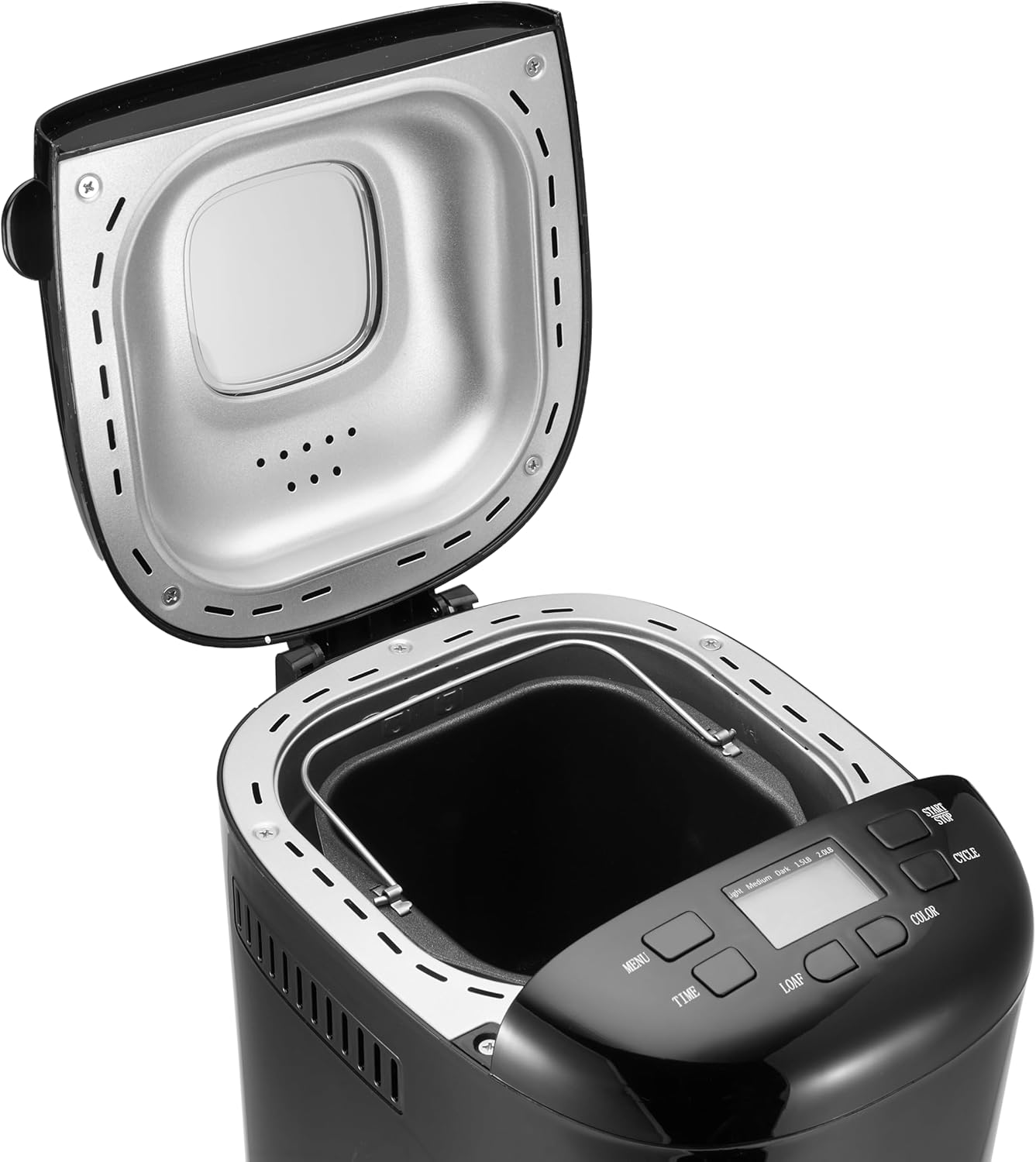
Figure 3: Bread Maker Interior. This image shows the bread maker with its lid open, revealing the heating element and the space where the bread pan is inserted. The control panel with its LCD display and buttons is visible at the front.
- หน่วยหลัก: ตัวเครื่องหลักของเครื่องทำขนมปัง
- แผงควบคุม: Features an LCD display and buttons for program selection, time, loaf size, and crust color.
- ฝา: Covers the baking chamber, often with a viewหน้าต่างไอเอ็นจี
- พิมพ์ขนมปัง: Non-stick baking pan where ingredients are placed and bread is baked.
- ใบมีดสำหรับนวดแป้ง: ติดกับเพลาด้านในถาดขนมปังเพื่อการผสมและนวดแป้ง
- ถ้วยตวง: For liquid and dry ingredients.
- ช้อนตวง: For smaller measurements (teaspoon/tablespoon).
- ตะขอ: Used to remove the kneading blade from the baked loaf.
การตั้งค่าและการใช้งานครั้งแรก
- การแกะกล่อง: นำเครื่องทำขนมปังและอุปกรณ์เสริมทั้งหมดออกจากบรรจุภัณฑ์อย่างระมัดระวัง เก็บรักษาบรรจุภัณฑ์ไว้เพื่อการจัดเก็บหรือการขนส่งในอนาคต
- การทำความสะอาด: Before first use, wash the bread pan and kneading blade with warm, soapy water. Rinse thoroughly and dry completely. Wipe the exterior of the bread maker with a damp ผ้า. อย่าจุ่มตัวเครื่องลงในน้ำ
- การเผาไหม้เบื้องต้น: It is recommended to run the bread maker empty for approximately 10 minutes on a "Bake" cycle (if available, or a short custom bake cycle) to burn off any manufacturing oils. Some smoke or odor may be present; this is normal. Ensure adequate ventilation. After this, allow the unit to cool completely and clean the interior again.
- การจัดวาง: วางเครื่องทำขนมปังบนพื้นผิวที่มั่นคง เรียบ และทนความร้อน ห่างจากแสงแดดโดยตรงและแหล่งความร้อน ตรวจสอบให้แน่ใจว่ามีการระบายอากาศที่เพียงพอรอบๆ เครื่องใช้ไฟฟ้า
- การเชื่อมต่อไฟฟ้า: เสียบสายไฟเข้ากับเต้ารับไฟฟ้าที่มีสายดิน หน้าจอจะสว่างขึ้น แสดงว่าเครื่องพร้อมใช้งานแล้ว
คำแนะนำการใช้งาน
This section guides you through the process of making bread with your appliance.
แผงควบคุมโอเวอร์view
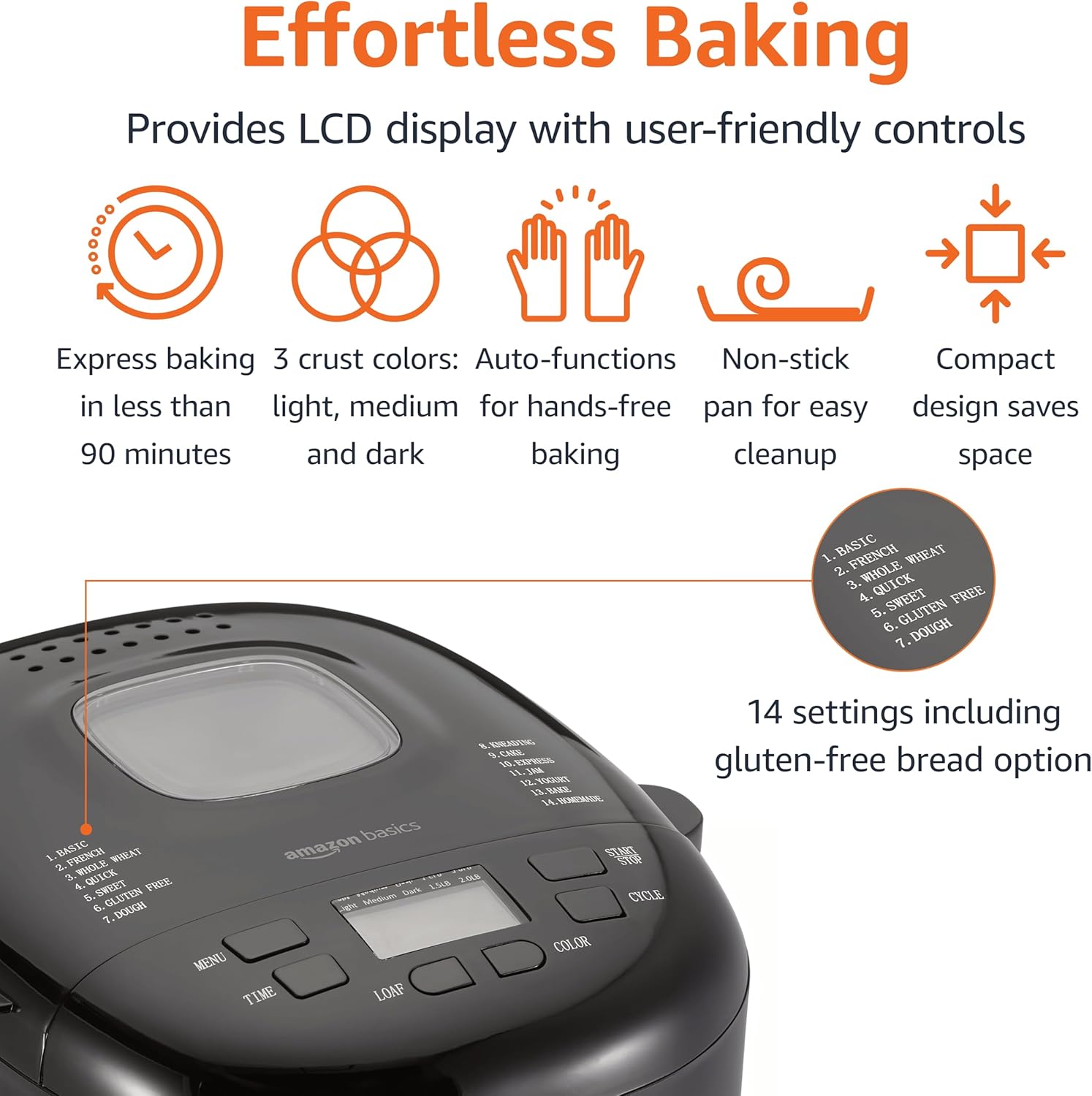
รูปที่ 4: แผงควบคุม This image highlights the bread maker's control panel, featuring an LCD screen that displays program information. Buttons for 'MENU', 'TIME', 'LOAF', 'COLOR', and 'CYCLE' are clearly visible, along with a list of 14 program settings.
- ปุ่มเมนู: Selects one of the 14 available programs (e.g., Basic, French, Whole Wheat, Sweet, Gluten Free, Dough, Jam).
- ปุ่มปรับเวลา (+/-): Adjusts the delay timer for delayed baking.
- ปุ่ม LOAF: Selects the loaf size (e.g., 1.5 lb or 2 lb).
- ปุ่มสี: Selects the crust darkness (Light, Medium, Dark).
- CYCLE (Start/Stop) Button: Starts or stops the selected program.
- จอแสดงผล LCD: Shows the selected program, time remaining, loaf size, and crust color.
ขั้นตอนพื้นฐานในการทำขนมปัง
- ใส่ใบมีดสำหรับนวด: วางใบมีดนวดลงบนเพลาภายในถาดขนมปัง
- เพิ่มส่วนผสม: Add ingredients to the bread pan in the order specified by your recipe (typically liquids first, then dry ingredients, with yeast last and separate from liquids/salt). Ensure accurate measurements.
- วางถาดขนมปัง: Insert the bread pan into the bread maker, ensuring it is securely locked in place. Close the lid.
- เลือกโปรแกรม: กดปุ่ม เมนู button to choose the desired program (e.g., "Basic" for white bread).
- เลือกขนาดก้อนขนมปัง: กดปุ่ม ก้อน button to select the appropriate loaf size (1.5 lb or 2 lb).
- เลือกสีเปลือกพิซซ่า: กดปุ่ม สี button to choose your preferred crust darkness (Light, Medium, or Dark).
- เริ่มโปรแกรม: กดปุ่ม วงจร button to start the program. The machine will begin mixing.
- การติดตาม: During the kneading cycles, you may check the dough consistency by opening the lid briefly. If the dough is too dry, add a small amount of liquid; if too wet, add a small amount of flour.
- เสร็จสิ้น: Once the program is complete, the bread maker will usually beep and switch to a "Keep Warm" cycle. Press the วงจร ปุ่มเพื่อหยุดเครื่อง
- เอาขนมปังออก: Using oven mitts, carefully remove the hot bread pan from the machine. Invert the pan onto a wire rack to release the bread. If the kneading blade remains in the loaf, use the provided hook to carefully remove it.
- การระบายความร้อน: Allow the bread to cool on a wire rack for at least 20-30 minutes before slicing. This allows the internal structure to set.
ฟังก์ชั่นตั้งเวลาหน่วงเวลา
The delay timer allows you to program the bread maker to finish baking at a later time, up to 13 hours. This is useful for having fresh bread ready in the morning.
- After selecting your program, loaf size, and crust color, press the เวลา buttons to set the desired delay time. The displayed time includes the baking cycle duration.
- กดปุ่ม วงจร button. The timer will count down, and the machine will start automatically when the delay time expires.
- คำเตือน: อย่าใช้ฟังก์ชันตั้งเวลาหน่วงกับสูตรอาหารที่มีส่วนผสมที่เน่าเสียง่าย เช่น นม ไข่ หรือผลไม้สด เพราะส่วนผสมเหล่านี้อาจเน่าเสียก่อนเริ่มอบ
คำแนะนำสูตร
The Amazon Basics Bread Maker offers 14 settings for various types of baked goods. For best results, always use recipes specifically designed for bread makers and ensure accurate measurement of ingredients.
- Bread Programs: Basic, French, Whole Wheat, Sweet, Gluten-Free, ExpressBake.
- โปรแกรมการทำแป้งโด: For pizza dough, pasta dough, or rolls.
- Specialty Programs: Jam, Cake, Yogurt.
Refer to the recipe book that came with your bread maker or reliable bread machine recipe sources for ingredient quantities and specific instructions for each program.
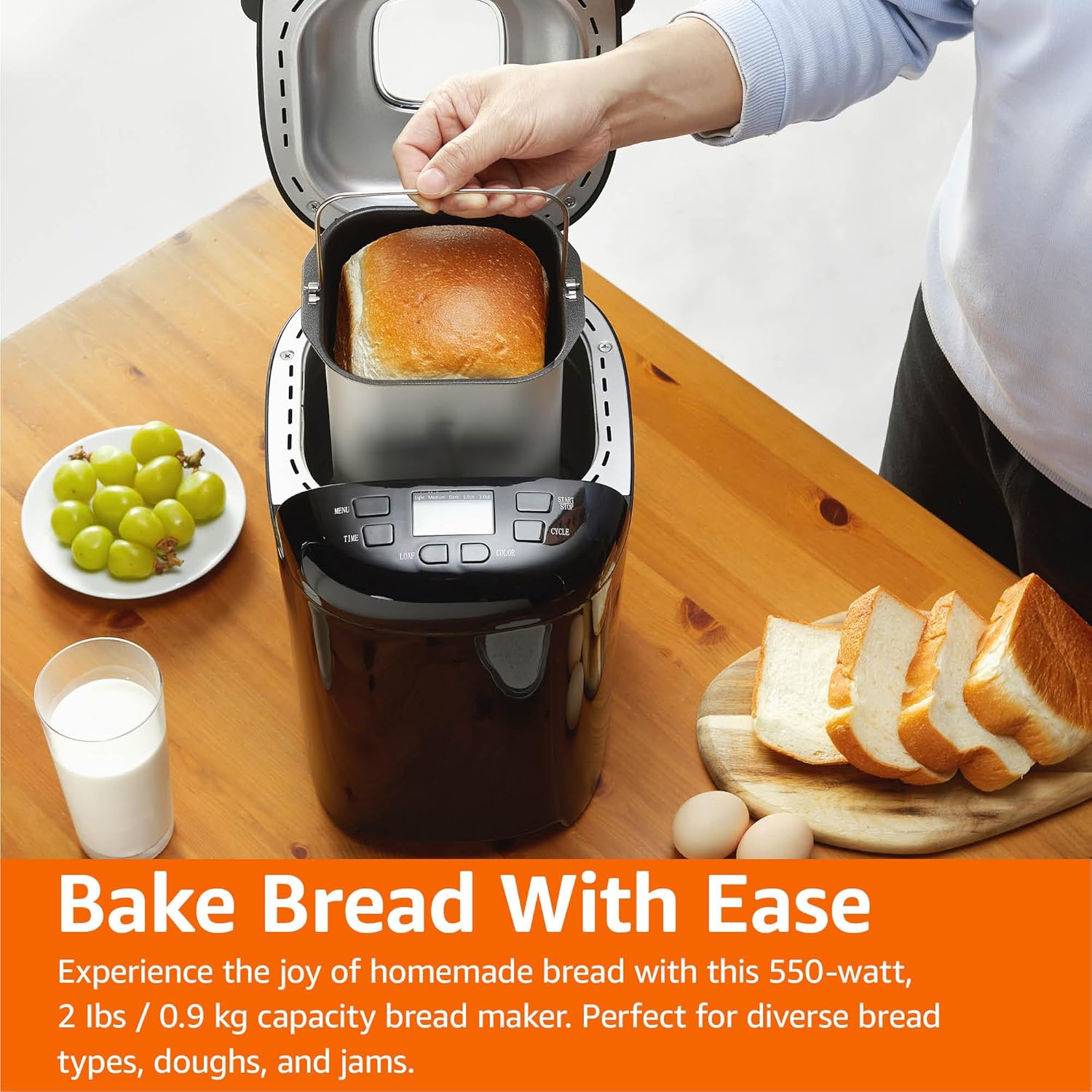
Figure 5: Freshly Baked Bread. This image shows a person carefully lifting the bread pan, containing a golden-brown loaf, out of the bread maker. Surrounding the machine are fresh grapes, a glass of milk, and slices of bread, illustrating the end result of the baking process.
การดูแลรักษา
การทำความสะอาดและบำรุงรักษาอย่างถูกวิธีจะช่วยยืดอายุการใช้งานของเครื่องทำขนมปังของคุณได้
- ถอดปลั๊ก: ควรถอดปลั๊กเครื่องออกจากเต้ารับไฟฟ้าทุกครั้ง และปล่อยให้เย็นลงสนิทก่อนทำความสะอาด
- ถาดขนมปังและใบมีดสำหรับนวด: Wash the bread pan and kneading blade with warm, soapy water. Do not use abrasive cleaners or metal scouring pads, as this can damage the non-stick coating. Rinse thoroughly and dry completely.
- ภายนอก: เช็ดภายนอกเครื่องทำขนมปังด้วยผ้านุ่มๆamp ผ้า. อย่าใช้สารเคมีที่รุนแรงหรือน้ำยาทำความสะอาดที่มีฤทธิ์กัดกร่อน
- ภายใน: ทำความสะอาดภายในห้องอบด้วยโฆษณาamp เช็ดด้วยผ้า กำจัดเศษอาหารหรือคราบต่างๆ ออกให้หมด
- พื้นที่จัดเก็บ: Store the bread maker in a clean, dry place. Ensure the bread pan and kneading blade are clean and dry before storing.
คู่มือการแก้ไขปัญหา
If you encounter issues with your bread maker, refer to the following common problems and solutions.
| ปัญหา | สาเหตุที่เป็นไปได้ | สารละลาย |
|---|---|---|
| ขนมปังไม่ขึ้น | Expired or inactive yeast, incorrect water temperature, too much salt, not enough sugar. | ตรวจสอบวันหมดอายุของยีสต์ ใช้น้ำอุ่น (105-115°F / 40-46°C) ตรวจสอบปริมาณส่วนผสมให้ถูกต้อง |
| ขนมปังมีความหนาแน่นหรือหนักเกินไป | Too much flour, not enough liquid, incorrect yeast amount, high humidity. | Measure ingredients accurately, especially flour (use a scale if possible). Adjust liquid slightly in humid conditions. |
| ขนมปังยุบตัวในระหว่างการอบ | Too much liquid, too much yeast, high altitude, opening lid too often. | Reduce liquid slightly. Ensure correct yeast amount. Avoid opening the lid during baking. |
| ใบมีดนวดติดอยู่ในขนมปัง | เหตุการณ์ที่เกิดขึ้นทั่วไป | Use the provided hook to carefully remove the blade after the bread has cooled slightly. |
| เครื่องไม่เริ่มทำงาน | ไม่ได้เสียบปลั๊ก ไฟดับtage, lid not closed properly, program not selected. | Check power connection. Ensure lid is fully closed. Select a program and press START. |
ข้อมูลจำเพาะผลิตภัณฑ์
Technical details for the Amazon Basics Programmable Bread Maker.
- หมายเลขรุ่น: BM1349-UL-B
- ยี่ห้อ: พื้นฐานของ Amazon
- สี: สีดำ
- พลัง: 550 วัตต์
- ความจุก้อน: สูงสุด 2 ปอนด์
- จำนวนโปรแกรม: 14
- ขนาดสินค้า : ลึก 11.6 นิ้ว x กว้าง 8.8 นิ้ว x สูง 11.4 นิ้ว
- น้ำหนักสินค้า: 8 ปอนด์
- ผู้ผลิต: อเมซอน
- คำแนะนำในการดูแล: เช็ดด้วยผ้าแห้ง (สำหรับภายนอก)
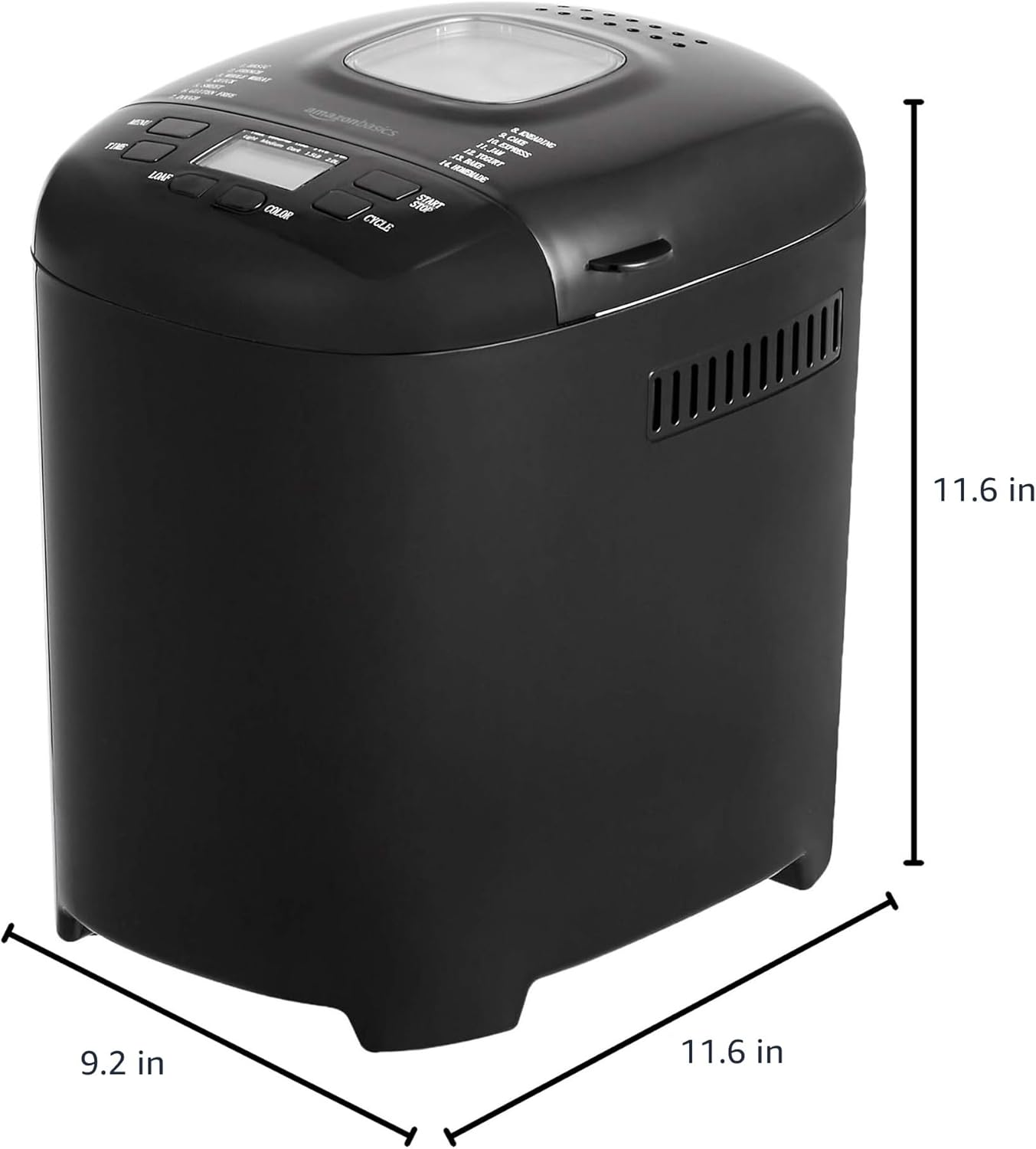
รูปที่ 6: ขนาดผลิตภัณฑ์ This image provides a visual representation of the bread maker's dimensions, indicating a depth of 11.6 inches, a width of 9.2 inches, and a height of 11.6 inches.
ข้อมูลการรับประกัน
For detailed warranty information, please refer to the warranty card included with your product packaging or visit the official Amazon Basics webไซต์ โดยทั่วไปการรับประกันจะครอบคลุมถึงข้อบกพร่องในวัสดุและฝีมือการผลิตภายใต้การใช้งานปกติ
การสนับสนุนลูกค้า
If you have any questions, require assistance, or need to report an issue with your Amazon Basics Bread Maker, please contact Amazon Basics Customer Service. You can typically find contact information on the Amazon website under the "Help" or "Customer Service" sections, or through your order details.
สำหรับการสนับสนุนออนไลน์ โปรดไปที่: ฝ่ายบริการลูกค้าของอเมซอน


