1. บทนำ
The AOPUTTRIVER AP-570C is a 4000-count auto-ranging digital clamp meter designed for precise electrical measurements. It offers a wide range of functions including AC/DC current, AC/DC voltage, resistance, capacitance, frequency, duty cycle, temperature, diode test, and continuity. This manual provides essential information for safe and effective operation of your device.
2. ข้อมูลด้านความปลอดภัย
Always adhere to safety precautions when using electrical testing equipment. Failure to do so may result in electric shock, injury, or damage to the meter or equipment under test.
- ตรวจสอบให้แน่ใจว่ามิเตอร์อยู่ในสภาพใช้งานได้ดีก่อนใช้งาน
- ไม่ต้องสมัครวอลุ่มtage or current exceeding the maximum rated values.
- ใช้เครื่องมือป้องกันภัยส่วนบุคคล (PPE) ที่เหมาะสม เช่น ถุงมือฉนวน และแว่นตานิรภัย
- Verify the function switch is in the correct position for the measurement being performed.
- Avoid touching exposed conductors or circuit components during measurements.
- Do not operate the meter in wet environments or in the presence of explosive gases or dust.
- เปลี่ยนแบตเตอรี่ทันทีเมื่อไฟแสดงสถานะแบตเตอรี่อ่อนปรากฏขึ้นเพื่อให้แน่ใจว่าการอ่านค่าแม่นยำ
- The AP-570C Clamp Meter meets IEC1010 Double Insulation, Pollution Degree 2, and Overvoltage Category III standards.
3. ส่วนประกอบผลิตภัณฑ์
The AOPUTTRIVER AP-570C package includes the following items:
- AOPUTTRIVER AP-570C Clamp เมตร
- นำไปสู่การทดสอบ (2)
- หัววัดอุณหภูมิ
- 9V (6F22) Battery
- คู่มือการใช้งาน
- กระเป๋าเก็บของ
- ไขควงเล็ก

Image: AOPUTTRIVER AP-570C Digital Clamp Meter with test leads, temperature probe, battery, and storage bag.
4. Product Diagram and Key Functions
Familiarize yourself with the main parts and controls of the AP-570C clamp เมตร:

Image: Labeled diagram of the AP-570C showing the clamp, rotary switch, LCD display, D.HOLD/Back Light key, SELECT key, MAX/MIN key, REL key, Hz/DUTY key, COM Input Jack, and T+VΩHz Input Jack.
- Clamp: ใช้สำหรับวัดกระแสไฟฟ้า AC/DC แบบไม่สัมผัส
- สวิตช์โรตารี่: เลือกฟังก์ชั่นการวัดที่ต้องการ
- จอแสดงผล LCD: แสดงค่าการวัดและตัวบ่งชี้
- D.HOLD/Back Light Key: Freezes the current reading on the display and activates/deactivates the backlight.
- ปุ่มเลือก: Toggles between different measurement modes within a single rotary switch position (e.g., AC/DC voltage, ไดโอด/ความต่อเนื่อง)
- คำอธิบายสัญลักษณ์ MAX/MIN: บันทึกค่าสูงสุดและต่ำสุดระหว่างช่วงการวัด
- REL Key: เปิดใช้งานโหมดการวัดแบบสัมพันธ์
- Hz/DUTY Key: เลือกการวัดความถี่หรือรอบหน้าที่
- Input Jacks (COM, T+VΩHz): Connect test leads for voltage, resistance, capacitance, diode, continuity, and temperature measurements.
5. การตั้งค่า
5.1. การติดตั้งแบตเตอรี่
The AP-570C requires one 9V (6F22) battery. To install or replace the battery:
- โปรดตรวจสอบให้แน่ใจว่ามิเตอร์ปิดอยู่
- Use the provided small screwdriver to open the battery compartment cover on the back of the meter.
- Insert the 9V battery, observing the correct polarity (+/-).
- ใส่ฝาปิดช่องใส่แบตเตอรี่และขันให้แน่นด้วยสกรู
5.2. การเชื่อมต่อสายทดสอบ
สำหรับการวัดส่วนใหญ่ (ปริมาตร)tage, resistance, capacitance, diode, continuity, temperature), connect the test leads:
- เสียบสายทดสอบสีดำเข้าไปในช่องเสียบ "COM" (common)
- Insert the red test lead into the "T+VΩHz" input jack.
- For temperature measurements, connect the temperature probe to the same input jacks, ensuring correct polarity if applicable.
6. คู่มือการใช้งาน
6.1. การวัดกระแสไฟฟ้ากระแสสลับ/กระแสตรง (Cl)amp)
clamp function allows for non-contact current measurement. This is ideal for safely measuring current in live circuits.
- Turn the rotary switch to the desired current range (e.g., 400A or 1000A).
- Press the SELECT button to toggle between AC and DC current measurement if necessary.
- เปิด clamp งัดขากรรไกรโดยการกดไกปืน
- ควรหุ้มตัวนำเดี่ยว (ไม่ใช่กลุ่มสายไฟ) ไว้ภายในตัวหุ้มamp ขากรรไกร ตรวจสอบให้แน่ใจว่าขากรรไกรปิดสนิทแล้ว
- อ่านค่าปัจจุบันบนจอ LCD

Image: The AP-570C clamp meter measuring current on an electrical cable.
Video: Demonstration on how to measure DC current using a clamp เมตร.
6.2. AC/DC เล่มที่tagอีการวัด
การวัดปริมาตรtage, use the test leads connected to the appropriate input jacks.
- หมุนสวิตช์แบบโรตารี่ไปที่ "V~" (AC Vol)tage) หรือ "V-" (DC Vol)tage) position. The meter may auto-range.
- ต่อสายวัดทดสอบแบบขนานเข้ากับวงจรหรือชิ้นส่วนที่คุณต้องการวัด
- อ่านเล่มที่tagค่า e บนจอ LCD

Image: The AP-570C clamp meter with test leads connected to an electrical outlet for voltagอีการวัด
6.3. Resistance, Capacitance, Diode, and Continuity Measurement
These functions are accessed via the rotary switch and SELECT button.
- Turn the rotary switch to the "Ω" (Resistance), "CAP" (Capacitance), or "Diode/Continuity" position.
- Use the SELECT button to switch between Diode Test and Continuity Test if on the combined setting.
- เชื่อมต่อสายทดสอบข้ามส่วนประกอบที่ต้องการวัด
- Read the value on the LCD display. For continuity, a buzzer will sound if continuity is detected.
Video: Demonstration on how to measure capacitance using a clamp เมตร.
6.4. การวัดอุณหภูมิ
The AP-570C can measure temperature using the included temperature probe.
- Turn the rotary switch to the "°C" (Temperature) position.
- Connect the temperature probe to the "COM" and "T+VΩHz" input jacks.
- วางปลายหัววัดอุณหภูมิลงบนหรือในวัตถุที่คุณต้องการวัดอุณหภูมิ
- Read the temperature value on the LCD display. The range is -20°C to 1000°C.
6.5. Backlight and Data Hold
- แสงไฟด้านหลัง: Press the "D.HOLD/Back Light" button briefly to turn the LCD backlight on or off, improving visibility in low-light conditions.
- การเก็บข้อมูล: Press and hold the "D.HOLD/Back Light" button to freeze the current reading on the display. Press again to release.

ภาพ: ระยะใกล้ view of the AP-570C's bright LCD display and protective case.
6.6. ไม่สัมผัส Voltagการตรวจจับ e (NCV)
ฟังก์ชัน NCV ช่วยให้ตรวจจับแรงดันไฟฟ้ากระแสสลับได้อย่างรวดเร็วtagอีโดยไม่ต้องมีการสัมผัสโดยตรง
- หมุนสวิตช์แบบหมุนไปที่ตำแหน่ง "NCV"
- Move the top part of the meter (near the clamp (ส่วนปากคีบ) ให้ใกล้กับตัวนำหรือเต้ารับ
- มิเตอร์จะแสดงว่ามีแรงดันไฟฟ้ากระแสสลับอยู่หรือไม่tagผ่านทางเสียงบี๊บและ/หรือตัวบ่งชี้ภาพ
7. ข้อมูลจำเพาะ
Key technical specifications for the AOPUTTRIVER AP-570C:
- แสดง: 4000 นับ
- กระแสไฟตรง: 200เอ~1000เอ
- กระแสไฟ AC: 400A~1000A (0.1A resolution for 0.1~400A)
- DC ฉบับที่tage: 400mV ~ 1000V
- ฉบับ ACtage: 4V~750V
- ความต้านทาน: 400Ω, 4KΩ, 40KΩ, 400KΩ, 4MΩ, 40MΩ
- ความจุ: 5.12nF~100µF
- ความถี่: ใช่
- รอบการทำงาน: ใช่
- การทดสอบไดโอด: ใช่
- สัญญาณเตือนภัยความต่อเนื่อง: ใช่
- ช่วงอุณหภูมิ: -20°C ถึง 1000°C
- Jaw Caliber: 45มม. (1.77 นิ้ว)
- ระดับความปลอดภัย: IEC1010 Double Insulation, Pollution Degree 2, Overvoltage หมวดหมู่ III
- แหล่งพลังงาน: แบตเตอรี่ 1 x 9V (รวมอยู่ด้วย)
- ขนาดสินค้า : 22.35 x 9.65 x 3.81 ซม.
- น้ำหนักสินค้า: 444.52 กรัม (0.98 ปอนด์)
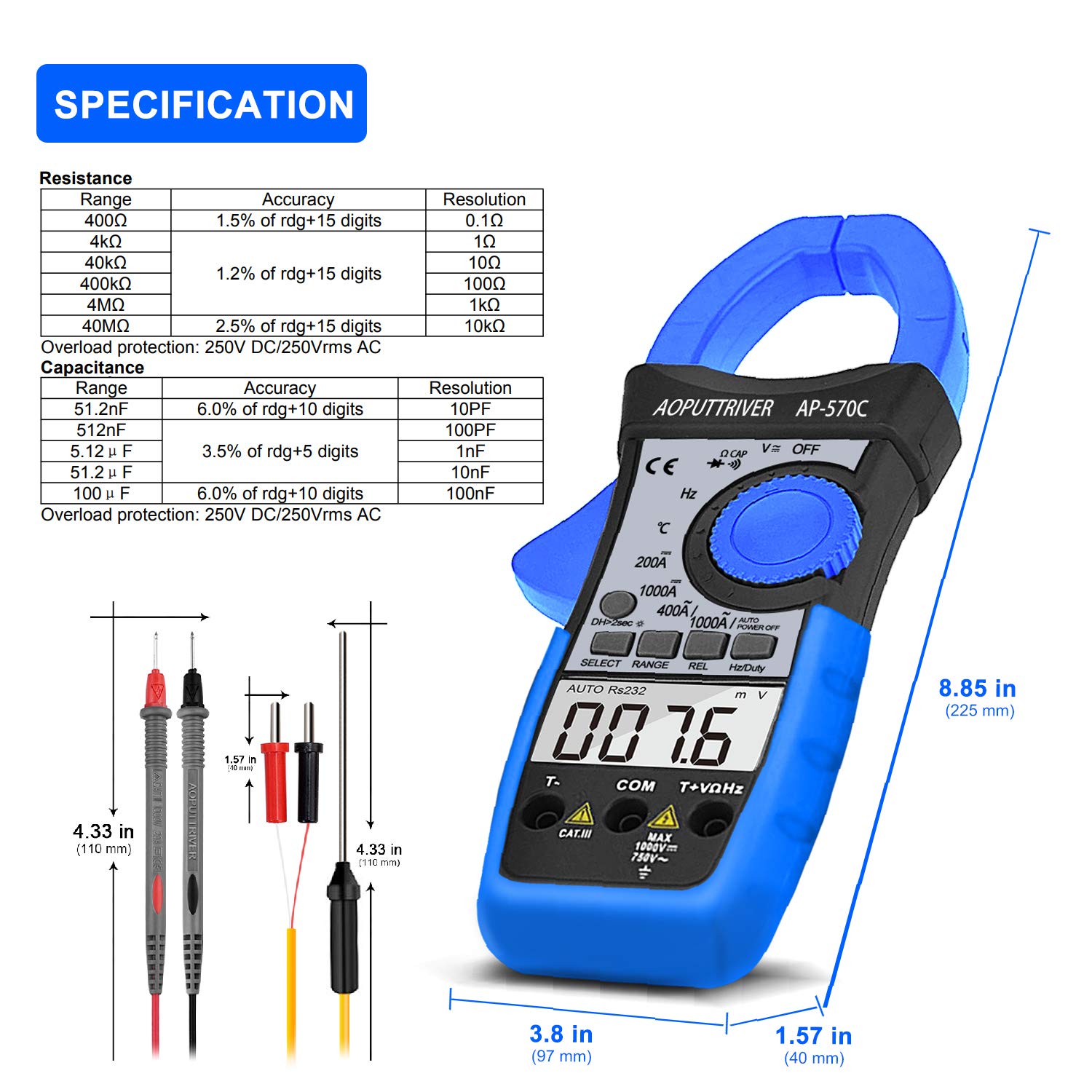
Image: Detailed specifications table for Resistance and Capacitance, along with physical dimensions of the meter and test leads.
8. การบำรุงรักษา
8.1. การทำความสะอาด
To maintain the accuracy and longevity of your meter:
- เช็ดเคสด้วยโฆษณาamp ผ้าและผงซักฟอกอ่อน ห้ามใช้สารกัดกร่อนหรือตัวทำละลาย
- Keep the input terminals and clamp jaws clean and free of debris.
8.2. การเปลี่ยนแบตเตอรี่
When the low battery indicator appears on the LCD, replace the 9V battery as described in the "Setup" section. Prompt replacement ensures continued accuracy.
8.3. การจัดเก็บ
When not in use, store the meter in its protective storage bag in a dry, cool place, away from direct sunlight and extreme temperatures.
9 การแก้ไขปัญหา
If you encounter issues with your AP-570C, consider the following common solutions:
- ไม่มีจอแสดงผล/จอแสดงผลจาง: ตรวจสอบระดับแบตเตอรี่และตรวจสอบให้แน่ใจว่าติดตั้งถูกต้อง เปลี่ยนแบตเตอรี่หากจำเป็น
- "OL" จัดแสดง: Indicates an over-range condition. The measured value exceeds the selected range. Switch to a higher range or verify the circuit.
- การอ่านค่าที่ไม่ถูกต้อง:
- ตรวจสอบให้แน่ใจว่าเสียบสายทดสอบเข้าไปจนสุดและสัมผัสกันดีแล้ว
- ตรวจสอบให้แน่ใจว่าสวิตช์หมุนตั้งค่าไว้ที่ฟังก์ชันและช่วงที่ถูกต้องแล้ว
- สำหรับการวัดกระแสไฟฟ้า โปรดตรวจสอบให้แน่ใจว่ามีตัวนำเพียงตัวเดียวอยู่ภายในวงจรamp ขากรรไกร
- ตรวจสอบการรบกวนทางแม่เหล็กไฟฟ้าจากภายนอก
- สัญญาณเตือนความต่อเนื่องไม่ทำงาน: Ensure the meter is in continuity mode and test leads are making proper contact. If the issue persists, the meter may require service.
10. การรับประกันและการสนับสนุน
The AOPUTTRIVER AP-570C comes with a รับประกัน 2 ปี and lifetime technical support. For any questions or assistance with your product, please contact AOPUTTRIVER customer support.
You can visit the official AOPUTTRIVER store for more information: AOPUTTRIVER Store


