1. บทนำ
The Retevis RT22S is an upgraded version of the RT22 walkie-talkie, designed for clear and reliable communication. This compact two-way radio features a clear signal prompt, channel display, and supports hands-free operation with its VOX function. It is suitable for various applications, from family outings to community events and business use.
Key enhancements in the RT22S include improved signal prompting, a dedicated channel display for quick identification, and enhanced features for secure and efficient communication.
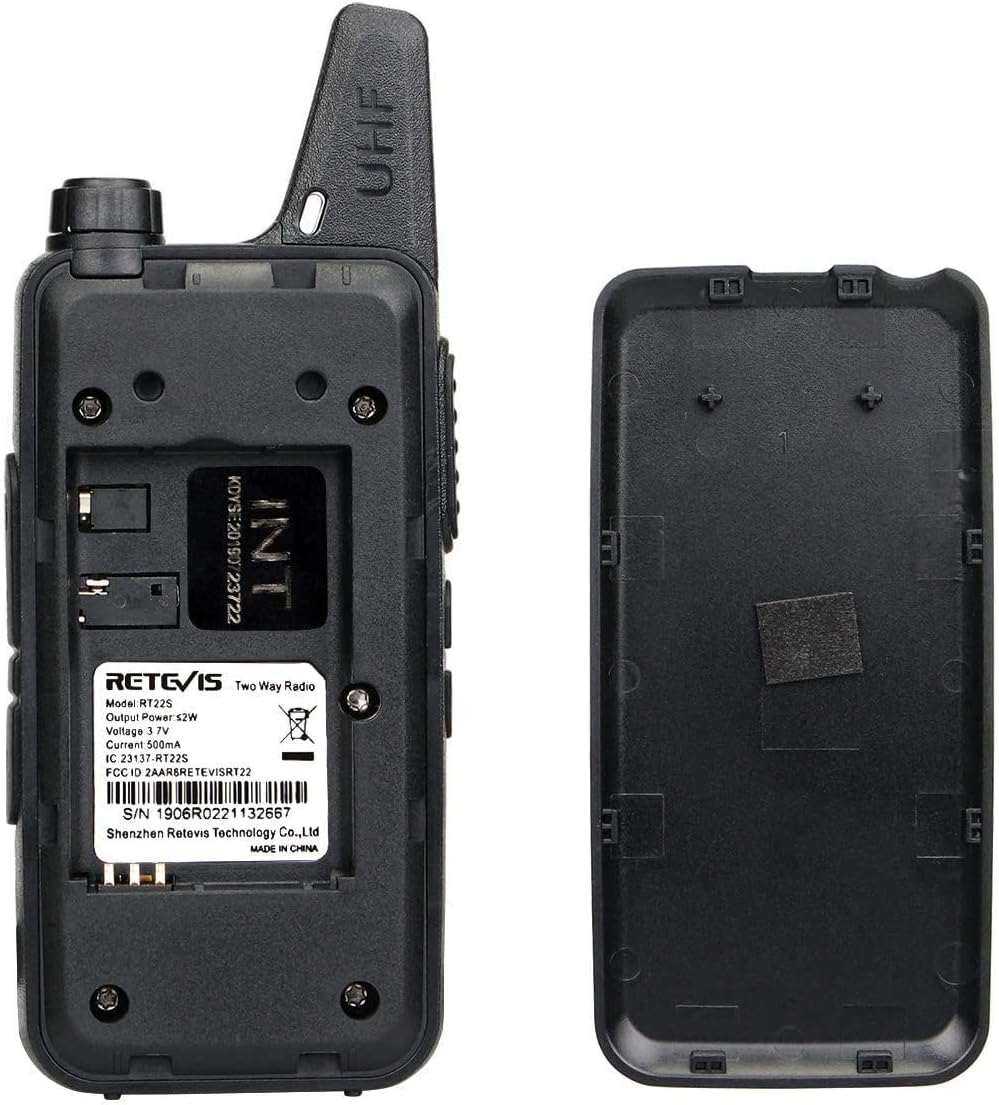
Image: Comparison of the Retevis RT22S (left) and RT22 (right) walkie-talkies, highlighting the RT22S's 22-channel capability versus the RT22's 16 channels.
2. เนื้อหาบรรจุภัณฑ์
Before using your Retevis RT22S walkie-talkies, please ensure all items are present in the package:
- 2 x Retevis RT22S Walkie-Talkies
- แบตเตอรี่ลิเธียมไอออน 2 x 1000mAh
- 1 x Dual USB Charging Dock
- สายชาร์จ USB 2 เส้น
- 2 x เข็มขัดคลิป
- 1 x คู่มือผู้ใช้ (เอกสารนี้)

Image: The complete package contents for the Retevis RT22S, including two radios, batteries, charger, USB cables, and the user manual.
3. สินค้าหมดview
Familiarize yourself with the various components and controls of your Retevis RT22S walkie-talkie.

Image: Detailed front and side views of the Retevis RT22S walkie-talkie, indicating the Power/Volume knob, PTT button, Channel Up/Down buttons, Earpiece Jack, USB Jack, Channel Display, and Round Indicator.
- เสาอากาศ: Fixed for optimal signal reception and transmission.
- ปุ่มเปิดปิด/ปรับระดับเสียง: Rotate to turn the radio on/off and adjust the volume.
- ปุ่ม PTT (Push-to-Talk): กดค้างไว้เพื่อส่งเสียงของคุณ ปล่อยเพื่อฟัง
- ปุ่มขึ้น/ลงช่อง: Use to select desired communication channels.
- แจ็คหูฟัง: Standard 2-pin Kenwood compatible jack for audio accessories.
- แจ็ค USB: Mini USB port for charging the radio.
- การแสดงช่อง: Digital display showing the current channel number.
- Round Indicator: Provides visual feedback for signal prompt and other statuses.
- คลิปหนีบเข็มขัด: Ergonomically designed for secure attachment to clothing or a belt.

Image: A hand holding the Retevis RT22S, illustrating its compact size (0.83 inches thick) and highlighting the Mini USB interface and Standard 2-pin earpiece jack.
4. การตั้งค่า
4.1. การติดตั้งแบตเตอรี่
- ตรวจสอบให้แน่ใจว่าวิทยุสื่อสารปิดอยู่
- ค้นหาฝาปิดช่องใส่แบตเตอรี่ที่ด้านหลังวิทยุ
- เลื่อนฝาครอบลงด้านล่างเพื่อถอดออก
- ใส่แบตเตอรี่ลิเธียมไออน 1000mAh โดยตรวจสอบให้แน่ใจว่าหน้าสัมผัสตรงกัน
- ปิดฝาช่องใส่แบตเตอรี่กลับเข้าที่และเลื่อนขึ้นจนกระทั่งล็อคเข้าที่

Image: The back of the Retevis RT22S walkie-talkie with the battery cover removed, showing the battery slot and product information including the serial number 1906R0221132667.
4.2. การชาร์จแบตเตอรี่
The RT22S walkie-talkies come with a dual USB charging dock and USB cables for convenient charging.
- Connect the USB charging cable to the dual USB charging dock and a compatible USB power source (e.g., wall adapter, computer USB port).
- Place the walkie-talkie into the charging slot on the dock. Alternatively, you can connect the mini USB cable directly to the radio's USB jack for charging.
- The round indicator on the front of the radio will illuminate red during charging.
- Once fully charged, the indicator light will change color (typically green or turn off, refer to the radio's specific behavior). A full charge provides over 12 hours of use.

Image: A Retevis RT22S walkie-talkie connected via its mini USB port, showing the red indicator light, signifying that the device is currently charging.
5. คู่มือการใช้งาน
5.1. เปิด/ปิดเครื่องและปรับระดับเสียง
- To power on the radio, rotate the Power/Volume knob clockwise until you hear a click and a voice prompt.
- หากต้องการปิดเครื่อง ให้หมุนปุ่มทวนเข็มนาฬิกาจนกว่าจะได้ยินเสียงคลิก
- ปรับระดับเสียงโดยหมุนปุ่ม Power/Volume
5.2. การเลือกช่อง
The RT22S features 22 channels. Use the Channel Up/Down buttons on the side of the radio to select your desired channel. The current channel number will be shown on the digital display.

Image: A close-up of the Retevis RT22S walkie-talkie, highlighting the channel display and the round indicator which provides signal prompts.
5.3. ปุ่มกดเพื่อพูด (PTT)
To transmit your voice, press and hold the PTT button located on the side of the radio. Speak clearly into the microphone. Release the PTT button to stop transmitting and listen for a response.
5.4. ฟังก์ชั่น VOX (การใช้งานแบบแฮนด์ฟรี)
The VOX (Voice Operated Exchange) function allows for hands-free communication. When activated, the radio will automatically transmit when it detects your voice, without needing to press the PTT button.
Video: Demonstration of the VOX (Voice Operated Exchange) function on the Retevis RT22S walkie-talkie, showing how to activate and use hands-free communication.
5.5. Remote Emergency Alert
The RT22S includes a remote emergency alert feature. This function typically needs to be assigned to a side button through programming. When activated, it can emit an alarm signal to other radios on the same channel, indicating an emergency situation.
Video: Demonstration of the Remote Emergency Alert function on the Retevis RT22S walkie-talkie, showing the activation and the alarm sound emitted.
5.6. CTCSS and DCS Tones
CTCSS (Continuous Tone-Coded Squelch System) and DCS (Digitally Coded Squelch) tones help filter out unwanted conversations. When enabled, your radio will only receive transmissions that include the same pre-set tone. This ensures more private and secure communication within your group.
6. การทำความเข้าใจระยะการส่งสัญญาณวิทยุ
The effective range of a two-way radio is influenced by several factors. While the RT22S has a maximum talking range of 1 mile under ideal conditions, actual performance can vary.
Factors Affecting Radio Range:
- กำลังส่งวิทยุ (วัตต์): Higher power generally means longer range.
- ประเภทสัญญาณวิทยุ: Different frequency bands (e.g., FRS, GMRS) have different propagation characteristics.
- ระยะห่างจากเส้นขอบฟ้า: Radio signals travel in a line of sight. The curvature of the Earth limits range.
- สภาพภูมิอากาศ: สภาพอากาศอาจส่งผลต่อการส่งสัญญาณ
- เสาอากาศ: Antenna quality and type impact range.
- Obstacles and Terrain: Buildings, hills, and dense foliage can block or weaken signals.
Video: An informational video explaining the various factors that affect two-way radio range, including terrain, obstacles, radio power, and atmospheric conditions.
Tips to Extend Communication Distance:
- เพิ่มกำลังส่ง: In theory, doubling transmission power can extend communication distance by approximately 1.4 times.
- ปรับปรุงความไวในการรับสัญญาณ: Adjust the squelch threshold of the walkie-talkie and use a high-gain antenna to improve receiving sensitivity.
- Communicate from a Higher Location: Elevating your position can significantly improve line-of-sight and extend range.
- Keep Your Battery Charged: A fully charged battery ensures optimal power output for transmission.
7. ข้อมูลจำเพาะ
| คุณสมบัติ | คำอธิบาย |
|---|---|
| ยี่ห้อ | เรเทวิส |
| แบบอย่าง | RT22S |
| สี | สีดำ |
| จำนวนช่องสัญญาณ | 22 |
| คุณสมบัติพิเศษ | Marquee indicator, Channel display, Signal display, Small and portable |
| ช่วงความถี่ | เอฟอาร์เอส |
| ระยะการสนทนาสูงสุด | 1 ไมล์ (ภายใต้สภาวะที่เหมาะสม) |
| เล่มที่tage | 3.7 โวลต์ |
| ระดับความต้านทานต่อน้ำ | ไม่ทนน้ำ |
| จำนวนแบตเตอรี่ | ต้องใช้แบตเตอรี่ลิเธียมไอออน 2 ก้อน (รวมอยู่ด้วย) |
| น้ำหนักสินค้า | 150 กรัม |
8. การบำรุงรักษา
Proper maintenance ensures the longevity and optimal performance of your walkie-talkies.
- การทำความสะอาด: ใช้แบบนุ่มๆamp ผ้าเช็ดทำความสะอาดภายนอกวิทยุ หลีกเลี่ยงสารเคมีรุนแรงหรือน้ำยาทำความสะอาดที่มีฤทธิ์กัดกร่อน
- พื้นที่จัดเก็บ: Store the walkie-talkies in a cool, dry place away from direct sunlight and extreme temperatures. Remove batteries if storing for extended periods.
- การดูแลแบตเตอรี่ Fully charge batteries before first use. Avoid overcharging or completely draining the battery frequently to prolong its lifespan.
- หลีกเลี่ยงผลกระทบ: Protect the radio from drops and strong impacts, which can damage internal components.
9 การแก้ไขปัญหา
If you encounter issues with your Retevis RT22S walkie-talkie, refer to the following common problems and solutions:
| ปัญหา | สาเหตุที่เป็นไปได้ | สารละลาย |
|---|---|---|
| ไม่มีไฟฟ้า | แบตเตอรี่อ่อนหรือติดตั้งไม่ถูกต้อง | ชาร์จแบตเตอรี่หรือติดตั้งใหม่โดยให้แน่ใจว่ามีการสัมผัสที่ถูกต้อง |
| ไม่สามารถส่งหรือรับได้ | Incorrect channel, out of range, or battery low | Verify both radios are on the same channel. Move closer to the other radio. Charge battery. |
| คุณภาพเสียงไม่ดี | Low battery, interference, or volume too low | ชาร์จแบตเตอรี่ อยู่ห่างจากแหล่งกำเนิดสัญญาณรบกวน ปรับระดับเสียง |
| VOX ไม่ทำงาน | VOX sensitivity too low or feature not activated | Adjust VOX sensitivity settings. Ensure VOX is enabled. |
| Emergency alert not activating | Feature not programmed to a side button | Consult programming software or a qualified technician to assign the function. |
10. การรับประกันและการสนับสนุน
Retevis products are manufactured to high-quality standards. For warranty information, technical support, or service inquiries, please refer to the warranty card included in your package or visit the official Retevis webไซต์ โปรดเก็บใบเสร็จรับเงินไว้เป็นหลักฐานการซื้อสำหรับการเรียกร้องการรับประกัน


