1. บทนำ
The Alpine X308U Mech-Less Navigation Receiver is designed to provide advanced smartphone integration and a reliable built-in navigation system for your vehicle. This manual provides essential information for the proper installation, operation, and maintenance of your device.
คุณสมบัติหลัก:
- 8-inch WVGA High-Resolution Capacitive Touch Display
- Compatibility with Apple CarPlay and Android Auto
- Embedded Navigation with 3D & 2D mapping and Pinch-to-Zoom interface
- Bluetooth hands-free calling and audio streaming
- Built-In HD Radio Tuner and SiriusXM Satellite Radio readiness
- Multiple connectivity options including HDMI input/output and USB
- Advanced audio tuning features: 9-band parametric EQ and 6-channel time correction
- Support for FLAC, AAC, MP3, WMA, HE-AC Playback
- Accessory Control Ready (KAC-001 Required) and iDatalink Maestro Module compatibility
2. สินค้าหมดview

รูปที่ 2.1 : ด้านหน้า View with Navigation Display. This image shows the Alpine X308U unit with its 8-inch high-resolution capacitive touch display active, presenting a detailed 3D navigation map. The screen displays street names, distances, and navigation icons, demonstrating the unit's integrated GPS capabilities. Control buttons are visible along the bottom edge of the screen.

รูปที่ 2.2 : ด้านหน้า View with Media Interface. This image illustrates the Alpine X308U's user interface for media playback and radio tuning. The display shows current FM radio frequency (105.8 MHz), preset stations, and options for HDMI, Music, Pandora, and Bluetooth Audio. Album art and song information are also visible, highlighting the unit's multimedia capabilities.

Figure 2.3: Audio Settings Interface. This image displays the "BASS ENGINE SQ" audio adjustment screen on the Alpine X308U. Users can select from various sound presets like Standard, Punch, Rich, Mid Bass, and Low Bass, and adjust levels for Bass Engine, Navi Audio, and Back Audio. This interface demonstrates the unit's comprehensive audio customization options.

รูปที่ 2.4: การเชื่อมต่อแผงด้านหลัง ภาพนี้ให้รายละเอียด view of the rear panel of the Alpine X308U, highlighting its various input and output ports. Visible connections include GPS antenna input, USB ports, HDMI In, HDMI Out, and the main wiring harness connector. A cooling fan is also visible on the left side, indicating thermal management features.
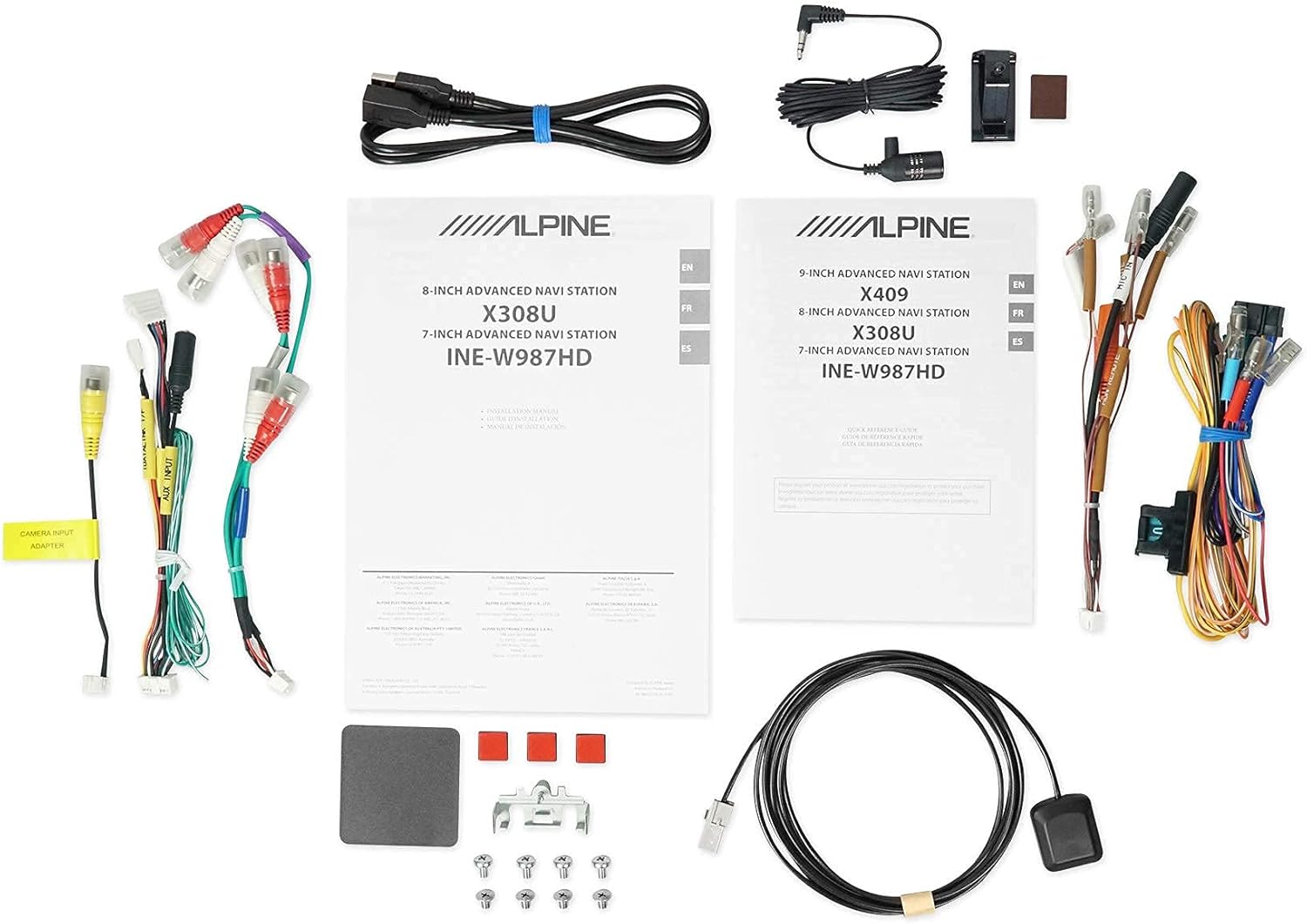
รูปที่ 2.5: ส่วนประกอบที่รวมอยู่ This image displays a selection of cables and accessories that come with the Alpine X308U unit. These include various wiring harnesses, RCA cables for audio/video connections, a USB extension cable, and a GPS antenna. These components are essential for the proper installation and functionality of the receiver.
3. การตั้งค่าและการติดตั้ง
Proper installation is crucial for the optimal performance of your Alpine X308U. It is highly recommended that installation be performed by a qualified professional car audio installer.
3.1. รายการตรวจสอบก่อนการติดตั้ง:
- Ensure all components listed in the "What's in the Box" section are present.
- ถอดขั้วลบของแบตเตอรี่รถยนต์ออกก่อนเริ่มงานเกี่ยวกับระบบไฟฟ้าใดๆ
- Review your vehicle's specific wiring diagrams and dash disassembly instructions.
3.2. การเชื่อมต่อสายไฟ:
Connect the main wiring harness to the vehicle's power, ground, and speaker wires. Utilize the provided connectors for a secure fit. Refer to the wiring diagram included with your unit for specific color codes and pin assignments.
- การเชื่อมต่อสายไฟ: เชื่อมต่อสายสีเหลือง (แรงดันไฟคงที่ 12V), สายสีแดง (แรงดันไฟสลับ 12V) และสายสีดำ (สายดิน)
- เอาต์พุตลำโพง: Connect the speaker wires to the corresponding vehicle speakers. Ensure correct polarity.
- อินพุต/เอาต์พุต HDMI: Use the HDMI ports for connecting external video sources or outputting video to a rear entertainment system. Note that HDMI output functionality may be limited to specific Alpine accessories.
- ช่องต่อ USB: Connect USB devices for media playback or smartphone integration (CarPlay/Android Auto).
- อินพุตกล้อง: เชื่อมต่อด้านหลัง-view camera to the dedicated input for enhanced safety. The unit supports up to 3 cameras with the optional KCX-C250MC Multi-camera selector.
- ก่อนamp เอาท์พุต: Utilize the 6-channel pre-amp เอาท์พุตสำหรับเชื่อมต่อภายนอก ampลิตเตอร์
- เสาอากาศ GPS: ติดตั้งเสาอากาศ GPS ในตำแหน่งที่มีสัญญาณชัดเจน view of the sky for optimal navigation performance.
3.3. การติดตั้งหน่วย:
Securely mount the X308U in your vehicle's dashboard using the provided mounting hardware. Ensure adequate ventilation around the unit to prevent overheating.
4. คู่มือการใช้งาน
4.1. การทำงานขั้นพื้นฐาน:
- เปิด/ปิดเครื่อง: กดปุ่มเปิด/ปิดค้างไว้ (โดยปกติจะอยู่ที่แผงด้านหน้า) เพื่อเปิดหรือปิดเครื่อง
- การควบคุมระดับเสียง: Adjust volume using the dedicated volume buttons or on-screen controls.
- อินเทอร์เฟซหน้าจอสัมผัส: Navigate through menus and select functions by tapping icons on the capacitive touch display. The unit supports 4-Way Swipe Action Control.
- ปุ่มเมนู: Access the main menu to switch between different sources and settings.
4.2. ระบบนำทาง:
- การเข้าถึงระบบนำทาง: Tap the "Navigation" icon on the main menu.
- Entering Destinations: Use the on-screen keyboard to input addresses, points of interest, or select from recent destinations.
- แผนที่ View: Switch between 2D and 3D map views. Use pinch-to-zoom gestures to adjust the map scale.
- เสียงแนะนำ: Follow spoken turn-by-turn directions for guidance.
4.3. Smartphone Integration (CarPlay & Android Auto):
- การเชื่อมต่อสมาร์ทโฟนของคุณ: Connect your compatible iPhone or Android phone to the unit's USB port using a certified USB cable.
- Activating CarPlay/Android Auto: Once connected, the respective interface will automatically launch or prompt you to activate it on the screen.
- การใช้แอพ: Access supported navigation, music, messaging, and communication apps directly from the unit's display.
4.4. Bluetooth Functions:
- การจับคู่อุปกรณ์: Go to the Bluetooth settings menu, enable pairing mode on the X308U, and search for the unit on your smartphone. Select "Alpine X308U" and confirm the pairing code.
- การโทรแบบแฮนด์ฟรี: Make and receive calls directly through the unit's microphone and vehicle speakers.
- การสตรีมเสียง: สตรีมเพลงแบบไร้สายจากสมาร์ทโฟนที่เชื่อมต่ออยู่
4.5. การตั้งค่าเสียง:
- Equalizer: Access the 9-band parametric EQ to fine-tune audio frequencies.
- การแก้ไขเวลา: Adjust the sound stage for optimal listening position using the 6-channel time correction feature.
- TuneIt App: For advanced audio tuning and sharing settings, download and use the Alpine TuneIt App on your smartphone.
5. การบำรุงรักษา
Regular maintenance ensures the longevity and optimal performance of your Alpine X308U.
- การทำความสะอาดหน้าจอ: Use a soft, lint-free cloth specifically designed for electronic screens to gently wipe the display. Do not use abrasive cleaners or solvents.
- การทำความสะอาดทั่วไป: รักษาตัวเครื่องให้ปราศจากฝุ่นและสิ่งสกปรก ใช้ผ้าแห้งนุ่มเช็ดทำความสะอาดภายนอก
- การอัปเดตซอฟต์แวร์: ตรวจสอบ Alpine เป็นระยะ website for firmware updates to ensure your unit has the latest features and bug fixes. Follow the instructions provided with the update carefully.
- สภาพแวดล้อม : หลีกเลี่ยงการให้เครื่องสัมผัสกับอุณหภูมิที่สูงหรือต่ำเกินไป แสงแดดโดยตรงเป็นเวลานาน หรือความชื้นที่มากเกินไป
6 การแก้ไขปัญหา
If you encounter issues with your Alpine X308U, refer to the following common troubleshooting steps before contacting support.
| ปัญหา | สาเหตุที่เป็นไปได้ | สารละลาย |
|---|---|---|
| ไม่มีไฟฟ้า/เครื่องไม่เปิด | การเชื่อมต่อไฟฟ้าหลวม ฟิวส์ขาด แบตเตอรี่รถยนต์มีปัญหา | Check all power wiring connections. Inspect and replace any blown fuses. Ensure vehicle battery is charged. |
| ไม่มีเสียงออกจากลำโพง | Speaker wires disconnected, incorrect audio settings, unit in mute mode. | Verify speaker wire connections. Check audio settings (e.g., fader/balance, EQ). Ensure unit is not muted. |
| ระบบนำทางใช้งานไม่ได้หรือให้ข้อมูลไม่ถูกต้อง | GPS antenna not properly connected or obstructed, outdated map data. | ตรวจสอบให้แน่ใจว่าเสาอากาศ GPS เชื่อมต่ออย่างแน่นหนาและมีสัญญาณที่ชัดเจน view of the sky. Check for available map updates. |
| อุปกรณ์บลูทูธไม่จับคู่ | Device not in pairing mode, incorrect pairing procedure, interference. | ตรวจสอบให้แน่ใจว่าอุปกรณ์ทั้งสองอยู่ในโหมดจับคู่ ลบการจับคู่ก่อนหน้านี้แล้วลองใหม่อีกครั้ง ขยับเข้าใกล้ตัวเครื่องมากขึ้น |
| หน้าจอสัมผัสไม่ตอบสนอง | Temporary software glitch, screen calibration needed. | Perform a soft reset (refer to manual for specific method). If issue persists, contact support. |
7. ข้อมูลจำเพาะ
| คุณสมบัติ | รายละเอียด |
|---|---|
| หมายเลขรุ่น | X308U |
| ขนาดหน้าจอ | 8 นิ้ว (เส้นทแยงมุม 21 ซม.) |
| ประเภทจอภาพ | WVGA High-Resolution Capacitive Touch Display |
| กำลังขับสูงสุด | 50 Watts x 4 channels |
| CTA-2006 Power Rating | 18 Watts x 4 channels |
| ก่อนamp เอาท์พุต | 3 (4-Volt) |
| เทคโนโลยีการเชื่อมต่อ | บลูทู ธ , USB, HDMI |
| ประเภทแผนที่ | Satellite, North America (Built-in 3D & 2D Navigation) |
| ขนาดสินค้า | 12 x 12 x 12 นิ้ว |
| น้ำหนักสินค้า | 6.4 ปอนด์ |
| ส่วนประกอบที่รวมอยู่ | HDMI input, USB input, composite A/V input, rear-view camera input, HDMI output, 6-channel preamp outputs, USB source |
8. การรับประกันและการสนับสนุน
This product is covered by a manufacturer's warranty. Please refer to the warranty card included with your purchase for specific terms and conditions, including warranty period and coverage details.
การสนับสนุนลูกค้า:
For technical assistance, troubleshooting beyond this manual, or warranty claims, please contact Alpine customer support. Visit the official Alpine webเว็บไซต์สำหรับข้อมูลติดต่อและทรัพยากรสนับสนุนล่าสุด
หมายเหตุ: เก็บหลักฐานการซื้อไว้เพื่อใช้ยืนยันการรับประกัน


