1. บทนำ
ขอบคุณสำหรับการซื้อasing the VIVIBRIGHT GP100UP LED Projector. This manual provides essential information for the safe and efficient operation of your device. Please read it thoroughly before use and retain it for future reference.
The VIVIBRIGHT GP100UP is an Android 6.0-based LED projector featuring built-in Wi-Fi and Bluetooth, designed for home theater and office presentations. It supports Full HD content and offers a bright projection experience.
2. ข้อมูลด้านความปลอดภัย
- แหล่งจ่ายไฟ: ใช้เฉพาะอะแดปเตอร์ไฟฟ้าที่ระบุเท่านั้น ตรวจสอบให้แน่ใจว่าระดับเสียงtage ตรงกับแหล่งจ่ายไฟในพื้นที่ของคุณ
- การระบายอากาศ : อย่าปิดกั้นช่องระบายอากาศ ตรวจสอบให้แน่ใจว่ามีอากาศถ่ายเทเพียงพอรอบ ๆ โปรเจ็กเตอร์เพื่อป้องกันความร้อนสูงเกินไป
- การสัมผัสของเหลว: ควรวางโปรเจคเตอร์ให้ห่างจากน้ำหรือของเหลวอื่นๆ ห้ามใช้งานในที่ชื้นแฉะamp สภาพแวดล้อม
- การทำความสะอาด: ถอดปลั๊กไฟก่อนทำความสะอาด ใช้ผ้าแห้งนุ่มๆ เช็ดทำความสะอาด หลีกเลี่ยงการใช้น้ำยาทำความสะอาดหรือสเปรย์
- การแทรกวัตถุ: Never insert objects of any kind into the projector openings as they may touch dangerous voltagจุด e หรือส่วนที่สั้นออก
- การบริการ: อย่าพยายามให้บริการผลิตภัณฑ์นี้ด้วยตนเอง ส่งต่อการบริการทั้งหมดไปยังช่างบริการที่ผ่านการรับรอง
- การปกป้องดวงตา: อย่ามองตรงเข้าไปในเลนส์โปรเจ็กเตอร์เมื่อลamp เปิดอยู่ แสงจ้าอาจทำให้ดวงตาเสียหายได้
3. เนื้อหาบรรจุภัณฑ์
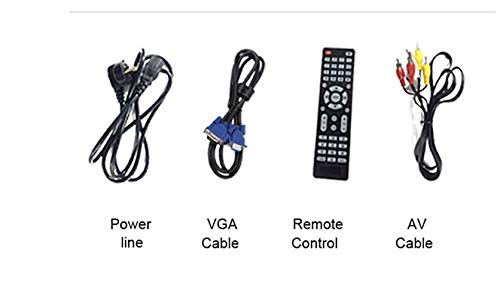
ตรวจสอบว่ารายการทั้งหมดที่ระบุไว้ด้านล่างนี้รวมอยู่ในแพ็คเกจของคุณ:
- VIVIBRIGHT GP100UP Projector
- สายไฟ
- สายเคเบิล VGA
- เคเบิ้ล AV
- รีโมทคอนโทรล
- คู่มือการใช้งาน (เอกสารนี้)
รูปที่ 3.1: Included accessories with the VIVIBRIGHT GP100UP projector, including power cable, VGA cable, remote control, and AV cable.
4. สินค้าหมดview
4.1. Projector Dimensions
รูปที่ 4.1: ด้านหน้าและด้านบน view of the VIVIBRIGHT GP100UP projector with approximate dimensions: 11 inches (length), 8.85 inches (width), and 4 inches (height).
4.2. พอร์ตอินพุต/เอาต์พุต
โปรเจ็กเตอร์มีพอร์ตต่างๆ สำหรับเชื่อมต่ออุปกรณ์ภายนอก:
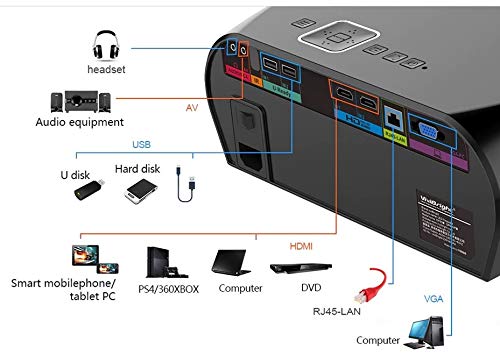
รูปที่ 4.2: Detailed diagram of the projector's rear panel, illustrating connectivity options including headset, audio equipment (AV), USB ports for U disk and hard disk, HDMI ports, RJ45-LAN, and VGA port.
- ช่องต่อ HDMI: Connect to Blu-ray players, gaming consoles, laptops, or other HDMI-enabled devices.
- ยูเอสบี: For connecting USB drives (U disk) or external hard drives.
- เอวี: สำหรับเชื่อมต่ออุปกรณ์รุ่นเก่าที่ใช้ระบบวิดีโอคอมโพสิตและเสียงสเตอริโอ
- VGA: For connecting to computers or laptops with a VGA output.
- RJ45-LAN: สำหรับการเชื่อมต่อเครือข่ายแบบใช้สาย
- แจ็คหูฟัง: สำหรับเชื่อมต่อหูฟังหรือลำโพงภายนอก
4.3. รีโมทคอนโทรล
รีโมทคอนโทรลที่รวมอยู่ช่วยให้ใช้งานโปรเจ็กเตอร์ได้สะดวก
รูปที่ 4.3: Remote control layout with key functions: ON/OFF, Volume Up/Down, OK, Menu, Home, Speed, Mute, Back, Mouse Mode, and the USB receiver.
- เปิด/ปิด: Power on or off the projector.
- ระดับเสียง +/-: ปรับระดับเสียง
- ตกลง: ยืนยันการเลือก
- เมนู: เข้าถึงการตั้งค่าโปรเจ็กเตอร์
- บ้าน: Return to the main Android interface.
- กลับ: กลับไปที่หน้าจอก่อนหน้า
- โหมดเมาส์: Activate/deactivate air mouse function (if applicable).
- ปิดเสียง: ปิดเสียงหรือเปิดเสียง
5. การตั้งค่า
5.1 การวาง
Place the projector on a stable, flat surface or mount it to the ceiling. Ensure there are no obstructions to the lens or ventilation ports. The optimal projection distance for a clear image is between 1 to 5 meters.
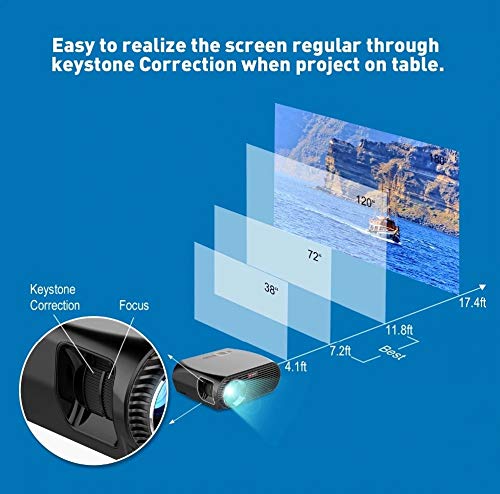
รูปที่ 5.1: Illustration of projection distances and corresponding screen sizes, along with the location of the keystone correction and focus rings on the projector.
- For a 72-inch screen, the recommended distance is approximately 7.2 feet (2.2 meters).
- For a 120-inch screen, the recommended distance is approximately 11.8 feet (3.6 meters).
5.2. การเชื่อมต่อไฟฟ้า
- ต่อสายไฟเข้ากับช่องเสียบไฟของโปรเจ็กเตอร์
- เสียบปลายอีกด้านของสายไฟเข้ากับเต้ารับไฟฟ้าที่เหมาะสม
- ไฟแสดงสถานะการทำงานของโปรเจ็กเตอร์ควรจะสว่างขึ้น
5.3. การแก้ไขโฟกัสและคีย์สโตน
After powering on, adjust the image for clarity and proper geometry.
- จุดสนใจ: Rotate the focus ring near the lens until the projected image is sharp and clear.
- การแก้ไขคีย์สโตน: If the projected image appears trapezoidal (wider at the top or bottom), use the keystone correction ring or lever (usually located near the focus ring) to adjust the image until it is rectangular. The GP100UP supports +/- 15 degrees vertical keystone correction.
6. คู่มือการใช้งาน
6.1. Initial Power On and Android Interface
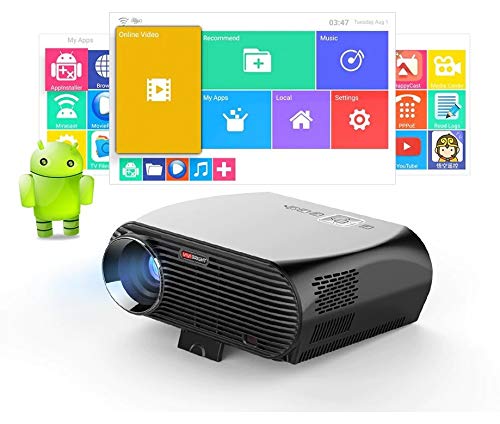
Press the power button on the projector or remote control to turn on the device. The projector will boot into its Android 6.0 operating system interface.
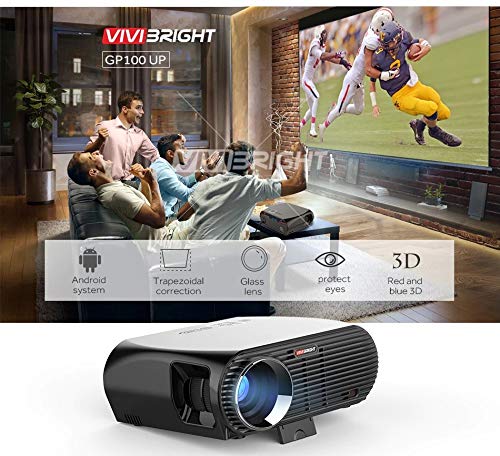
รูปที่ 6.1: The VIVIBRIGHT GP100UP projector in operation, highlighting its Android system capabilities and other features.
Navigate the Android interface using the remote control. You can access pre-installed applications, settings, and media files.
6.2. การเชื่อมต่ออุปกรณ์ภายนอก
To project content from external sources:
- Connect your device (e.g., laptop, gaming console, USB drive) to the appropriate port on the projector (HDMI, USB, AV, VGA).
- On the projector's Android interface, navigate to the "Input Source" or "Source" option.
- Select the corresponding input source (e.g., HDMI1, USB, AV, VGA) to display content from your connected device.
6.3. Wireless Connectivity (Wi-Fi, Bluetooth, Screen Mirroring)
The GP100UP supports various wireless functions:
- ไวไฟ :
- Go to "Settings" on the Android interface.
- เลือก "Wi-Fi" แล้วเปิดใช้งาน
- Choose your desired network and enter the password to connect.
- บลูทูธ:
- Go to "Settings" on the Android interface.
- เลือก "บลูทูธ" แล้วเปิดใช้งาน
- จับคู่กับอุปกรณ์เสียงบลูทูธ เช่น หูฟังหรือลำโพง
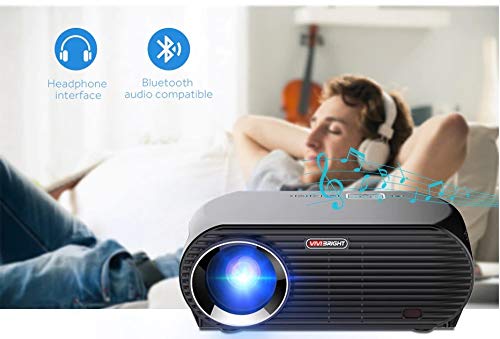
รูปที่ 6.2: The projector's Bluetooth audio compatibility, allowing connection to wireless headphones or speakers.
- Screen Mirroring (Miracast/Airplay/DLNA):
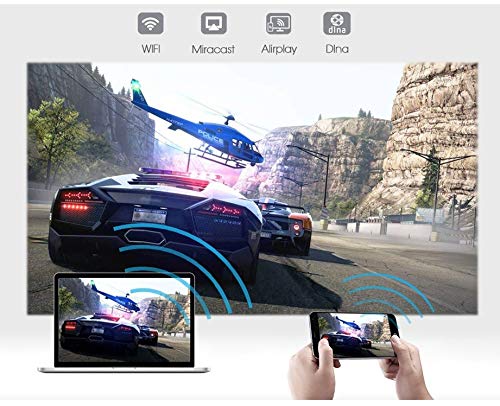
The projector supports mirroring content from compatible smartphones, tablets, and laptops via Wi-Fi, Miracast, Airplay, and DLNA.
- ตรวจสอบให้แน่ใจว่าทั้งอุปกรณ์ของคุณและโปรเจ็กเตอร์เชื่อมต่ออยู่กับเครือข่าย Wi-Fi เดียวกัน
- On the projector's Android interface, open the relevant screen mirroring application (e.g., Miracast, Airplay, DLNA).
- On your smartphone/tablet/laptop, activate its screen mirroring function (e.g., "Screen Mirroring," "Smart View," "Cast," "AirPlay").
- Select the projector from the list of available devices to begin mirroring.

รูปที่ 6.3: Wireless screen mirroring capabilities, enabling content from mobile devices and laptops to be displayed on the projector.
7. การบำรุงรักษา
7.1. การทำความสะอาดเลนส์
ใช้ผ้าเนื้อนุ่ม ปราศจากขน ที่ออกแบบมาสำหรับเลนส์แว่นตาโดยเฉพาะ เช็ดเลนส์เบาๆ เพื่อขจัดฝุ่นหรือคราบสกปรก หลีกเลี่ยงการใช้วัสดุที่มีฤทธิ์กัดกร่อนหรือสารเคมีรุนแรง
7.2. Cleaning the Projector Casing
เช็ดทำความสะอาดภายนอกโปรเจคเตอร์ด้วยผ้าแห้งนุ่มๆ สำหรับคราบฝังแน่น ให้ใช้ผ้าชุบน้ำหมาดๆ เช็ดอีกครั้งamp สามารถใช้ผ้าชุบน้ำเช็ดได้ ตามด้วยผ้าแห้งอีกผืน ตรวจสอบให้แน่ใจว่าไม่มีของเหลวเข้าไปในช่องระบายอากาศ
7.3. Air Filter (if applicable)
While LED projectors typically have sealed optical engines, regularly check ventilation openings for dust accumulation. Use a soft brush or compressed air to clear any blockages.
8 การแก้ไขปัญหา
| ปัญหา | สาเหตุที่เป็นไปได้ | สารละลาย |
|---|---|---|
| ไม่มีภาพแสดง |
|
|
| ภาพเบลอ |
|
|
| รูปภาพเป็นรูปสี่เหลี่ยมคางหมู |
|
|
| ไม่มีเสียง |
|
|
| ปัญหาการเชื่อมต่อ Wi-Fi/บลูทูธ |
|
|
9. ข้อมูลจำเพาะ
| คุณสมบัติ | รายละเอียด |
|---|---|
| หมายเลขรุ่น | GP100UP |
| เทคโนโลยีการแสดงผล | จอแอลซีดี |
| ความละเอียดดั้งเดิม | 1280x800dpi (WXGA) |
| ความสว่าง | 3500 ลูเมน |
| อัตราส่วนคอนทราสต์ | 1000:1-2000:1 |
| แหล่งกำเนิดแสง | นำ |
| แหล่งกำเนิดแสงชีวิต | Not specified (typically 20,000+ hours for LED) |
| ระยะฉายภาพ | 1-5ม. |
| มิติที่ฉาย | 40-300 inches (Best image size: 72-120 inches) |
| ขนาดหน้าจอ | 4:3/16:9 |
| Keystone Correction | Manual Correction, +/- 15 degrees (vertical) |
| ระบบ | Android 6.0.1, CPU: Quad core ARM Cortex-A53 |
| หน่วยความจำ (RAM / ROM) | RAM: 1G / ROM: 8G |
| การเชื่อมต่อแบบไร้สาย | Wi-Fi, Bluetooth, DLNA, Miracast, Airplay |
| พอร์ตอินพุต | HDMI, USB, AV, VGA, RJ45-LAN |
| แหล่งจ่ายไฟ | ไฟฟ้ากระแสสลับ 90-240 โวลต์, 50/60 เฮิรตซ์ |
| การใช้พลังงาน | 140วัตต์ |
| ขนาด (โดยประมาณ) | 37 x 30.5 x 15.9 ซม. |
| น้ำหนัก (โดยประมาณ) | 2.6กก. |
| ฟังก์ชั่น 3D | Red-blue 3D |
10. การรับประกันและการสนับสนุน
The VIVIBRIGHT GP100UP Projector comes with a รับประกัน 1 ปี นับจากวันที่ซื้อ การรับประกันนี้ครอบคลุมถึงข้อบกพร่องจากการผลิตภายใต้การใช้งานปกติ
For technical support, warranty claims, or service inquiries, please contact your retailer or the official VIVIBRIGHT customer service channel. Please have your product model number (GP100UP) and proof of purchase ready when contacting support.


