
1. บทนำ
This user manual provides detailed instructions for the installation, configuration, and operation of your Jennov 5.0MP PTZ Outdoor WiFi Security Camera. Please read this manual thoroughly before using the product to ensure proper functionality and safety. Keep this manual for future reference.
คุณลักษณะของผลิตภัณฑ์มากกว่าview:
- 5.0 Megapixel Resolution: นำเสนอภาพวิดีโอที่ชัดเจนและละเอียดtage.
- ซูมแบบออปติคอล 5 เท่า: Allows for detailed magnification of distant objects without loss of clarity.
- Pan/Tilt/Zoom (PTZ) Functionality: Offers a 355° horizontal rotation and 100° vertical tilt for comprehensive area coverage.
- เสียงสองทาง: ไมโครโฟนและลำโพงในตัวช่วยให้สามารถสื่อสารแบบเรียลไทม์ได้
- ปรับปรุงการมองเห็นในตอนกลางคืน: Equipped with infrared LEDs for clear monitoring up to 65ft in low-light conditions.
- การตรวจจับการเคลื่อนไหวและการแจ้งเตือน: Configurable motion detection zones and sensitivity with push notifications and email alerts.
- ระดับการกันน้ำ IP66: โลหะทนทาน casing designed to withstand various outdoor weather conditions.
- รวมการ์ด SD ขนาด 64GB: Provides local storage for continuous 24/7 recording.
- การเข้าถึงระยะไกล: Monitor and control the camera from your smartphone, tablet, or PC.
2. เนื้อหาบรรจุภัณฑ์
โปรดตรวจสอบให้แน่ใจว่าสินค้าทุกรายการที่ระบุไว้ด้านล่างครบถ้วนในพัสดุของคุณ หากมีสินค้าใดขาดหายหรือเสียหาย โปรดติดต่อฝ่ายบริการลูกค้า
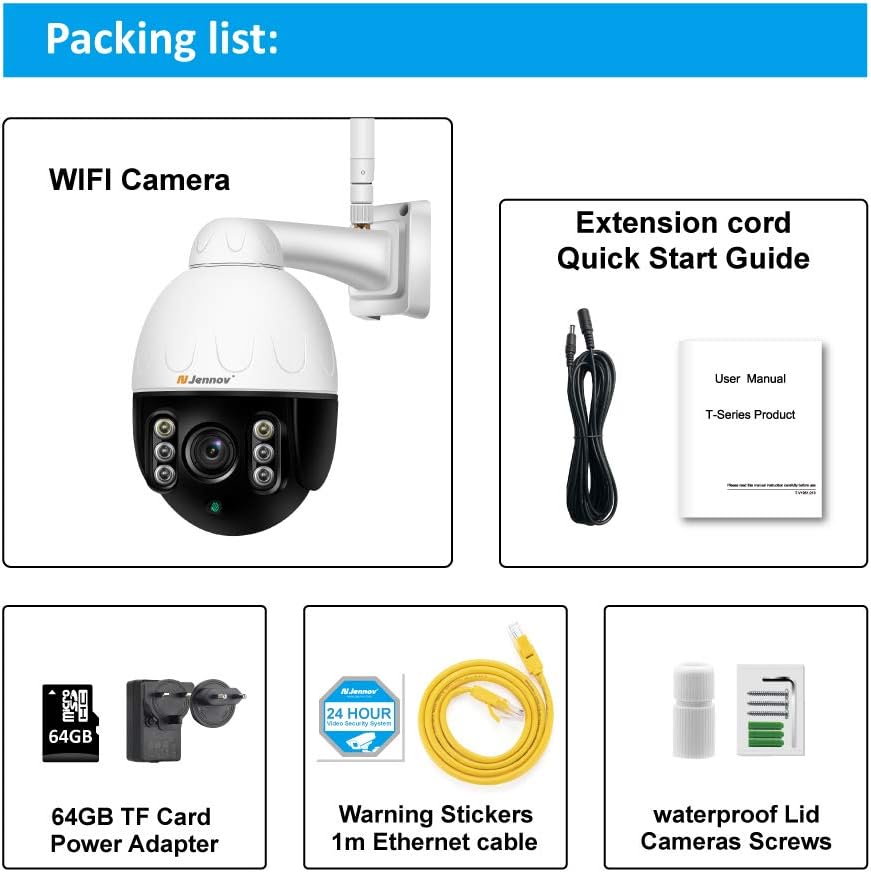
Image: Visual representation of the Jennov PTZ Camera and its included accessories.
- Jennov 5.0MP PTZ WiFi Camera (1 unit)
- 12V1A Power Adapter (1 unit)
- 3.3ft Ethernet Cable (1 unit)
- Mounting Screws (set)
- Waterproof Cap for Ethernet connection (1 unit)
- Warning Label (1 unit)
- การ์ด Micro SD ขนาด 64GB (ติดตั้งมาแล้ว)
- คู่มือเริ่มต้นใช้งานฉบับย่อ / คู่มือผู้ใช้
3. คำแนะนำในการตั้งค่า
3.1 การติดตั้งทางกายภาพ
- เลือกตำแหน่ง: Select a suitable outdoor location for mounting the camera. Ensure it has a clear line of sight to the area you wish to monitor and is within range of your 2.4GHz Wi-Fi network. The camera is designed for wall or ceiling mounting.
- ติดตั้งกล้อง: Use the provided mounting screws to securely attach the camera bracket to the chosen surface. Ensure the camera is positioned correctly for optimal viewมุมอิง
- เชื่อมต่อพลังงาน: Connect the 12V1A power adapter to the camera's power input and plug it into a power outlet.
- การเชื่อมต่ออีเทอร์เน็ต (ทางเลือก): For a more stable connection, you can use the provided Ethernet cable to connect the camera directly to your router. Use the waterproof cap to protect the Ethernet port if installed outdoors.
3.2 App Installation and Initial Setup
- ดาวน์โหลดแอป: ค้นหา the recommended camera application (e.g., 'HiCam' or similar as per quick start guide) on your smartphone's app store (iOS or Android) and install it.
- ลงทะเบียนบัญชี: Open the app and follow the on-screen instructions to register a new user account.
- เพิ่มกล้อง: Power on the camera. In the app, select 'Add Device' or '+' icon. Follow the prompts to connect the camera to your home 2.4GHz Wi-Fi network. Ensure your phone is also connected to the 2.4GHz network during setup.
- กำหนดค่าการตั้งค่า: Once connected, you can rename the camera, set a password, and adjust initial video settings.
4. คู่มือการใช้งาน
4.1 สด View และการควบคุม PTZ
Access the live video feed through the mobile app or PC client.

Image: A smartphone screen displaying the camera's live feed with pan and tilt controls, indicating 355° horizontal and 100° vertical rotation.
- แพน/เอียง: Use the directional controls within the app to rotate the camera horizontally (355°) and vertically (100°) to adjust the viewมุมอิง
- ซูมออปติคอล: Utilize the zoom controls (often a pinch-to-zoom gesture or dedicated buttons) to activate the 5X optical zoom for closer inspection of details.
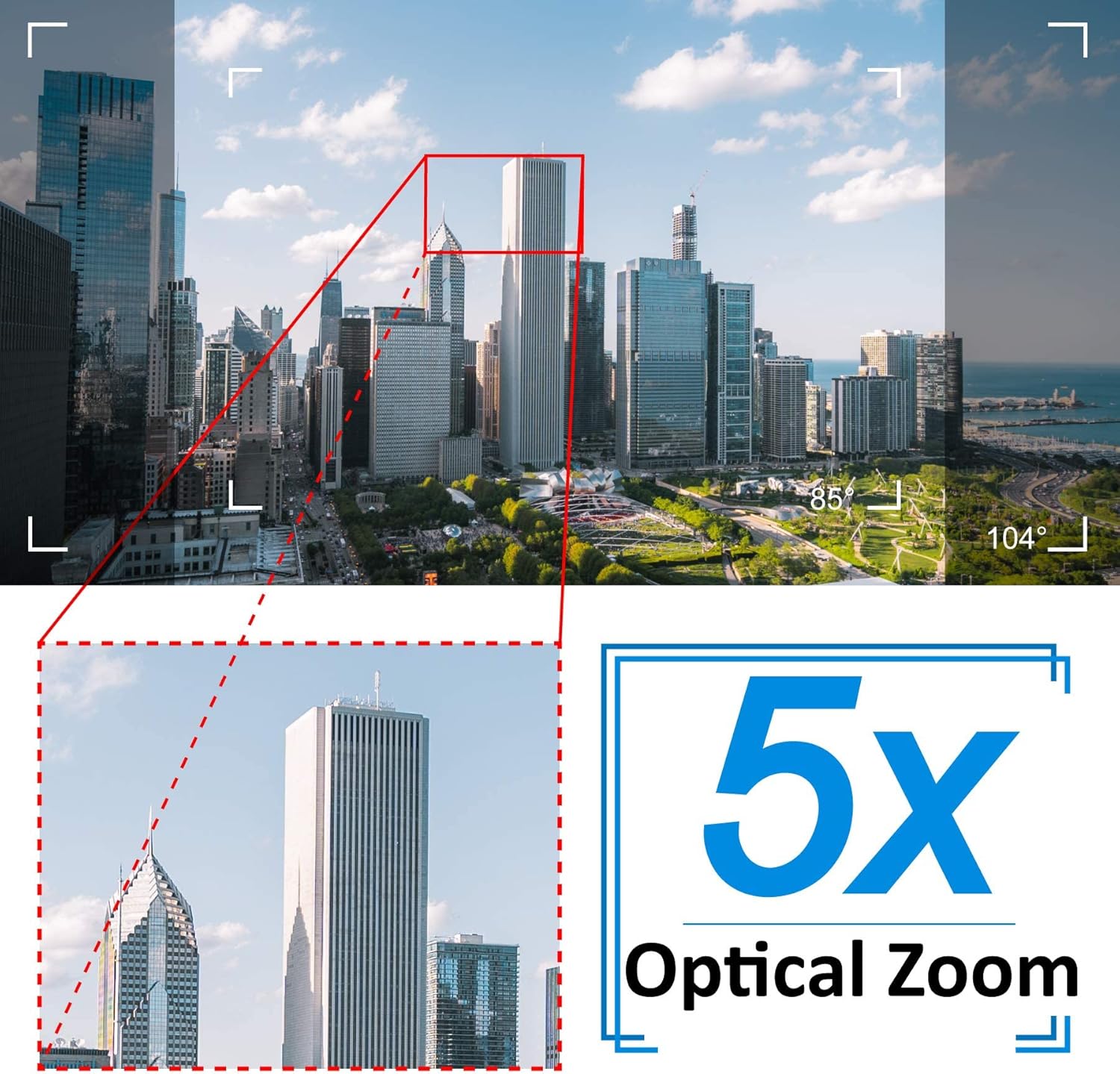
Image: A cityscape view demonstrating the 5X optical zoom feature, highlighting the ability to magnify distant objects clearly.
4.2 เสียงสองทาง
The camera supports two-way audio communication.

Image: A person interacting with the camera's two-way audio feature via a smartphone, showing speech bubbles for communication.
- ฟัง: Tap the speaker icon in the app to hear audio from the camera's location.
- พูด: Press and hold the microphone icon to speak through the camera's speaker. Release to stop speaking.
4.3 การมองเห็นตอนกลางคืน
กล้องจะสลับไปที่โหมดมองเห็นตอนกลางคืนโดยอัตโนมัติเมื่ออยู่ในสภาวะแสงน้อย

ภาพ: การเปรียบเทียบแสดงภาพในเวลากลางวัน view of a house and its clear night vision equivalent captured by the 5MP 1920P camera.
- The integrated IR-Cut filter and infrared LEDs provide clear black-and-white video up to 65ft (20 meters) in complete darkness.
4.4 การตรวจจับการเคลื่อนไหวและการแจ้งเตือน
ตั้งค่าการตรวจจับการเคลื่อนไหวเพื่อรับการแจ้งเตือนเมื่อมีกิจกรรมที่น่าสงสัย

Image: A visual representation of the camera's human detection, email alert, and app notification features, with highlighted detection zones.
- Set Detection Zone: ในการตั้งค่าแอป ให้กำหนดพื้นที่เฉพาะภายในกล้อง view สำหรับการตรวจจับความเคลื่อนไหว
- ปรับความไว: Modify the motion detection sensitivity to minimize false alarms.
- Configure Alerts: Enable push notifications to your smartphone and/or email alerts with snapshots when motion is detected.
4.5 การบันทึกและการเก็บรักษา
The camera comes with a pre-installed 64GB SD card for local storage.
- การบันทึกต่อเนื่อง: The camera supports 24/7 continuous recording to the SD card.
- การบันทึกแบบวนซ้ำ: When the SD card is full, new recordings will automatically overwrite the oldest footage.
- การเล่นซ้ำ: การเข้าถึงที่บันทึกไว้ footage through the app's playback function.
5. การบำรุงรักษา
การบำรุงรักษาตามปกติจะช่วยให้กล้องรักษาความปลอดภัยของคุณมีประสิทธิภาพสูงสุดและมีอายุการใช้งานยาวนาน

Image: The Jennov PTZ camera shown outdoors in various weather conditions (rain, snow, sun, wind), emphasizing its IP66 weatherproof rating.
- การทำความสะอาด: ทำความสะอาดเลนส์กล้องเป็นระยะด้วยผ้านุ่มๆamp cloth to remove dust, dirt, or water spots that may affect image quality. Do not use harsh chemicals.
- ตรวจสอบการเชื่อมต่อ: Regularly inspect power and Ethernet cable connections for any signs of wear or damage. Ensure waterproof caps are securely in place.
- อัพเดตเฟิร์มแวร์: Check the app regularly for available firmware updates. Keeping the camera's firmware updated can improve performance and security.
- การปกป้องสิ่งแวดล้อม: While the camera is IP66 weatherproof, extreme conditions (e.g., direct lightning strikes, prolonged submersion) should be avoided.
6 การแก้ไขปัญหา
หากคุณพบปัญหาเกี่ยวกับกล้อง โปรดดูปัญหาทั่วไปและวิธีแก้ไขต่อไปนี้
| ปัญหา | สาเหตุที่เป็นไปได้ | สารละลาย |
|---|---|---|
| กล้องไม่สามารถเชื่อมต่อกับ Wi-Fi ได้ | Incorrect Wi-Fi password; Camera too far from router; Only supports 2.4GHz Wi-Fi. | Verify password. Move camera closer to router. Ensure your router is broadcasting a 2.4GHz network and your phone is connected to it during setup. |
| No image or black screen in live view. | Power issue; Network disconnection; Camera malfunction. | Check power connection. Verify Wi-Fi/Ethernet connection. Restart camera and router. |
| Night vision is unclear. | Dirty lens; Obstruction; Insufficient IR illumination. | Clean the camera lens. Ensure no objects are blocking the IR LEDs. |
| Motion detection alerts are too frequent or not triggered. | Sensitivity too high/low; Detection zone not configured correctly. | Adjust motion detection sensitivity in the app. Redefine the detection zone to focus on critical areas. |
| ระบบเสียงสองทางใช้งานไม่ได้ | Microphone/speaker muted; App permissions; Network latency. | Check mute settings in the app. Ensure the app has microphone permissions on your phone. Verify stable network connection. |
7. ข้อมูลจำเพาะ
Detailed technical specifications for the Jennov 5.0MP PTZ Outdoor WiFi Security Camera.
| คุณสมบัติ | ข้อมูลจำเพาะ |
|---|---|
| หมายเลขรุ่น | JE-P22HT55-5X-FAS-64-UK |
| ความละเอียดวิดีโอที่มีประสิทธิภาพ | 5 MP (1920p) |
| ซูมออปติคอล | 5X (2.7-13.5mm autofocus lens) |
| มุมก้าน / เอียง | แนวนอน: 355°, แนวตั้ง: 100° |
| เทคโนโลยีไร้สาย | Wi-Fi (2.4GHz เท่านั้น) |
| ช่วงการมองเห็นตอนกลางคืน | Up to 65ft (20 meters) with Infrared LED |
| คะแนนสภาพอากาศ | IP66 |
| พื้นที่จัดเก็บ | การ์ด Micro SD ขนาด 64GB (ติดตั้งมาแล้ว) |
| แหล่งจ่ายไฟ | 12V1A DC (24 Watts) |
| วัสดุ | เมทัลซีasing |
| ขนาด (กว้าง x ยาว x สูง) | 21.5 x 19.5 x 11.5 ซม. |
| น้ำหนัก | 1.2 กิโลกรัม |
| อุปกรณ์ที่รองรับ | Android/iOS Smartphones, Tablets, PCs |
| ประเภทการติดตั้ง | ติดผนัง, ติดเพดาน |
8. การรับประกันและการสนับสนุน
For warranty information and technical support, please refer to the official Jennov website or contact their customer service directly. Details regarding warranty periods and support channels are typically provided with your purchase documentation or on the manufacturer's product page.
โปรดเก็บหลักฐานการซื้อไว้เพื่อใช้ในกรณีเรียกร้องการรับประกัน


