1. บทนำ
This manual provides detailed instructions for the VTech Kidi Star Karaoke Machine, Model 80-165835. This interactive karaoke system is designed to provide an engaging musical experience with features such as Music Magic mode, voice-changing effects, built-in songs and games, and a colorful disco light. Please read this manual thoroughly before use to ensure proper operation and to maximize your enjoyment of the product.
2. ข้อมูลด้านความปลอดภัย
- ความปลอดภัยของแบตเตอรี่: Requires 4 AA batteries (included). Ensure correct polarity when inserting batteries. Do not mix old and new batteries, or different types of batteries. Remove exhausted batteries promptly.
- การดูแลผู้ใหญ่: Recommended for assembly and initial setup.
- อันตรายจากการสำลัก: มีชิ้นส่วนเล็ก ไม่เหมาะสำหรับเด็กอายุต่ำกว่า 3 ปี
- ความปลอดภัยทางไฟฟ้า: Use only the provided audio cable for connecting external devices. Do not attempt to modify or repair the unit.
- การจัดวาง: วางเครื่องบนพื้นผิวที่มั่นคงและเรียบเพื่อป้องกันการพลิคว่ำ
3. เนื้อหาบรรจุภัณฑ์
กรุณาตรวจสอบว่าสินค้าทั้งหมดมีอยู่ในแพ็คเกจ:
- VTech Kidi Star Karaoke Machine (Main Unit)
- Adjustable Stand (multiple sections)
- Microphone with cord
- สายสัญญาณเสียง (แจ็ค 3.5 มม.)
- แบตเตอรี่ AA 4 ก้อน
- คู่มือการใช้งาน (เอกสารนี้)
4. การตั้งค่า
4.1 การติดตั้งแบตเตอรี่
- Locate the battery compartment on the underside of the main unit.
- ใช้ไขควงเปิดฝาครอบช่องใส่แบตเตอรี่
- ใส่แบตเตอรี่ AA ใหม่ 4 ก้อน โดยตรวจสอบให้แน่ใจว่าขั้วถูกต้อง (+/-)
- เปลี่ยนฝาครอบและขันสกรูให้แน่น
4.2 Assembly of the Stand and Microphone
- Connect the base of the stand to the lowest pole section.
- Attach the remaining pole sections, adjusting the height as desired.
- Secure the main karaoke unit onto the top of the assembled stand.
- Plug the microphone into the designated port on the main unit.
- ตรวจสอบให้แน่ใจว่าการเชื่อมต่อทั้งหมดปลอดภัยก่อนใช้งาน

Figure 1: Fully assembled VTech Kidi Star Karaoke Machine.
5. คู่มือการใช้งาน
5.1 เปิด/ปิดเครื่อง
กดปุ่ม ปุ่มเปิดปิด (usually marked with a circle and a vertical line) located on the main unit to turn the machine on or off.

Figure 2: Control panel with various buttons and screen.
5.2 Music Magic Mode
เปิดใช้งาน Music Magic Mode to reduce the main vocal track of built-in songs or songs played from an external device. This allows you to sing along as the lead vocalist.

Figure 3: The Music Magic button for vocal reduction.
5.3 การเชื่อมต่ออุปกรณ์ภายนอก
Use the included audio cable to connect your MP3 player or smartphone to the karaoke machine. Plug one end into the device's headphone jack and the other into the AUX-in port on the karaoke machine. You can then play your own music through the machine's speaker.

Figure 4: Connecting an external device via audio cable.
5.4 Voice Changer Effects
The machine includes five different voice-changing effects. Press the ปุ่มเปลี่ยนเสียง to cycle through effects such as robot, echo, and more, adding fun variations to your singing.
5.5 Built-in Songs and Games
The Kidi Star Karaoke Machine features eight original built-in songs and six interactive games. Use the navigation buttons and the ปุ่มตกลง to select and play songs or games from the main menu.
5.6 ฟังก์ชั่นการบันทึก
Record your performances for up to five minutes using the built-in recorder. Press the ปุ่มบันทึก to start and stop recording. You can then play back your recorded tracks.
5.7 Disco Light Operation
The integrated disco light can be twisted 180 degrees to project colorful light patterns onto walls and ceilings, enhancing the karaoke experience. The lights activate automatically when the unit is on or can be controlled via a dedicated button.
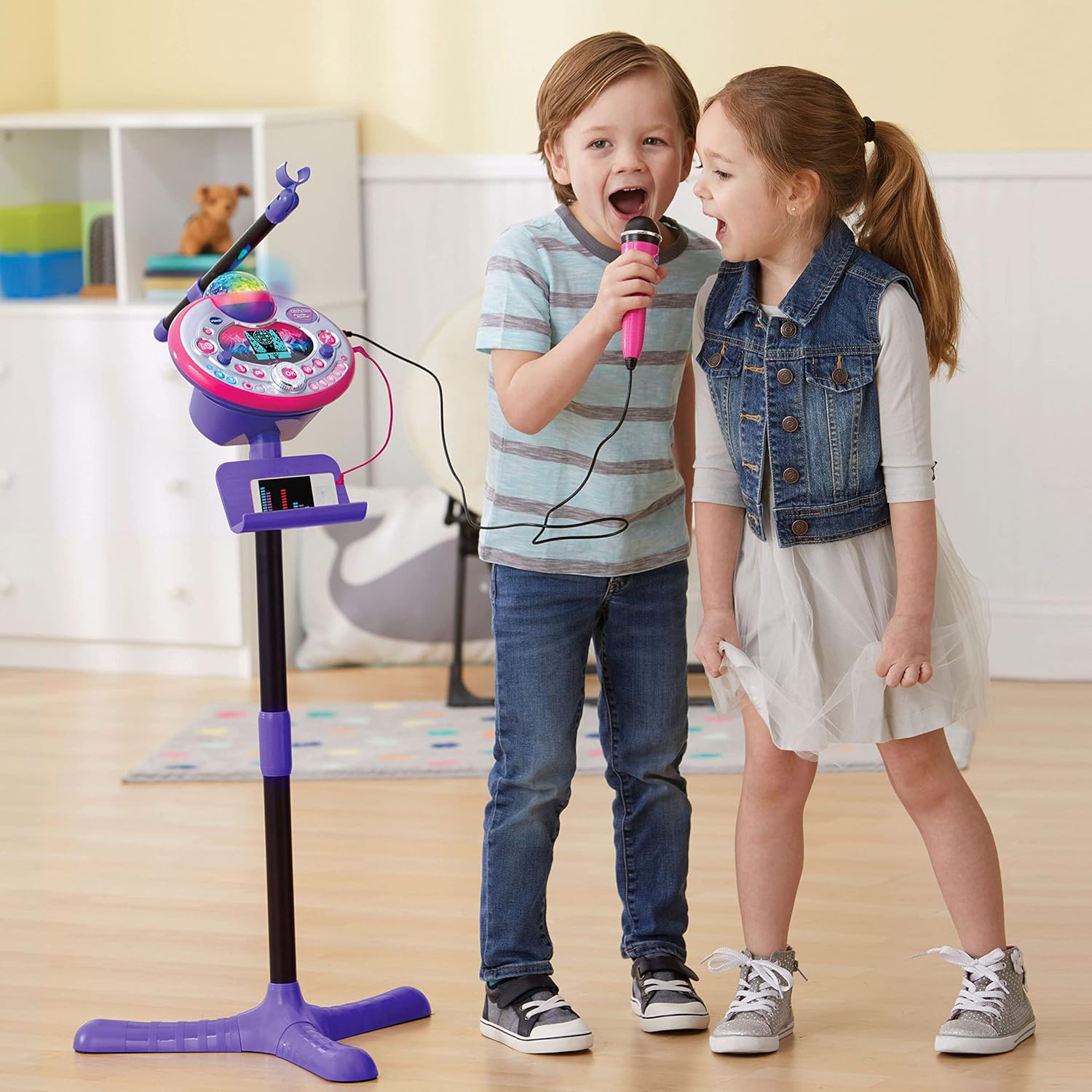
Figure 5: Disco light in action, projecting colorful patterns.
5.8 Audience Sounds
Engage the audience sound effects, such as applause, cheering, and laughter, by pressing the dedicated buttons. This feature simulates a live performance atmosphere.
6. การบำรุงรักษา
- การทำความสะอาด: เช็ดตัวเครื่องด้วย d เล็กน้อยamp ผ้า. อย่าใช้สารเคมีที่รุนแรงหรือน้ำยาทำความสะอาดที่มีฤทธิ์กัดกร่อน
- พื้นที่จัดเก็บ: ควรเก็บเครื่องคาราโอเกะไว้ในที่แห้งและเย็น หลีกเลี่ยงแสงแดดโดยตรงเมื่อไม่ได้ใช้งาน
- การดูแลแบตเตอรี่ ถอดแบตเตอรี่ออกหากจะไม่ได้ใช้งานเครื่องเป็นเวลานานเพื่อป้องกันการรั่วไหล
7 การแก้ไขปัญหา
| ปัญหา | สาเหตุที่เป็นไปได้ | สารละลาย |
|---|---|---|
| เครื่องไม่เปิด | แบตเตอรี่เหลือน้อยหรือติดตั้งไม่ถูกต้อง | เปลี่ยนแบตเตอรี่ใหม่โดยตรวจสอบให้แน่ใจว่าใส่ขั้วถูกต้อง |
| ไม่มีเสียงจากไมโครโฟน | Microphone not securely plugged in; volume too low. | Ensure microphone is fully inserted. Adjust microphone volume. |
| External device audio is not playing. | Audio cable not connected properly; device volume too low. | Check audio cable connections. Increase volume on both the external device and the karaoke machine. |
| Disco light not working. | Light feature is turned off or unit is in a low-power state. | Ensure the light button is pressed or the unit is powered on. Check batteries. |
8. ข้อมูลจำเพาะ
- หมายเลขรุ่น: 80-165835
- ยี่ห้อ: VTech
- สี: สีชมพู/ม่วง
- วัสดุ: พลาสติก
- แหล่งพลังงาน: แบตเตอรี่ AA 4 ก้อน (รวมอยู่ด้วย)
- การเชื่อมต่อ: อุปกรณ์เสริม (แจ็ค 3.5 มม.)
- อุปกรณ์ที่รองรับ: Smartphone, MP3 Player
- คุณสมบัติพิเศษ: Voice Changer, Disco Light, Built-in Recorder, Audience Sounds, Music Magic Mode, Built-in Songs & Games
- ขนาดสินค้า : Approximately 127.94 x 37.01 x 42.42 cm (assembled)
- น้ำหนักสินค้า: ประมาณ 1.34 กก.
9. การรับประกันและการสนับสนุน
สำหรับข้อมูลการรับประกันและการบริการลูกค้า โปรดดูที่เว็บไซต์อย่างเป็นทางการของ VTech webหรือติดต่อฝ่ายบริการลูกค้า โปรดเก็บใบเสร็จรับเงินไว้เป็นหลักฐานการซื้อสำหรับการเรียกร้องการรับประกันใดๆ
VTech Webเว็บไซต์: www.vtechkids.com


