1. บทนำ
Thank you for choosing the Greadio Retro Bluetooth Speaker and Vintage FM Radio. This manual provides essential information for the safe and efficient operation of your device. Please read it thoroughly before use and retain it for future reference.
2. ข้อมูลด้านความปลอดภัย
- อย่าให้เครื่องสัมผัสกับน้ำ ความชื้น หรืออุณหภูมิที่สูงหรือต่ำเกินไป
- หลีกเลี่ยงการทำอุปกรณ์หล่นหรือกระแทกอย่างรุนแรง
- อย่าพยายามถอดประกอบหรือซ่อมแซมอุปกรณ์ด้วยตนเอง โปรดติดต่อเจ้าหน้าที่บริการที่มีคุณสมบัติเหมาะสม
- เก็บให้พ้นจากมือเด็ก
- ใช้เฉพาะสายชาร์จที่ให้มาเท่านั้น
3. เนื้อหาบรรจุภัณฑ์
ตรวจสอบว่ามีรายการทั้งหมดอยู่ในแพ็คเกจ:
- Greadio Retro Bluetooth Speaker (Model GR919P)
- สายชาร์จ USB
- สาย AUX
- คู่มือการใช้งาน

Image: Greadio Retro Bluetooth Speaker (Pink) with its charging cable, AUX cable, and user manual.
4. สินค้าหมดview
Familiarize yourself with the main components and controls of your Greadio Retro Bluetooth Speaker.

Image: Front panel of the speaker, showing the speaker, frequency scale, tuning knob, volume knob, and ON/OFF & Function knob.

Image: Rear panel of the speaker, showing the Micro USB port, TF card socket, Play/Pause button, and Previous/Next buttons.
คุณสมบัติหลัก:
- ขนาดกระทัดรัด: Measures 4.4 x 2.7 x 2 inches, making it highly portable.
- ระดับเสียงที่ดัง: Equipped with a five-watt amplifier for rich and clear audio.
- Bluetooth 5.0: Advanced wireless connectivity for quick pairing.
- การเล่นหลายโหมด: Supports FM Radio, Bluetooth, TF Card, and AUX input.
- แบตเตอรี่แบบชาร์จไฟได้ในตัว: เล่นได้นานสูงสุด 9 ชั่วโมง
5. การตั้งค่า
5.1 การชาร์จเริ่มต้น
Before first use, fully charge the speaker. Connect the provided USB charging cable to the Micro USB port on the back of the speaker and plug the other end into a USB power adapter (not included) or a computer's USB port. The charging indicator light will illuminate during charging and turn off when fully charged.
5.2 เปิด/ปิดเครื่อง
To power on the speaker, rotate the ON/OFF & Function knob clockwise until you hear a click and the display lights up. To power off, rotate the knob counter-clockwise until it clicks off.
6. โหมดการทำงาน
The Greadio Retro Bluetooth Speaker supports multiple playback modes. Rotate the ON/OFF & Function knob to switch between modes.
6.1 โหมดบลูทู ธ
In Bluetooth mode, the speaker can connect wirelessly to your smartphone, tablet, or other Bluetooth-enabled devices.
- Turn on the speaker and switch to Bluetooth mode. The display will show a blue light, indicating it's ready for pairing.
- On your device, enable Bluetooth and search for "Greadio" or "R919".
- เลือกอุปกรณ์ลำโพงจากรายการเพื่อทำการจับคู่ จะมีเสียงยืนยันเมื่อการจับคู่สำเร็จ
- ตอนนี้คุณสามารถเล่นเสียงจากอุปกรณ์ของคุณผ่านลำโพงได้

Image: The speaker's dial illuminated in blue, signifying Bluetooth mode is active.
Video: Demonstrates how to connect the Greadio Bluetooth Speaker to a smartphone via Bluetooth, showing the pairing process and audio playback.
โหมดวิทยุ FM 6.2
Enjoy your favorite FM radio stations with the vintage-style tuner.
- Turn on the speaker and switch to FM Radio mode. The display will show an orange light.
- Rotate the Tuning Knob (large central knob) to scan for available FM stations.
- Adjust the Volume Knob (smaller knob) to your desired listening level.

Image: The speaker's dial illuminated in orange, signifying FM radio mode is active.
6.3 โหมดการ์ด TF
Play music directly from a TF (MicroSD) card.
- Insert a TF card (up to 32GB, not included) with MP3 audio files into the TF card socket on the back of the speaker.
- The speaker will automatically switch to TF Card mode and begin playback.
- Use the Play/Pause button and Previous/Next buttons on the back to control playback.

Image: The TF card slot located on the rear of the speaker for direct music playback.
6.4 โหมด AUX
Connect external audio devices using the AUX cable.
- Connect one end of the provided AUX cable to the AUX port on the back of the speaker.
- ต่อปลายอีกด้านหนึ่งเข้ากับช่องสัญญาณเสียงออกของอุปกรณ์ภายนอกของคุณ (เช่น เครื่องเล่น MP3, คอมพิวเตอร์)
- ลำโพงจะเปลี่ยนเป็นโหมด AUX โดยอัตโนมัติ เล่นเสียงจากอุปกรณ์ภายนอกของคุณ

Image: The AUX port on the rear of the speaker for wired audio connections.
7. การชาร์จไฟ
The speaker features a built-in 1100mAh rechargeable Lithium Ion battery. When the battery is low, the speaker will indicate this (e.g., voice prompt). Connect the Micro USB charging cable to a 5V/1A USB power source to recharge. A full charge typically takes 3-4 hours and provides up to 9 hours of playback time, depending on volume and mode.
8. การบำรุงรักษา
- ทำความสะอาดลำโพงด้วยผ้านุ่มและแห้ง ห้ามใช้น้ำยาทำความสะอาดหรือสารละลายที่มีฤทธิ์กัดกร่อน
- เก็บลำโพงไว้ในที่แห้งและเย็น หลีกเลี่ยงแสงแดดโดยตรงและอุณหภูมิที่สูงหรือต่ำเกินไป
- หากไม่ได้ใช้งานเป็นเวลานาน ควรชาร์จแบตเตอรี่อย่างน้อยทุก ๆ สามเดือน เพื่อยืดอายุการใช้งาน
9 การแก้ไขปัญหา
| ปัญหา | สาเหตุที่เป็นไปได้ | สารละลาย |
|---|---|---|
| ลำโพงไม่เปิดเครื่อง | แบตเตอรี่อ่อน | ชาร์จลำโพงให้เต็ม |
| ไม่มีเสียงในโหมดบลูทูธ | Not paired or volume too low. | Ensure device is paired and volume is up on both speaker and source device. |
| การรับสัญญาณวิทยุ FM ไม่ดี | สัญญาณอ่อนหรือมีสัญญาณรบกวน | Adjust the speaker's position or rotate for better reception. The charging cable can act as an antenna. |
| การ์ด TF เล่นไม่ได้ | Card not inserted correctly or unsupported file รูปแบบ | ใส่การ์ด TF กลับเข้าไปใหม่ ตรวจสอบให้แน่ใจ files อยู่ในรูปแบบ MP3 |
10. ข้อมูลจำเพาะ
- หมายเลขรุ่น: GR919P
- ขนาดสินค้า : 4.4 x 2.7 x 2 นิ้ว
- น้ำหนักสินค้า: 7.7 ออนซ์
- เทคโนโลยีการเชื่อมต่อ: บลูทูธ 5.0
- เทคโนโลยีจูนเนอร์: FM
- แหล่งพลังงาน: ใช้พลังงานจากแบตเตอรี่ (รวมแบตเตอรี่ลิเธียมไอออน 1 ก้อน)
- คุณสมบัติพิเศษ: ชาร์จไฟได้
- ผู้ผลิต: Gredio
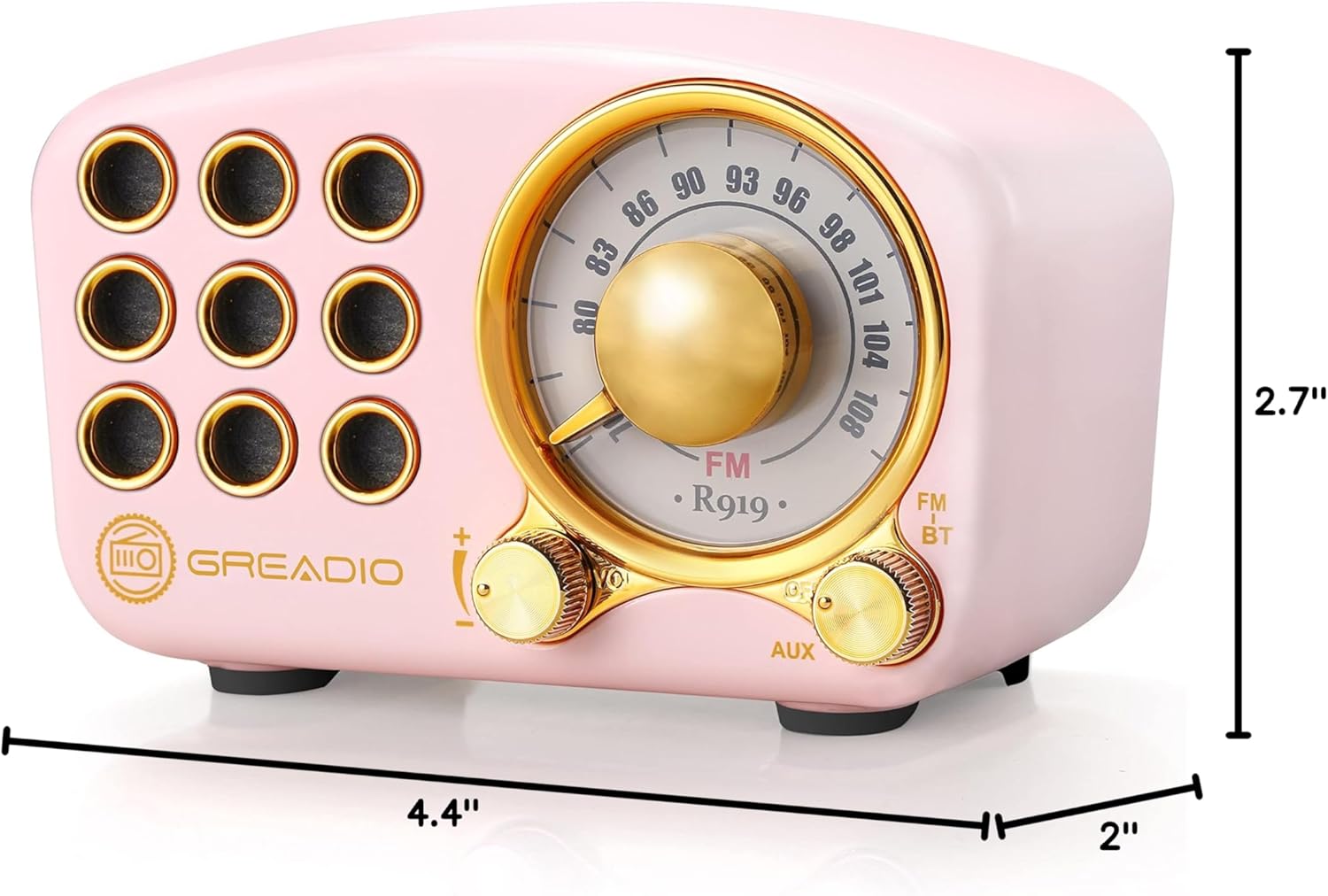
Image: Dimensions of the Greadio Retro Bluetooth Speaker.
11. การรับประกันและการสนับสนุน
Greadio products are designed for reliability and performance. For warranty information or technical support, please refer to the contact details provided on the product packaging or visit the official Greadio webไซต์ โปรดเก็บใบเสร็จรับเงินไว้เป็นหลักฐานการซื้อ


