1. บทนำ
This manual provides detailed instructions for the installation, configuration, and operation of your Anpviz 4MP PoE PTZ IP Camera, model PTZIP204WX4IR. Please read this manual thoroughly before using the product to ensure proper functionality and safety. This camera is designed for surveillance applications, offering high-resolution video, pan-tilt-zoom capabilities, and smart detection features.
2. ข้อมูลด้านความปลอดภัย
- ตรวจสอบแหล่งจ่ายไฟ voltage is correct before connecting the camera.
- อย่าวางกล้องไว้ในที่ที่มีอุณหภูมิสูง ความชื้นสูง หรือสภาพแวดล้อมที่มีฤทธิ์กัดกร่อน
- ควรหลีกเลี่ยงการหันเลนส์กล้องไปทางแหล่งกำเนิดแสงที่สว่างจ้าเป็นเวลานาน
- Handle the camera with care; avoid dropping or subjecting it to strong vibrations.
- การติดตั้งควรดำเนินการโดยบุคลากรที่มีคุณสมบัติเหมาะสมและเป็นไปตามข้อกำหนดด้านไฟฟ้าของท้องถิ่น
- ตัดการเชื่อมต่อไฟฟ้าก่อนดำเนินการบำรุงรักษาหรือทำความสะอาดใดๆ
3. เนื้อหาบรรจุภัณฑ์
ตรวจสอบว่ามีรายการทั้งหมดอยู่ในแพ็คเกจของคุณ:
- 1x Anpviz 4MP PTZ PoE IP Camera (Model PTZIP204WX4IR)
- ฝาปิดกันน้ำ 1 ชิ้น
- 1x Screw Kit for mounting
- 1x คู่มือผู้ใช้
- 1x After-sales Card
4. สินค้าหมดview
The Anpviz PTZIP204WX4IR is a 4-megapixel Power over Ethernet (PoE) Pan-Tilt-Zoom (PTZ) dome camera designed for both indoor and outdoor surveillance. It features 4x optical zoom, infrared night vision, and advanced video compression.

รูปที่ 4.1: ด้านหน้า view of the Anpviz 4MP PoE PTZ IP Camera.
คุณสมบัติหลัก:
- ความละเอียดระดับ HD 4 ล้านพิกเซล: Captures video at 2560x1440 pixels at 30 frames per second.
- ซูมแบบออปติคอล 4 เท่า: Allows for detailed magnification without loss of image quality.
- ฟังก์ชันการทำงานของ PTZ: 330° pan and 90° tilt for wide area coverage.
- IR ไนท์วิชั่น: Provides clear black and white video up to 67 feet in low-light conditions.
- H.265/H.265+ Compression: Efficient video compression to reduce bandwidth and storage requirements.
- ไมโครโฟนในตัว: For audio capture (one-way audio).
- ช่องเสียบการ์ด Micro SD: รองรับหน่วยความจำภายในสูงสุด 256GB (ไม่รวมการ์ดหน่วยความจำ)
- กันฝนระดับ IP67: Suitable for outdoor use, protected against dust and temporary immersion in water.
- การตรวจจับอัจฉริยะ: Includes perimeter protection (intrusion and line crossing detection) and motion detection.

รูปที่ 4.2: Visual representation of key features including 4MP resolution, IP67 waterproof rating, IR night vision, one-way audio, pan/tilt, 4X optical zoom, H.265+ compression, and 120dB Wide Dynamic Range.
5. การตั้งค่า
5.1 การติดตั้งกล้อง
The camera supports both ceiling and wall mounting. A wall mount may require an additional bracket (not included). Use the provided screw kit for secure installation. Ensure the mounting surface is stable and can support the camera's weight.

รูปที่ 5.1: Example of the Anpviz PTZIP204WX4IR camera mounted on the exterior of a building, connected to an NVR via network cable.
5.2 การเชื่อมต่อไฟฟ้าและเครือข่าย
The camera offers flexible connectivity options:
- Power over Ethernet (PoE) Switch: Connect the camera directly to a PoE switch using an Ethernet cable. The switch will provide both power (48V-52V) and network access.
- Anpviz H Series NVR (Plug & Play): For seamless integration, connect the camera to an Anpviz H Series NVR's PoE port. The NVR will manage power, recording, and network access.
- อะแดปเตอร์แปลงไฟ DC 12V: If not using PoE, connect a 12V DC power adapter (not included) to the camera's power input and an Ethernet cable to a standard router or switch for network access.

รูปที่ 5.2: Connection diagrams for PoE switch, Anpviz H Series NVR, and 12V DC power adapter.
5.3 การกำหนดค่าเริ่มต้น
After connecting the camera, you can access it via the Guarding Vision app (smartphone), iVMS PC client, or a web browser (requires plugin for Windows browsers like Edge, Firefox, Chrome). You may need to activate the camera and set an initial password for security. Refer to the specific software's user guide for detailed configuration steps.
6. การดำเนินการ
6.1 การควบคุมการแพน การเอียง และการซูม
The camera features 330° horizontal pan and 90° vertical tilt, allowing you to adjust the viewing angle remotely. The 4x optical zoom provides clear magnification of distant objects. These functions are controlled through the Guarding Vision app or iVMS PC client.

รูปที่ 6.1: The camera's pan and tilt capabilities, illustrating 330° pan and 90° tilt movement.

รูปที่ 6.2: Demonstrates the clarity difference between a normal view and a 4X optical zoom view.
6.2 คุณสมบัติการตรวจจับอัจฉริยะ
The camera includes advanced detection capabilities:
- การตรวจจับการเคลื่อนไหว: Configurable to detect movement within the camera's field of view and trigger alerts.
- การป้องกันปริมณฑล: Allows you to define specific areas for intrusion detection or line crossing detection. When an event occurs, the camera can send immediate alerts via the app or email.
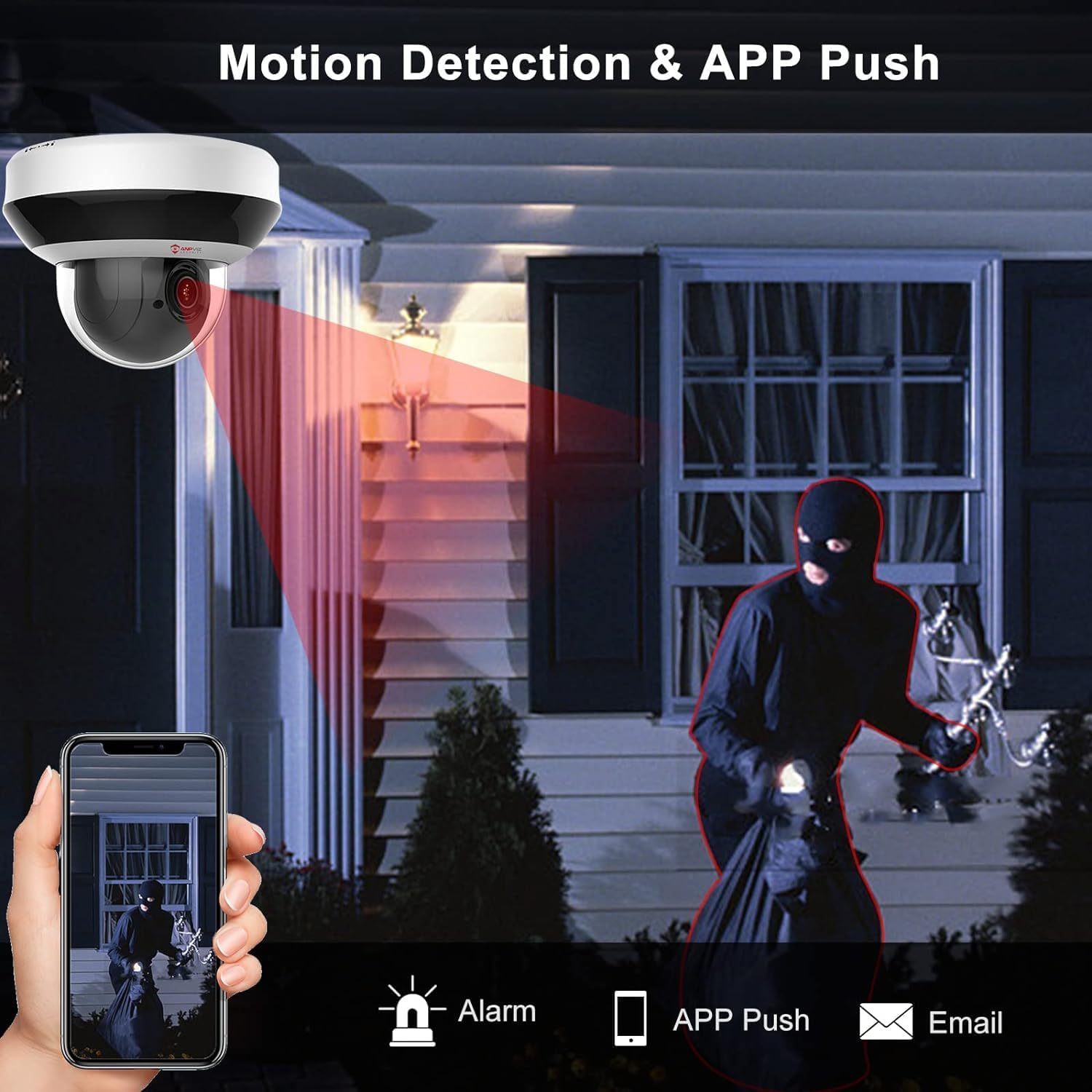
รูปที่ 6.3: Illustration of motion detection triggering an alarm and app push notification.

รูปที่ 6.4: Visual explanation of configurable line crossing and intrusion detection areas.
6.3 การบันทึกและการเก็บรักษา
กล้องรองรับวิธีการบันทึกและจัดเก็บข้อมูลหลากหลายวิธี:
- การ์ด Micro SD: Insert a Micro SD card (up to 256GB, not included) into the camera's slot for local video storage. Configure recording schedules (continuous, motion-triggered) via the app or PC client.
- Network Video Recorder (NVR): Connect to a compatible NVR for centralized recording and management.
- Network Attached Storage (NAS) / FTP: The camera supports NAS and FTP for network-based storage solutions.

รูปที่ 6.5: The camera features a built-in Micro SD card slot supporting up to 256GB for local storage.
The camera utilizes H.265/H.265+ video compression, which significantly reduces file sizes by up to 75% compared to H.264, optimizing storage space and bandwidth usage while maintaining video quality.

รูปที่ 6.6: เกินview of flexible storage options for the camera.

รูปที่ 6.7: H.265+ compression efficiency compared to H.264.
6.4 การเข้าถึงระยะไกล
Monitor your property from anywhere using the following platforms:
- Guarding Vision App: Available for iOS and Android devices. Provides live view, playback, and camera control.
- iVMS PC Client: Desktop software for Windows and macOS for comprehensive management.
- Web เบราว์เซอร์: Access the camera's interface directly via a web browser (Edge, Firefox, Chrome on Windows require a plugin).

รูปที่ 6.8: The Guarding Vision app interface for mobile monitoring.

รูปที่ 6.9: Remote access options across various devices.
7. การบำรุงรักษา
- การทำความสะอาด: Gently wipe the camera lens and body with a soft, dry cloth. For stubborn dirt, use a cloth lightly dampล้างให้สะอาดด้วยน้ำ หลีกเลี่ยงสารเคมีรุนแรงหรือน้ำยาทำความสะอาดที่มีฤทธิ์กัดกร่อน
- อัพเดตเฟิร์มแวร์: Periodically check the Anpviz website or your monitoring software for available firmware updates. Keeping the firmware updated ensures optimal performance and security.
- การปกป้องสิ่งแวดล้อม: While the camera is IP67 rated, ensure its mounting location minimizes direct exposure to extreme weather conditions to prolong its lifespan.
8 การแก้ไขปัญหา
| ปัญหา | สาเหตุที่เป็นไปได้ | สารละลาย |
|---|---|---|
| ไม่มีภาพ/วิดีโอส่งมา |
|
|
| การควบคุม PTZ ไม่ตอบสนอง |
|
|
| คุณภาพของภาพไม่ดีในเวลากลางคืน |
|
|
| Camera attempts to "phone home" (unauthorized network connections) |
|
|
9. ข้อมูลจำเพาะ
| คุณสมบัติ | รายละเอียด |
|---|---|
| ชื่อรุ่น | PTZIP204WX4IR |
| ความละเอียดในการจับภาพวิดีโอ | 4MP (2560x1440) |
| อัตราเฟรม | 30 เฟรมต่อวินาที |
| ซูมออปติคอล | 4x |
| ช่วงแพน | 330 องศา |
| ช่วงความเอียง | 90 องศา |
| ช่วงการมองเห็นตอนกลางคืน | 67 ฟุต (อินฟราเรด) |
| การบีบอัดวิดีโอ | H.265 / H.265 + |
| เสียง | Built-in Microphone (one-way) |
| พื้นที่จัดเก็บ | การ์ด Micro SD (สูงสุด 256GB ไม่รวม) |
| การเชื่อมต่อ | Wired (PoE), ONVIF, RTSP |
| แหล่งพลังงาน | ระบบไฟฟ้าแบบมีสาย (PoE หรือ 12V DC) |
| การใช้พลังงาน | 5 วัตต์ |
| ทนทานต่อสภาพอากาศ | กันน้ำระดับ IP67 |
| อุณหภูมิในการทำงาน | -22°F ถึง 140°F (-30°C ถึง 60°C) |
| ขนาด (กว้าง x ยาว x สูง) | 5 x 4 x 4 นิ้ว |
| น้ำหนักสินค้า | 1.83 ปอนด์ |
| อุปกรณ์ที่รองรับ | Anpviz NVRs, ONVIF-compatible NVRs/software (e.g., Blue Iris, Synology) |
| วิธีการควบคุม | App (Guarding Vision), PC Client (iVMS-4200), Web เบราว์เซอร์ |
| เทคโนโลยีโฟโต้เซนเซอร์ | ซีมอส |
| ประเภทการแจ้งเตือน | การเคลื่อนไหวเท่านั้น |
| ประเภทแหล่งกำเนิดแสง | อินฟราเรด |
| รูปแบบการจับภาพวิดีโอ | เอ็มพี 4 |
| การใช้งานเฉพาะของผลิตภัณฑ์ | การเฝ้าระวัง |
10. การรับประกันและการสนับสนุน
Anpviz provides a รับประกัน 2 ปี for this product. Additionally, การสนับสนุนทางเทคนิคตลอดอายุการใช้งาน is available to assist with any questions or issues you may encounter.
For technical assistance or warranty claims, please contact Anpviz support:
- อีเมล: support@anpviz.com
- เวลาทำการ : Monday - Friday, 9:00 AM - 6:00 PM (Time Zone not specified, assume PST/EST based on Amazon.com context)

รูปที่ 10.1: Anpviz customer support contact details.


