การแนะนำ
Thank you for choosing the NEDIS Wi-Fi Smart Fan Heater. This manual provides essential information for the safe and efficient operation of your new device. Please read these instructions carefully before use and retain them for future reference. Proper use and maintenance will ensure optimal performance and longevity of the product.
คำแนะนำเพื่อความปลอดภัย
เพื่อลดความเสี่ยงจากการเกิดไฟไหม้ ไฟฟ้าช็อต หรือการบาดเจ็บ ควรปฏิบัติตามข้อควรระวังด้านความปลอดภัยพื้นฐานเหล่านี้เสมอ:
- อ่านคำแนะนำทั้งหมดก่อนใช้เครื่องทำความร้อนนี้
- ห้ามใช้เครื่องทำความร้อนนี้บริเวณบริเวณใกล้เคียงอ่างอาบน้ำ ฝักบัว หรือสระว่ายน้ำ
- ห้ามคลุมเครื่องทำความร้อน การคลุมเครื่องทำความร้อนอาจทำให้เกิดความร้อนสูงเกินไปและเกิดไฟไหม้ได้
- ควรวางวัสดุที่ติดไฟได้ง่าย เช่น เฟอร์นิเจอร์ หมอน ผ้าปูที่นอน กระดาษ เสื้อผ้า และผ้าม่าน ให้ห่างจากด้านหน้าของเครื่องทำความร้อนอย่างน้อย 1 เมตร (3 ฟุต) และควรวางให้ห่างจากด้านข้างและด้านหลังด้วย
- ควรถอดปลั๊กเครื่องทำความร้อนทุกครั้งเมื่อไม่ได้ใช้งาน
- อย่าใช้งานฮีตเตอร์ด้วยสายไฟหรือปลั๊กที่เสียหายหรือหลังจากที่ฮีตเตอร์ทำงานผิดปกติตกหล่นหรือเสียหายในลักษณะใด
- ห้ามเดินสายไฟใต้พรม ห้ามคลุมสายไฟด้วยพรมเช็ดเท้า พรมยาว หรือวัสดุคลุมที่คล้ายกัน จัดสายไฟให้ห่างจากบริเวณที่มีคนสัญจรไปมาและบริเวณที่สายไฟจะไม่สะดุดล้ม
- จำเป็นต้องใช้ความระมัดระวังเป็นพิเศษเมื่อเด็กหรือผู้ป่วยใช้เครื่องทำความร้อน รวมถึงทุกครั้งที่ปล่อยให้เครื่องทำความร้อนทำงานและไม่มีใครดูแล
- This heater is equipped with a tip-over protection switch that automatically shuts off the heater if it is accidentally knocked over.
- ตรวจสอบให้แน่ใจว่าวางเครื่องทำความร้อนไว้บนพื้นผิวที่มั่นคงและระดับเดียวกัน
- สำหรับใช้ภายในอาคารเท่านั้น
สินค้าเกินview
Familiarize yourself with the main components of your NEDIS Wi-Fi Smart Fan Heater.
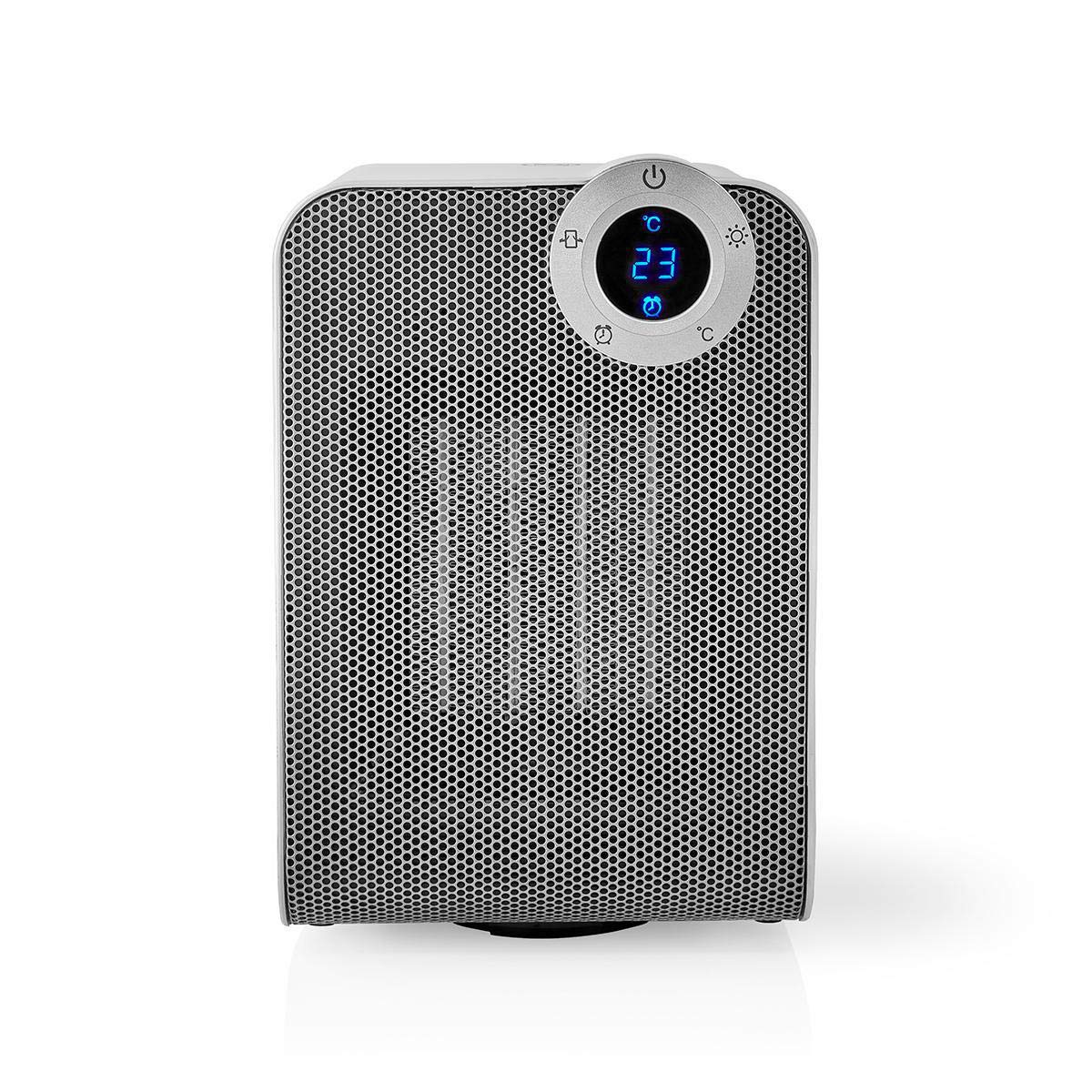
The front panel features a digital display that shows the current temperature and settings. Surrounding the display are touch-sensitive buttons for power, mode selection, oscillation, and timer functions.

The rear of the heater includes the main power switch (often a rocker switch) and the air intake grille. Ensure this area is not obstructed for proper airflow.

The compact design of the heater allows for easy placement in various indoor settings.
การตั้งค่า
การแกะกล่อง
- นำเครื่องทำความร้อนออกจากบรรจุภัณฑ์อย่างระมัดระวัง
- ตรวจสอบความเสียหายระหว่างการขนส่ง หากเกิดความเสียหาย ห้ามใช้งานและติดต่อฝ่ายสนับสนุนลูกค้า
- เก็บรักษาบรรจุภัณฑ์ไว้เพื่อการจัดเก็บหรือขนส่งในอนาคต
การจัดวาง
- วางเครื่องทำความร้อนบนพื้นผิวที่เรียบสม่ำเสมอ
- Ensure there is at least 1 meter (3 feet) of clear space around the heater to allow for proper air circulation and to prevent fire hazards.
- Do not place the heater near curtains, drapes, or other loose fabrics that could block the air intake or outlet.
- ตรวจสอบให้แน่ใจว่าสายไฟไม่ถูกหนีบหรือวางไว้ใต้ของหนัก
เปิดเครื่องเบื้องต้น
- Plug the heater into a suitable electrical outlet (220-240V AC, 50/60Hz).
- พลิกสวิตช์เปิดปิดหลักที่ด้านหลังของเครื่องไปที่ตำแหน่ง 'เปิด'
- The digital display on the front will illuminate, indicating the heater is in standby mode.
Wi-Fi Connection & App Setup
The NEDIS Wi-Fi Smart Fan Heater can be controlled via the Nedis SmartLife app, offering advanced features and remote control.
- ดาวน์โหลด เนดิส สมาร์ทไลฟ์ ดาวน์โหลดแอปจาก App Store (iOS) หรือ Google Play Store (Android)
- ลงทะเบียนบัญชีใหม่หรือเข้าสู่ระบบหากคุณมีบัญชีอยู่แล้ว
- ตรวจสอบให้แน่ใจว่าสมาร์ทโฟนของคุณเชื่อมต่อกับเครือข่าย Wi-Fi 2.4 GHz
- ในแอป ให้แตะไอคอน '+' เพื่อเพิ่มอุปกรณ์ใหม่
- Follow the on-screen instructions in the app to connect your heater to your Wi-Fi network. This usually involves putting the heater into pairing mode (refer to the app for specific instructions, often by pressing and holding a button on the heater).
- Once connected, you can control the heater from anywhere using the app.
คำแนะนำการใช้งาน
การควบคุมด้วยมือ
The heater can be operated directly using the touch buttons on the front panel:
- ปุ่มเปิด/ปิด: กดเพื่อเปิดหรือปิดเครื่องทำความร้อน
- ปุ่มโหมด: Cycle through heating modes (e.g., High Heat 1800W, Low Heat 900W, Fan Only).
- การปรับอุณหภูมิ: Use the '+' and '-' buttons (or similar) to set the desired temperature. The heater will operate at 1800W for rapid heating and automatically switch to 900W once the set temperature is approached.
- ปุ่มสั่น: Press to activate or deactivate the horizontal oscillation feature, distributing heat across a wider area.
- ปุ่มตั้งเวลา: Set a timer for the heater to automatically turn off after a specified duration.
SmartLife App Control
Once connected to the Nedis SmartLife app, you can access advanced control features:
- เปิด/ปิดเครื่องจากระยะไกล: ควบคุมเครื่องทำความร้อนได้จากทุกที่
- การปรับอุณหภูมิ: Precisely set and monitor the room temperature.
- การเลือกโหมด: Choose between different heating levels or fan-only mode.
- การควบคุมการสั่น: เปิดหรือปิดคุณสมบัติการสั่น
- การกำหนดตารางเวลา: Create custom heating schedules for different times of the day or week.
- ฟังก์ชั่นจับเวลา: Set a countdown timer for automatic shutdown.
การควบคุมด้วยเสียง
The heater supports voice control through popular smart assistants. To enable this, link your Nedis SmartLife account with your preferred voice assistant (Google Home or Amazon Alexa) via their respective apps. Once linked, you can use voice commands such as:
- "Hey Google, turn on the heater."
- "Alexa, set the heater to 22 degrees."
- "Hey Google, turn off the heater."
การซ่อมบำรุง
การทำความสะอาด
การทำความสะอาดอย่างสม่ำเสมอจะช่วยรักษาประสิทธิภาพการทำงานของเครื่องทำน้ำอุ่นและยืดอายุการใช้งานได้
- ควรถอดปลั๊กเครื่องทำความร้อนออกและปล่อยให้เย็นลงสนิทก่อนทำความสะอาด
- เช็ดพื้นผิวภายนอกด้วยผ้านุ่ม damp ผ้า ห้ามใช้สารทำความสะอาดที่มีฤทธิ์กัดกร่อนหรือตัวทำละลาย
- ใช้เครื่องดูดฝุ่นที่มีหัวแปรงเพื่อกำจัดฝุ่นออกจากช่องรับอากาศและช่องระบายอากาศ
- ตรวจสอบให้แน่ใจว่าไม่มีน้ำเข้าไปในเครื่องทำน้ำอุ่น
พื้นที่จัดเก็บ
เมื่อไม่ได้ใช้งานเป็นเวลานาน:
- Unplug the heater and clean it as described above.
- Store the heater in its original packaging or a suitable box to protect it from dust and damage.
- Keep it in a cool, dry place, away from direct sunlight and moisture.
การแก้ไขปัญหา
หากคุณพบปัญหาเกี่ยวกับเครื่องทำความร้อน โปรดดูปัญหาทั่วไปและวิธีแก้ไขต่อไปนี้:
| ปัญหา | สาเหตุที่เป็นไปได้ | สารละลาย |
|---|---|---|
| เครื่องทำความร้อนไม่เปิด | No power, main switch off, tip-over switch activated. | Check power outlet, ensure main switch is ON, place heater upright on a stable surface. |
| ไม่มีความร้อนออก | Incorrect mode, thermostat setting too low. | Select a heating mode (High/Low), increase the thermostat setting above the current room temperature. |
| การเชื่อมต่อ Wi-Fi ล้มเหลว | รหัสผ่าน Wi-Fi ไม่ถูกต้อง, เครือข่าย 5GHz, ระยะห่างจากเราเตอร์ | Verify Wi-Fi password, ensure you are on a 2.4GHz network, move heater closer to the router, try re-pairing. |
| เครื่องทำความร้อนปิดลงโดยไม่คาดคิด | Overheating protection, tip-over protection, timer activated. | Ensure heater is not covered, clear obstructions, place upright, check timer settings. Allow to cool before restarting. |
ข้อมูลจำเพาะ
| คุณสมบัติ | ข้อมูลจำเพาะ |
|---|---|
| หมายเลขรุ่น | WIFIFNH20CWT |
| แหล่งพลังงาน | สายไฟ |
| กำลังขับ | 1800W (สูง), 900W (ต่ำ) |
| วิธีการให้ความร้อน | พา |
| ขนาด (กว้าง x ยาว x สูง) | 16.5 x 14.5 x 25 ซม. |
| น้ำหนักสินค้า | 1.8 กก. |
| สี | ขาว/เงิน |
| คุณสมบัติพิเศษ | On/Off Timer, Oscillation, Tip-over Protection, Thermostat, Wi-Fi, App Control, Voice Control (Alexa, Google Home) |
| ประเภทการติดตั้ง | ชั้นเมา |
| ข้อแนะนำการใช้ | Indoor, Home, Study Room |
| แบตเตอรี่ที่จำเป็น | เลขที่ |
การรับประกันและการสนับสนุน
Your NEDIS Wi-Fi Smart Fan Heater is covered by a manufacturer's warranty. Please refer to the warranty card included with your purchase for specific terms and conditions, including the warranty period and coverage details.
For technical support, troubleshooting assistance, or warranty claims, please contact NEDIS customer service. Contact information can typically be found on the product packaging, the NEDIS webไซต์หรือใบเสร็จรับเงินการซื้อของคุณ


