1. สินค้าหมดview
The OOYCYOO 100 Amp MPPT Solar Charge Controller, Model KP60 100, is designed for efficient management of solar power systems. It automatically identifies 12V or 24V battery systems and is compatible with various battery types, including AGM, Sealed, Gel, Flooded, and Lithium. This controller features advanced Maximum Power Point Tracking (MPPT) technology to maximize energy harvest from solar panels, ensuring optimal charging for your battery bank.
Key features include a backlit LCD display for real-time monitoring, enhanced safety protections, and a high DC/DC transfer efficiency of up to 98.7%.

รูปที่ 1 : ด้านหน้า view of the OOYCYOO 100 Amp MPPT Solar Charge Controller, showing the LCD display and connection terminals.
2. คำแนะนำด้านความปลอดภัย
โปรดอ่านคำแนะนำและคำเตือนทั้งหมดอย่างละเอียดก่อนการติดตั้งและการใช้งาน การไม่ปฏิบัติตามคำแนะนำเหล่านี้อาจทำให้เกิดไฟฟ้าช็อต ไฟไหม้ หรือการบาดเจ็บร้ายแรงได้
- Ensure all wiring is correctly polarized and securely connected to prevent damage to the controller and connected devices.
- Always disconnect the solar panel array and battery before installing or adjusting the controller.
- ติดตั้งตัวควบคุมในบริเวณที่มีอากาศถ่ายเทสะดวก ห่างจากวัสดุไวไฟและแสงแดดโดยตรง
- Do not disassemble or attempt to repair the controller. Refer to qualified personnel for service.
- ควรใช้เบรกเกอร์หรือฟิวส์ที่เหมาะสมสำหรับการเชื่อมต่อทั้งหมดเพื่อป้องกันกระแสไฟเกิน
- Wear appropriate personal protective equipment, including eye protection and insulated gloves, during installation.
3. ส่วนประกอบและการเชื่อมต่อของผลิตภัณฑ์
The controller features clearly labeled terminals for solar panel input, battery connection, and load output. It also includes a remote temperature sensor port and USB charging ports.

รูปที่ 2: รายละเอียด view of the controller's LCD display, 5S Reset button, Solar Panel Terminal, Battery Terminal, Load Terminal, USB 5V2A ports, Remote Temp Sensor port, and RS485 Communication Port.
เนื้อหาแพ็คเกจ:
- 1 x OOYCYOO 100A MPPT Solar Charge Controller (Model K2500W)
- เซ็นเซอร์อุณหภูมิ 1 x
- 1 x คู่มือผู้ใช้ (ภาษาอังกฤษ)
4. ข้อมูลจำเพาะทางเทคนิค
The following table outlines the technical specifications for the OOYCYOO 100 Amp MPPT Solar Charge Controller (Model KP60 100).
| พารามิเตอร์ | ข้อมูลจำเพาะ |
|---|---|
| กระแสไฟชาร์จที่กำหนด | 100เอ |
| ปริมาตรที่กำหนดของระบบtage | 12V/24VDC Auto Identifying |
| 12V System Max. PV Input Power | 1300วัตต์ |
| 24V System Max. PV Input Power | 2600วัตต์ |
| แม็กซ์ PV Open Circuit Voltagอี (Voc) | 100VDC |
| ปริมาณแบตเตอรี่tagอี เรนจ์ | 9V ~ 32V |
| Power Terminal Wire Gauge | 10 อ็อกกิวเมนต์ |
| ขนาด (กว้าง x ยาว x สูง) | 12 x 7.8 x 3.2 นิ้ว (30.5 x 19.8 x 8.1 ซม.) |
| น้ำหนัก | 8.84 ปอนด์ (4 กก.) |
| ประเภทจอภาพ | จอแอลซีดี |
| อุณหภูมิในการทำงาน | สูงถึง 45°C (113°F) |
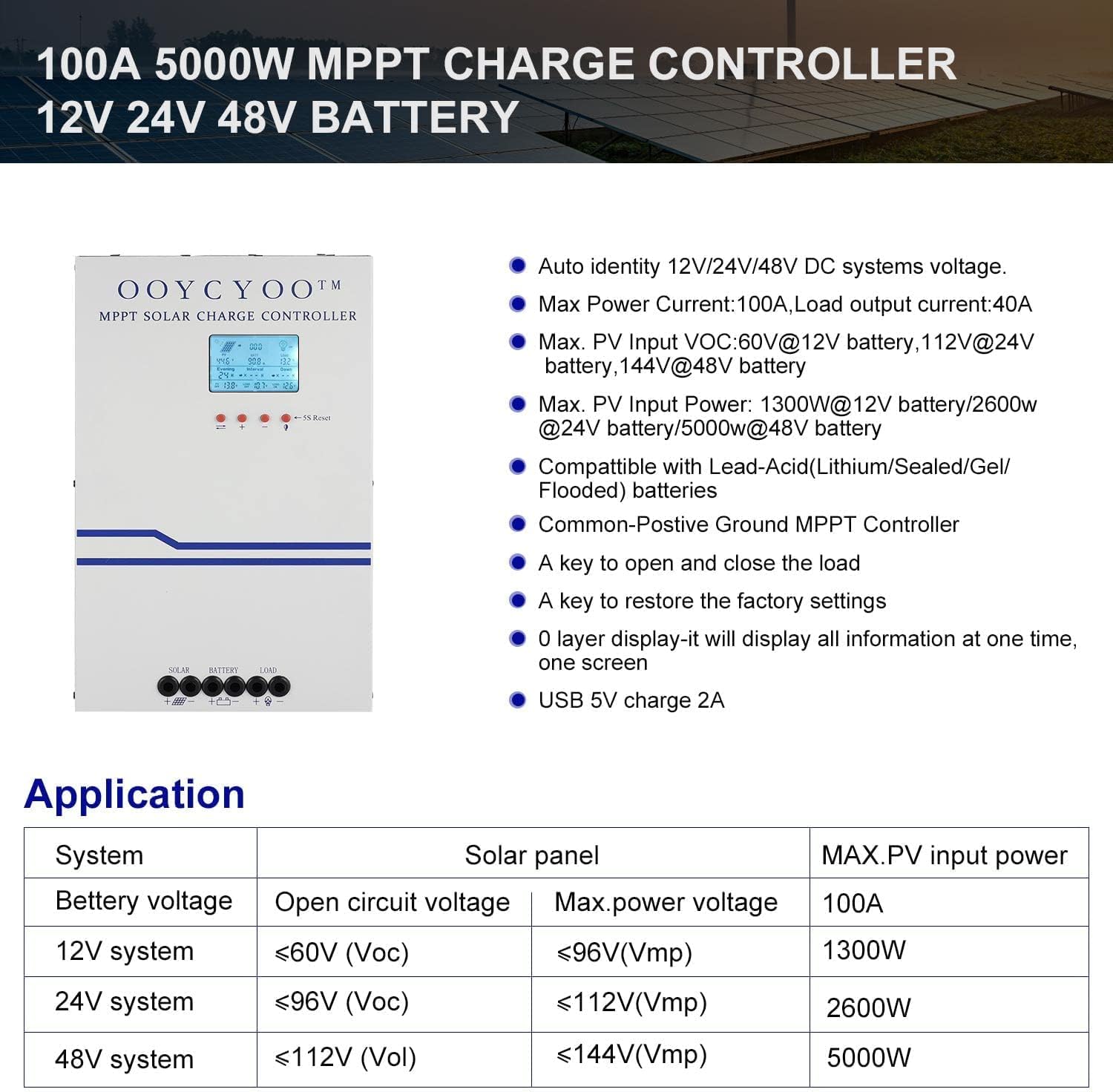
Figure 3: Application table detailing maximum PV input power and voltage for 12V, 24V, and 48V systems.
5. คู่มือการติดตั้ง
การติดตั้งอย่างถูกต้องมีความสำคัญอย่างยิ่งต่อการทำงานที่ปลอดภัยและมีประสิทธิภาพของตัวควบคุมการชาร์จพลังงานแสงอาทิตย์ของคุณ โปรดปฏิบัติตามขั้นตอนเหล่านี้อย่างระมัดระวัง:
5.1 การติดตั้งคอนโทรลเลอร์
- Choose a dry, well-ventilated location, protected from direct sunlight, high temperatures, and moisture.
- Ensure sufficient clearance around the controller for proper airflow, especially around the cooling vents.
- ติดตั้งตัวควบคุมในแนวตั้งบนพื้นผิวที่ไม่ติดไฟ โดยใช้อุปกรณ์ยึดที่เหมาะสม
5.2 การเชื่อมต่อสายไฟ
Connect the components in the following order: Battery > Solar Panel > Load. Always ensure correct polarity.
- เชื่อมต่อแบตเตอรี่: Connect the battery cables to the battery terminals on the controller. Ensure the positive (+) and negative (-) terminals are correctly matched. The controller will automatically detect the battery voltagอี (12V หรือ 24V)
- เชื่อมต่อแผงโซล่าเซลล์: Connect the solar panel cables to the PV input terminals on the controller. Verify correct polarity. Ensure the open circuit voltage (Voc) of your solar array does not exceed 100VDC.
- เชื่อมต่อโหลด: Connect your DC load to the load output terminals. Ensure the load current does not exceed the controller's rated load current.
- เชื่อมต่อเซ็นเซอร์วัดอุณหภูมิ: Plug the remote temperature sensor into its designated port. This sensor helps the controller optimize charging based on battery temperature.
The controller is compatible with various battery types:

Figure 4: The controller supports AGM, Sealed, Gel, Flooded, and Lithium-Iron phosphate batteries for 12V/24V/48V systems.
6. คู่มือการใช้งาน
Once installed, the controller will begin operation. The LCD display provides real-time system status and allows for configuration.
6.1 จอแสดงผล LCD
The backlit LCD display shows various parameters such as battery voltage, charging current, solar panel voltage, load status, and accumulated energy (KWH). Use the buttons below the display to navigate through the different screens and access settings.
6.2 การตั้งค่าพื้นฐาน
The controller allows users to set parameters for different battery types (Lithium, LiFePO4, Li(NiCoMn)O2, Flooded, Sealed, Gel). Refer to the on-screen menu for specific adjustments to absorption voltage, ปริมาตรลอยtage และปริมาตรต่ำtage disconnect settings. A load timer function is also available for controlling DC loads.
6.3 การทำงานของพัดลมระบายความร้อน
The built-in cooling fan activates automatically when the internal temperature exceeds 45°C (113°F) and turns off when the temperature drops below 40°C (104°F). This mechanism ensures optimal performance and extends the lifespan of the controller.
7. การบำรุงรักษา
การบำรุงรักษาอย่างสม่ำเสมอจะช่วยให้ตัวควบคุมการชาร์จพลังงานแสงอาทิตย์ของคุณมีอายุการใช้งานยาวนานและทำงานได้อย่างมีประสิทธิภาพสูงสุด
- การทำความสะอาด: Periodically clean the controller's exterior with a dry cloth. Ensure cooling vents are free from dust and debris.
- การเชื่อมต่อ: ควรตรวจสอบความแน่นหนาและการกัดกร่อนของจุดเชื่อมต่อสายไฟทั้งหมดเป็นประจำทุกปี การเชื่อมต่อที่หลวมอาจทำให้เกิดความร้อนสูงเกินไปและเกิดความเสียหายได้
- สิ่งแวดล้อม: Verify that the installation environment remains dry and well-ventilated.
8 การแก้ไขปัญหา
The controller incorporates multiple protection functions to safeguard your system. If an issue arises, check the LCD display for error codes or indicators.
8.1 ฟังก์ชันการป้องกัน
- PV Over Current/Power Protection
- ระบบป้องกันการลัดวงจร PV
- การป้องกันการกลับขั้ว PV
- Night Reverse Charging Protection
- การป้องกันการกลับขั้วของแบตเตอรี่
- แบตเตอรี่เกิน Voltagการป้องกันอี
- ระบบป้องกันการคายประจุแบตเตอรี่
- Battery Overheating, Controller Overheating Protection
- ระบบป้องกันแบตเตอรี่ลิเธียมที่อุณหภูมิต่ำ
- การป้องกันไฟฟ้าลัดวงจร
- ป้องกันการโอเวอร์โหลด
- TVS ฉบับสูงtage การป้องกันชั่วคราว
8.2 ปัญหาทั่วไป
- ไม่มีการชาร์จ: Check solar panel connections, ensure sufficient sunlight, and verify battery voltage อยู่ภายในขอบเขตการทำงาน
- โหลดไม่ทำงาน: Check load connections, ensure battery voltage อยู่เหนือระดับต่ำtage disconnect setting, and verify load timer settings.
- ความร้อนสูงเกินไป: Ensure adequate ventilation around the controller and that cooling vents are clear.
- Vol .ไม่ถูกต้องtage การอ่าน: Verify all connections are secure and the temperature sensor is properly installed.
หากปัญหายังคงอยู่หลังจากตรวจสอบตามขั้นตอนเหล่านี้แล้ว โปรดติดต่อฝ่ายบริการลูกค้า
9. การรับประกันและการสนับสนุน
The OOYCYOO 100 Amp MPPT Solar Charge Controller is a professional product. For any questions or technical assistance, please contact us directly via email. We are committed to providing prompt support and ensuring your satisfaction.
โปรดดูเอกสารการซื้อของคุณสำหรับข้อกำหนดและเงื่อนไขการรับประกันโดยเฉพาะ


