1. บทนำ
Thank you for choosing the Ozeri 360 Duo Tower Fan. This manual provides essential information for the safe and efficient operation of your new fan. Please read these instructions thoroughly before use and retain them for future reference.
The Ozeri 360 Duo Tower Fan features a unique dual oscillation system and advanced airflow patterns designed to circulate air effectively throughout your room.
2. คำแนะนำด้านความปลอดภัยที่สำคัญ
- อ่านคำแนะนำทั้งหมดก่อนใช้พัดลมนี้
- ตรวจสอบให้แน่ใจว่าแหล่งจ่ายไฟตรงกับปริมาตรtagตามที่ระบุไว้บนฉลากค่าพิกัดของพัดลม
- ห้ามใช้งานพัดลมที่มีสายไฟหรือปลั๊กชำรุด ทิ้งพัดลมหรือส่งกลับไปยังศูนย์บริการที่ได้รับอนุญาตเพื่อตรวจสอบและ/หรือซ่อมแซม
- ห้ามเดินสายไฟใต้พรม ห้ามคลุมสายไฟด้วยพรมเช็ดเท้า พรมยาว หรือวัสดุคลุมที่คล้ายกัน จัดสายไฟให้ห่างจากบริเวณที่มีคนสัญจรไปมาและบริเวณที่สายไฟจะไม่สะดุดล้ม
- หากต้องการตัดการเชื่อมต่อพัดลม ให้หมุนปุ่มควบคุมไปที่ปิด จากนั้นถอดปลั๊กออกจากเต้าเสียบ
- Do not insert or allow foreign objects to enter any ventilation or exhaust opening as this may cause an electric shock or fire, or damage the fan.
- อย่าปิดกั้นช่องระบายอากาศ หรือใช้งานใกล้กับม่านหรือวัสดุอื่น ๆ ที่อาจขัดขวางการไหลเวียนของอากาศ
- พัดลมนี้ไม่ได้มีไว้สำหรับใช้ในที่เปียกหรือเปียกamp สถานที่
- ควรวางพัดลมบนพื้นผิวที่มั่นคงและเรียบเสมอขณะใช้งาน
- จำเป็นต้องมีการดูแลอย่างใกล้ชิดเมื่อมีเด็กหรือใช้งานเครื่องใช้ไฟฟ้าใดๆ ใกล้เด็ก
3. เนื้อหาบรรจุภัณฑ์
Carefully unpack your Ozeri 360 Duo Tower Fan and ensure all items are present:
- Ozeri 360 Duo Tower Fan Unit
- Fan Base (consisting of two halves)
- รีโมทคอนโทรล
- คู่มือการใช้งาน (เอกสารนี้)
4. สินค้าหมดview
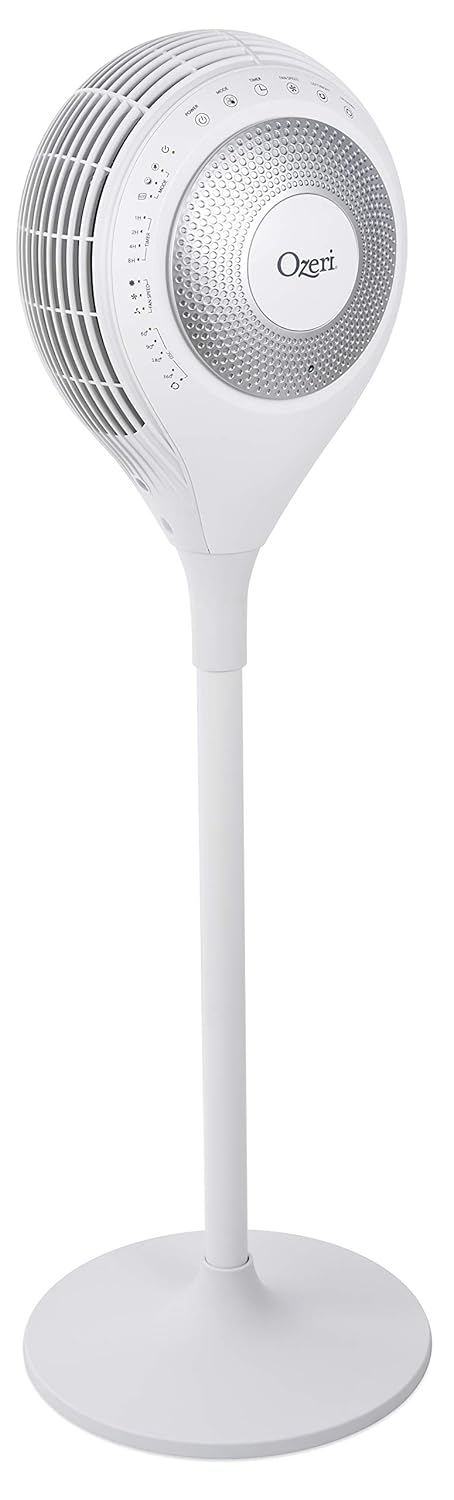
Familiarize yourself with the components of your Ozeri 360 Duo Tower Fan.


5. การตั้งค่า
The Ozeri 360 Duo Tower Fan is designed for easy assembly without special tools.
- ประกอบฐาน: Connect the two halves of the fan base together. Ensure they snap securely into place.
- Attach Fan Unit to Base: Carefully align the main fan unit with the assembled base. Push down firmly until it is securely seated.
- ตำแหน่งพัดลม: Place the fan on a firm, level surface, ensuring there are no obstructions to airflow.
- เชื่อมต่อกับพลังงาน: Plug the power cord into a standard AC electrical outlet.
6. คู่มือการใช้งาน
Your Ozeri 360 Duo Tower Fan can be operated using the touch control panel on the unit or the included remote control.

6.1. แผงควบคุมและฟังก์ชันระยะไกล
| ปุ่ม/ฟังก์ชั่น | คำอธิบาย |
|---|---|
| พลัง (⏻) | เปิดหรือปิดพัดลม |
| โหมด (☸) | Cycles through Normal, Natural, Sleeping, and Eco modes. |
| Fan Speed (☠) | Adjusts fan speed (Low, Medium, High) in Normal mode. Speed adjusts automatically in other modes. |
| Left/Right Oscillation (↻) | Activates or deactivates horizontal oscillation (60°, 90°, 180°, 360°). Press repeatedly to cycle through options. |
| Up/Down Oscillation (⇅) | Activates or deactivates vertical oscillation. |
| จับเวลา (⏲) | ตั้งเวลาปิดอัตโนมัติได้ 1, 2, 4 หรือ 8 ชั่วโมง |

6.2. โหมดการทำงาน
- โหมดปกติ: Provides continuous airflow at a selected speed (Low, Medium, High).
- โหมดธรรมชาติ: Simulates natural breezes by alternating between low, medium, and high airflow speeds.
- โหมดสลีป: Provides soothing, patterned airflow. The fan speed gradually reduces after 30 minutes to promote restful sleep. The LED display dims automatically.
- โหมดอีโค: Adjusts fan speed automatically based on ambient temperature to maintain comfort and optimize energy use.
6.3. Dual Oscillation
The Ozeri 360 Duo Tower Fan features both horizontal (Left/Right) and vertical (Up/Down) oscillation. These can be used independently or simultaneously to create helical wind currents, ensuring comprehensive air circulation throughout the room.
- การแกว่งแนวนอน: Press the Left/Right Oscillation button to cycle through 60°, 90°, 180°, or 360° rotation angles.
- การสั่นในแนวตั้ง: Press the Up/Down Oscillation button to activate or deactivate vertical movement of the fan head.
7. การบำรุงรักษา
การทำความสะอาดอย่างสม่ำเสมอจะช่วยรักษาประสิทธิภาพการทำงานของพัดลมและยืดอายุการใช้งานได้
- ก่อนการทำความสะอาด: ควรถอดปลั๊กพัดลมออกจากเต้ารับไฟฟ้าทุกครั้งก่อนทำความสะอาด
- การทำความสะอาดภายนอก: ใช้แบบนุ่มๆamp ผ้าเช็ดทำความสะอาดพื้นผิวภายนอกของพัดลม ห้ามใช้น้ำยาทำความสะอาดที่มีฤทธิ์กัดกร่อนหรือตัวทำละลาย
- Air Intake/Output Vents: Use a vacuum cleaner with a brush attachment to gently remove dust from the air intake and output vents. Do not attempt to disassemble the fan for cleaning.
- พื้นที่จัดเก็บ: If storing the fan for an extended period, cover it to protect it from dust and store it in a cool, dry place.
8 การแก้ไขปัญหา
If you experience issues with your Ozeri 360 Duo Tower Fan, please refer to the following common problems and solutions:
| ปัญหา | สาเหตุที่เป็นไปได้ | สารละลาย |
|---|---|---|
| พัดลมไม่เปิด | ไม่ได้เสียบปลั๊ก; ปลั๊กไฟไม่ทำงาน; ไม่ได้กดปุ่มเปิด/ปิด | Ensure the fan is securely plugged into a working outlet. Press the Power button on the unit or remote. |
| การไหลเวียนของอากาศอ่อน | Fan speed set too low; vents obstructed; dust accumulation. | Increase fan speed. Ensure vents are clear. Clean dust from vents as per Maintenance section. |
| การแกว่งไม่ทำงาน | ฟังก์ชั่นการสั่นไม่ได้เปิดใช้งาน | Press the Left/Right or Up/Down Oscillation button to activate. |
| รีโมทคอนโทรลไม่ทำงาน | Batteries depleted; remote not aimed at sensor. | Replace remote control batteries. Ensure the remote is aimed at the fan's control panel sensor. |
9. ข้อมูลจำเพาะ
| คุณสมบัติ | รายละเอียด |
|---|---|
| ยี่ห้อ | โอเซริ |
| ชื่อรุ่น | Ozeri 360 Duo Tower Fan, with Dual Oscillation |
| หมายเลขรุ่นสินค้า | ออซเอฟ7 |
| สี | สีขาว |
| การออกแบบพัดลมไฟฟ้า | พัดลมตั้งพื้น |
| แหล่งพลังงาน | AC |
| ขนาดสินค้า | ลึก 14.5 นิ้ว x กว้าง 14.5 นิ้ว x สูง 45.5 นิ้ว |
| น้ำหนักสินค้า | 14.96 ปอนด์ (6.8 กิโลกรัม) |
| คุณสมบัติพิเศษ | Oscillating (Dual Oscillation: Horizontal and Vertical) |
| วิธีการควบคุม | ระบบสัมผัส, รีโมท |
| ตรงตามข้อกำหนด | พลังงานสตาร์, FCC |
| ยูพีซี | 815817012654 |
10. การรับประกันและการสนับสนุน
Ozeri products are manufactured to high-quality standards. For specific warranty information, please refer to the warranty card included with your purchase or visit the official Ozeri webเว็บไซต์.
For technical support, replacement parts, or customer service inquiries, please contact Ozeri customer support through their official channels.
การสนับสนุนทางออนไลน์: เยี่ยมชม Ozeri Store on Amazon สำหรับข้อมูลผลิตภัณฑ์และทรัพยากรสนับสนุนเพิ่มเติม


