การแนะนำ
The Amazon Echo Show 8 (1st Gen, 2019 release) is a smart display designed to enhance your daily life with Alexa. Featuring an 8-inch HD screen and stereo sound, it allows you to manage your day, connect with loved ones through video calls, enjoy entertainment, control smart home devices, and personalize your experience. This manual provides detailed instructions to help you get the most out of your device.
มีอะไรอยู่ในกล่อง
Upon unboxing your Echo Show 8, ensure all components are present:
- อุปกรณ์ Echo Show 8
- อะแดปเตอร์แปลงไฟ (30 วัตต์) พร้อมสายไฟ (ยาว 4.9 ฟุต)
- คู่มือเริ่มต้นอย่างรวดเร็ว
การตั้งค่า
Setting up your Echo Show 8 is a straightforward process, often simplified by Amazon Wi-Fi simple setup technology.
- เปิดเครื่อง: Connect the power adapter to your Echo Show 8 and plug it into a wall outlet. The device will power on automatically.
- เลือกภาษา: ทำตามคำแนะนำบนหน้าจอเพื่อเลือกภาษาที่คุณต้องการ
- การเชื่อมต่อ Wi-Fi: Select your Wi-Fi network from the list and enter the password. The Echo Show 8 supports dual-band Wi-Fi (802.11a/b/g/n/ac).
- การเข้าสู่ระบบบัญชี Amazon: Log in with your Amazon account credentials. If you don't have one, you will be prompted to create one.
- การลงทะเบียนอุปกรณ์: Your device will register to your Amazon account.
- เขตเวลาและสถานที่ตั้ง: ยืนยันการตั้งค่าเขตเวลาและตำแหน่งที่ตั้งของคุณ
- บทช่วยสอน: The device may offer a brief tutorial on how to navigate and use its features.
The Alexa app is compatible with Fire OS, Android, and iOS devices and is also accessible via your web browser for further management and customization.
การใช้งาน Echo Show 8 ของคุณ
The Echo Show 8 can be operated using voice commands with Alexa or through its touch screen interface.
คำสั่งเสียง (Alexa)
เพียงพูดว่า "Alexa" ตามด้วยคำสั่งของคุณ เช่นampรวมถึง:
- "อเล็กซ่า อากาศเป็นยังไงบ้าง?"
- "อเล็กซ่า เล่นเพลง"
- "Alexa, call [contact name]."
- "Alexa, show me my photos."
- "Alexa, turn off the lights."

Image: Echo Show 8 displaying current weather conditions, demonstrating its ability to provide glanceable information.
การนำทางหน้าจอสัมผัส
Swipe down from the top of the screen to access quick settings and the home menu. Swipe left from the right edge to view cards with suggestions and information. Tap on icons and options to interact with the device.
คุณสมบัติ
The Echo Show 8 offers a wide range of features to simplify and enrich your daily routines:
- Video Calling & Messaging: Connect with friends and family who have the Alexa app or an Echo device with a screen. Make announcements to other devices in your home.

Image: A user making a video call on the Echo Show 8, highlighting its communication capabilities.
- ความบันเทิง: Ask Alexa to show you movie trailers, TV shows, movies, or the news. Listen to radio stations, podcasts, and audiobooks.
- การควบคุมบ้านอัจฉริยะ: Voice control compatible devices or manage them on the easy-to-use display. Ask Alexa to show you security cameras, control lights, and adjust thermostats.

Image: The Echo Show 8 displaying a live feed from a nursery camera, illustrating its smart home monitoring feature.
- การปรับแต่ง: Show off your albums from Amazon Photos. Customize your home screen. Create morning routines to start your day.
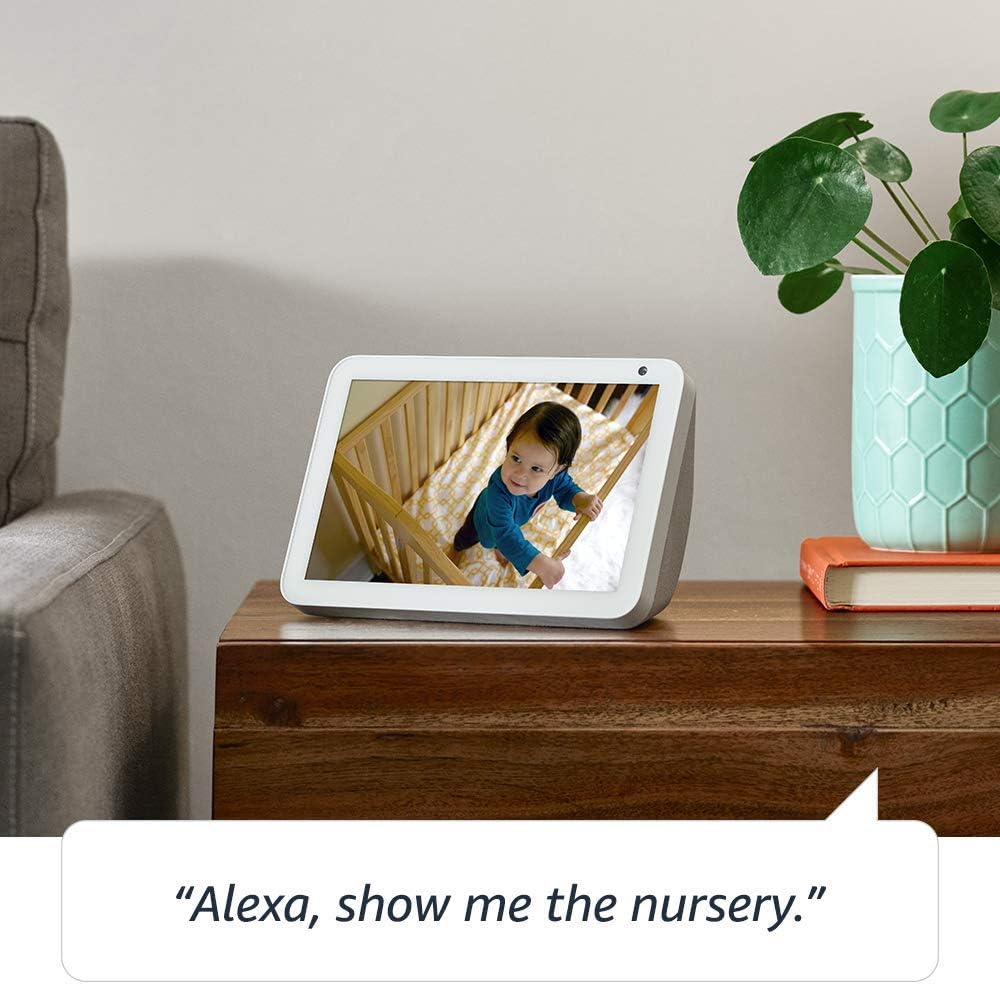
Image: The Echo Show 8 displaying a scenic photo from a user's Amazon Photos album, demonstrating its personalization options.
- ความช่วยเหลือรายวัน: Cook along to step-by-step recipes. Easily update to-do lists and calendars. Glance at weather and traffic on your way out.
คุณสมบัติความเป็นส่วนตัว
The Echo Show 8 is designed with privacy in mind, offering several controls:
- ปุ่มปิดไมโครโฟน/กล้อง: Electronically disconnect the microphones and camera with one press of a button.
- ชัตเตอร์กล้องในตัว: Slide the built-in shutter to physically cover the camera lens.

Image: A finger activating the physical camera shutter on the Echo Show 8, demonstrating a privacy control feature.
- เทคโนโลยี Wake Word: Alexa devices are designed to detect only your chosen wake word (e.g., "Alexa").
- ตัวบ่งชี้การสตรีมมิ่ง: Visual indicators show when Alexa is streaming your request to the cloud.
- การจัดการบันทึกเสียง: ความสามารถในการ view and delete your voice recordings through the Alexa app or Alexa Privacy Hub.
สำหรับข้อมูลเพิ่มเติม โปรดเยี่ยมชม Alexa Privacy Hub
การซ่อมบำรุง
เพื่อให้มั่นใจถึงอายุการใช้งานที่ยาวนานและประสิทธิภาพสูงสุดของ Echo Show 8 โปรดปฏิบัติตามคำแนะนำการบำรุงรักษาดังต่อไปนี้:
- การทำความสะอาด: Use a soft, lint-free cloth to clean the screen and exterior. Avoid abrasive cleaners or sprays directly on the device.
- การจัดวาง: Place the device on a stable, flat surface away from direct sunlight, heat sources, and moisture. Ensure proper ventilation.
- การอัปเดตซอฟต์แวร์: The device automatically receives software updates. Ensure it is connected to Wi-Fi to receive these updates, which improve performance and add new features.
การแก้ไขปัญหา
หากคุณพบปัญหาเกี่ยวกับ Echo Show 8 โปรดลองทำตามขั้นตอนต่อไปนี้:
- ไม่มีไฟฟ้า:
- ตรวจสอบให้แน่ใจว่าอะแดปเตอร์ไฟฟ้าเชื่อมต่อกับอุปกรณ์และเต้ารับไฟฟ้าที่ใช้งานได้แน่นหนา
- ลองใช้เต้ารับไฟอื่น
- ปัญหาการเชื่อมต่อ Wi-Fi:
- ตรวจสอบว่ารหัสผ่าน Wi-Fi ของคุณถูกต้อง
- รีสตาร์ทเราเตอร์ Wi-Fi และโมเด็มของคุณ
- ย้าย Echo Show 8 เข้าใกล้เราเตอร์ Wi-Fi ของคุณมากขึ้น
- Alexa ไม่ตอบสนอง:
- Ensure the microphone is not muted (check the microphone/camera off button).
- พูดให้ชัดเจนและระดับเสียงปกติ
- ลองรีสตาร์ทอุปกรณ์โดยถอดปลั๊กออกสองสามวินาทีแล้วเสียบกลับเข้าไปอีกครั้ง
- ปัญหาหน้าจอ:
- หากหน้าจอไม่ตอบสนอง ให้ลองรีสตาร์ทอุปกรณ์
- Ensure the screen is clean and free of smudges.
- รีเซ็ตเป็นค่าเริ่มต้นจากโรงงาน: As a last resort, you can perform a factory reset. This will erase all your personal data and settings. To do this, go to Settings > Device Options > Reset to Factory Defaults.
ข้อมูลจำเพาะ
| คุณสมบัติ | รายละเอียด |
|---|---|
| ขนาด | 7.9”x 5.4”x 3.9” (200mm x 135mm x 99mm) |
| น้ำหนัก | 36.6 ออนซ์ (1037 กรัม) |
| แสดง | หน้าจอสัมผัสขนาด 8.0” |
| กล้อง | 1MP camera with built-in shutter |
| การเชื่อมต่อ Wi-Fi | Wi-Fi แบบดูอัลแบนด์รองรับเครือข่าย Wi-Fi 802.11a/b/g/n/ac ไม่รองรับการเชื่อมต่อกับเครือข่าย Wi-Fi แบบ Ad-hoc (หรือแบบ peer-to-peer) |
| การเชื่อมต่อบลูทูธ | โปรกระจายเสียงขั้นสูงfile รองรับ A2DP สำหรับการสตรีมเสียงจากอุปกรณ์มือถือของคุณไปยัง Echo Show 8 หรือจาก Echo Show 8 ไปยังลำโพงบลูทูธของคุณ รีโมทคอนโทรลเสียง/วิดีโอ Profile (AVRCP) สำหรับการควบคุมอุปกรณ์เคลื่อนที่ที่เชื่อมต่อด้วยเสียง ไม่รองรับการควบคุมด้วยเสียงแบบแฮนด์ฟรีสำหรับอุปกรณ์ Mac OS X ไม่รองรับลำโพงบลูทูธที่ต้องใช้รหัส PIN |
| เสียง | 2.0” (52 mm) neodymium speakers with passive bass radiator |
| ความต้องการของระบบ | Echo Show 8 comes ready to connect to your WiFi. The Alexa app is compatible with Fire OS, Android, and iOS devices and also accessible via your web browser. Supported operating systems. Certain skills and services may require subscription or other fees. |
| โปรเซสเซอร์ | มีเดียเทค เอ็มที 8163 |
| ภาษา | Alexa พูดภาษาอังกฤษและภาษาสเปน |
คุณสมบัติการเข้าถึง
The Echo Show 8 includes various accessibility features to personalize Alexa to your abilities:
- แตะเพื่อ Alexa: Access Alexa via touch through on-screen tiles or a keyboard.
- การฟังแบบปรับตัว: เพิ่มเวลาให้พูดจบก่อนที่ Alexa จะตอบกลับ
- อัตราการพูดที่ต้องการ: ควบคุมความเร็วในการพูดของ Alexa ได้ตามต้องการ
- คำบรรยาย Alexa, คำบรรยายการโทร, คำบรรยายปิด: ให้คำอธิบายข้อความสำหรับเนื้อหาที่รองรับ
- แสดงและบอกเล่า: Helps customers who are blind or visually impaired identify products by saying “Alexa, what am I holding.”
- เสียงView โปรแกรมอ่านหน้าจอ: Enables access for customers who are blind or visually impaired.
- แว่นขยายหน้าจอ: Enables zooming in/out and panning around the screen.
- แจ้งเตือนเมื่ออยู่ใกล้: Plays notification sounds when you’re detected near your Echo device.
- Kindle อ่านออกเสียง: Alexa สามารถอ่านหนังสือ Kindle ของคุณออกเสียงได้
- ข้อความเรียลไทม์: Enables typing live text in a video call.
- การตั้งค่าเพิ่มเติม ได้แก่ การกลับสี การแก้ไขสี การร้องขอเสียง และอื่นๆ อีกมากมาย
To enable these features, go to Settings → Accessibility on your Echo Show 8.
การรับประกันและการสนับสนุน
Your Certified Refurbished Echo Show 8 comes with a 1-year limited warranty and service, similar to a new device. Use of Echo Show 8 is subject to Amazon's terms and conditions.
For further assistance, visit the Amazon Device Support page or contact Amazon Customer Service.


