1. บทนำ
This manual provides detailed instructions for the setup, operation, and maintenance of your TOPVISION SD01 Detachable Stereo Soundbar. Please read this manual thoroughly before using the product to ensure proper functionality and to maximize your audio experience. Keep this manual for future reference.
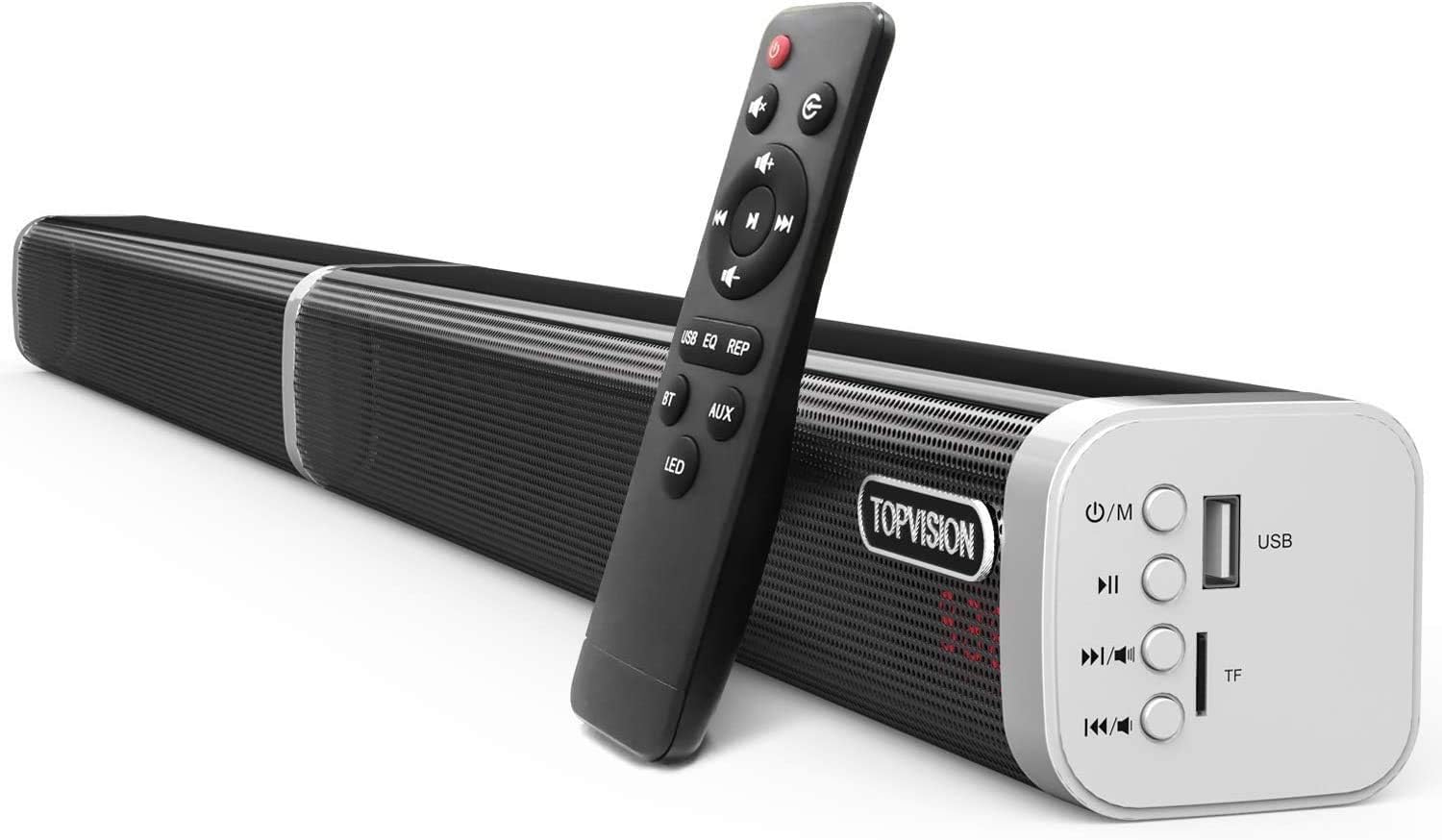
Image 1.1: TOPVISION SD01 Detachable Stereo Soundbar with included remote control.
2. เนื้อหาบรรจุภัณฑ์
โปรดตรวจสอบว่ารายการทั้งหมดที่ระบุไว้ด้านล่างมีอยู่ในแพ็คเกจของคุณหรือไม่:
- 1x Sound Bar (detachable into two tower speakers)
- สายออปติคอล 1 เส้น
- สายเคเบิล RCA ขนาด 1x3.5 มม.
- สายสัญญาณเสียง 1x 3.5mm
- อะแดปเตอร์ไฟฟ้า 1x
- 1x 10cm Audio Line (for connecting detached speakers)
- 1x 2m Audio Line (for connecting detached speakers)
- 1x Wall Mount Screws (set)
- 1x Wall Mount Template
- 1x รีโมทคอนโทรล

Image 2.1: All components included in the TOPVISION SD01 Soundbar package.
3. สินค้าหมดview
The TOPVISION SD01 is a versatile 60-watt, 39-inch stereo soundbar designed to enhance your audio experience. It features an integrated subwoofer for strong bass and offers both wired and wireless connectivity options, including Bluetooth 5.0. Its unique detachable design allows for flexible placement as a single soundbar or two tower speakers.
3.1 คุณสมบัติหลัก
- การออกแบบที่ถอดออกได้: Can be used as a single soundbar or two vertical tower speakers.
- คุณภาพเสียงสูง: 60 Watts output with an internal subwoofer for enhanced bass.
- ตัวเลือกการเชื่อมต่อที่หลากหลาย: Bluetooth 5.0, AUX, Optical, Coaxial, USB, TF Card.
- เทคโนโลยี DSP: Digital Signal Processing for optimized sound modes (Music, TV, Natural, Jazz, Popular, Classical, Rock).
- รีโมทคอนโทรล: Full control over modes, volume, playback, and LED display.

Image 3.1: Internal components of the soundbar, highlighting the speakers and bass diaphragms.

Image 3.2: Soundbar in use with a TV, demonstrating DSP sound modes.
4. การตั้งค่า
4.1 วิธีการติดตั้ง
The TOPVISION SD01 soundbar offers flexible installation options:
- วางบนชั้นวางทีวี: Place the soundbar horizontally in front of your television.
- ติดผนัง: Use the included wall mount kit and template to securely attach the soundbar to a wall.
- Tower Speakers: Detach the soundbar into two separate vertical speakers and place them on either side of your TV or desired location. Use the provided audio lines to connect the two halves.

Image 4.1: Various installation methods for the soundbar.

Image 4.2: Illustration of the detachable and combinable design.
4.2 การเชื่อมต่อซาวด์บาร์
The soundbar supports multiple connection types:
- Bluetooth 5.0: สำหรับการเชื่อมต่อแบบไร้สายกับอุปกรณ์ที่รองรับ เช่น สมาร์ทโฟน แท็บเล็ต และแล็ปท็อป
- ช่องเสริม: Use the 3.5mm audio cable for a standard wired connection.
- ออปติคอล: Connect via the optical cable for high-quality digital audio from your TV or other devices.
- โคแอกเซียล: Use a coaxial cable for digital audio connection.
- USB/การ์ด TF: Insert a USB drive or TF card for direct media playback.

Image 4.3: Easy connection options for the soundbar.
4.3 การเชื่อมต่อสายไฟ
Connect the provided power adapter to the DC 18V input port on the soundbar and then plug it into a power outlet. The soundbar will power on and indicate its status via the LED display.
Video 4.1: Demonstration of connecting the power adapter and powering on the soundbar, showing the LED display and remote control functionality.
5. คู่มือการใช้งาน
สามารถควบคุมซาวด์บาร์ได้โดยใช้ปุ่มบนตัวเครื่องหรือรีโมทคอนโทรลที่ให้มาด้วย
5.1 เปิด/ปิดเครื่อง
- กดปุ่ม พลัง กดปุ่มบนซาวด์บาร์หรือรีโมทคอนโทรลเพื่อเปิดหรือปิดเครื่อง
การเลือกโหมด 5.2
กดปุ่ม M (Mode) button on the soundbar or the corresponding input button (BT, AUX, OPT, COA, USB) on the remote to switch between input modes. The current mode will be displayed on the LED screen.
- บลูทูธ (BT): สำหรับการสตรีมเสียงแบบไร้สาย
- ช่องเสริม: สำหรับอินพุตเสียงแบบอนาล็อก
- ออปติคอล (OPT): For digital optical audio input.
- โคแอกเซียล (COA): For digital coaxial audio input.
- ยูเอสบี: สำหรับการเล่นเสียง fileจากไดรฟ์ USB
- บัตร TF: สำหรับการเล่นเสียง fileจากบัตร TF
5.3 การควบคุมระดับเสียง
- กดปุ่ม เพิ่มระดับเสียง (+) or ลดเสียงลง (-) ใช้ปุ่มบนซาวด์บาร์หรือรีโมทคอนโทรลเพื่อปรับระดับเสียง
- กดปุ่ม ปิดเสียง button on the remote to mute or unmute the sound.
5.4 Playback Controls (USB/Bluetooth Mode)
- เล่น/หยุดชั่วคราว: กดปุ่ม เล่น/หยุดชั่วคราว ปุ่ม.
- เพลงถัดไป: กดปุ่ม เพลงถัดไป ปุ่ม.
- แทร็กก่อนหน้า: กดปุ่ม เพลงก่อนหน้า ปุ่ม.
- Repeat Play (REP): Available only in USB mode.
5.5 Sound Effects (EQ)
กดปุ่ม EQ button on the remote control to cycle through different sound modes: Music, TV, Natural, Jazz, Popular, Classical, Rock.
5.6 การควบคุมจอแสดงผล LED
กดปุ่ม นำ button on the remote control to turn the LED display on or off.

Image 5.1: Soundbar controls and remote control functions.


