การแนะนำ
Thank you for choosing the Mipro MR-823 Dual Hand Wireless Microphone system. This manual provides detailed instructions for the proper setup, operation, and maintenance of your new wireless microphone system. Please read this manual thoroughly before using the product to ensure optimal performance and longevity.
ข้อมูลด้านความปลอดภัย
- อย่าให้เครื่องโดนฝนหรือความชื้นเพื่อป้องกันไฟไหม้หรือไฟฟ้าช็อต
- อย่าวางวัตถุที่บรรจุของเหลว เช่น แจกัน บนตัวเครื่อง
- ตรวจสอบให้แน่ใจว่ามีการระบายอากาศที่เหมาะสม อย่าปิดกั้นช่องระบายอากาศใดๆ
- ใช้เฉพาะอุปกรณ์เสริม/สิ่งที่แนบตามที่ผู้ผลิตกำหนดเท่านั้น
- ส่งต่อการบริการทั้งหมดไปยังช่างบริการที่ผ่านการรับรอง จำเป็นต้องเข้ารับบริการเมื่ออุปกรณ์ได้รับความเสียหายแต่อย่างใด
เนื้อหาแพ็คเกจ
กรุณาตรวจสอบเนื้อหาในแพ็คเกจของคุณเพื่อให้แน่ใจว่ามีสินค้าครบทั้งหมด:
- 1 x Mipro MR-823 Wireless Receiver Unit
- ไมโครโฟนไร้สายแบบถือ 2 ตัว
- อะแดปเตอร์แปลงไฟ
- สายสัญญาณเสียง
สินค้าเกินview
The Mipro MR-823 system consists of a receiver unit and two handheld wireless microphones, designed for clear and reliable audio transmission.
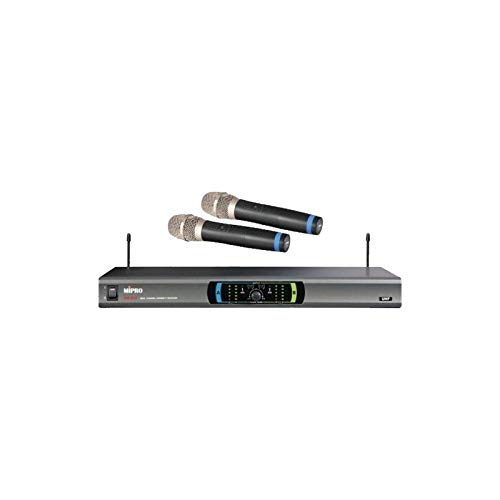
This image displays the complete Mipro MR-823 Dual Hand Wireless Microphone system. It features a sleek, rectangular receiver unit with a control panel and two antennas, accompanied by two black handheld wireless microphones. The microphones have silver grilles and blue accents near the base of the grille.
คุณสมบัติของชุดรับสัญญาณ:
- Front panel display for channel and status indication.
- Volume controls for each microphone channel.
- Antenna inputs for optimal signal reception.
- Audio output jacks (XLR and 1/4" unbalanced) on the rear panel.
Handheld Microphone Features:
- Integrated transmitter.
- สวิตช์ไฟ
- ช่องใส่แบตเตอรี่
การตั้งค่า
- แกะส่วนประกอบ: นำรายการทั้งหมดออกจากบรรจุภัณฑ์อย่างระมัดระวัง
- Position Receiver: Place the receiver unit on a stable, flat surface, away from potential sources of interference (e.g., computers, Wi-Fi routers). Ensure adequate ventilation around the unit.
- เชื่อมต่อเสาอากาศ: Screw the two antennas securely into their respective connectors on the rear of the receiver. Position them vertically for best reception.
- เชื่อมต่อเอาต์พุตเสียง: Connect the receiver's audio output (XLR or 1/4" unbalanced) to your mixer, amplifier, or sound system using the provided audio cable.
- เชื่อมต่อพลังงาน: Plug the power adapter into the DC input on the receiver and then into a suitable power outlet. Do not power on the unit yet.
- ติดตั้งแบตเตอรี่ไมโครโฟน: Open the battery compartment of each handheld microphone and insert fresh batteries, observing the correct polarity.
- เปิดเครื่อง: Turn on your audio system first, then power on the Mipro MR-823 receiver. Finally, turn on each handheld microphone.
คำแนะนำการใช้งาน
การซิงโครไนซ์ช่องสัญญาณ:
The MR-823 system typically features automatic frequency synchronization. Once the receiver and microphones are powered on, they should automatically link to an available clear channel. Refer to the receiver's display for channel information.
การปรับระดับเสียง:
Use the individual volume control knobs on the front panel of the receiver to adjust the output level of each microphone. Start with a low volume and gradually increase it to avoid feedback or distortion.
การใช้งานไมโครโฟน:
- ถือไมโครโฟนให้ห่างจากปากประมาณ 2-6 นิ้ว เพื่อรับเสียงได้ดีที่สุด
- Avoid covering the microphone grille with your hand, as this can affect sound quality and signal strength.
- Ensure a clear line of sight between the microphones and the receiver for best wireless performance.
การซ่อมบำรุง
- การทำความสะอาด: Use a soft, dry cloth to clean the exterior of the receiver and microphones. Do not use liquid cleaners or abrasive chemicals.
- การเปลี่ยนแบตเตอรี่: Replace microphone batteries when the low battery indicator appears or when audio quality degrades. Always use fresh, high-quality batteries.
- พื้นที่จัดเก็บ: When not in use for extended periods, remove batteries from the microphones and store the system in a cool, dry place, away from direct sunlight and extreme temperatures.
- การดูแลเสาอากาศ: โปรดระมัดระวังในการจับเสาอากาศเพื่อหลีกเลี่ยงการงอหรือแตกหัก
การแก้ไขปัญหา
| ปัญหา | สาเหตุที่เป็นไปได้ | สารละลาย |
|---|---|---|
| ไม่มีเสียงออกจากไมโครโฟน | Microphone not powered on; Low or dead batteries; Receiver not powered on; Volume too low; Microphone out of range; Frequency mismatch. | Ensure microphone and receiver are on; Replace batteries; Check receiver power; Increase volume; Move closer to receiver; Re-sync frequencies if necessary. |
| คุณภาพเสียงไม่ดี / สัญญาณรบกวน | Interference; Low batteries; Microphone too far from receiver; Obstructions; Incorrect gain settings. | Change operating frequency (if available); Replace batteries; Reduce distance; Remove obstructions; Adjust receiver volume. |
| เสียงสะท้อน (เสียงหอน) | Microphone too close to speakers; Volume too high; Room acoustics. | Move microphone away from speakers; Lower volume; Adjust speaker placement or use acoustic treatment. |
| ช่วงไร้สายสั้น | Obstructions; Interference; Antenna position. | Ensure clear line of sight; Re-position antennas; Avoid placing receiver near metal objects or other wireless devices. |
ข้อมูลจำเพาะ
| คุณสมบัติ | ข้อมูลจำเพาะ |
|---|---|
| ยี่ห้อ | MIPRO |
| แบบอย่าง | MR-823 |
| อิมพีแดนซ์ | 250 โอห์ม |
| แหล่งพลังงาน | ใช้พลังงานจากแบตเตอรี่ |
| อัตราส่วนสัญญาณต่อเสียงรบกวน | 78 เดซิเบล |
| ช่วงความถี่ | 100 เฮิรตซ์ - 10 กิโลเฮิรตซ์ |
| การตอบสนองความถี่ | ความถี่ 16 กิโลเฮิรตซ์ |
| ขนาดแพ็คเกจ | 34.01 x 24.99 x 21.01 ซม. |
| น้ำหนักสินค้า | 122 กรัม |
| แบตเตอรี่ที่จำเป็น | No (for receiver, but yes for microphones) |
| คุณสมบัติพิเศษ | ไร้สาย |
| สี | สีดำ |
| รูปแบบขั้ว | รอบทิศทาง |
การรับประกันและการสนับสนุน
For warranty information and technical support, please refer to the warranty card included with your product or visit the official MIPRO webไซต์ โปรดเก็บใบเสร็จรับเงินของคุณไว้เป็นหลักฐานการซื้อสำหรับการเรียกร้องการรับประกันใดๆ
If you encounter issues not covered in this manual, please contact MIPRO customer service or your authorized dealer for assistance.


