1. บทนำ
This manual provides essential information for the safe and efficient installation, operation, and maintenance of the IFM D100/DY34-A Speed Controller. This device is designed for pulse rate and rotational speed control in industrial applications, operating on 110/120 VAC power. Please read this manual thoroughly before attempting to install or operate the unit.
2. ข้อมูลด้านความปลอดภัย
คำเตือน: อันตรายจากไฟฟ้าช็อต การติดตั้งและบำรุงรักษาควรดำเนินการโดยบุคลากรผู้เชี่ยวชาญเท่านั้น
- ควรตัดกระแสไฟก่อนทำการติดตั้ง เดินสาย หรือบำรุงรักษาอุปกรณ์ทุกครั้ง
- ตรวจสอบให้แน่ใจว่ามีการต่อสายดินอย่างเหมาะสมเพื่อป้องกันไฟฟ้าช็อต
- ตรวจสอบว่าปริมาณการจ่ายtage matches the device's specified voltage (110/120 VAC)
- Do not operate the device in environments exceeding its specified temperature or humidity limits.
- Protect the device from moisture and corrosive substances.
- Refer to local and national electrical codes for all wiring and installation procedures.
3. สินค้าหมดview
The IFM D100/DY34-A is a compact speed controller designed for precise monitoring and control of rotational speeds or pulse rates. It features robust construction suitable for industrial environments.
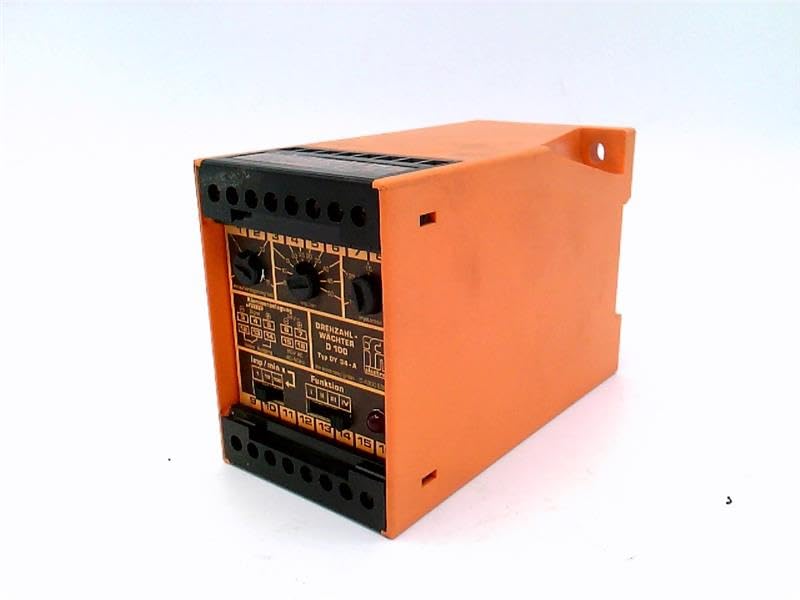
รูปที่ 1: ด้านหน้า view of the IFM D100/DY34-A Speed Controller. The image shows the orange casing, black terminal blocks at the top and bottom, and control dials on the front panel labeled for functions like "DREHZAHL-WACHTER D 100" (Rotational Speed Monitor D 100) and "Funktion" (Function).
ส่วนประกอบที่สำคัญ ได้แก่:
- บล็อกเทอร์มินัล: For power input, sensor connections, and output signals.
- ปุ่มควบคุม: Used for setting parameters such as speed thresholds and operating modes.
- ไฟแสดงสถานะ: (If visible/implied) For status indication (e.g., power, output active, error).
4. การตั้งค่า
4.1 การติดตั้ง
The controller is typically mounted on a DIN rail within an electrical enclosure. Ensure adequate ventilation around the unit to prevent overheating.
- Securely attach the unit to a standard DIN rail.
- Ensure sufficient clearance for wiring and heat dissipation.
4.2 การเดินสายไฟ
Refer to the wiring diagram provided on the unit or in the detailed technical documentation for specific connections. General wiring steps include:
- แหล่งจ่ายไฟ: Connect the 110/120 VAC power supply to the designated terminals. Observe correct polarity if applicable.
- อินพุตเซนเซอร์: Connect the pulse or rotational speed sensor to the input terminals. Ensure the sensor type (e.g., NPN, PNP) is compatible with the controller.
- การเชื่อมต่อขาออก: Connect the control output(s) to the driven device (e.g., motor contactor, alarm).
- การต่อลงดิน: Connect the protective earth ground to the designated ground terminal.
CAUTION: Incorrect wiring can damage the device or connected equipment. Double-check all connections before applying power.
5. คู่มือการใช้งาน
5.1 การเพิ่มพลังเริ่มต้น
- หลังจากเดินสายไฟเสร็จเรียบร้อยแล้ว ให้จ่ายไฟให้กับอุปกรณ์
- Observe any power indicator lights to confirm the unit is receiving power.
5.2 การตั้งค่าพารามิเตอร์
The D100/DY34-A features adjustable parameters via its front panel dials. These typically include:
- Set Point (Threshold): Adjust this dial to set the desired speed or pulse rate at which the output will activate or deactivate.
- Hysteresis/Window: (If available) Adjust to prevent rapid switching of the output when the input signal fluctuates around the set point.
- ตัวเลือกฟังก์ชัน: Select the operating mode (e.g., overspeed, underspeed, window function).
Consult the detailed technical manual for precise instructions on calibrating and setting each parameter for your specific application.
5.3 การดำเนินงาน
Once configured, the controller continuously monitors the input signal from the connected sensor. When the monitored speed or pulse rate crosses the set threshold, the corresponding output will change state according to the selected function.
6. การบำรุงรักษา
The IFM D100/DY34-A Speed Controller is designed for reliable operation with minimal maintenance. However, periodic checks are recommended.
- การทำความสะอาด: Keep the unit clean and free from dust and debris. Use a soft, dry cloth for cleaning. Do not use abrasive cleaners or solvents.
- การเชื่อมต่อ: ตรวจสอบการเชื่อมต่อสายไฟเป็นระยะๆ เพื่อดูว่ามีความแน่นหนาและมีสัญญาณของการกัดกร่อนหรือไม่
- สภาพแวดล้อม : ตรวจสอบให้แน่ใจว่าสภาพแวดล้อมการทำงานยังคงอยู่ในช่วงอุณหภูมิและความชื้นที่กำหนด
คำเตือน: โปรดตัดกระแสไฟทั้งหมดก่อนทำการบำรุงรักษาหรือทำความสะอาดใดๆ
7 การแก้ไขปัญหา
If the speed controller is not functioning as expected, consider the following common issues:
| ปัญหา | สาเหตุที่เป็นไปได้ | สารละลาย |
|---|---|---|
| ไม่มีไฟแสดงสถานะเพาเวอร์ | ไม่มีแหล่งจ่ายไฟ สายไฟไม่ถูกต้อง ฟิวส์ขาด | Check power source; verify wiring connections; replace fuse if necessary. |
| เอาท์พุตไม่เปิดใช้งาน/ปิดใช้งาน | Incorrect set point; faulty sensor; incorrect function setting; wiring error. | Adjust set point; check sensor operation; verify function selector; inspect output wiring. |
| การอ่านผิดพลาด | Sensor interference; loose connections; faulty sensor. | Check sensor cabling for shielding; tighten connections; test or replace sensor. |
If problems persist after attempting these solutions, contact IFM technical support or a qualified service technician.
8. ข้อมูลจำเพาะ
The following specifications are for the IFM D100/DY34-A Speed Controller:
- แบบอย่าง: D100/DY34-A
- อินพุต Voltage: 110 / 120 VAC
- การทำงาน: Pulse Rate/Rotational Speed Control
- น้ำหนักสินค้า: 1.84 ปอนด์
- ผู้ผลิต: EFECTOR (IFM)
- ASIN: B07RRL4XY3
- มีจำหน่ายครั้งแรก: 21 กุมภาพันธ์ 2025
9. การรับประกันและการสนับสนุน
For information regarding warranty coverage, technical support, or service, please refer to the official IFM website or contact your local IFM distributor. Keep your purchase receipt and product serial number handy when contacting support.
หมายเหตุ: ข้อกำหนดและเงื่อนไขการรับประกันเฉพาะอาจแตกต่างกันไปตามภูมิภาคและวันที่ซื้อ


