การแนะนำ
This manual provides detailed instructions for the setup, operation, and maintenance of your JENSEN JTA-230R 3-Speed Stereo Turntable with Built-in Speakers. Please read this manual thoroughly before using the product to ensure proper function and longevity.
คุณสมบัติหลัก
- Belt-driven 3-speed stereo turntable: Supports 33-1/3, 45, and 78 RPM records.
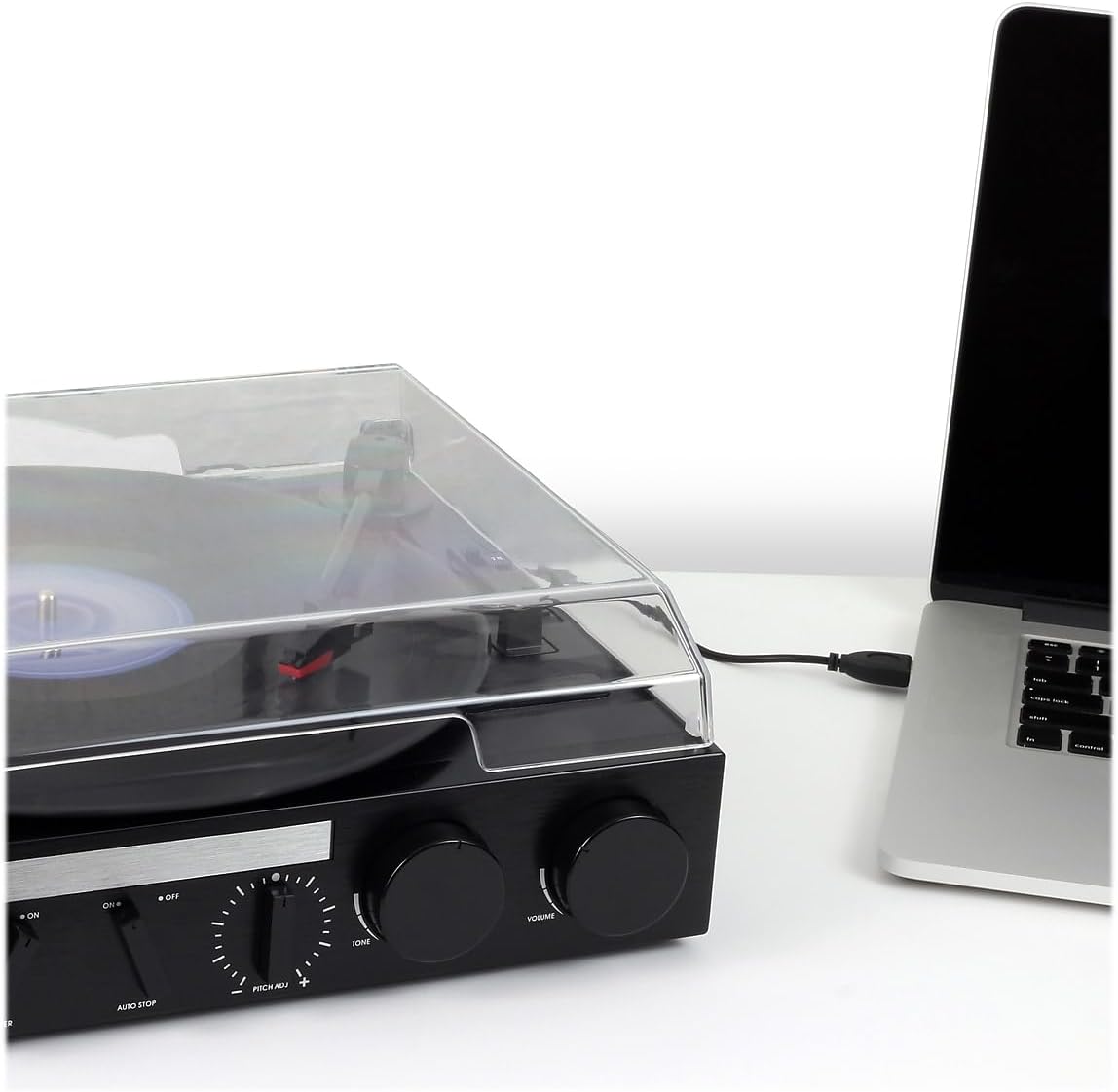
- USB port with included cable and software: Enables recording, editing, and converting vinyl records to digital MP3 format.
- Auxiliary input: Allows connection of external audio devices such as iPods, MP3 players, or other digital audio players.
- Stereo headphone output: For private listening.
- RCA line outputs: For connecting the turntable to an external home music system or ampชีวิต.
- Built-in stereo speakers: Provides integrated audio playback.
- Front-mounted pitch control: For fine-tuning record speed.
- Tone control: For adjusting sound quality.
การตั้งค่า
- การแกะกล่อง: Carefully remove the turntable from its packaging. Retain all packing materials for future transport or storage.
- การจัดวาง: วางเครื่องเล่นแผ่นเสียงบนพื้นผิวที่มั่นคงและเรียบเสมอกัน ห่างจากแสงแดดโดยตรง แหล่งความร้อน และฝุ่นละอองหรือการสั่นสะเทือนมากเกินไป
- ฝาปิดป้องกันฝุ่น: The unit includes a clear dust cover to protect the platter and tonearm when not in use. Ensure it is properly hinged.
- การเชื่อมต่อไฟฟ้า: Connect the AC power adapter to the DC input jack on the rear of the unit, then plug the adapter into a standard wall outlet.
- การป้องกันสไตลัส: Remove the clear plastic stylus protector from the needle before first use.

คำแนะนำการใช้งาน
เล่นแผ่นเสียงไวนิล
- เปิดเครื่อง: หมุนปุ่ม POWER/VOLUME ตามเข็มนาฬิกาเพื่อเปิดเครื่อง ไฟแสดงสถานะการทำงานจะสว่างขึ้น
- เลือกฟังก์ชัน: Set the FUNCTION switch to 'PHONO'.
- บันทึกสถานที่: เปิดฝาครอบกันฝุ่นและวางแผ่นเสียงลงบนแท่นหมุนอย่างระมัดระวัง
- เลือกความเร็ว: Set the SPEED SELECTOR switch (33/45/78) to match the playback speed of your record. For 45 RPM records, place the included 45 RPM adapter on the center spindle.
- ยกแขนโทนอาร์ม: ค่อยๆ ยกแขนโทนอาร์มขึ้นโดยใช้คันโยกสำหรับยกหัวอ่าน
- การปรับตำแหน่งแขนโทนอาร์ม: Move the tonearm over the desired track of the record.
- แขนโทนอาร์มส่วนล่าง: Slowly lower the tonearm onto the record using the cueing lever. The record will begin to play.
- ปรับระดับเสียง: ปรับระดับเสียงโดยใช้ปุ่ม POWER/VOLUME
- หยุดอัตโนมัติ: The AUTO STOP switch can be set to ON or OFF. When ON, the turntable will automatically stop spinning when the record finishes. When OFF, the turntable will continue to spin.
- สิ้นสุดการเล่น: At the end of the record, lift the tonearm, return it to the tonearm rest, and lower the cueing lever. Turn the POWER/VOLUME knob counter-clockwise to power off the unit.

การใช้วิทยุ
- เปิดเครื่อง: หมุนปุ่ม POWER/VOLUME ตามเข็มนาฬิกา
- เลือกฟังก์ชัน: Set the FUNCTION switch to 'AM' or 'FM' for radio playback.
- สถานีจูน: หมุนปุ่มปรับคลื่นวิทยุเพื่อเลือกสถานีวิทยุที่คุณต้องการ
- ปรับระดับเสียง: ปรับระดับเสียงโดยใช้ปุ่ม POWER/VOLUME
Connecting External Devices (AUX Input)
- เชื่อมต่ออุปกรณ์: Use an audio cable (not included) to connect your external audio device (e.g., MP3 player, smartphone) to the AUX IN jack on the front of the turntable.
- เลือกฟังก์ชัน: Set the FUNCTION switch to 'AUX'.
- เล่นเสียง: Start playback on your external device. The audio will play through the turntable's built-in speakers.
- ปรับระดับเสียง: Adjust the volume using the POWER/VOLUME knob on the turntable and/or the volume control on your external device.
การใช้หูฟัง
Plug your headphones into the HEADPHONE jack on the front of the unit for private listening. The built-in speakers will be muted when headphones are connected.
Connecting to an External Audio System (RCA Line Out)
Use RCA cables (not included) to connect the RCA LINE OUT jacks on the rear of the turntable to an available audio input on your home stereo system or powered speakers. This allows you to play vinyl records through a larger sound system.
Converting Vinyl to MP3 (USB Recording)
The JTA-230R includes a USB port and software for converting your vinyl records to digital MP3 fileส. ทำตามขั้นตอนเหล่านี้:
- ติดตั้งซอฟต์แวร์: Install the provided software (e.g., Audacity) onto your computer.
- เชื่อมต่อ USB: เชื่อมต่อเครื่องเล่นแผ่นเสียงเข้ากับคอมพิวเตอร์ของคุณโดยใช้สาย USB ที่ให้มา
- เตรียมพร้อมสำหรับการบันทึก: Open the software on your computer and follow its instructions to prepare for recording.
- บันทึกการเล่น: Start playing your vinyl record on the turntable as described in the 'Playing a Vinyl Record' section.
- Record and Save: Use the software to record the audio. Once recorded, you can edit and save the tracks as MP3 files on your computer for playback on digital devices.
การซ่อมบำรุง
การทำความสะอาดตัวเครื่อง
- เช็ดด้านนอกของตัวเครื่องด้วยผ้านุ่มdamp ผ้า ห้ามใช้สารทำความสะอาดที่มีฤทธิ์กัดกร่อนหรือตัวทำละลาย
- ควรปิดฝาครอบกันฝุ่นเมื่อไม่ใช้งาน เพื่อป้องกันฝุ่นสะสมบนแผ่นเสียงและหัวเข็ม
การดูแลสไตลัส
- สไตลัส (เข็ม) เป็นชิ้นส่วนที่บอบบาง โปรดใช้ด้วยความระมัดระวัง
- ทำความสะอาดสไตลัสเป็นระยะๆ โดยใช้แปรงขนนุ่มปัดเบา ๆ จากด้านหลังไปด้านหน้า
- A worn or damaged stylus can harm your records and degrade sound quality. Replace the stylus if it appears bent, chipped, or if sound quality diminishes significantly.
การแก้ไขปัญหา
| ปัญหา | สาเหตุที่เป็นไปได้ | สารละลาย |
|---|---|---|
| ไม่มีไฟฟ้า | ไม่ได้เสียบสายไฟ; ปลั๊กไฟไม่ทำงาน; เครื่องไม่ได้เปิดใช้งาน | Ensure power cord is securely plugged in; Check power outlet; Turn POWER/VOLUME knob clockwise. |
| ไม่มีเสียงออกจากลำโพง | ระดับเสียงเบาเกินไป; สวิตช์ฟังก์ชันไม่ถูกต้อง; เสียบหูฟังแล้ว | Increase volume; Set FUNCTION switch to 'PHONO', 'AM', 'FM', or 'AUX' as appropriate; Disconnect headphones. |
| เสียงเพี้ยน | Dirty record; Worn stylus; Incorrect speed; Tone control setting. | Clean record; Replace stylus; Verify correct speed (33/45/78 RPM); Adjust TONE control. |
| Record speed too fast or too slow | Incorrect speed selector setting; Pitch control adjustment. | Set SPEED SELECTOR to match record (33-1/3, 45, or 78 RPM); Adjust PITCH ADJ. knob for fine-tuning. |
| การข้ามการบันทึก | Dirty or scratched record; Turntable not level; Stylus worn or damaged. | Clean record; Ensure turntable is on a stable, level surface; Replace stylus. |
ข้อมูลจำเพาะ
- หมายเลขรุ่น: เจทีเอ-230อาร์
- ขนาดสินค้า : 11.34 x 12 x 4.96 นิ้ว
- น้ำหนักสินค้า: 1 ปอนด์ (454 กรัม)
- ยี่ห้อ: เจนเซ่น
- ความเร็วรอบสูงสุด: 78 รอบต่อนาที
- วัสดุ: พลาสติก
- สี: สีดำ
- คุณสมบัติพิเศษ: พกพาได้
- อุปกรณ์ที่รองรับ: หูฟัง, เครื่องเล่น MP3, ลำโพง, แท็บเล็ต
- ส่วนประกอบที่รวมอยู่: ผลิตภัณฑ์, คู่มือการใช้งาน
การรับประกันและการสนับสนุน
Information regarding product warranty and customer support is not available in the provided data. Please refer to the product packaging or manufacturer's webเว็บไซต์สำหรับรายละเอียด


