1. สินค้าหมดview
This manual provides comprehensive instructions for the setup, operation, and maintenance of your Calvas Fetcus replacement remote control for Panasonic air conditioners. This remote is designed to provide seamless control over your compatible air conditioning unit, offering functions such as power, mode selection, temperature adjustment, fan speed control, and timer settings.
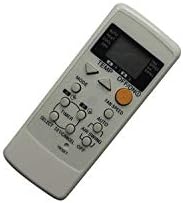
รูปที่ 1 : ด้านหน้า view of the Calvas Fetcus remote control.
2. การตั้งค่า
2.1. การติดตั้งแบตเตอรี่
The remote control requires batteries for operation. Please follow these steps to install or replace the batteries:
- ค้นหาฝาปิดช่องใส่แบตเตอรี่ที่ด้านหลังของรีโมทคอนโทรล
- เลื่อนฝาครอบลงหรือกดที่สลัก (ถ้ามี) เพื่อเปิดช่อง
- Insert two new batteries of the appropriate type (e.g., AAA or AA, please check markings inside the compartment) into the compartment, ensuring the positive (+) and negative (-) terminals align correctly with the markings inside.
- ปิดฝาช่องใส่แบตเตอรี่โดยเลื่อนกลับเข้าที่จนกระทั่งล็อคเข้าที่

รูปที่ 2: ช่องใส่แบตเตอรี่ด้านหลังของรีโมทคอนโทรล
2.2. การใช้งานครั้งแรก
Once batteries are installed, the remote control is ready for use. No programming is typically required for this replacement remote, as it is pre-programmed for compatible Panasonic air conditioner models. Simply point the remote control towards the air conditioner's receiver and press the desired function button.
3. คู่มือการใช้งาน
ทำความคุ้นเคยกับปุ่มต่างๆ และฟังก์ชันการทำงานของปุ่มเหล่านั้น เพื่อให้สามารถควบคุมเครื่องปรับอากาศได้อย่างมีประสิทธิภาพสูงสุด
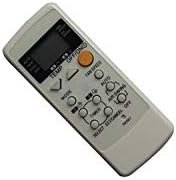
รูปที่ 3: รายละเอียด view of remote control buttons.
3.1. ปุ่มฟังก์ชัน
- ปุ่มเปิด/ปิด: เปิดหรือปิดเครื่องปรับอากาศ
- ปุ่มโหมด: สามารถสลับโหมดการทำงานได้ เช่น ทำความเย็น ทำความร้อน พัดลม ดูดฝุ่น และอัตโนมัติ
- ปุ่มปรับอุณหภูมิ ▲/▼: ปรับอุณหภูมิที่ต้องการขึ้นหรือลง
- ปุ่มความเร็วพัดลม: Changes the fan speed (e.g., Low, Medium, High, Auto).
- AIR SWING Button: ควบคุมการเคลื่อนไหวของช่องระบายอากาศแนวตั้งเพื่อทิศทางลม
- ปุ่มตั้งเวลา: Initiates or adjusts the timer settings for scheduled operation.
- ปุ่มอัตโนมัติ: Activates the automatic operating mode, where the unit selects the best mode and fan speed based on room temperature.
- ปุ่มรีเซ็ต: Resets the remote control settings (usually a small recessed button requiring a pointed object).
3.2. การทำงานพื้นฐาน
- การเปิด/ปิด: กดปุ่ม เปิด/ปิด button once to turn the unit on, and again to turn it off.
- การเลือกโหมด: กดปุ่ม โหมด button repeatedly until the desired operating mode (e.g., Cool, Heat) is displayed on the remote's screen.
- ปรับอุณหภูมิ: ใช้ อุณหภูมิ ▲ or อุณหภูมิ ▼ buttons to set your preferred temperature.
- การตั้งค่าความเร็วพัดลม: กดปุ่ม ความเร็วของพัดลม ปุ่มสำหรับเลือกปรับความเร็วพัดลมตามระดับที่ต้องการ
4. การบำรุงรักษา
4.1. การเปลี่ยนแบตเตอรี่
Replace batteries when the remote control's display becomes dim or when the remote no longer responds to button presses. Refer to Section 2.1 for detailed battery installation instructions. Always replace both batteries at the same time with new ones of the appropriate type.
4.2. การทำความสะอาด
ในการทำความสะอาดรีโมทคอนโทรล ให้เช็ดพื้นผิวเบาๆ ด้วยผ้าแห้งนุ่มๆ สำหรับคราบสกปรกที่ติดแน่น ให้ใช้ผ้าชุบน้ำหมาดๆ เช็ดทำความสะอาดamp cloth can be used, followed immediately by a dry cloth. Do not use abrasive cleaners, solvents, or immerse the remote in water, as this can damage the electronic components.
4.3. การจัดเก็บ
If the remote control will not be used for an extended period, it is recommended to remove the batteries to prevent leakage and potential damage to the remote. Store the remote in a cool, dry place away from direct sunlight and extreme temperatures.
5 การแก้ไขปัญหา
| ปัญหา | สาเหตุที่เป็นไปได้ | สารละลาย |
|---|---|---|
| รีโมทคอนโทรลไม่ทำงาน | แบตเตอรี่เสียหรือติดตั้งไม่ถูกต้อง | เปลี่ยนแบตเตอรี่โดยตรวจสอบให้แน่ใจว่าขั้วถูกต้อง (+/-) |
| ระยะการควบคุมระยะไกลไม่ดี | Weak batteries; Obstruction between remote and AC unit; Remote not pointed directly at AC unit. | Replace batteries; Remove obstructions; Ensure direct line of sight to AC unit's receiver. |
| Air conditioner does not respond to commands. | Remote control not compatible with AC unit; AC unit is off or unplugged; AC unit's receiver is faulty. | Verify compatibility with your specific Panasonic AC model; Check AC unit's power supply; Consult AC unit's manual or service technician. |
| หน้าจอแสดงผลระยะไกลมืดหรือว่างเปล่า | พลังงานแบตเตอรี่ต่ำ | เปลี่ยนแบตเตอรี่ |
6. ข้อมูลจำเพาะ
| คุณสมบัติ | รายละเอียด |
|---|---|
| ยี่ห้อ | หัวล้าน |
| หมายเลขรุ่น | CLS-D41D8CD98F00B204E9800998ECF8427E |
| อุปกรณ์ที่รองรับ | Panasonic Air Conditioners (CS-E9CKP, CS-E15CKP, CWA75C258, CWA75C377, CWA75C376) |
| เทคโนโลยีการเชื่อมต่อ | อินฟาเรด (IR) |
| การสื่อสารแบบไร้สาย | IR |
| ความถี่ | 433 เมกะเฮิรตซ์ |
| ช่อง | 1 |
| จำนวนอุปกรณ์ที่รองรับสูงสุด | 1 |
| น้ำหนักสินค้า | 99.8 ก. (โดยประมาณ) |
| วัสดุ | อื่น |
| รายการ จำนวนแพ็คเกจ | 1 |
| คุณสมบัติพิเศษ | Infrared, Universal, Wireless |
| คำอธิบายแบตเตอรี่ | ลิเธียม (Note: Typically uses AAA/AA. Please check remote's battery compartment for specific type.) |
7. ข้อมูลการรับประกัน
ผลิตภัณฑ์นี้มาพร้อมกับ รับประกัน 90 วัน from the date of purchase. This warranty covers manufacturing defects and malfunctions under normal use. Please retain your proof of purchase for warranty claims. For specific terms and conditions, or to initiate a warranty claim, please contact your retailer or the manufacturer.
8. การสนับสนุน
For further assistance, troubleshooting not covered in this manual, or inquiries regarding your Calvas Fetcus remote control, please contact the seller or the manufacturer directly. Refer to your purchase documentation for contact details. You may also visit the product page on Amazon.ca for additional information or customer service options.
ลิงค์ผลิตภัณฑ์: https://www.amazon.ca/Calvas-RemoteControl-Panasonic-CS-E15CKP-Conditioner/dp/B07R6X7KZL


