1. สินค้าหมดview
The E90-DTU-433L30 is a high-performance wireless data transceiver designed for reliable long-range communication. Operating within the 410-441MHz frequency range with a power output of 30dBm, it can achieve communication distances up to 8.0km. This device integrates digital data processing, modulation, demodulation, and error correction (FEC) to provide a transparent RS232/RS485 interface, distinguishing it from traditional analog FM transceivers.

รูปที่ 1 : ด้านหน้า view of the E90-DTU-433L30 Wireless Transceiver, showing RS232, RS485, GND, VCC ports, PWR, TXD, RXD indicators, M0, M1 pins, DC-IN, and antenna connector.
2. คุณสมบัติหลัก
- Advanced LoRa Modulation: Utilizes military-grade LoRa modulation technology for enhanced communication distance and stability.
- กำลังขับสูง: Transmission power up to 1W, with multi-level adjustable settings, meeting European industrial standards.
- Wide Interface Support: Provides transparent RS232 and RS485 interfaces for versatile connectivity.
- การออกแบบที่แข็งแกร่ง: All-aluminum alloy shell for compact size, easy installation, good heat dissipation, and excellent electromagnetic compatibility.
- เพิ่มความน่าเชื่อถือ: Features power reverse connection protection, over-connection protection, and antenna surge protection.
- พาวเวอร์ซัพพลายแบบยืดหยุ่น: Supports 10-28V power supply, compatible with various power devices or line pressure modes.
- Precise Frequency Stability: Incorporates temperature compensators for frequency stability better than ±1.5PPM.
- พารามิเตอร์ที่กำหนดค่าได้: All parameters such as power, frequency, air speed, and address ID can be set via programming software.
- การใช้พลังงานต่ำ: Standby current is only 21mA (even lower in power-saving and sleep modes).
- Built-in Watchdog: Ensures automatic module restart in case of exceptions, maintaining continuous operation with previous settings.
3. ฮาร์ดแวร์โอเวอร์view
The E90-DTU-433L30 features clearly labeled interfaces and indicators for easy setup and monitoring.

รูปที่ 2: รายละเอียด view of the transceiver's hardware components, including Antenna Interface, Dip Switch, Power Interface, Function Indicators (PWR, TXD, RXD), RS485 terminals, and RS232 port.
- อินเทอร์เฟซเสาอากาศ: SMA-K connector for external antenna connection.
- Dip Switch (M0, M1): Used to set the module's operating mode (e.g., normal, wake-up, power-saving, configuration).
- Power Interface (DC-IN): Input for 10-28V DC power supply.
- ตัวบ่งชี้ฟังก์ชัน:
- PWR: ไฟแสดงสถานะพลังงาน
- เท็กซัส: Transmit data indicator.
- RXD: Receive data indicator.
- อินเตอร์เฟซ RS485: Screw terminals for RS485_A, RS485_B, GND, and VCC connections.
- อินเตอร์เฟซ RS232: DB9 serial port for RS232 communication.
4. Setup and Basic Function
The E90-DTU-433L30 facilitates transparent data transmission between devices using RS232 or RS485 interfaces.
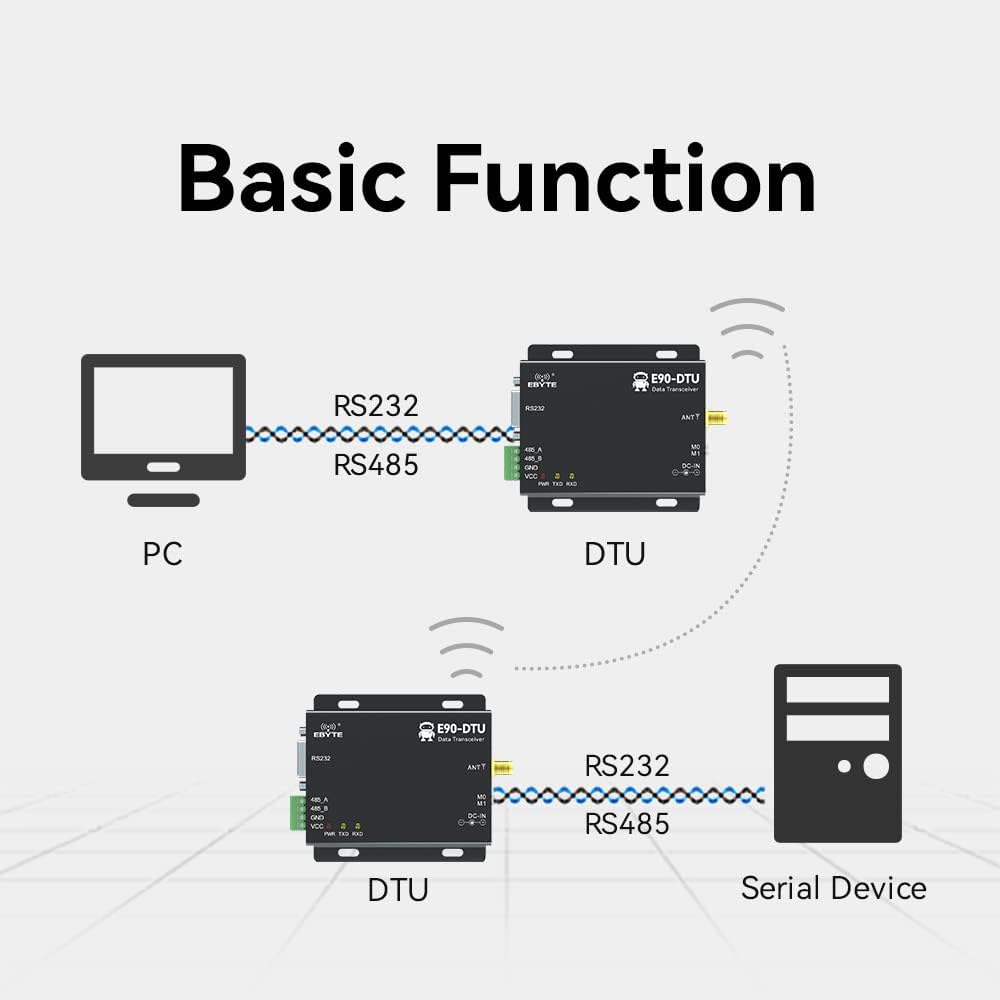
Figure 3: Diagram illustrating typical connections: a PC connected to one DTU via RS232/RS485, and another DTU connected to a serial device via RS232/RS485, communicating wirelessly.
4.1. การตั้งค่าเริ่มต้น
- เชื่อมต่อเสาอากาศ: Securely attach the 433MHz antenna to the SMA-K connector.
- การเชื่อมต่อไฟฟ้า: Connect a 10-28V DC power supply to the DC-IN port. Ensure correct polarity.
- การเชื่อมต่ออินเทอร์เฟซข้อมูล:
- For RS232: Connect your device (e.g., PC) to the DB9 RS232 port using a serial cable.
- For RS485: Connect your device to the RS485_A and RS485_B terminals. Ensure proper A/B wiring.
- Mode Configuration: Set the M0 and M1 dip switches according to your desired operating mode (e.g., transparent transmission, configuration mode). Refer to the detailed technical manual for specific mode settings.
4.2. การกำหนดค่าซอฟต์แวร์
The E90-DTU-433L30 supports software configuration for various parameters, including frequency, air speed, and address ID.

รูปที่ 4: อดีตample interface of the Function Configuration Software, available for download from the official webเว็บไซต์.
It is recommended to download and use the official configuration software to customize the module's settings to match your application requirements. This software allows for precise control over the transceiver's operational parameters.
5. การดำเนินการ
Once properly configured and connected, the E90-DTU-433L30 operates as a transparent data link. Data sent to its RS232 or RS485 port will be wirelessly transmitted to a paired E90-DTU module, and vice-versa.
- การส่งผ่านข้อมูล: When data is received on the serial input (RS232/RS485), the module automatically modulates and transmits it wirelessly. The TXD indicator will flash.
- การรับข้อมูล: Upon receiving wireless data, the module demodulates it and outputs it through the serial interface. The RXD indicator will flash.
- การจัดการโหมด: Ensure both transmitting and receiving modules are set to compatible operating modes (e.g., transparent transmission mode) for seamless communication.
6. ข้อมูลจำเพาะทางเทคนิค
| ข้อมูลจำเพาะ | ค่า |
|---|---|
| ASIN | B07R51G2CD |
| หมายเลขรุ่นสินค้า | อาร์เอส232 |
| ยี่ห้อ | อีไบต์ |
| พอร์ตอีเทอร์เน็ตรวม | 2 |
| จำนวนพอร์ต | 2 |
| อัตราการถ่ายโอนข้อมูลต้นทางสูงสุด | 433 เมกะเฮิรตซ์ |
| ประเภทโมเด็ม | ดิจิตอล |
| ผู้ผลิต | อีไบต์ |
| วันที่พร้อมใช้งานครั้งแรก | วันที่ 27 กันยายน 2021 |

Figure 5: Physical dimensions of the E90-DTU-433L30 module, approximately 82mm in length and 62mm in width.
7. การใช้งานทั่วไป
The E90-DTU-433L30 is suitable for a wide range of applications requiring reliable wireless data transmission.

รูปที่ 6: อดีตamples of application environments: Smart home, Agricultural application, Intelligent warehouse, Industrial applications, Device management, and general Wireless data transmission.
- ระบบบ้านอัจฉริยะ
- Agricultural Monitoring and Control
- Intelligent Warehouse Management
- ระบบอัตโนมัติและการควบคุมอุตสาหกรรม
- การจัดการอุปกรณ์ระยะไกล
- General Wireless Data Transmission
8. การบำรุงรักษา
To ensure the longevity and optimal performance of your E90-DTU-433L30 transceiver, follow these maintenance guidelines:
- รักษาความสะอาด: Regularly clean the exterior of the module with a soft, dry cloth. Avoid using harsh chemicals or abrasive materials.
- สภาพแวดล้อม : ใช้งานโมดูลภายในช่วงอุณหภูมิและความชื้นที่กำหนดไว้ หลีกเลี่ยงการสัมผัสกับอุณหภูมิที่สูงเกินไป แสงแดดโดยตรง หรือความชื้นสูง
- การเชื่อมต่อที่ปลอดภัย: Periodically check all cable connections (power, serial, antenna) to ensure they are secure and free from damage.
- อัพเดตเฟิร์มแวร์: ตรวจสอบของผู้ผลิต webไซต์สำหรับการอัปเดตเฟิร์มแวร์ที่มีอยู่ซึ่งอาจช่วยปรับปรุงประสิทธิภาพหรือแก้ไขปัญหาได้
- การจัดการที่เหมาะสม: Handle the module with care to prevent physical damage. Avoid dropping or subjecting it to strong vibrations.
9 การแก้ไขปัญหา
If you encounter issues with your E90-DTU-433L30, consider the following troubleshooting steps:
- ไม่มีไฟฟ้า:
- ตรวจสอบปริมาณแหล่งจ่ายไฟtage อยู่ในช่วงแรงดันไฟฟ้ากระแสตรง 10-28 โวลต์
- Check power cable connections and ensure they are secure and correctly polarized.
- Confirm the power outlet or source is functional.
- ไม่มีการสื่อสาร:
- Ensure both transmitting and receiving modules are powered on and their PWR indicators are lit.
- Check serial cable connections (RS232/RS485) for proper wiring and secure fit.
- Verify that the M0 and M1 dip switch settings on both modules are identical and configured for the desired operating mode (e.g., transparent transmission).
- Confirm that the frequency, air speed, and address ID settings are consistent across all communicating modules using the configuration software.
- Check antenna connections and ensure antennas are properly installed and not obstructed.
- Reduce the distance between modules or remove obstacles if communication range is an issue.
- การสื่อสารแบบไม่ต่อเนื่อง:
- ตรวจสอบหาแหล่งกำเนิดสัญญาณรบกวนทางแม่เหล็กไฟฟ้า (EMI) ที่อยู่ใกล้กับโมดูล
- ตรวจสอบให้แน่ใจว่าแหล่งจ่ายไฟมีความเสถียรและปราศจากความผันผวน
- Verify antenna integrity and placement.
- Module Not Responding to Software:
- Ensure the module is in configuration mode (check M0/M1 settings).
- Verify the correct COM port is selected in the software.
- Check the serial cable and drivers on your computer.
10. การสนับสนุนและทรัพยากร
For detailed technical documentation, software downloads, and further support, please refer to the official EBYTE resources:
- Technical Manual Support: http://www.ebyte.com/en/product-view-news.aspx?id=418
- ผู้ผลิต: อีไบต์
- เป็นทางการ Webเว็บไซต์: Visit the EBYTE official website for the latest product information, drivers, and software.
11. ข้อมูลการรับประกัน
Specific warranty terms and conditions for the E90-DTU-433L30 Wireless Transceiver are typically provided at the point of purchase or can be found on the official EBYTE website. Please retain your proof of purchase for any warranty claims. For detailed warranty policy, please consult the manufacturer's official documentation or contact EBYTE customer support directly.


