1. สินค้าหมดview
The AZIMOM 6W Bluetooth Music Control RGB LED Fiber Optic Lights Star Ceiling Light Kit provides a versatile lighting solution for various indoor and automotive applications. This kit features a 6W RGBW light source, fiber optic strands, and multiple control options including an RF remote and a Bluetooth-enabled mobile application. The system is designed to create a starry sky effect with customizable colors and dynamic modes, including sound-activated functions.
ส่วนประกอบที่รวมอยู่:
- 6W RGBW Light Source Engine
- Fiber Optic Strands (550pcs, 0.75mm diameter, 13.1ft length)
- RF 28-Key Remote Control (batteries not included)
- Power Adapter (AC86-265V / DC12V)

ภาพที่ 1.1: จบแล้วview of the AZIMOM Fiber Optic Light Kit components, including the light engine, fiber strands, remote, and power cables.
2. ข้อมูลด้านความปลอดภัย
- ตรวจสอบให้แน่ใจว่าแหล่งจ่ายไฟตรงกับปริมาตรที่ระบุtage (AC86-265V or DC12V).
- Do not expose the light source engine to water or high humidity. This product is not water-resistant.
- Keep the light source engine in a well-ventilated area to prevent overheating.
- หลีกเลี่ยงการสัมผัสกับแหล่งกำเนิดแสงโดยตรง
- Do not press or tread on the fiber optic cables during installation or use to prevent damage.
- เก็บให้พ้นจากมือเด็ก
3. การตั้งค่าและการติดตั้ง
Installation of the fiber optic star ceiling kit requires careful planning and execution. The process involves marking star points, drilling holes, inserting fibers, and securing the light engine.
ขั้นตอนการติดตั้ง:
- เตรียมพื้นผิว: Determine the desired pattern for your star ceiling. Mark the star points on the ceiling panel (e.g., car headliner or home ceiling board).
- เจาะรู: Drill holes vertically at each marked point. The size of the drill bit should be appropriate for the fiber optic strand diameter (0.75mm).
- Insert Fibers: Insert the fiber optic strands into the drilled holes from the front side of the panel. Insert approximately 10cm of fiber into the board.
- Secure Fibers: On the back side of the panel, fix the inserted fibers with hot melt adhesive or glass cement to prevent them from slipping out.
- Organize Fibers: Straighten and tie the fibers into small bundles. It is recommended to sort the fibers by length and location to ensure even distribution and avoid tangling.
- Connect to Light Engine: Insert the fiber bundles into the light source engine. Ensure all fibers are securely seated.
- Test and Trim: Connect the light engine to power and test the lighting. Once satisfied with the arrangement, clip off any excess fiber length from beneath the panel using nail clippers or similar tools for a clean finish.
- Mount Light Engine: Place the light engine in a location where it can be easily powered and is well-ventilated. For car installations, the light source is typically placed on the C-pillar and powered by a 6.5ft car cigarette lighter. For indoor use, ensure the light source is powered by the provided adapter.
บันทึก: The required fiber length is calculated as: Length from LED light engine to the star point + 30-40cm. This extra length allows for flexibility during installation.
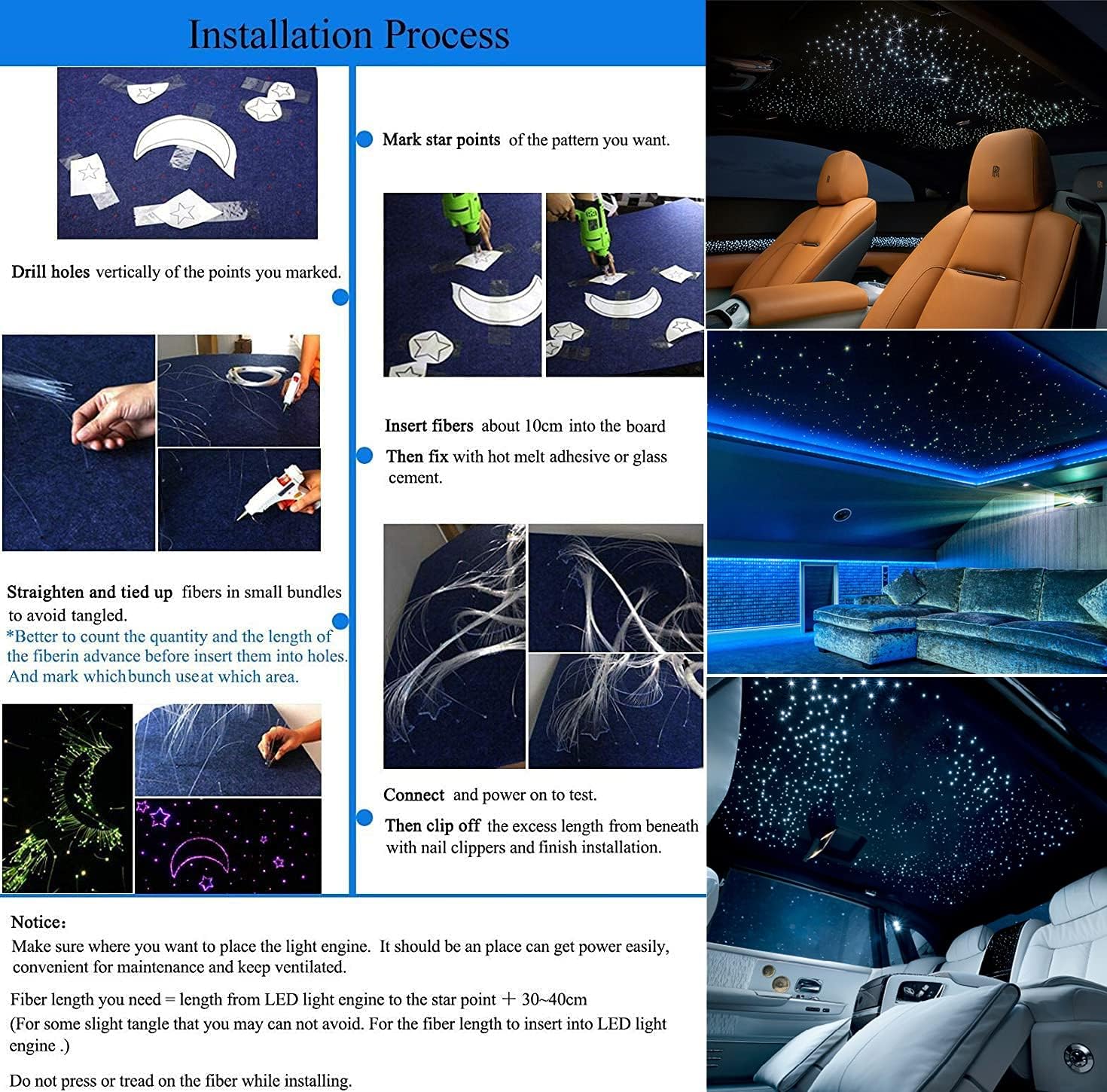
Image 3.1: Visual guide for the fiber optic light installation process.

Image 3.2: Illustration of light engine placement and fiber routing for home ceiling and car roof installations.
4. การดำเนินการ
The AZIMOM Fiber Optic Light Kit offers multiple ways to control its lighting effects: via the RF remote control, a Bluetooth-enabled mobile application, and sound activation.
4.1 การเปิด/ปิดเครื่อง
Connect the light engine to the appropriate power source (DC12V for car, AC adapter for home). Use the 'ON' and 'OFF' buttons on the RF remote or the power toggle within the mobile application to turn the lights on or off.
4.2 ฟังก์ชันการควบคุมระยะไกลด้วยคลื่นวิทยุ
The 28-key RF remote allows for direct control over various lighting parameters.
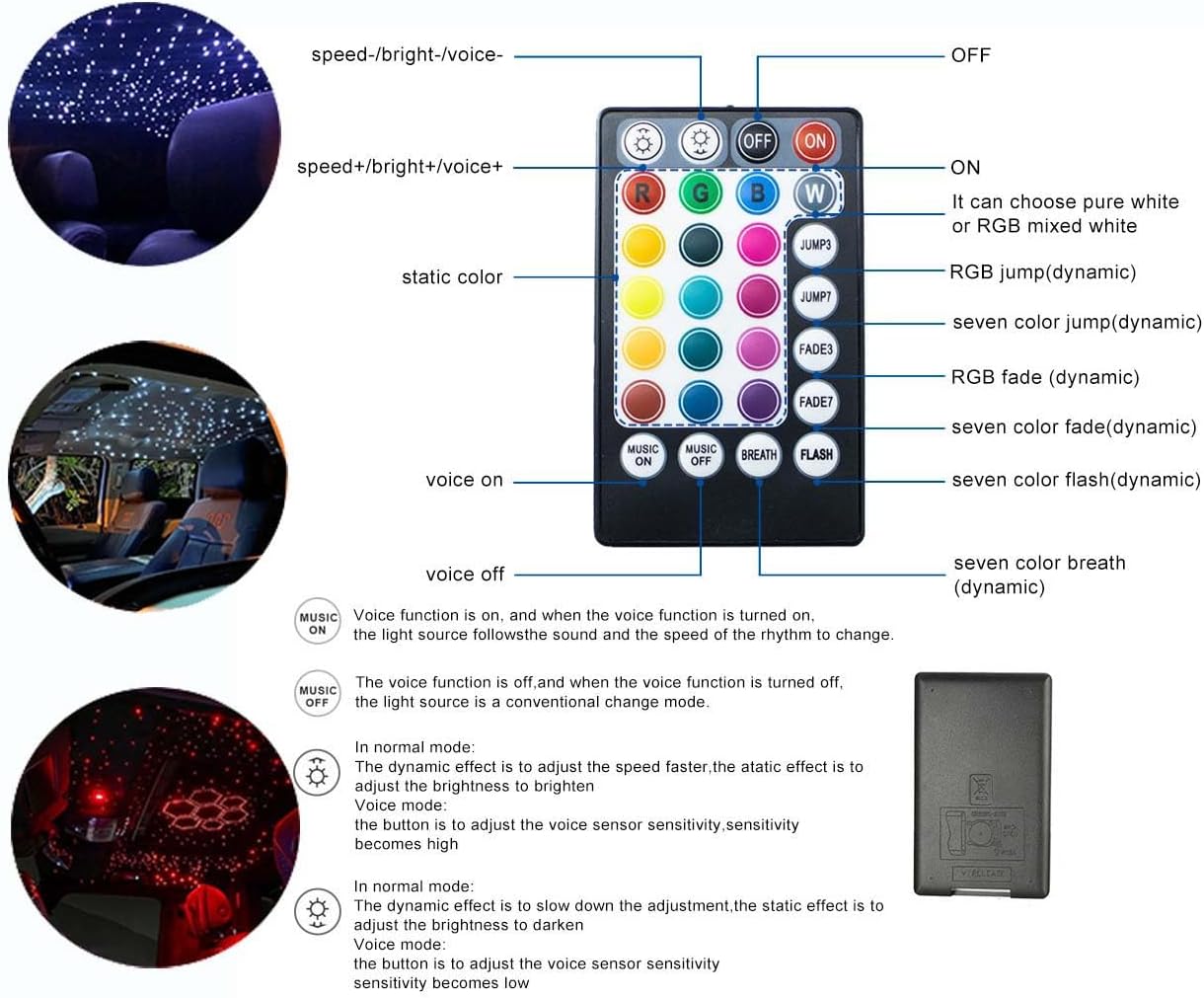
Image 4.1: Layout and functions of the 28-key RF remote control.
- เปิด/ปิด: Power on/off the light kit.
- อาร์, จี, บี, ดับเบิลยู: เลือกสีคงที่ แดง เขียว น้ำเงิน หรือขาว
- จานสี: เลือกได้จาก 16 สีคงที่
- กระโดด3/กระโดด7: Activate 3-color or 7-color jump dynamic modes.
- เฟด3/เฟด7: Activate 3-color or 7-color fade dynamic modes.
- แฟลช: Activate flash mode.
- ลมหายใจ: Activate breath mode.
- Speed+/Speed-: ปรับความเร็วของโหมดไดนามิก
- Bright+/Bright-: Adjust the brightness of the lights (1%-100%).
- MUSIC ON/MUSIC OFF: Toggle sound-activated mode. When 'MUSIC ON' is active, the lights will respond to ambient sound or music. When 'MUSIC OFF' is active, the light operates in conventional change mode.
- VOICE+/VOICE-: Adjust the sensitivity of the sound-activated mode.
4.3 การควบคุมแอปบลูทูธ
The light kit can be controlled via the "My SmartLED" mobile application, available for Android and iOS devices. This offers extended control options, including 16 million colors and group control.

Image 4.2: Screenshots of the 'My SmartLED' application interface for controlling the light kit.

Image 4.3: Visual representation of Bluetooth APP control functionality.
- ดาวน์โหลดแอป: Scan the QR code provided in the product packaging or search for "My SmartLED" in the App Store (iOS) or Google Play Store (Android).
- เปิดใช้งานบลูทูธ: ตรวจสอบให้แน่ใจว่าเปิดใช้งาน Bluetooth บนโทรศัพท์มือถือของคุณแล้ว
- เชื่อมต่อกับอุปกรณ์: Power on the light kit. Open the "My SmartLED" app. The app should automatically detect and connect to the light engine.
- ฟังก์ชั่นการควบคุม:
- สีคงที่: Select from over 16 million static colors using the color wheel.
- โหมดไดนามิก: Choose from 20 dynamic modes, including jump, fade, flash, and breath effects. Adjust speed and brightness.
- โหมดเพลง: Activate sound-activated mode, where the fiber optic strands dance with the rhythm of music or ambient sound detected by your phone's microphone.
- การควบคุมกลุ่ม: The app supports controlling multiple AZIMOM starlight kits simultaneously or individually.
4.4 การควบคุมเพลง
Both the RF remote and the mobile application feature a music control mode. When activated, the light effects will synchronize with the rhythm of music or ambient sounds, creating a dynamic and immersive experience.

ภาพที่ 4.4: อดีตamples of various colors and effects produced by the light kit.
5. ข้อมูลจำเพาะ
| คุณสมบัติ | ข้อมูลจำเพาะ |
|---|---|
| ยี่ห้อ | อาซิมอม |
| หมายเลขรุ่น | ซี-889 |
| แหล่งกำเนิดแสง | 6W |
| อินพุต Voltage | AC86-265V / DC12V |
| ประเภท LED | ไฟ LED RGBW |
| Fiber Head Inner Diameter | 20มม. |
| วัสดุไฟเบอร์ | พลาสติก |
| Fiber Quantity & Size | 550pcs*0.03in*13.1ft (550pcs, 0.75mm diameter, 4m length) |
| วิธีการควบคุม | RF 28-Key Remote, Bluetooth APP ("My SmartLED"), Sound-Activated |
| สีสัน | 16 static colors (remote), 16+ million static colors (APP), RGBW mixing |
| โหมดไดนามิก | 20+ (jump, fade, flash, breath) |
| ความสว่าง/ความเร็ว | ปรับได้ (1%-100%) |
| ตลอดอายุการใช้งาน | 50,000 ชั่วโมง |
| ขนาดรายการ (ยาว x กว้าง x สูง) | 5.9 x 3.9 x 2 นิ้ว |
| น้ำหนักสินค้า | 3.8 ปอนด์ |
| ระดับความต้านทานต่อน้ำ | ไม่ทนน้ำ |
6. การบำรุงรักษา
- การทำความสะอาด: Gently wipe the light engine and fiber optic ends with a soft, dry cloth to remove dust. Do not use liquid cleaners directly on the light engine.
- Fiber Care: Avoid bending the fiber optic strands sharply, as this can damage them and reduce light transmission.
- พื้นที่จัดเก็บ: If storing the kit for an extended period, ensure it is kept in a dry, cool place away from direct sunlight and extreme temperatures.
7 การแก้ไขปัญหา
- ไม่มีไฟฟ้า:
- Ensure the power adapter is securely connected to both the light engine and a working power outlet.
- ตรวจสอบว่าแหล่งพลังงานกำลังทำงานอยู่
- รีโมทคอนโทรลไม่ทำงาน:
- Check if the remote control batteries are inserted correctly and are not depleted. (Note: Batteries are not included with the kit).
- Ensure there are no obstructions between the remote and the light engine's RF receiver.
- ปัญหาการเชื่อมต่อแอป:
- ตรวจสอบให้แน่ใจว่าได้เปิดใช้งาน Bluetooth บนอุปกรณ์มือถือของคุณ
- Verify the light engine is powered on.
- Restart the "My SmartLED" app and try connecting again.
- If issues persist, try restarting your mobile device and the light engine.
- การกระจายแสงที่ไม่สม่ำเสมอ:
- Check if all fiber strands are properly inserted into the light engine.
- Ensure fibers are not sharply bent or kinked, which can impede light flow.
- Verify that the light engine's LED is functioning correctly.
- Sound-Activated Mode Not Responding:
- Ensure 'MUSIC ON' is selected on the remote or within the app.
- Adjust the 'VOICE+' sensitivity setting on the remote or within the app.
- Ensure there is sufficient sound for the microphone to detect.
8. ข้อมูลการรับประกัน
The AZIMOM 6W Bluetooth Music Control RGB LED Fiber Optic Lights Star Ceiling Light Kit comes with a รับประกัน 2 ปี from the date of purchase. This warranty covers manufacturing defects and malfunctions under normal use. Please retain your proof of purchase for warranty claims. The warranty does not cover damage caused by improper installation, misuse, accidents, unauthorized repairs, or natural disasters.
9. การสนับสนุนลูกค้า
For further assistance, technical support, or warranty inquiries, please contact AZIMOM customer service through the retailer where the product was purchased or visit the official AZIMOM brand store.
AZIMOM Brand Store: Visit the AZIMOM Store on Amazon


