1. บทนำ
This manual provides essential information for the safe and effective operation of your Project Nursery Portable Sleep Soother Sound Machine and Night Light. Please read this manual thoroughly before use and retain it for future reference.
2. ข้อมูลด้านความปลอดภัย
คำแนะนำด้านความปลอดภัยที่สำคัญ:
- หลีกเลี่ยงการสัมผัสน้ำ
- อย่าใช้เป็นของเล่น
- Handle power sources carefully to avoid electric shock.
- Keep out of reach of infants and young children when not in use or supervised.
3. คุณสมบัติของผลิตภัณฑ์
The Project Nursery Portable Sleep Soother is a versatile 4-in-1 device designed to assist with sleep and provide comfort. Key features include:
- โปรเจ็กเตอร์: Choose from 3 different themes – shapes, transportation, or sea life images.
- Sound Soother: Features 3 lullabies and 5 pre-loaded natural sounds (total 8 sounds) to promote sleep.
- ไฟกลางคืน: Built-in nightlight provides a soft glow with 3 brightness settings.
- เวลานอน: Set the soother to constant on or a 60-minute timer. The timer will automatically shut off the light, projector, and sound.
- ความสามารถในการพกพา: Operates with 3 AAA batteries (not included) for on-the-go use or plugs into a wall for continuous operation.

รูปที่ 1: เกินview of the 4-in-1 features of the Project Nursery Sleep Soother.
4. การตั้งค่า
ทำตามขั้นตอนเหล่านี้เพื่อตั้งค่าอุปกรณ์ของคุณ:
- แกะกล่อง: นำผลิตภัณฑ์ออกจากบรรจุภัณฑ์อย่างระมัดระวัง
- แหล่งพลังงาน:
- For portable use, insert 3 AAA batteries (not included) into the battery compartment.
- For continuous use, plug in the AC Power Adapter (if included) into a wall outlet and the device.
- การจัดวาง: Place the device on a stable, flat surface near the desired area for soothing sounds, nightlight, or projected images.
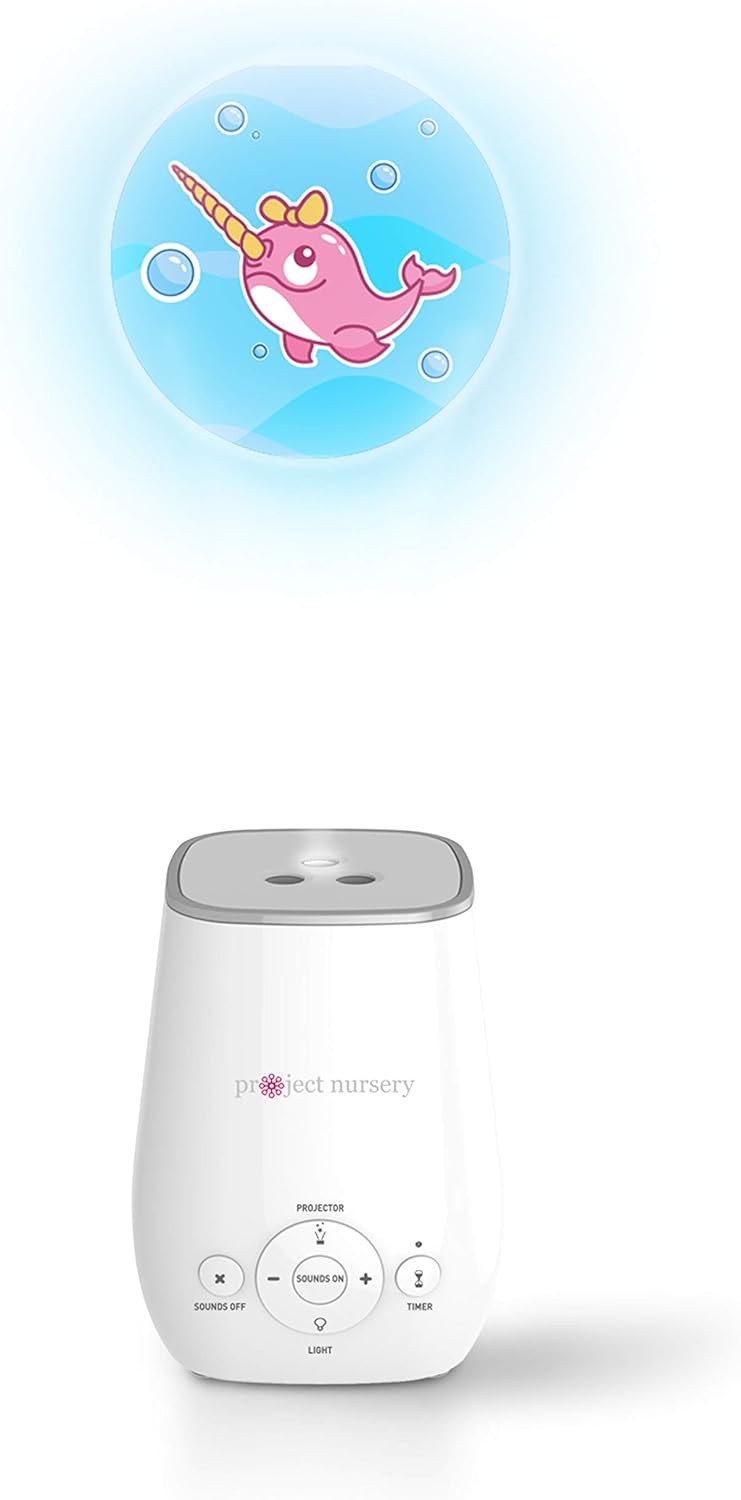
Figure 2: The Project Nursery Sleep Soother in use, projecting an image onto a surface.
5. คู่มือการใช้งาน
The device features intuitive controls for easy operation.
5.1. Sound Soother
- เปิด/ปิด: Press the "Sounds On" button (center button) to activate the sound soother. Press "Sounds Off" (left button) to turn off the sound.
- เลือกเสียง: Use the "+" and "-" buttons around the "Sounds On" button to cycle through the 8 pre-loaded sounds (3 lullabies, 5 natural sounds).
- ปรับระดับเสียง: The volume is adjusted automatically with the sound selection.
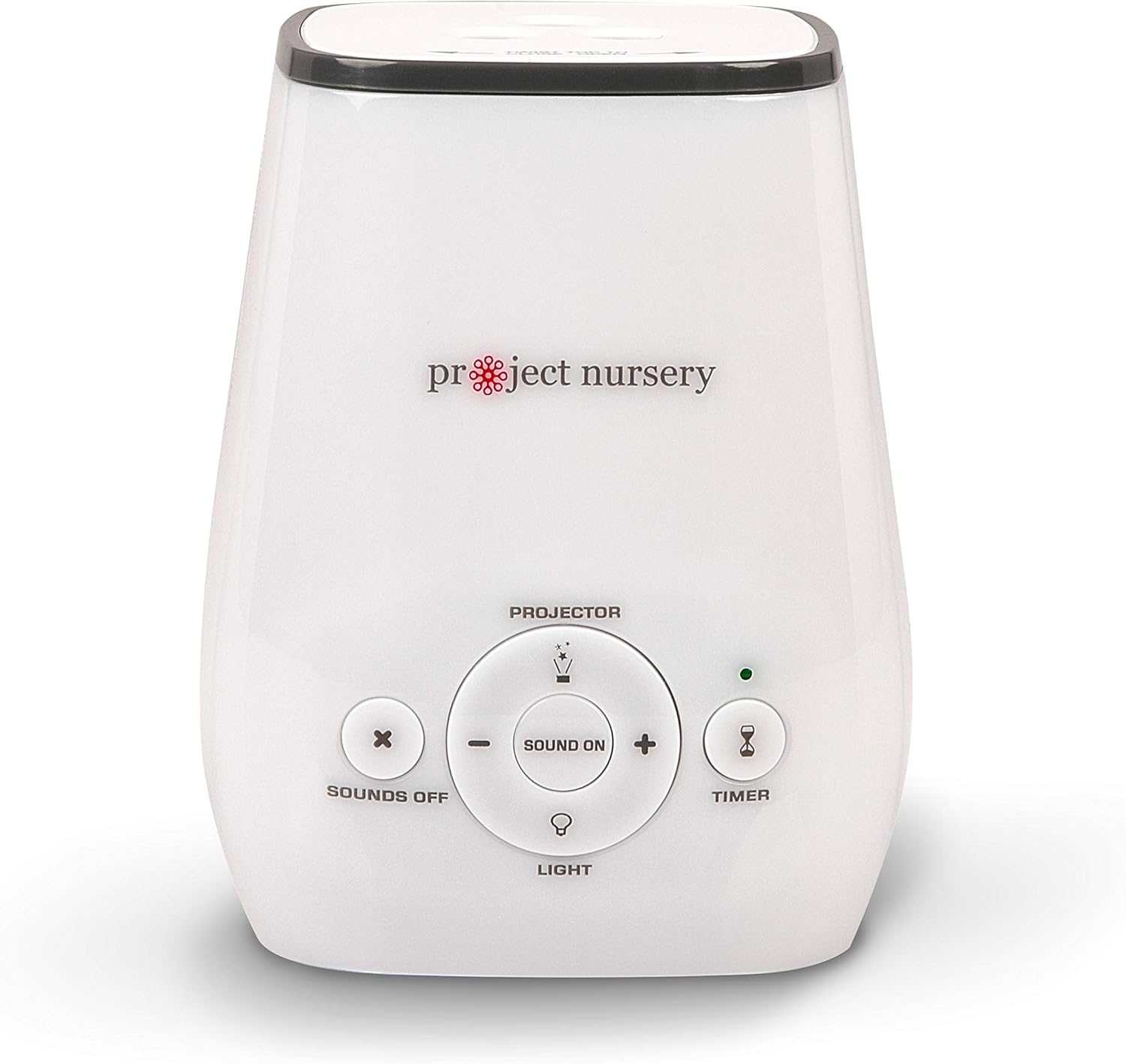
Figure 3: Control panel with buttons for sound selection and volume adjustment.
5.2. ไฟกลางคืน
- เปิดใช้งานแสงกลางคืน: Press the "Light" button (bottom button) to turn on the night light.
- ปรับความสว่าง: Press the "Light" button repeatedly to cycle through the 3 brightness settings.
- ปิด: Continue pressing the "Light" button until the light turns off, or use the main power off.
5.3. โปรเจ็คเตอร์
- เปิดใช้งานโปรเจ็กเตอร์: Press the "Projector" button (top button) to turn on the image projector.
- Change Themes: To change the projected image theme, twist the top of the unit to open the projector disc compartment. Rotate the disc to select one of the 3 themes (shapes, transportation, or sea life). Close the top securely.
- ปิด: Press the "Projector" button again to turn off the projector.

Figure 4: Top of the device indicating how to twist to open and change projector themes.
5.4. ตั้งเวลาปิดเครื่อง
- ตั้งเวลา: Press the "Timer" button (right button) to activate the 60-minute sleep timer. The indicator light will illuminate.
- ค่าคงที่: To disable the timer and keep the device on continuously, press the "Timer" button again until the indicator light turns off.
6. การบำรุงรักษา
เพื่อให้แน่ใจว่าอุปกรณ์ของคุณมีอายุการใช้งานยาวนานและทำงานได้อย่างถูกต้อง:
- การทำความสะอาด: เช็ดอุปกรณ์ด้วยผ้านุ่มและแห้ง ห้ามใช้น้ำยาทำความสะอาดที่มีฤทธิ์กัดกร่อนหรือแช่น้ำ
- การเปลี่ยนแบตเตอรี่: If using batteries, replace all 3 AAA batteries when the device's performance diminishes. Ensure correct polarity.
- พื้นที่จัดเก็บ: เก็บอุปกรณ์ไว้ในที่แห้งและเย็นเมื่อไม่ได้ใช้งานเป็นเวลานาน
7 การแก้ไขปัญหา
| ปัญหา | สาเหตุที่เป็นไปได้ | สารละลาย |
|---|---|---|
| อุปกรณ์ไม่เปิด | ไม่มีไฟหรือแบตเตอรี่หมด | Ensure AC adapter is securely plugged in or replace batteries. |
| เสียงผิดเพี้ยนหรือเบาเกินไป | แบตเตอรี่เหลือน้อย หรือตั้งค่าระดับเสียงไม่ถูกต้อง | Replace batteries or adjust volume using the '+' button. |
| ภาพจากโปรเจคเตอร์ไม่ชัด | Distance to projection surface is too far or too close. | Adjust the distance of the device from the projection surface. |
8. ข้อมูลจำเพาะ
- ชื่อรุ่น : โปรเจ็คเตอร์
- หมายเลขรุ่นสินค้า: 1
- ยี่ห้อ: โครงการเนอสเซอรี่
- สี: สีขาว
- แหล่งพลังงาน: Battery Powered (3 AAA batteries, not included) or AC Adapter
- ขนาดแพ็คเกจ: 6.4 x 4.2 x 4.1 นิ้ว
- น้ำหนักสินค้า: 12 ออนซ์
- ความลึกของรายการ: 3.5 นิ้ว
- ผู้ผลิต: VOXX อินเตอร์เนชั่นแนล คอร์ป
- อายุที่แนะนำ: 1 เดือนขึ้นไป
9. การรับประกันและการสนับสนุน
สำหรับข้อมูลการรับประกันหรือการสนับสนุนผลิตภัณฑ์ โปรดดูที่เว็บไซต์อย่างเป็นทางการของผู้ผลิต webหรือติดต่อฝ่ายบริการลูกค้าโดยตรง เก็บใบเสร็จรับเงินไว้เพื่อใช้ในการเคลมประกัน
การปฏิเสธความรับผิดทางกฎหมาย: ข้อความเกี่ยวกับการผลิตภัณฑ์เสริมอาหารนี้ยังไม่ได้รับการประเมินโดยองค์การอาหารและยา (FDA) และไม่ได้มีวัตถุประสงค์เพื่อวินิจฉัย รักษา บรรเทา หรือป้องกันโรคหรือภาวะสุขภาพใดๆ ผลิตภัณฑ์นี้ไม่ใช่ผลิตภัณฑ์เสริมอาหาร
10. แหล่งข้อมูลเพิ่มเติม
Watch this helpful video for a visual guide on features and operation:
Video 1: Project Nursery Sound Machine - Quick Review and How-To! This video provides a quick overview and demonstration of the sound machine's features and operation.


