1. บทนำและเรื่องอื่นๆview
The Emtek Empowered Motorized Touchscreen Keypad Smart Deadbolt combines Emtek's renowned long-lasting quality with advanced smart home technology. Designed for security and convenience, this deadbolt offers keyless entry, remote access, and intelligent features to enhance your home's safety.
This manual will guide you through the installation, setup, and daily operation of your new smart deadbolt, ensuring you can fully utilize its capabilities.

รูปที่ 1.1 : ด้านหน้า view of the Emtek Empowered Motorized Touchscreen Keypad Smart Deadbolt.
2. คุณสมบัติหลัก
- ปุ่มกดเรืองแสง: The keypad illuminates with a touch, featuring numbers designed for durability and resistance to wear.
- การตั้งค่าเพิ่มเติม: Customize settings such as auto re-lock, privacy mode, and tamper alarms for enhanced security.
- Motorized Deadbolt: Features a quiet motor and a tapered deadbolt to accommodate minor door misalignments.
- การติดตั้งง่าย: Designed to replace existing deadbolts with minimal tools, fitting standard doors 1-3/4” to 2-1/4” thick with a 2-1/8” face bore prep.
- Weather Protected: Includes a rubber gasket for increased protection against outdoor elements.
- การเชื่อมต่ออัจฉริยะ: Integrated with August technology, allowing for unlimited entry codes, remote control via the August mobile app, and 24/7 activity history.
- Auto-Unlock Function: Features Home Mode and Away Mode, enabling automatic unlocking when you approach your door (within approximately 200 meters) and automatic locking when you leave.
- ความเข้ากันได้ของผู้ช่วยเสียง: Works seamlessly with Amazon Alexa, Google Assistant, and Siri.
- August Connect Wi-Fi Bridge & DoorSense: The smart bundle includes a pre-installed August module, August Connect Wi-Fi Bridge for remote access, and DoorSense for real-time door status monitoring.
- BILT App Support: Access easy step-by-step 3D instructions for installation and setup via the BILT app.
- 9V Battery Port: A convenient 9V battery port is included to prevent lockouts in case of main battery depletion.
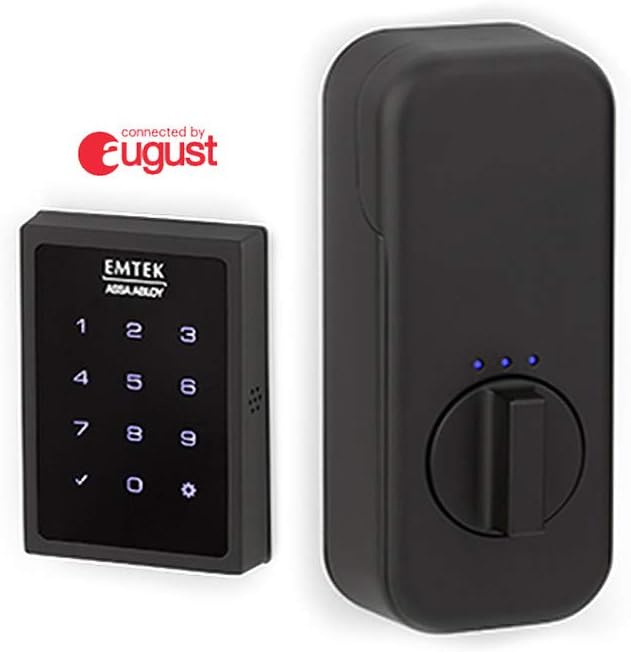
Figure 2.1: Emtek Empowered Smart Deadbolt exterior keypad and interior unit.

รูปที่ 2.2: เกินview of August connectivity features including the mobile app, Wi-Fi bridge, and DoorSense.
3. เนื้อหาบรรจุภัณฑ์
โปรดตรวจสอบว่าส่วนประกอบทั้งหมดมีอยู่ก่อนเริ่มการติดตั้ง:
- ฝาครอบแบตเตอรี่
- โล่ภายใน
- แผ่นยึด
- จานตี
- แผ่นความปลอดภัย
- Deadbolt Latch (2-3/4”)
- Deadbolt Latch (2-3/8”)
- August Connect
- ความรู้สึกประตูสิงหาคม
- แบตเตอรี่ AA (x4)
- #8-32 x 5/16” Machine Screws (x4)
- #8 x 3/4” Wood Screws (x2)
- #10-32 x 1-3/8” Machine Screws (x2)
- #10 x 3” Wood Screws (x2)
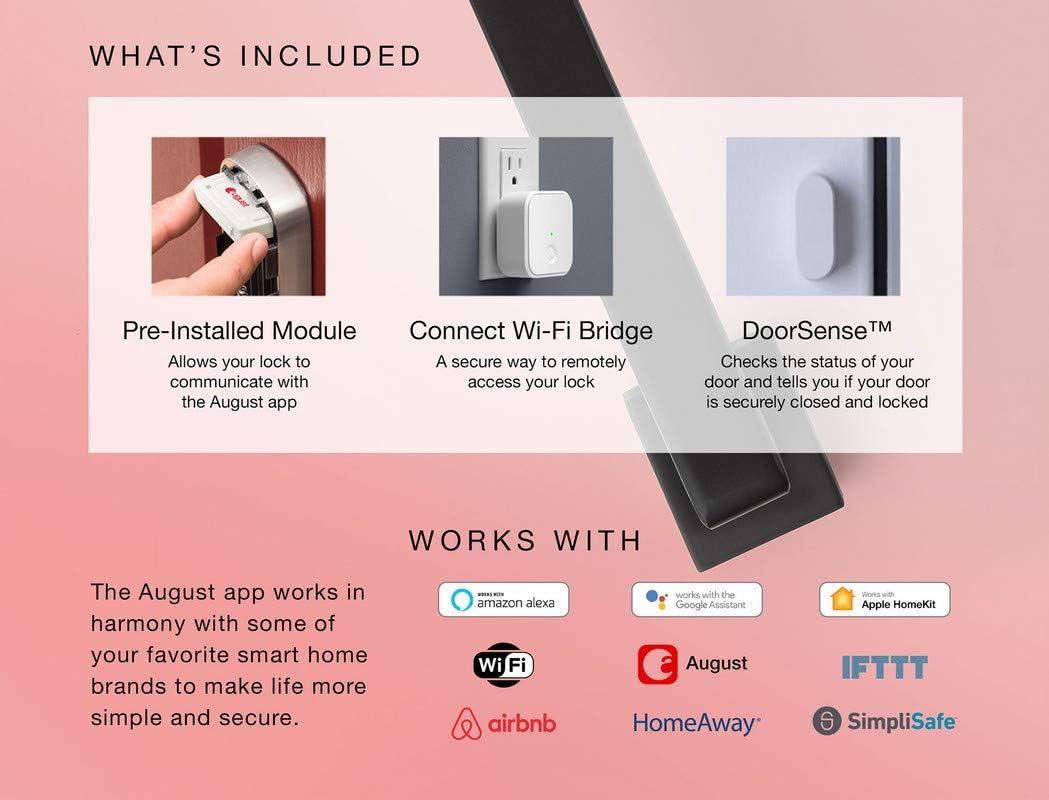
Figure 3.1: Visual representation of included components and smart home compatibility.
4. การตั้งค่าและการติดตั้ง
The Emtek Empowered Smart Deadbolt is designed for simple installation, typically requiring only a screwdriver. It replaces most existing deadbolts and is compatible with standard doors 1-3/4” to 2-1/4” thick with a standard 2-1/8” face bore door prep.
4.1. การตรวจสอบก่อนการติดตั้ง
- Ensure your door thickness and bore prep meet the specifications.
- ตรวจสอบว่าสิ่งของในบรรจุภัณฑ์ครบถ้วนหรือไม่
- For optimal smart features, ensure you have a stable Wi-Fi connection at your installation location.
4.2. ขั้นตอนการติดตั้ง
For detailed, step-by-step 3D instructions, it is highly recommended to download and use the แอป BILT. The app provides visual guidance for each stage ของกระบวนการติดตั้ง
ขั้นตอนทั่วไปมีดังนี้:
- ถอดเดดโบลต์ตัวเดิมของคุณออก
- Install the new deadbolt latch into the door edge.
- ติดตั้งชุดแป้นพิมพ์ภายนอก
- ติดตั้งแผ่นยึดภายใน
- Connect the cable from the exterior assembly to the interior escutcheon.
- Secure the interior escutcheon.
- Install the batteries (4 AA batteries included).
- Perform the door handing process as instructed by the lock or BILT app.
- Install the August Connect Wi-Fi Bridge and DoorSense according to their respective instructions to enable smart features.

รูปที่ 4.1: เกินview of hassle-free setup and customizable features.
5. คู่มือการใช้งาน
5.1. การทำงานของปุ่มกด
- ล็อค: Simply touch the keypad with your palm or fingers. The deadbolt will extend.
- การปลดล็อค: Enter your programmed user code on the backlit keypad. The deadbolt will retract.
5.2. August App Control
The August mobile app provides comprehensive control and monitoring capabilities:
- การล็อก/ปลดล็อกจากระยะไกล: Control your deadbolt from anywhere using the app.
- การเข้าถึงของแขก: Create and manage unlimited entry codes for guests, setting specific access schedules.
- การติดตามกิจกรรม: View a 24/7 history log of who enters and exits your home.
- DoorSense Status: Check if your door is securely closed and locked in real-time.
- Auto-Unlock (Home/Away Mode): Configure the lock to automatically unlock as you approach your home and lock when you leave.

Figure 5.1: Home Mode and Away Mode for automatic unlocking and locking.
5.3. การควบคุมด้วยเสียง
Integrate your Emtek smart deadbolt with your preferred voice assistant for hands-free control:
- อเมซอนอเล็กซ่า: "Alexa, lock the front door."
- ผู้ช่วย Google: "Hey Google, is the back door locked?"
- สิริ: "Hey Siri, unlock the garage door." (Requires Apple HomeKit setup via August app)
6. การบำรุงรักษา
6.1. การเปลี่ยนแบตเตอรี่
The deadbolt requires 4 AA alkaline batteries. When battery levels are low, the lock will provide an alert. To replace batteries:
- Remove the battery cover on the interior escutcheon.
- ถอดแบตเตอรี่เก่าออก
- Insert new AA alkaline batteries, ensuring correct polarity.
- เปลี่ยนฝาครอบแบตเตอรี่
สำคัญ: In case of complete battery depletion, a 9V battery port is available on the exterior keypad for temporary power to unlock the deadbolt. Simply hold a 9V battery to the contacts on the bottom of the keypad while entering your code.
6.2. การทำความสะอาด
ทำความสะอาดแผงปุ่มกดภายนอกและตัวเครื่องภายในด้วยผ้าเนื้อนุ่มamp ผ้า หลีกเลี่ยงการใช้น้ำยาทำความสะอาดหรือตัวทำละลายที่มีฤทธิ์กัดกร่อน เพราะอาจทำให้พื้นผิวและชิ้นส่วนอิเล็กทรอนิกส์เสียหายได้
7 การแก้ไขปัญหา
If you encounter issues with your Emtek Empowered Smart Deadbolt, refer to the following common problems and solutions:
| ปัญหา | สาเหตุที่เป็นไปได้ | สารละลาย |
|---|---|---|
| ระบบล็อคไม่ตอบสนองต่อการกดปุ่มบนแป้นพิมพ์ | Dead batteries; Keypad not waking up. | Replace AA batteries. Ensure you are touching the keypad to activate it. Use 9V battery backup if completely dead. |
| เดดโบลต์ไม่ยืด/หดได้เต็มที่ | Door misalignment; Low battery; Obstruction in door frame. | Check door alignment and strike plate. Replace batteries. Clear any obstructions. Re-run door handing process. |
| Cannot connect to August app or Wi-Fi. | August Connect not properly set up; Wi-Fi signal weak; App issues. | Ensure August Connect is plugged in and within range of the lock and Wi-Fi router. Check Wi-Fi signal strength. Restart August Connect and your mobile device. Consult August app help or BILT app. |
| Auto-unlock not working consistently. | Phone location services disabled; App not running in background; Geofencing issues. | Ensure location services are enabled for the August app. Keep the app running in the background. Calibrate your home's geofence in the August app settings. |
| Lock is unresponsive after installation. | Incorrect wiring/connection; Missing battery contact; Manufacturing defect. | Double-check all cable connections. Verify battery contacts are correctly seated. If issues persist, contact Emtek customer support. |
For further assistance, refer to the BILT app or contact Emtek customer support.
8. ข้อมูลจำเพาะ
| คุณสมบัติ | รายละเอียด |
|---|---|
| ยี่ห้อ | เอ็มเทค |
| ชื่อรุ่น | Empowered Motorized Touchscreen Keypad Smart Deadbolt |
| หมายเลขรุ่น | EMP1101US19 |
| ประเภทล็อค | แป้นพิมพ์ตัวเลข |
| คุณสมบัติพิเศษ | Touchscreen, Wi-Fi, Motorized, Backlit Keypad |
| วัสดุ | ทองเหลือง |
| สี | Flat Black Coated (US19) |
| ขนาดรายการ (ยาว x กว้าง x สูง) | 6 x 3 x 3 นิ้ว |
| น้ำหนักสินค้า | 4.86 ปอนด์ |
| ความเข้ากันได้ของความหนาของประตู | 1-3/4” to 2-1/4” |
| แหล่งพลังงาน | แบตเตอรี่ AA 4 ก้อน (รวมอยู่ด้วย) |
| เครื่องสำรองไฟ | พอร์ตแบตเตอรี่ 9V |
| โปรโตคอลการเชื่อมต่อ | Wi-Fi (via August Connect) |
| ประเภทตัวควบคุม | อเมซอน อเล็กซา, กูเกิล แอสซิสต์, ซิริ |
9. การรับประกันและการสนับสนุน
Emtek products are known for their quality and durability. For specific warranty information regarding your Empowered Motorized Touchscreen Keypad Smart Deadbolt, please refer to the warranty card included in your product packaging or visit the official Emtek webเว็บไซต์.
For technical support, troubleshooting assistance, or to inquire about replacement parts, please contact Emtek customer service. You can also find helpful resources and 3D installation guides on the แอป BILT.


