การแนะนำ
ขอบคุณสำหรับการซื้อasing the Greadio Retro Bluetooth Speaker and FM Radio. This compact and stylish device combines vintage aesthetics with modern audio technology, offering a rich sound experience through Bluetooth 5.0, FM radio, TF card playback, and AUX input. Designed for portability and ease of use, it's an ideal companion for music lovers who appreciate classic design.
โปรดอ่านคู่มือนี้อย่างละเอียดก่อนใช้งานผลิตภัณฑ์ เพื่อให้มั่นใจได้ว่าผลิตภัณฑ์ใช้งานได้อย่างถูกต้องและยืดอายุการใช้งานให้ยาวนานที่สุด เก็บคู่มือนี้ไว้เพื่อใช้อ้างอิงในอนาคต
คุณสมบัติผลิตภัณฑ์
- ขนาดกะทัดรัดและพกพาสะดวก: Mini size (approximately 4.4 x 2.7 x 2 inches) with surprisingly loud volume.
- คุณภาพเสียงสูง: Four-watt amplifiers for rich, clear sound with strong bass enhancement.
- การเล่นแบบมัลติฟังก์ชั่น: Supports Bluetooth 5.0 wireless connection, FM radio (87.5-108 MHz), TF card (MP3 player), and AUX input.
- อายุการใช้งานแบตเตอรี่ยาวนาน: Built-in 1100 mAh rechargeable lithium-ion battery provides up to 8 hours of playtime.
- การออกแบบย้อนยุค: วินที่ไม่เหมือนใครtage appearance with a smooth red paint finish, blending classic aesthetics with modern technology.
- ง่ายต่อการใช้: Intuitive controls for volume, tuning, and mode selection.
เนื้อหาแพ็คเกจ
กรุณาตรวจสอบสิ่งของภายในบรรจุภัณฑ์เมื่อแกะกล่องเพื่อให้แน่ใจว่ามีสินค้าครบทั้งหมด:
- Greadio Retro Bluetooth Speaker (Model: R919)
- สายชาร์จไมโคร USB
- สายสัญญาณเสียง AUX 3.5 มม.
- คู่มือการใช้งาน

Image: Contents of the Greadio Retro Bluetooth Speaker package, showing the red speaker, a Micro USB charging cable, a 3.5mm AUX cable, and the user manual.
การควบคุมและพอร์ต
Familiarize yourself with the controls and ports on your Greadio Retro Bluetooth Speaker:
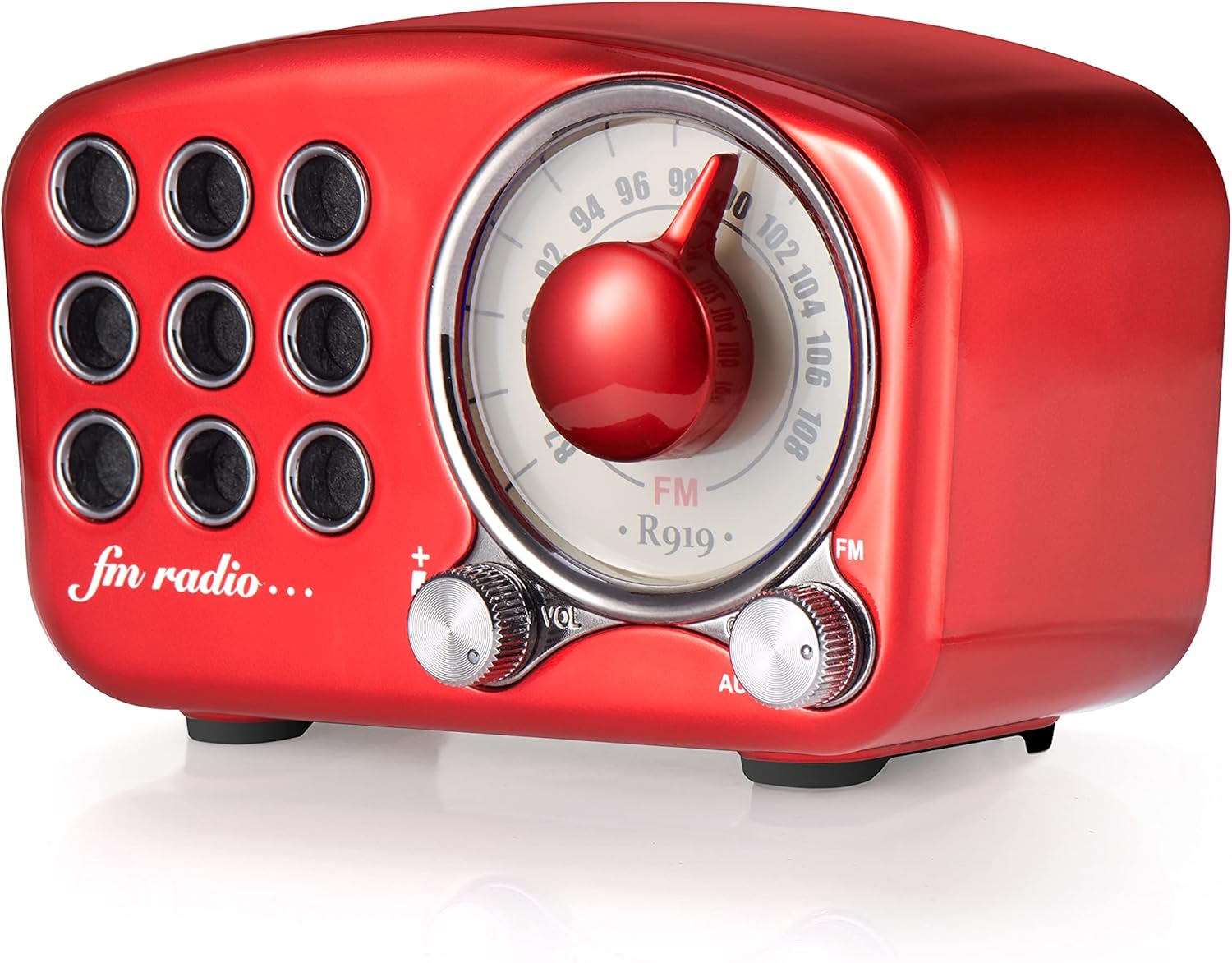
ภาพ: ด้านหน้า view of the Greadio R919 speaker, highlighting the large central tuning dial, the volume knob on the left, and the mode switch (FM/AUX) on the right.
- ปรับหน้าปัด: Large central dial for selecting FM radio frequencies.
- ปุ่มปรับระดับเสียง (VOL): Located on the left, turn to adjust the audio volume.
- Mode Switch (FM/AUX): Located on the right, switch between FM radio mode and AUX input mode.
- สวิตช์ไฟ: Often integrated with the volume knob (turn clockwise to power on, counter-clockwise to power off).

ภาพ: ด้านหลัง view of the Greadio R919 speaker, showing the Micro USB charging port, 3.5mm AUX input jack, and the TF (MicroSD) card slot.
- พอร์ตชาร์จ Micro USB: สำหรับเชื่อมต่อสายชาร์จ
- แจ็คอินพุต AUX: For connecting external audio devices via the 3.5mm AUX cable.
- ช่องเสียบการ์ด TF: For inserting a TF (MicroSD) card with MP3 audio files.
การตั้งค่า
การชาร์จเบื้องต้น
Before first use, it is recommended to fully charge the speaker. Connect the supplied Micro USB cable to the charging port on the back of the speaker and the other end to a USB power adapter (not included) or a computer's USB port. The charging indicator light will typically illuminate during charging and turn off or change color when fully charged.
A full charge usually takes a few hours and provides up to 8 hours of playback time.
คำแนะนำการใช้งาน
เปิด/ปิดเครื่อง
- To power on, turn the Volume knob clockwise until you hear a click and the speaker powers on.
- To power off, turn the Volume knob counter-clockwise until you hear a click and the speaker powers off.
โหมดบลูทู ธ
The speaker will automatically enter Bluetooth pairing mode when powered on if no other mode is selected or if the mode switch is set to Bluetooth (if applicable, otherwise it defaults to Bluetooth).
- ตรวจสอบให้แน่ใจว่าลำโพงเปิดอยู่
- บนอุปกรณ์พกพาของคุณ (สมาร์ทโฟน แท็บเล็ต แล็ปท็อป) เปิดใช้งานบลูทูธและค้นหาอุปกรณ์ที่ใช้งานได้
- Select "R919" or "Greadio R919" from the list of found devices.
- Once connected, the speaker will emit a confirmation sound. You can now play audio from your device through the speaker.

Image: The Greadio R919 speaker wirelessly connected to a smartphone, tablet, and laptop, illustrating its Bluetooth compatibility.
โหมดวิทยุ FM
- Switch the mode selector to "FM".
- Slowly turn the Tuning Dial to search for FM radio stations. The frequency range is 87.5-108 MHz.
- ปรับปุ่มปรับระดับเสียงไปยังระดับเสียงที่คุณต้องการฟัง
- For better reception, extend the built-in antenna (if present, or reposition the speaker).

Image: A family enjoying the Greadio R919 speaker while listening to FM radio outdoors, demonstrating its portability and radio function.
TF Card (MP3 Player) Mode
- ใส่การ์ด TF (MicroSD) พร้อมเสียง MP3 fileเสียบการ์ด TF เข้าไปในช่องเสียบการ์ด TF ด้านหลังลำโพง
- The speaker should automatically switch to TF card playback mode and begin playing the first compatible audio file.
- Use the volume knob to adjust the sound level. (Note: Track navigation controls may not be available on this model, playback is sequential).
โหมดอินพุต AUX
- Connect one end of the supplied 3.5mm AUX audio cable to the AUX input jack on the back of the speaker.
- Connect the other end of the AUX cable to the headphone jack or audio output of your external audio device (e.g., MP3 player, computer).
- เลื่อนตัวเลือกโหมดไปที่ "AUX"
- Play audio from your external device. Adjust volume using both the speaker's volume knob and your external device's volume controls.
การซ่อมบำรุง
- การทำความสะอาด: ใช้ผ้านุ่มและแห้งเช็ดทำความสะอาดพื้นผิวของลำโพง ห้ามใช้น้ำยาทำความสะอาดที่มีฤทธิ์กัดกร่อน แว็กซ์ หรือตัวทำละลาย
- พื้นที่จัดเก็บ: เก็บลำโพงไว้ในที่แห้งและเย็น หลีกเลี่ยงแสงแดดโดยตรงและอุณหภูมิที่สูงหรือต่ำเกินไป
- การดูแลแบตเตอรี่ เพื่อยืดอายุการใช้งานแบตเตอรี่ ควรหลีกเลี่ยงการใช้แบตเตอรี่จนหมดบ่อยๆ ควรชาร์จลำโพงเป็นประจำ แม้จะไม่ได้ใช้งานเป็นเวลานานก็ตาม
- ความต้านทานน้ำ: This speaker is NOT water-resistant. Avoid exposure to water or high humidity.
การแก้ไขปัญหา
| ปัญหา | สาเหตุที่เป็นไปได้ | สารละลาย |
|---|---|---|
| ไม่มีไฟฟ้า | Battery is dead; Power switch is off. | Charge the speaker; Turn the volume knob clockwise to power on. |
| ไม่มีเสียงในโหมดบลูทูธ | Speaker not paired; Volume too low on speaker or device. | Ensure speaker is in Bluetooth mode and paired; Increase volume on both speaker and connected device. |
| การรับสัญญาณวิทยุ FM ไม่ดี | Weak signal; Speaker position. | Reposition the speaker; Extend the antenna (if applicable); Try tuning to a stronger station. |
| การ์ด TF ไม่เล่น | Card not inserted correctly; Incompatible file format; Corrupted card. | Reinsert TF card; Ensure files are MP3 format; Try a different TF card. |
| ไม่มีเสียงในโหมด AUX | Cable not connected properly; Mode not set to AUX; Volume too low. | Check AUX cable connections; Switch mode to AUX; Increase volume on both speaker and external device. |
ข้อมูลจำเพาะ
| คุณสมบัติ | รายละเอียด |
|---|---|
| ยี่ห้อ | Gredio |
| แบบอย่าง | R919 |
| เทคโนโลยีการเชื่อมต่อ | บลูทูธ 5.0, ช่องต่อ AUX |
| เทคโนโลยีจูนเนอร์ | เอฟเอ็ม (87.5-108 เมกะเฮิรตซ์) |
| กำลังขับของลำโพง | 4 วัตต์ |
| แหล่งพลังงาน | ใช้พลังงานจากแบตเตอรี่ |
| ประเภทแบตเตอรี่ | ลิเธียมไอออน |
| ความจุของแบตเตอรี่ | 1100 มิลลิแอมป์ |
| อายุการใช้งานแบตเตอรี่โดยเฉลี่ย | นานถึง 8 ชั่วโมง |
| ขนาดสินค้า (กว้าง x ยาว x สูง) | 10.67 x 6.35 x 4.57 ซม. (4.2 x 2.5 x 1.8 นิ้ว) |
| น้ำหนักสินค้า | 199.58 กรัม (0.44 ปอนด์) |
| ประเภทวัสดุ | Plastic with Red Coating/Paint |
| อุปกรณ์ที่รองรับ | Smartphone, Laptop, MP3 Player, etc. |
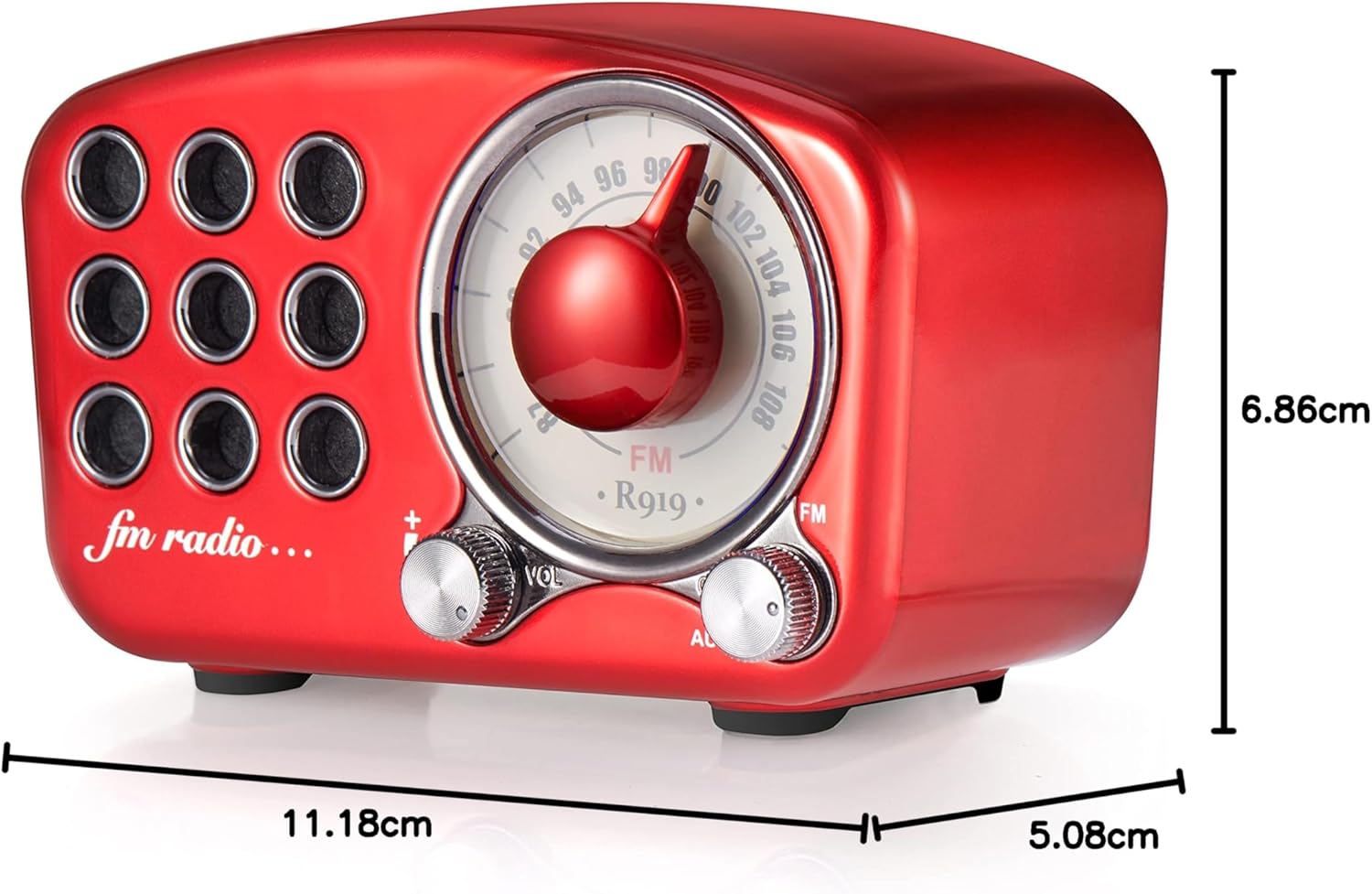
Image: Diagram showing the dimensions of the Greadio R919 speaker: 11.18 cm (length), 5.08 cm (width), and 6.86 cm (height).
การรับประกันและการสนับสนุน
The Greadio Retro Bluetooth Speaker comes with a การรับประกันจากผู้ผลิต 1 ปีครอบคลุมถึงข้อบกพร่องด้านวัสดุและฝีมือการผลิตภายใต้การใช้งานปกติ
Additionally, Greadio provides บริการลูกค้าตลอดชีพ. If you encounter any issues or have questions regarding your product, please contact Greadio customer support through the retailer's platform or the official Greadio webเว็บไซต์เพื่อขอความช่วยเหลือ
Please note that the warranty does not cover wear and tear, misuse, accidental damage, or unauthorized repairs.


