1. บทนำ
The SanA Smart Light Switch is designed to provide wireless control of your home lighting using your existing Wi-Fi network. This device allows for remote control via a mobile application, voice commands through compatible smart assistants, and traditional manual operation. It integrates seamlessly into modern smart home ecosystems without requiring a separate hub.
ฟังก์ชั่นหลัก ได้แก่ :
- Control lights from any location with internet access.
- Set schedules for lights to turn on or off automatically.
- รองรับการควบคุมด้วยเสียงผ่าน Amazon Alexa และ Google Home
- LED indicators for night navigation and status.
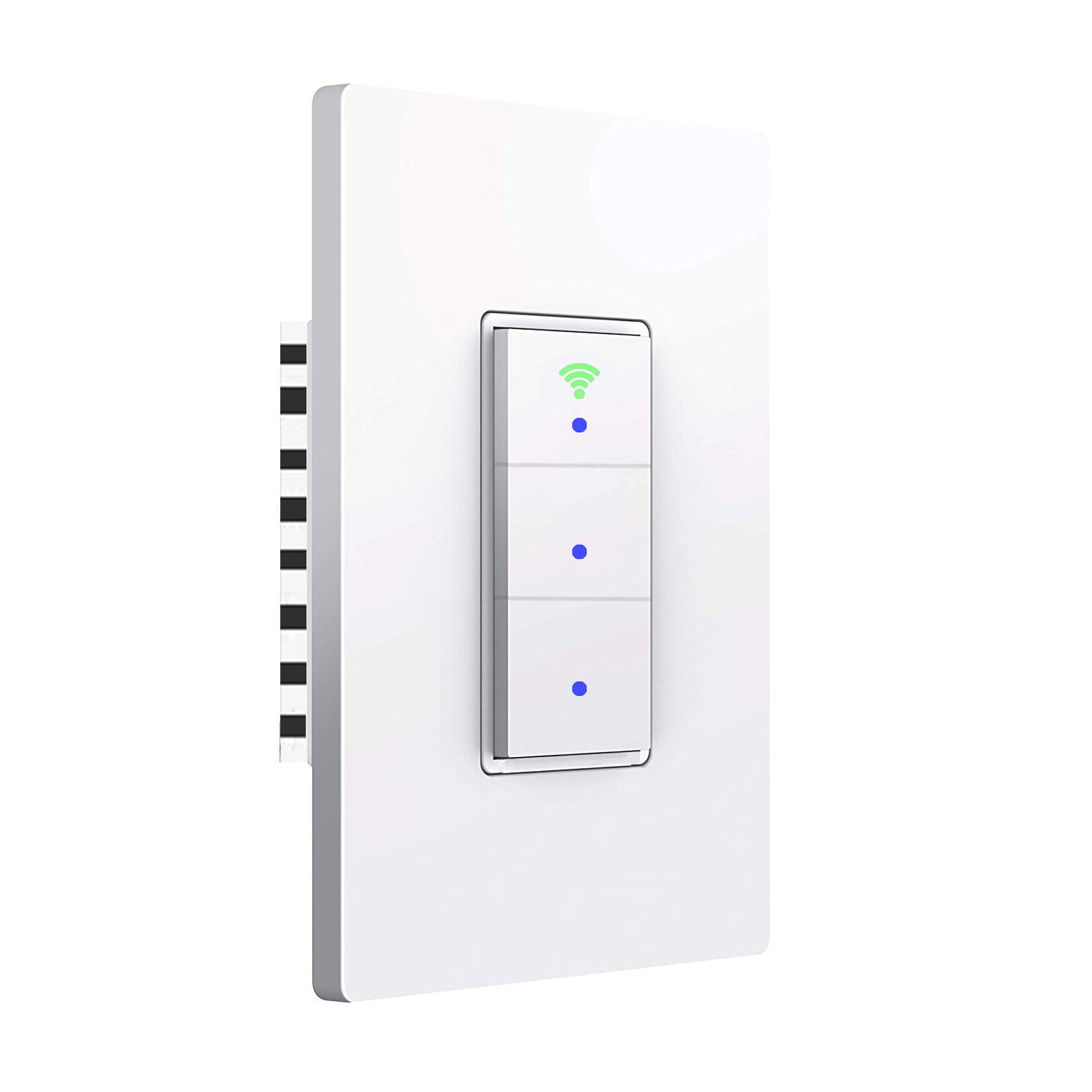
ภาพ: ด้านหน้า view of the SanA Smart Light Switch, showing its three buttons and Wi-Fi indicator.
2. ข้อมูลด้านความปลอดภัยที่สำคัญ
คำเตือน: มีความเสี่ยงต่อการเกิดไฟฟ้าช็อต
- Installation must be performed by a qualified electrician or a person with thorough knowledge of electrical wiring.
- ควรปิดเบรกเกอร์ทุกครั้งก่อนติดตั้งหรือซ่อมบำรุงสวิตช์
- ตรวจสอบให้แน่ใจว่าสวิตช์มีพิกัดเหมาะสมกับโหลดที่จะควบคุม
- This device requires a neutral wire for proper operation. If your existing wiring does not include a neutral wire, consult a professional electrician.
- ห้ามติดตั้งขณะมือเปียกหรือยืนอยู่บนพื้นเปียกหรือแห้งamp พื้นผิว
- ใช้เฉพาะภายในอาคารเท่านั้น
3. เนื้อหาบรรจุภัณฑ์
ตรวจสอบว่ามีส่วนประกอบทั้งหมดอยู่ในแพ็คเกจ:
- 1x SanA Smart Wall Light Switch (3 Switches in 1 Gang)
- 1x คู่มือผู้ใช้ (เอกสารนี้)
- 2x สกรูสำหรับติดตั้ง
4. ข้อมูลจำเพาะผลิตภัณฑ์
| คุณสมบัติ | รายละเอียด |
|---|---|
| พิมพ์ | สวิตช์ไฟติดผนังอัจฉริยะ |
| วัสดุ | PC flame retardant polymer, Copper, Brass |
| ปฏิบัติการฉบับที่tage | ไฟฟ้ากระแสสลับ 100V-240V / 50Hz~60Hz |
| Max Power (Resistance Load) | 1100W/แก๊ง |
| Max Power (Capacitive Load) | 400W/แก๊ง |
| กระแสไฟฟ้าทำงาน | สูงสุด 10A |
| ความชื้นในการทำงาน | <80% |
| โปรโตคอลวิทยุ | WiFi 2.4GHz (5GHz not supported) |
| การใช้พลังงานขณะสแตนด์บาย | <0.1มิลลิแอมป์ |
| อุณหภูมิสภาพแวดล้อมการทำงาน | -20 ~ 45 ° C (-4 ~ 113 ° F) |
| Life Long | >100,000 ครั้ง |
| สลับมิติ | 5.04 x 3.31 x 0.91 นิ้ว (12.8 x 8.4 x 2.3 ซม.) |
| ประเภทวงจร | 3-way (Note: This switch is not a 3-way switch replacement, it controls 3 separate loads from one location) |
| ประเภทขั้วต่อ | ไร้สาย |
| ประเภทตัวกระตุ้น | ปุ่มกด |

Image: Diagram showing the dimensions of the SanA Smart Light Switch: 5.04 inches height, 3.31 inches width, and 0.91 inches depth.
5. คู่มือการติดตั้ง
5.1 รายการตรวจสอบก่อนการติดตั้ง
- ต้องการลวดเป็นกลาง: This smart switch requires a neutral wire for operation. Confirm your electrical box has a neutral wire (usually white). If not, consult a qualified electrician.
- หมดแรง: Before starting, turn off the power to the switch location at the circuit breaker. Verify power is off using a voltagอีผู้ทดสอบ
- เครือข่าย Wi-Fi 2.4GHz: Ensure your home Wi-Fi network is 2.4GHz. This switch does not support 5GHz Wi-Fi.
5.2 คำแนะนำในการเดินสายไฟ
- ปิดไฟที่เบรกเกอร์
- ถอดแผ่นผนังที่มีอยู่และสวิตช์ออกจากกล่องผนัง
- ระบุสายไฟ:
- สายไฟ (L): โดยทั่วไปเป็นสีดำ รับกระแสไฟฟ้าจากเบรกเกอร์
- สายนิวทรัล (N): Usually white, required for the smart switch.
- Load Wires (Load1, Load2, Load3): Wires going to the light fixtures.
- Ground Wire (Optional): โดยทั่วไปจะเป็นสีเขียวหรือสีทองแดงเปลือย
- Connect the wires from the wall box to the corresponding terminals on the SanA Smart Light Switch using wire nuts (not included, but recommended for secure connections):
- ต่อสายไฟ (Live wire) เข้ากับขั้ว 'L'
- ต่อสายกลาง (Neutral) เข้ากับขั้ว 'N'
- Connect Load1 to the 'Load1' terminal, Load2 to 'Load2', and Load3 to 'Load3'.
- Connect the Ground wire (if present) to the 'Ground' terminal.
- Carefully push the wired switch into the wall box.
- Secure the switch to the wall box with the provided screws.
- ติดแผ่นผนังใหม่
- เปิดเครื่องที่เซอร์กิตเบรกเกอร์

Image: Detailed wiring diagram showing connections for Live, Neutral, Ground (optional), and three Load wires to the smart switch terminals.
5.3 การดาวน์โหลดและการจับคู่แอป
- ดาวน์โหลดแอป: ค้นหา "Smart Life" in the Apple App Store (for iOS) or Google Play Store (for Android) and download the application.
- ลงทะเบียน/เข้าสู่ระบบ: Open the Smart Life app and register for a new account or log in if you already have one.
- เพิ่มอุปกรณ์:
- แตะไอคอน "+" ที่มุมบนขวาของแอปเพื่อเพิ่มอุปกรณ์
- Select "Electrical" then "Switch (Wi-Fi)" or "Wall Switch".
- Follow the on-screen instructions to put the switch into pairing mode. This usually involves pressing and holding one of the switch buttons until the Wi-Fi indicator light blinks rapidly.
- ป้อนชื่อเครือข่าย Wi-Fi 2.4GHz และรหัสผ่านของคุณเมื่อได้รับแจ้ง
- The app will then search for and connect to the switch. Once connected, you can rename the switch and individual gangs within the app.

Image: Icons representing key features: Timing Function, Voice Control, Sharing, Remote Control, and 2.4GHz WiFi compatibility.
6. คู่มือการใช้งาน
6.1 การควบคุมด้วยตนเอง
Each button on the switch functions as a traditional light switch. Press a button to toggle the connected light on or off.
The Wi-Fi indicator light on the switch will show its status:
- แสงสีฟ้า: Indicates the switch is working and powered on.
- ไฟเขียว: Indicates the switch is successfully connected to your Wi-Fi network.

Image: Illustration showing the smart switch with blue dots indicating power on, and a green Wi-Fi icon indicating network connection.
การควบคุมแอพ 6.2 ตัว
Once paired, you can control your lights from the "Smart Life" app:
- เปิดแอพ Smart Life
- Select your SanA Smart Light Switch from the device list.
- Tap on the individual switch icons within the app to turn lights on or off.
- You can also set up scenes, groups, and automations within the app for more advanced control.
6.3 การควบคุมด้วยเสียง (Alexa และ Google Home)
To enable voice control, link your Smart Life account to your Amazon Alexa or Google Home app:
- เปิดแอป Alexa หรือ Google Home
- ไปที่ส่วน "ทักษะ" (Alexa) หรือ "ทำงานร่วมกับ Google" (Google Home)
- ค้นหา "Smart Life" and enable the skill/service.
- Log in with your Smart Life account credentials.
- Once linked, discover devices (Alexa) or sync devices (Google Home).
- ตอนนี้คุณสามารถใช้คำสั่งเสียงได้เช่น:
- "Alexa, turn on living room light."
- "Hey Google, turn off kitchen light."
- "Alexa, set bedroom light to 50%." (If dimmable bulbs are used and supported by the switch/app)
6.4 Timer and Schedule Settings
The Smart Life app allows you to set schedules and timers for your lights:
- การกำหนดตารางเวลา: Set specific times for lights to turn on or off daily or on selected days of the week.
- นาฬิกาจับเวลาถอยหลัง: Set a countdown for a light to turn off after a certain duration.

Image: Screenshot of the Smart Life app interface showing the timer function, allowing users to set schedules for lights to work automatically.
6.5 การแชร์อุปกรณ์
You can share control of your smart switch with family members or other users through the Smart Life app. This allows multiple users to control the lights from their own devices.
7. การบำรุงรักษา
- การทำความสะอาด: To clean the switch, wipe it with a soft, dry cloth. Do not use abrasive cleaners or solvents. Ensure power is off before cleaning.
- อัพเดตเฟิร์มแวร์: Periodically check the Smart Life app for firmware updates for your switch. Updates can improve performance and add new features.
- ความเสถียรของเครือข่าย: Ensure your Wi-Fi network is stable and strong in the area where the switch is installed for optimal performance.
8 การแก้ไขปัญหา
| ปัญหา | สาเหตุที่เป็นไปได้ / วิธีแก้ไข |
|---|---|
| Switch not turning on/off manually. |
|
| Cannot connect to Wi-Fi / App control not working. |
|
| ระบบควบคุมด้วยเสียงไม่ตอบสนอง |
|
| ไฟกระพริบหรือไม่ดับสนิท |
|
| Switch feels warm. |
|
9. การรับประกันและการสนับสนุน
For any questions regarding installation, operation, or troubleshooting, please contact SanA customer support. Refer to the contact information provided on the product packaging or the seller's information on the purchase platform.
ผลิตภัณฑ์นี้มาพร้อมกับการรับประกันมาตรฐานจากผู้ผลิต โปรดเก็บหลักฐานการซื้อไว้เพื่อใช้ในการเรียกร้องการรับประกัน
For further assistance, you may visit the SanA official webไซต์หรือติดต่อทีมสนับสนุนของพวกเขาโดยตรง


