1. บทนำ
This manual provides essential information for the safe and effective use of your VonHaus 71 Key Digital Safe Cabinet. Please read these instructions thoroughly before installation and operation, and retain them for future reference. The VonHaus Key Safe is designed to securely store up to 71 keys, featuring a robust steel body, an electronic keypad for access, and an emergency override system.
2. ข้อมูลด้านความปลอดภัย
- Ensure the safe is mounted on a solid, stable surface capable of supporting its weight and potential contents.
- Keep emergency override keys in a secure location away from the safe. Do not store them inside the safe.
- Do not expose the safe to extreme temperatures or moisture.
- ตรวจสอบระดับแบตเตอรี่เป็นประจำเพื่อให้แน่ใจว่าจะทำงานได้อย่างต่อเนื่อง
- Keep the keypad clean and free from debris.
3. เนื้อหาบรรจุภัณฑ์
ตรวจสอบว่าส่วนประกอบทั้งหมดมีอยู่ก่อนดำเนินการติดตั้ง:
- VonHaus 71 Key Digital Safe Cabinet
- กุญแจสำรองฉุกเฉิน 2 ดอก
- สลักเกลียว (4)
- Wall Plugs/Anchors (4)
- Keyrings and Labels (71 sets)
- คู่มือการใช้งาน
4. สินค้าหมดview
The VonHaus Key Safe features a robust design for secure key storage. Key components include:
- Rust-Resistant Solid Steel Body: Provides durability and security.
- Digital Electronic Keypad: For setting and entering a 3-8 digit access code.
- กุญแจล็อคฉุกเฉิน: A manual override for access if the code is forgotten or batteries are depleted.
- Robust Rotary Dial: The handle used to open the safe door after successful code entry or manual unlock.
- ไฟ LED แสดงสถานะ: Lights to indicate successful entry, failed entry, and low battery level.
- Adjustable Key Shelves: Seven shelves with integrated hooks for organizing up to 71 keys.

5. การตั้งค่า
5.1. การติดตั้งบนผนัง
The key safe is designed for wall mounting to ensure maximum security. It comes with pre-drilled mounting holes and all necessary hardware.
- Choose a suitable, solid wall location for installation. Ensure there are no hidden electrical wires or pipes.
- Hold the safe against the wall at the desired height and mark the positions of the four pre-drilled mounting holes.
- Drill pilot holes at the marked positions using an appropriate drill bit for your wall type.
- Insert the provided wall plugs (anchors) into the drilled holes.
- Align the safe with the wall plugs and secure it using the provided mounting bolts. Tighten securely.

5.2. การติดตั้งแบตเตอรี่
The electronic keypad requires batteries (not included) for operation.
- Open the safe door using the emergency override key (refer to Section 6.2 if needed).
- หาช่องใส่แบตเตอรี่ที่อยู่ด้านในประตูตู้เซฟ
- Insert the required batteries (typically AA, check compartment for exact type and quantity) according to the polarity markings.
- ปิดฝาช่องใส่แบตเตอรี่
5.3. การตั้งรหัสส่วนตัวของคุณ
The safe allows you to set a 3-8 digit personal access code.
- With the safe door open, locate the red reset button on the inside of the door, near the hinge.
- Press the red reset button. You will hear a beep, and the yellow LED on the keypad will illuminate.
- Within 5 seconds, enter your desired 3-8 digit code on the keypad.
- Press the '#' button to confirm your code. You will hear a confirmation beep, and the yellow LED will turn off.
- Test your new code: With the door still open, enter your new code followed by '#'. The green LED should light up, and you should be able to turn the rotary dial to simulate opening the safe. If it doesn't work, repeat steps 1-4.
6. คู่มือการใช้งาน
6.1. เปิดตู้นิรภัยด้วยรหัสของคุณ
- กรอกรหัสส่วนตัว 3-8 หลักของคุณบนแป้นพิมพ์
- Press the '#' button. The green LED will illuminate, indicating successful entry.
- Within 5 seconds, turn the rotary dial clockwise to open the safe door.
6.2. Using Emergency Override Keys
In case you forget your code or the batteries are depleted, you can use the emergency override keys.
- หาช่องกุญแจฉุกเฉิน ซึ่งมักจะซ่อนอยู่หลังฝาครอบเล็กๆ บนแผงปุ่มกด
- Insert one of the emergency override keys into the keyhole and turn it.
- While the key is turned, rotate the main rotary dial clockwise to open the safe door.
- หลังจากเปิดประตูแล้ว ให้ถอดกุญแจสำรองออก

6.3. Organizing Keys
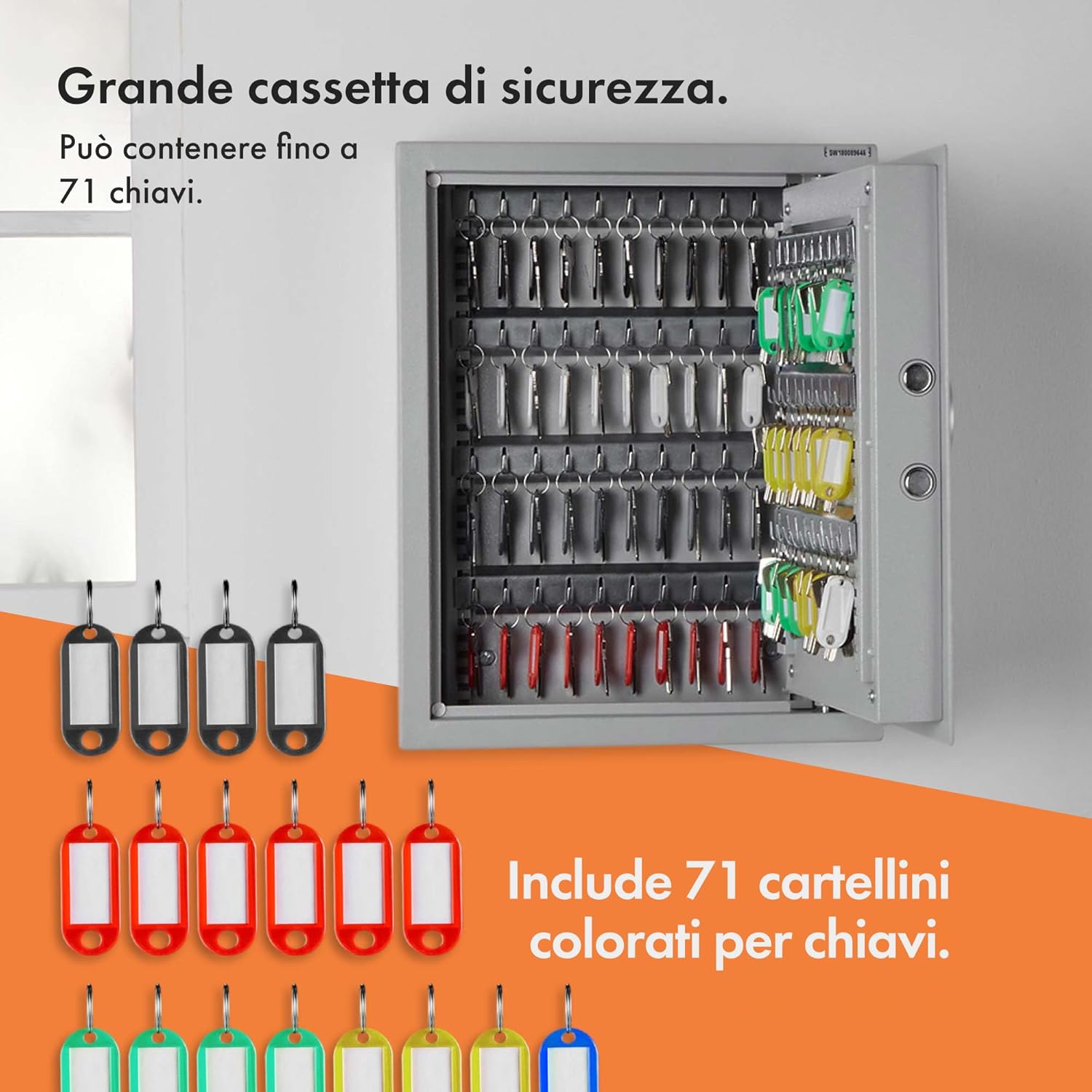
The safe is equipped with 7 adjustable key shelves and 71 keyrings with labels for efficient organization.
- Attach your keys to the provided keyrings and labels.
- The 7 key shelves (4 with 11 hangers and 3 with 9 hangers) can be removed and adjusted to accommodate different key sizes and quantities. Simply slide them out of their slots and re-insert them into desired positions.
- Hang the labeled keyrings onto the hooks on the shelves.


7. การบำรุงรักษา
7.1. การเปลี่ยนแบตเตอรี่
When the low battery indicator (red LED) illuminates, it is time to replace the batteries.
- Open the safe door (using your code or emergency key).
- เปิดฝาช่องใส่แบตเตอรี่
- ถอดแบตเตอรี่เก่าออกและทิ้งอย่างมีความรับผิดชอบ
- ใส่แบตเตอรี่ใหม่ ตรวจสอบให้แน่ใจว่าขั้วถูกต้อง
- ปิดฝาช่องใส่แบตเตอรี่
7.2. การทำความสะอาด
เช็ดภายนอกตู้เซฟด้วยผ้านุ่มๆamp ผ้า ห้ามใช้สารทำความสะอาดที่มีฤทธิ์กัดกร่อนหรือตัวทำละลาย
8 การแก้ไขปัญหา
- ตู้เซฟไม่สามารถเปิดได้ด้วยรหัส:
- Ensure batteries are not depleted. Replace if necessary.
- Verify you are entering the correct 3-8 digit code followed by '#'.
- If the code is forgotten, use the emergency override keys.
- แป้นพิมพ์ไม่ตอบสนอง:
- ตรวจสอบและเปลี่ยนแบตเตอรี่
- ตรวจสอบให้แน่ใจว่าไม่มีเศษสิ่งสกปรกกีดขวางปุ่มกด
- ประตูไม่ปิดสนิท:
- Check for any obstructions preventing the door from fully closing.
- Ensure the locking bolts are retracting correctly when the door is open.

รูปที่ 8.1: ภาพระยะใกล้ view of the robust locking bolts, ensuring secure closure of the safe.
9. ข้อมูลจำเพาะ
| ยี่ห้อ | ฟอนเฮาส์ |
| ชื่อรุ่น | VonHaus 71 Digital Key Safe |
| หมายเลขรุ่นสินค้า | 3500139 |
| สี | เงิน |
| วัสดุ | เหล็กอัลลอยด์ |
| ประเภทล็อค | รหัสล็อคแบบอิเล็กทรอนิกส์ |
| ความสามารถหลัก | 71 คีย์ |
| จำนวนชั้นวาง | 7 |
| ประเภทการติดตั้ง | Wall Mounted (Surface Mount) |
| น้ำหนักสินค้า | 9 กก. 600 ก. |
| ขนาดรายการ (LxWxH) | 14.2 x 17.7 x 4.7 Centimeters (Note: These dimensions seem to be package or internal, refer to Figure 4.1 for external safe dimensions: 36cm W x 45cm H x 12cm D) |
| จำเป็นต้องประกอบ | Yes (Mounting) |
10. การรับประกันและการสนับสนุน
All VonHaus products are backed by a minimum 2-year warranty. For support, warranty claims, or further assistance, please refer to the contact information provided with your purchase or visit the official VonHaus webโปรดเตรียมหมายเลขรุ่น (3500139) และรายละเอียดการซื้อให้พร้อมเมื่อติดต่อฝ่ายสนับสนุน


