1. บทนำ
This manual provides essential information for the safe and efficient operation of your Muse M-1990 DJ Bluetooth Party Speaker. Please read these instructions thoroughly before using the device and retain them for future reference.
The Muse M-1990 DJ is a powerful party speaker designed to deliver high-quality audio with dynamic light effects. It features multiple connectivity options including Bluetooth, CD player, USB, and AUX inputs, making it versatile for various audio sources.

Image 1.1: The Muse M-1990 DJ Bluetooth Party Speaker showcasing its integrated light effects.
2. ข้อมูลด้านความปลอดภัย
ปฏิบัติตามข้อควรระวังด้านความปลอดภัยต่อไปนี้เพื่อป้องกันไฟฟ้าช็อต ไฟไหม้ หรือความเสียหายต่อเครื่อง:
- อย่าให้เครื่องโดนฝนหรือความชื้น
- อย่าเปิดcasinก. ส่งต่อการบริการทั้งหมดให้กับบุคลากรที่มีคุณสมบัติเหมาะสม
- ตรวจสอบแหล่งจ่ายไฟ voltage ตรงกับฉลากการจัดอันดับบนหน่วย
- ควรวางเครื่องให้ห่างจากแสงแดดโดยตรง แหล่งความร้อน และฝุ่นละอองมากเกินไป
- ให้แน่ใจว่ามีการระบายอากาศเพียงพอรอบๆ เครื่อง
- ห้ามวางของหนักบนตัวเครื่อง
- ถอดปลั๊กเครื่องในระหว่างที่เกิดพายุฝนฟ้าคะนองหรือเมื่อไม่ได้ใช้งานเป็นเวลานาน
3. เนื้อหาบรรจุภัณฑ์
ตรวจสอบว่ามีสินค้าทั้งหมดอยู่ในบรรจุภัณฑ์:
- Muse M-1990 DJ Party Speaker Unit
- รีโมทคอนโทรล (ต้องใช้แบตเตอรี่ AA 2 ก้อน รวมอยู่ด้วย)
- ไมโครโฟนแบบมีสาย
- AUX IN Cable (3.5mm jack)
- สายไฟ (AC 100-240V, 50/60Hz)

Image 3.1: Included accessories: remote control, wired microphone, and AUX cable.
4. สินค้าหมดview
Familiarize yourself with the main components and controls of your M-1990 DJ speaker.
4.1 แผงควบคุมด้านบน
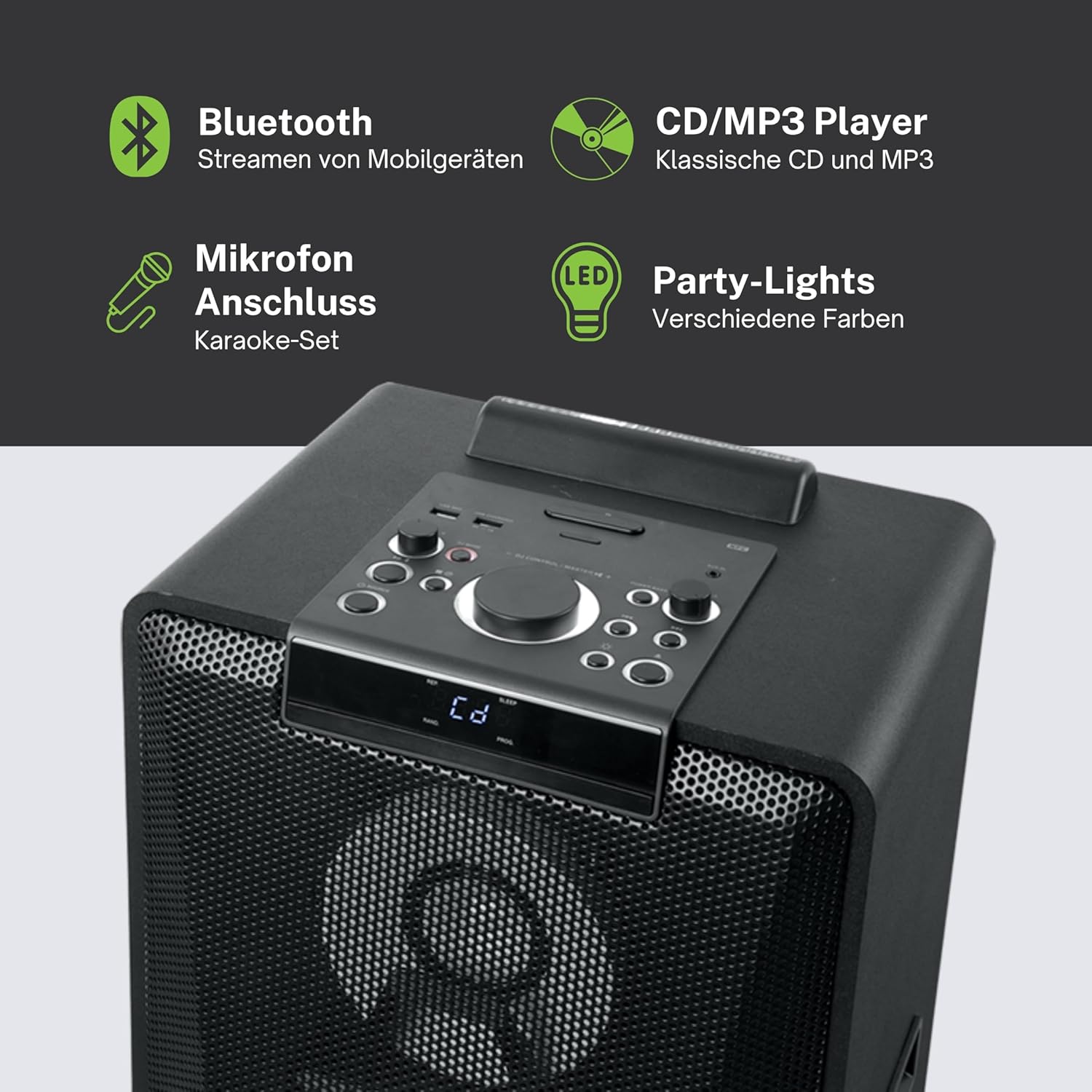
ภาพที่ 4.1: รายละเอียด view of the top control panel, showing various buttons and the LED display.
The top panel features controls for power, volume, source selection, playback, light effects, and a white LED display. It also includes a built-in cradle for a tablet or smartphone.
4.2 Rear Connectivity Ports
แผงด้านหลังมีตัวเลือกอินพุตและเอาต์พุตต่างๆ ดังนี้:
- USB 2.0 Port (for MP3 playback and charging)
- AUX IN 1 (2 x RCA jacks)
- AUX IN 2 (3.5mm jack)
- Microphone Inputs (2 jacks)
- Guitar Input (1 jack)
- AC Power Input (100-240V, 50/60Hz)
5. การตั้งค่า
5.1 การจัดวาง
Place the speaker on a stable, flat surface. Ensure there is adequate space around the unit for ventilation. The unit is designed for floor mounting.
5.2 การเชื่อมต่อสายไฟ
- Connect the supplied power cable to the AC power input on the rear of the speaker.
- เสียบปลายอีกด้านของสายไฟเข้ากับเต้ารับไฟฟ้ามาตรฐาน (AC 100-240V, 50/60Hz)
- The unit does not contain a rechargeable battery and must be connected to a power source for operation.
6. คู่มือการใช้งาน
6.1 เปิด/ปิดเครื่อง
Press the Power button on the top control panel or the remote control to turn the unit on or off.
6.2 การจับคู่บลูทูธ
- Press the Source button to select Bluetooth mode. The LED display will show 'BT' and the Bluetooth indicator will flash.
- เปิดใช้งานบลูทูธบนสมาร์ทโฟน แท็บเล็ต หรืออุปกรณ์อื่นที่เข้ากันได้ของคุณ
- ค้นหา 'M-1990 DJ' in your device's Bluetooth list and select it to pair.
- Once paired, the Bluetooth indicator will stop flashing, and you can begin streaming audio.
- For NFC-enabled devices, simply tap your device on the NFC area of the speaker for automatic pairing.
6.3 การเล่นแผ่นซีดี
- กดปุ่ม Source เพื่อเลือกโหมด CD
- Open the CD tray and place a CD (CD, CD-R/RW, MP3 compatible) with the label side up.
- Close the CD tray. Playback will start automatically or can be initiated using the Play/Pause button.
6.4 การเล่น USB
- ใส่แฟลชไดรฟ์ USB ที่มี MP3 files into the USB 2.0 port.
- Press the Source button to select USB mode.
- Playback will start automatically or can be controlled using the playback buttons.
- The USB port also functions as a charging port for external devices.
อินพุต AUX 6.5 ช่อง
- Connect your external audio device to either the AUX IN 1 (RCA jacks) or AUX IN 2 (3.5mm jack) using the appropriate cable.
- Press the Source button to select the corresponding AUX input.
- ควบคุมการเล่นจากอุปกรณ์ที่เชื่อมต่อของคุณ
6.6 อินพุตไมโครโฟนและกีตาร์
- Plug your microphone(s) into the Microphone input jacks.
- Plug your guitar into the Guitar input jack.
- Adjust the microphone/guitar volume using the dedicated controls on the top panel.
6.7 เอฟเฟกต์แสง
The M-1990 DJ features color-changing lights and strobe effects. Use the dedicated Light Effects button on the control panel or remote to cycle through different modes or turn the lights off.
6.8 Stereo Pairing (Dual Bluetooth)
If you have two M-1990 DJ units, you can pair them wirelessly for a stereo sound experience. Refer to the specific instructions for stereo pairing in the full manual (if provided by manufacturer) or on the manufacturer's webเว็บไซต์.
7. การบำรุงรักษา
7.1 การทำความสะอาด
- ถอดปลั๊กเครื่องออกจากเต้ารับก่อนทำความสะอาดทุกครั้ง
- ใช้ผ้าแห้งนุ่มๆ เช็ดทำความสะอาดพื้นผิวภายนอก
- ห้ามใช้สารทำความสะอาดที่มีฤทธิ์กัดกร่อน ขี้ผึ้ง หรือตัวทำละลาย เพราะอาจทำให้พื้นผิวเสียหายได้
7.2 พื้นที่จัดเก็บ
เมื่อไม่ได้ใช้งานเป็นเวลานาน ควรเก็บลำโพงไว้ในที่แห้งและเย็น หลีกเลี่ยงแสงแดดโดยตรงและอุณหภูมิที่สูงหรือต่ำเกินไป
8 การแก้ไขปัญหา
If you encounter issues with your M-1990 DJ speaker, refer to the following common problems and solutions:
| ปัญหา | สาเหตุที่เป็นไปได้ | สารละลาย |
|---|---|---|
| ไม่มีไฟฟ้า | สายไฟไม่ได้เชื่อมต่อ เต้ารับไฟฟ้าไม่ทำงาน | Ensure power cable is securely connected; Try a different outlet |
| ไม่มีเสียง | Volume too low; Incorrect source selected; Audio cable not connected | Increase volume; Select correct input source; Check audio cable connections |
| บลูทูธไม่จับคู่ | ลำโพงไม่อยู่ในโหมดจับคู่; บลูทูธของอุปกรณ์ปิดอยู่; อุปกรณ์อยู่ไกลเกินไป | Ensure speaker is in BT mode and flashing; Enable Bluetooth on device; Move device closer (within 10m) |
| ซีดีไม่เล่น | CD inserted incorrectly; CD scratched/dirty; Incorrect format | Reinsert CD correctly; Clean CD; Ensure CD is audio CD or MP3 compatible |
| USB ไม่เล่น | เสียบ USB ไดรฟ์ไม่ถูกต้อง; Files not MP3 format; USB drive corrupted | ใส่ไดรฟ์ USB กลับเข้าไปใหม่ ตรวจสอบให้แน่ใจว่า files are MP3; Try a different USB drive |
หากปัญหายังคงมีอยู่หลังจากพยายามแก้ไขปัญหาเหล่านี้แล้ว โปรดติดต่อฝ่ายสนับสนุนลูกค้า
9. ข้อมูลจำเพาะ
Detailed technical specifications for the Muse M-1990 DJ Party Speaker:
- หมายเลขรุ่น: M-1990 ดีเจ
- ยี่ห้อ: มิวส์
- กำลังขับ: 1000 วัตต์
- จำนวนช่องสัญญาณ: 2
- เทคโนโลยีการเชื่อมต่อ: บลูทูธ V4.2
- อุปกรณ์ที่รองรับ: สมาร์ทโฟน, แท็บเล็ต
- อินพุตเสียง: 2 x Microphone jacks, 1 x Guitar jack, 2 x RCA AUX IN, 1 x 3.5mm AUX IN
- พอร์ต USB: 1 x USB 2.0 (for MP3 playback and charging)
- เครื่องเล่นซีดี: CD, CD-R/RW, MP3 compatible
- เอฟเฟกต์แสง: Color changing lights, Strobe effects, Light projection
- แหล่งพลังงาน: AC 100-240V, 50/60Hz (Electric Cable)
- แบตเตอรี่แบบชาร์จไฟได้: เลขที่
- วัสดุ: Wood (cabinet)
- สี: สีดำ
- น้ำหนักสินค้า: 17.9 กิโลกรัม
- ขนาด (ยาว x กว้าง x สูง): 35.6 x 34.8 x 105.7 เซนติเมตร
- คำแนะนำการใช้: Party and entertainment
- ประเภทการติดตั้ง: ชั้นเมา
- รวมแบตเตอรี่: 2 AA (for remote control)

Image 9.1: Dimensional drawing of the Muse M-1990 DJ speaker.
10. การรับประกันและการสนับสนุน
10.1 ข้อมูลการรับประกัน
Warranty terms and conditions for the Muse M-1990 DJ speaker are typically provided with the product packaging or can be found on the official Muse webไซต์ โปรดเก็บหลักฐานการซื้อไว้เพื่อใช้ในกรณีเรียกร้องการรับประกันใดๆ
10.2 การสนับสนุนลูกค้า
For further assistance, technical support, or service inquiries, please refer to the contact information provided in your product documentation or visit the official Muse customer support webเว็บไซต์.


