การแนะนำ
This manual provides comprehensive instructions for the GameSir GK300 Wireless Mechanical Gaming Keyboard. It covers setup, operation, maintenance, and troubleshooting to ensure optimal performance and longevity of your device. Please read this manual thoroughly before using the keyboard.

Image: The GameSir GK300 Wireless Mechanical Gaming Keyboard, shown with its detachable wrist rest, highlighting its full-sized layout and sleek design.
เนื้อหาแพ็คเกจ
ตรวจสอบว่ามีรายการทั้งหมดอยู่ในแพ็คเกจ:
- GameSir GK300 Wireless Mechanical Gaming Keyboard
- USB Adapter (for 2.4GHz wireless connection)
- คู่มือการใช้งาน
- ที่วางข้อมือ
- Charging Cable (not explicitly listed but implied for rechargeable battery)
การตั้งค่า
1. การชาร์จคีย์บอร์ด
The keyboard features a built-in 3600mAh rechargeable Lithium battery. Before initial use, fully charge the keyboard. Connect the provided charging cable to the keyboard's charging port and to a USB power source. Charging typically takes 2.5 to 3 hours.
2 การเชื่อมต่อผ่านระบบไร้สาย 2.4GHz
- Locate the USB adapter included in the package.
- Plug the USB adapter into an available USB port on your Windows PC, Laptop, or compatible Android device.
- Turn on the keyboard. The keyboard should automatically connect to the adapter.
- The 2.4GHz connection offers a 1ms report rate for high precision and responsiveness.
3. การเชื่อมต่อผ่าน Bluetooth
The GameSir GK300 supports Bluetooth 4.1 and below for connection to various devices, including Windows PCs, macOS, Android (4.4 or later), and iOS (7.0 or later).
- ตรวจสอบให้แน่ใจว่าได้เปิดใช้งานบลูทูธบนอุปกรณ์ของคุณแล้ว
- Put the keyboard into Bluetooth pairing mode (refer to the keyboard's function key combinations for specific instructions, usually Fn + a specific key).
- On your device, search for available Bluetooth devices and select "GameSir GK300" to pair.
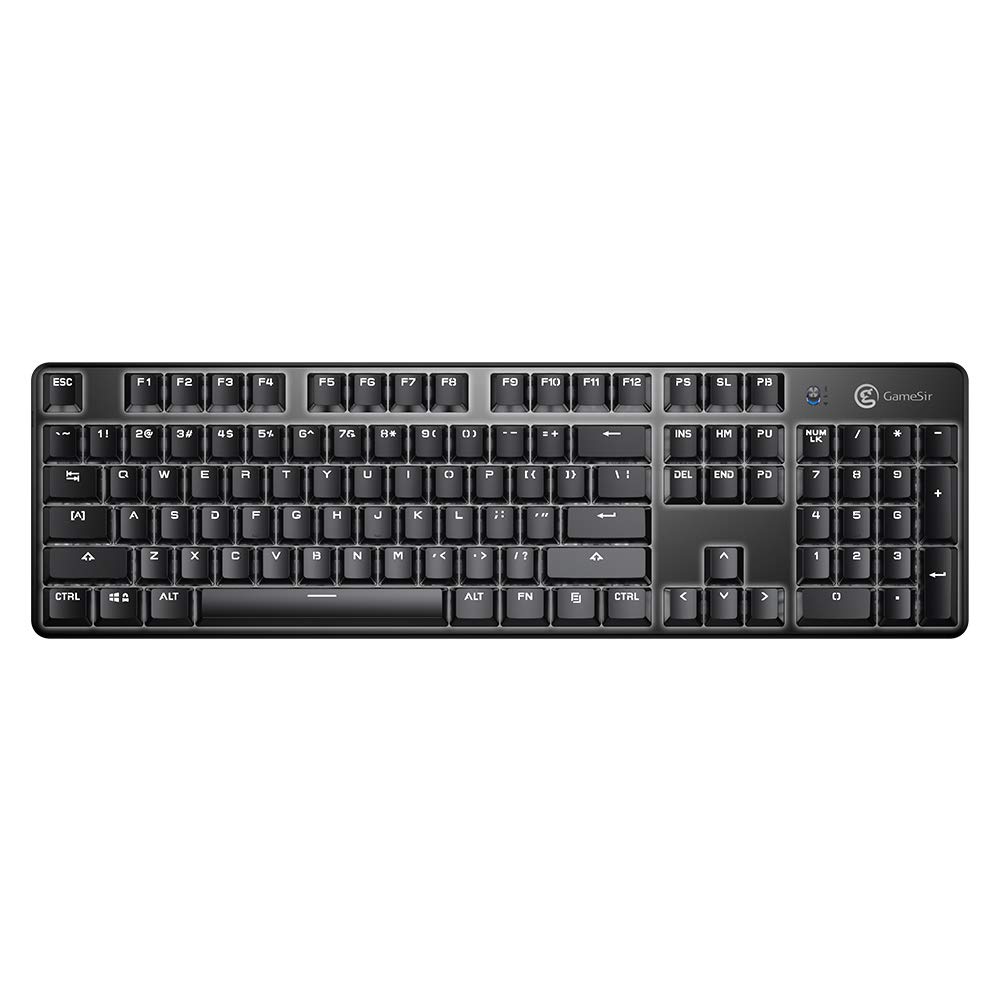
ภาพ: จากบนลงล่าง view of the GameSir GK300 keyboard, showing the full 104-key layout and keycap spacing.
คำแนะนำการใช้งาน
1. Dual Mode Connection Switching
The keyboard supports both 2.4GHz wireless and Bluetooth connections. Use the appropriate function key combination (e.g., Fn + 1/2/3 for Bluetooth profiles, or Fn + 4 for 2.4GHz) to switch between connected devices or modes.
2. การควบคุมแบ็คไลท์
The GameSir GK300 features white LED backlighting with 5 adjustable brightness levels and various lighting effects. Use the dedicated function keys (e.g., Fn + arrow keys or other designated keys) to cycle through effects and adjust brightness.
3. ป้องกันภาพซ้อน
The keyboard is equipped with 10-key anti-ghosting, ensuring that up to 10 simultaneous key presses are registered accurately without conflict, which is crucial for gaming performance.
4. สวิตช์เชิงกล
The keyboard utilizes TTC Blue Mechanical Switches, known for their tactile feedback and audible click. These switches have a lifespan of 50 million keystrokes, providing durability and a distinct typing experience.

Image: The GameSir GK300 keyboard illuminated with its LED backlight, positioned within a gaming setup, demonstrating its visual appeal during use.
การซ่อมบำรุง
1. การทำความสะอาด
To clean your keyboard, power it off and disconnect it from any power source. Use a soft, dry cloth to wipe the surface. For dust and debris between keys, use compressed air. Avoid using harsh chemicals or abrasive materials.
2. การดูแลแบตเตอรี่
To prolong battery life, avoid fully discharging the keyboard frequently. Charge the keyboard when the battery indicator is low. If storing the keyboard for an extended period, charge it to approximately 50% and store it in a cool, dry place.
การแก้ไขปัญหา
- แป้นพิมพ์ไม่เชื่อมต่อ:
Ensure the keyboard is powered on and fully charged. For 2.4GHz, verify the USB adapter is securely plugged in. For Bluetooth, ensure the keyboard is in pairing mode and your device's Bluetooth is active. Try re-pairing the device.
- Interference with Wi-Fi:
The 2.4GHz wireless connection may experience interference from Wi-Fi routers operating on the same frequency band. If you experience missed keystrokes or erratic behavior, try changing the Wi-Fi channel on your router if possible, or move the keyboard closer to the USB adapter.
- คีย์ไม่ตอบสนองหรือพิมพ์ไม่ถูกต้อง:
Ensure the keyboard is clean and free of debris. If individual keys are consistently failing, this may indicate a switch issue. For persistent problems, contact customer support.
- ไฟแบ็คไลท์ไม่ทำงานหรือหรี่ลง:
Check the battery level; low battery can affect backlight performance. Use the function keys to adjust brightness and cycle through lighting modes. If the issue persists, a factory reset (if available) or contacting support may be necessary.
- โหมดสลีปอัตโนมัติ:
The keyboard is designed to enter sleep mode after a period of inactivity to conserve battery. Press any key to wake it up. Note that the first key press after waking may not register as input.
ข้อมูลจำเพาะ
| คุณสมบัติ | รายละเอียด |
|---|---|
| ยี่ห้อ | เกมเซอร์ |
| หมายเลขรุ่น | GK300 |
| สี | สีดำ |
| ขนาด (กxยxส) | 46.5 x 14 x 6.5 ซม. |
| น้ำหนักสินค้า | 816.47 กรัม |
| เทคโนโลยีไร้สาย | ระบบไร้สาย 2.4GHz, บลูทูธ 4.1 |
| เค้าโครงคีย์ | 104 กุญแจเชิงกล |
| ประเภทสวิตช์ | สวิตช์สีฟ้า TTC |
| อายุการใช้งานคีย์สโตรก | 50 ล้าน |
| สีแบ็คไลท์ | White, 5-level adjustable brightness |
| ความจุของแบตเตอรี่ | แบตเตอรี่ลิเธียมแบบชาร์จไฟได้ 3600mAh |
| เวลาในการชาร์จ | 2.5 - 3 ชั่วโมง |
| อายุการใช้งานแบตเตอรี่ (เมื่อเปิดไฟแบ็คไลท์) | นานถึง 30 ชั่วโมง |
| อายุการใช้งานแบตเตอรี่ (ปิดไฟแบ็คไลท์) | นานถึง 300 ชั่วโมง |
| ป้องกันการโดนผีหลอก | 10 คีย์ |
| แพลตฟอร์มที่เข้ากันได้ | Windows PC (7+), macOS, Android (4.4+), iOS (7.0+) |
| ส่วนประกอบที่รวมอยู่ | Gaming Keyboard, User Manual, USB Adapter |
วิดีโอสินค้า
Video: Demonstrates the GameSir GK300 Wireless Mechanical Gaming Keyboard in action during Apex Legends gameplay, showcasing its responsiveness and suitability for gaming.
Video: Highlights the key features and design elements of the GameSir GK300 Wireless Mechanical Gaming Keyboard, providing a detailed overview ของความสามารถของตน
การรับประกันและการสนับสนุน
The GameSir GK300 Wireless Mechanical Gaming Keyboard comes with a 3-month warranty. For warranty claims, technical support, or further assistance, please contact GameSir customer service or visit the official GameSir webเว็บไซต์.
Manufacturer: Gamesir, Room 6, 5/F EasternHarbour Centre, 28 Hoi Chak Street, Quarry Bay, Hong Kong
Importer: Bellstar Trading Pvt Ltd - A24, Naraina INDL Area Ph-1, Delhi-110028 - 01145629914