1. บทนำ
Thank you for choosing the Optonica Solar LED Projector. This manual provides essential information for the safe and efficient use of your solar-powered lighting system. Please read these instructions carefully before installation and operation, and retain them for future reference.
2. คำแนะนำด้านความปลอดภัย
- ตรวจสอบให้แน่ใจว่าการเชื่อมต่อทั้งหมดมีความปลอดภัยและมีฉนวนป้องกันอย่างเหมาะสมเพื่อป้องกันอันตรายจากไฟฟ้า
- Do not attempt to disassemble or modify the product. Unauthorized modifications may void the warranty and pose safety risks.
- Keep the solar panel and projector away from flammable materials.
- Avoid direct eye exposure to the LED light when it is active, as it can be very bright.
- Install the solar panel in a location that receives maximum direct sunlight for optimal charging performance.
- This product is waterproof; however, avoid submerging it in water.
3. เนื้อหาบรรจุภัณฑ์
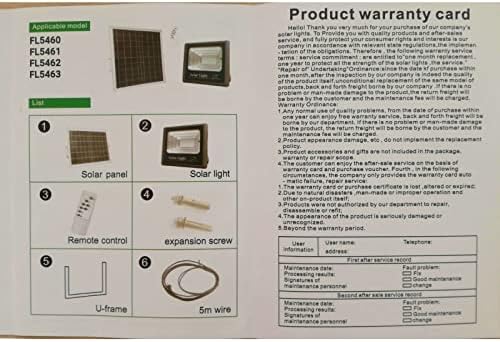
โปรดตรวจสอบว่าส่วนประกอบทั้งหมดมีอยู่ในแพ็คเกจของคุณ:

This image shows the product warranty card and a diagram illustrating the package contents, including the solar panel, solar light, remote control, expansion screws, U-frame, and 5m wire.
- แผงโซล่าเซลล์
- Solar Light (LED Projector)
- รีโมทคอนโทรล
- Expansion Screws (for mounting)
- U-frame (for mounting)
- 5-meter Connection Wire
4. สินค้าหมดview
The Optonica Solar LED Projector system consists of a high-efficiency solar panel, a powerful LED projector, and a convenient remote control for various lighting modes.
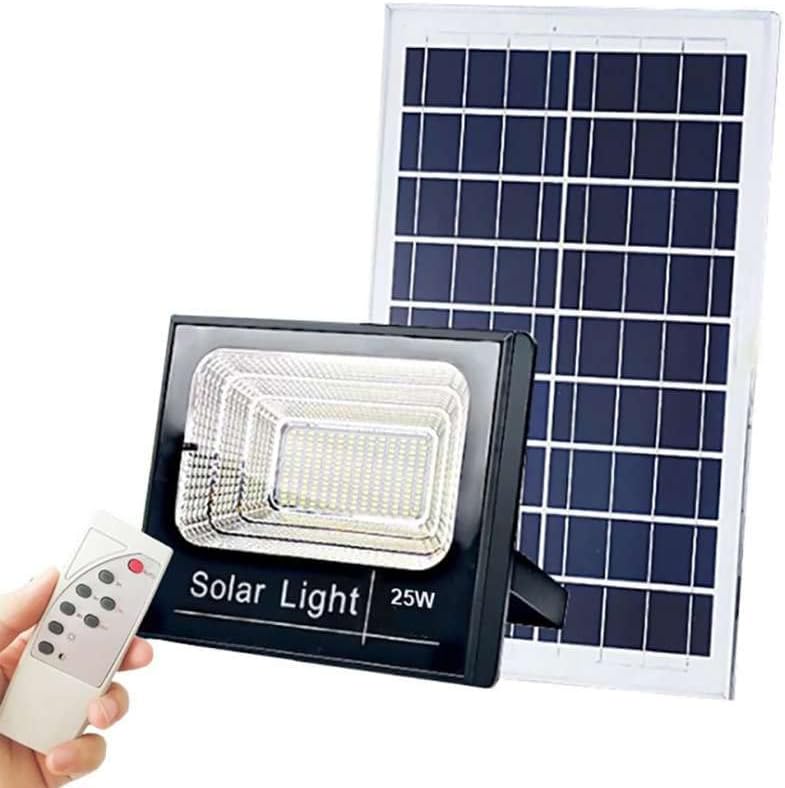
This image displays the Optonica Solar LED Projector, its accompanying solar panel, and the remote control. The projector is a black rectangular unit with an LED array, and the solar panel is a larger rectangular panel designed to capture sunlight.
4.1 แผงโซลาร์เซลล์
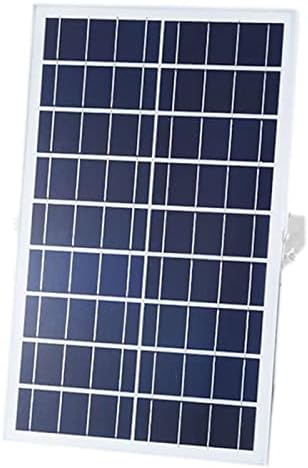
ภาพระยะใกล้ view of the solar panel component, showing its photovoltaic cells designed to convert sunlight into electrical energy.
The solar panel converts sunlight into electrical energy, which is stored in the projector's internal battery. It is designed for outdoor use and should be positioned to receive maximum direct sunlight.
โปรเจ็กเตอร์ LED 4.2 ดวง
The projector houses the LED light source and the rechargeable battery. It is designed to be waterproof and durable for outdoor environments, providing bright illumination.
4.3 การควบคุมระยะไกล
รายละเอียด view of the remote control for the Optonica Solar LED Projector, with labels indicating the functions of each button, such as AUTO, 3H, 5H, 8H, ON, OFF, and brightness adjustment.
The remote control allows you to manage the projector's functions, including power, automatic mode, timer settings, and brightness levels.
5. การตั้งค่าและการติดตั้ง
ปฏิบัติตามขั้นตอนเหล่านี้เพื่อการติดตั้งที่ถูกต้อง:
- เลือกตำแหน่ง: Select a mounting location for the solar panel that receives at least 6-8 hours of direct sunlight daily. The projector can be mounted separately in the desired lighting area.
- ติดตั้งแผงโซลาร์เซลล์: Use the U-frame and expansion screws to securely mount the solar panel. Adjust its angle to face the sun directly for maximum efficiency.
- Mount the Projector: Install the LED projector in your chosen location using appropriate mounting hardware (e.g., on a wall). Ensure it is stable and directed as desired.
- เชื่อมต่อส่วนประกอบ: Connect the 5-meter wire from the solar panel to the input port on the LED projector. Ensure the connection is firm.
- ค่าใช้จ่ายเริ่มต้น: Allow the solar panel to charge the projector's battery for at least 8-10 hours in direct sunlight before first use.
6. คู่มือการใช้งาน
Use the remote control to operate the projector:
- ปุ่มอัตโนมัติ: Activates the automatic mode. The projector will turn on automatically at dusk and turn off at dawn.
- ปุ่มเปิด: Manually turns the projector ON.
- ปุ่มปิด: Manually turns the projector OFF.
- 3H / 5H / 8H Buttons: Sets the projector to turn off automatically after 3, 5, or 8 hours of operation, respectively. This function is typically used in conjunction with the ON button.
- Brightness Adjustment Buttons (☀ / ☾): Adjusts the brightness level of the LED light. Use ☀ เพื่อเพิ่มความสว่างและ ☾ เพื่อลดความสว่าง
7. การบำรุงรักษา
- การทำความสะอาด: ทำความสะอาดพื้นผิวแผงโซล่าเซลล์ด้วยผ้านุ่มๆ เป็นประจำamp cloth to remove dust, dirt, or debris. A clean panel ensures optimal charging efficiency.
- การตรวจสอบ: Periodically check all cables and connections for any signs of wear or damage. Ensure they remain securely connected.
- การดูแลแบตเตอรี่ For optimal battery life, ensure the product receives sufficient sunlight for charging. Avoid prolonged periods of discharge.
8 การแก้ไขปัญหา
- Projector does not turn on:
- Ensure the solar panel is receiving adequate direct sunlight for charging.
- Check if the connection cable between the solar panel and projector is securely plugged in.
- Verify that the remote control battery is functional.
- Allow for an initial charge of 8-10 hours if it's the first use or after prolonged storage.
- Light is dim or short-lived:
- The solar panel may not be receiving enough sunlight. Relocate or clear any obstructions.
- Clean the solar panel surface to remove dirt or dust.
- Battery capacity might be reduced due to insufficient charging or aging.
- การควบคุมระยะไกลไม่ทำงาน:
- ตรวจสอบและเปลี่ยนแบตเตอรี่รีโมทคอนโทรลหากจำเป็น
- Ensure there are no obstructions between the remote and the projector's sensor.
9. ข้อมูลจำเพาะ
| คุณสมบัติ | ข้อมูลจำเพาะ |
|---|---|
| ยี่ห้อ | ออปโทนิก้า |
| หมายเลขรุ่น | FL5462 (also FL5460, FL5461, FL5463) |
| พลัง | 20 วัตต์ |
| ฟลักซ์ส่องสว่าง | 1800 ลูเมน |
| อุณหภูมิสี | 6000K (เดย์ไลท์ไวท์) |
| เล่มที่tage | 6.4 โวลต์ |
| ความจุของแบตเตอรี่ | 11อา |
| วัสดุ | อลูมิเนียม |
| คุณสมบัติพิเศษ | กันน้ำ |
| แหล่งพลังงาน | Battery Powered (Solar Charged) |
| วิธีการควบคุม | รีโมทคอนโทรล |
| ประเภทการติดตั้ง | ติดผนัง |
10. การรับประกันและการสนับสนุน
This product comes with a warranty period. Please refer to the warranty card included in your package for specific terms and conditions. Generally, the warranty covers manufacturing defects for a specified period from the date of purchase.
เงื่อนไขการรับประกัน:
- Any normal use quality problems within one year from the purchase date are covered.
- Product appearance damage is not covered.
- Product accessories and gifts are not included in the warranty.
- The warranty card or purchase certificate must be presented for service.
- Damage due to natural disasters, improper operation, or unauthorized disassembly is not covered.
- The warranty is void if the product is seriously damaged or unrecognized.
For technical support or warranty claims, please contact your retailer or the manufacturer's customer service with your purchase details and model number (FL5462).


