1. บทนำ
ขอบคุณสำหรับการซื้อasing the Sami Sami-RS12301NA Wireless Multimedia Clock Radio. This device combines a digital clock, FM radio, Bluetooth speaker, and MP3 player into one compact unit. Please read this manual carefully before using the product to ensure proper operation and to maximize its lifespan. Keep this manual for future reference.
2. ข้อมูลด้านความปลอดภัย
- อย่าให้เครื่องสัมผัสกับน้ำ ความชื้น หรืออุณหภูมิที่สูงหรือต่ำเกินไป
- หลีกเลี่ยงการทำอุปกรณ์หล่นหรือกระแทกอย่างรุนแรง
- ห้ามถอดประกอบ ซ่อมแซม หรือดัดแปลงอุปกรณ์ด้วยตนเอง แนะนำให้ช่างผู้ชำนาญการเป็นผู้ดำเนินการซ่อมบำรุงทั้งหมด
- ใช้เฉพาะสายชาร์จและแหล่งจ่ายไฟที่ระบุไว้เท่านั้น
- ควรวางอุปกรณ์ให้ห่างจากแหล่งความร้อน เช่น เครื่องทำความร้อน เตา หรือเครื่องใช้ไฟฟ้าอื่นๆ ที่ให้ความร้อน
- Clean the device only with a dry, soft cloth. Do not use liquid cleaners or aerosol sprays.
3. เนื้อหาบรรจุภัณฑ์
กรุณาตรวจสอบเนื้อหาในบรรจุภัณฑ์เมื่อเปิด:
- Sami Sami-RS12301NA Wireless Multimedia Clock Radio
- สายชาร์จ USB
- สายสัญญาณเสียง AUX
- คู่มือการใช้งาน
หากมีสินค้าใดขาดหายหรือเสียหาย โปรดติดต่อผู้ค้าปลีกของคุณ
4. สินค้าหมดview
Familiarize yourself with the main components of your Sami-RS12301NA device:
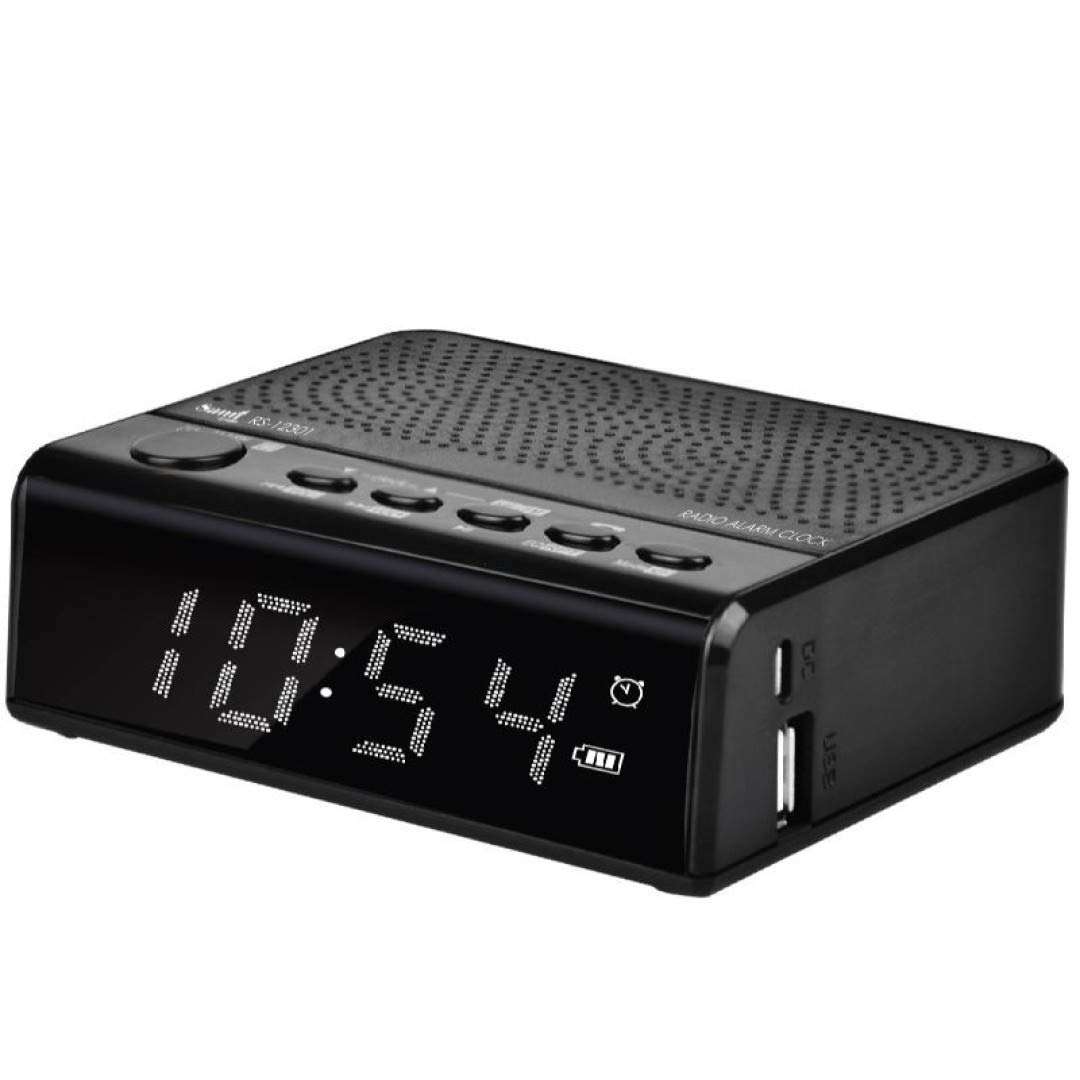
รูปที่ 4.1 : ด้านหน้า View. This image shows the front of the Sami-RS12301NA clock radio, featuring a large, clear digital LED display that shows the time (e.g., 10:54) and various status icons like alarm, battery level, and mode indicators. The top surface has control buttons and a speaker grille, while the right side has USB ports.
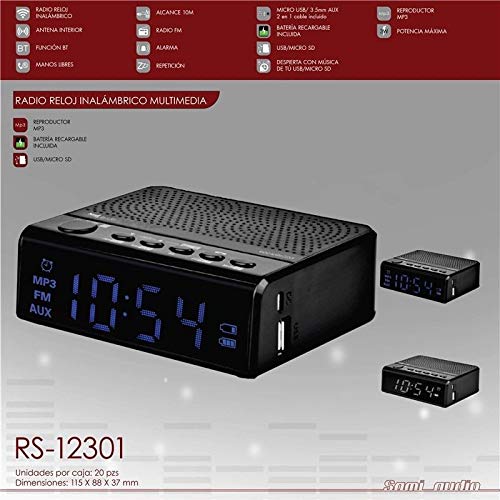
รูปที่ 4.2: คุณสมบัติโดยรวมview. ภาพนี้ให้รายละเอียด view of the Sami-RS12301NA, highlighting its key features and connectivity options. It shows the main unit with its digital display and top controls, along with smaller inset images of the device from different angles. Text overlays indicate features such as MP3 player, FM radio, AUX input, Bluetooth function, hands-free calling, alarm, and the inclusion of a rechargeable battery, Micro USB, and Micro SD card support.
5. การตั้งค่า
5.1 การเปิดเครื่องและการชาร์จครั้งแรก
- Connect the supplied USB charging cable to the Micro USB port on the back or side of the device.
- Connect the other end of the USB cable to a USB power adapter (not included) or a powered USB port (e.g., computer).
- The device will automatically power on or can be powered on by pressing the Power button.
- For optimal battery life, fully charge the device before first use. The battery indicator on the display will show charging status.
5.2 การตั้งเวลา
- In clock mode, press and hold the 'Time Set' button (usually marked with a clock icon or 'SET').
- The hour digits will start flashing. Use the 'Previous' and 'Next' buttons (often marked with arrows or '<<' / '>>') to adjust the hour.
- Press the 'Time Set' button again to confirm the hour and move to the minute setting.
- Use the 'Previous' and 'Next' buttons to adjust the minutes.
- Press the 'Time Set' button one more time to save the time settings.
6. คู่มือการใช้งาน
6.1 ฟังก์ชั่นพื้นฐาน
- เปิด/ปิดเครื่อง: Press and hold the 'Power' button.
- การควบคุมระดับเสียง: ใช้ปุ่ม '+' และ '-' เพื่อปรับระดับเสียง
- การเลือกโหมด: Press the 'M' (Mode) button to cycle through available modes: FM Radio, Bluetooth, MP3 (USB/Micro SD), AUX.
โหมดวิทยุ FM 6.2
- เปลี่ยนไปใช้โหมดวิทยุ FM โดยใช้ปุ่ม 'M'
- Press and hold the 'Play/Pause' button (often marked with a play icon) to initiate an automatic station scan. The radio will scan and save available stations.
- ใช้ปุ่ม 'ก่อนหน้า' และ 'ถัดไป' เพื่อนำทางระหว่างสถานีที่บันทึกไว้
6.3 โหมดบลูทูธ (BT)
- Switch to Bluetooth mode using the 'M' button. The display will show 'BT' and an icon, indicating it's ready for pairing.
- บนอุปกรณ์เคลื่อนที่ของคุณ เปิดใช้งานบลูทูธและค้นหาอุปกรณ์ใหม่
- Select 'Sami-RS12301NA' from the list of available devices.
- Once paired, the device will confirm the connection, and you can now play audio from your mobile device through the clock radio.
6.4 MP3 Player (USB/Micro SD)
- Insert a USB flash drive or a Micro SD card (with MP3 fileเสียบ (s) เข้ากับพอร์ตที่เกี่ยวข้อง
- The device should automatically switch to MP3 mode. If not, select it using the 'M' button.
- Use the 'Play/Pause' button to play or pause music.
- Use the 'Previous' and 'Next' buttons to skip tracks.
อินพุต AUX 6.5 ช่อง
- Connect one end of the supplied AUX audio cable to the 'AUX IN' port on the clock radio.
- ต่อปลายอีกด้านหนึ่งเข้ากับช่องเสียบหูฟังหรือช่องต่อสัญญาณเสียงออกของอุปกรณ์เสียงภายนอกของคุณ (เช่น สมาร์ทโฟน เครื่องเล่น MP3)
- Switch to AUX mode using the 'M' button. Audio from your external device will now play through the clock radio.
6.6 ฟังก์ชั่นปลุก
- Press the 'Alarm Set' button (often marked with an alarm icon). The alarm hour digits will flash.
- Use the 'Previous' and 'Next' buttons to set the desired alarm hour.
- Press 'Alarm Set' again to confirm the hour and set the minutes.
- Use the 'Previous' and 'Next' buttons to set the desired alarm minutes.
- Press 'Alarm Set' one more time to save the alarm time.
- To activate/deactivate the alarm, short press the 'Alarm Set' button. An alarm icon will appear/disappear on the display.
- When the alarm sounds, press any button (except Power) to snooze, or press the 'Power' button to turn off the alarm for the day.
6.7 Hands-Free Function (via Bluetooth)
- When a call comes in while in Bluetooth mode, the music will pause.
- Press the 'Play/Pause' button to answer the call.
- พูดใส่ไมโครโฟนในตัว
- Press the 'Play/Pause' button again to end the call.
7. การบำรุงรักษา
- การทำความสะอาด: Use a soft, dry, lint-free cloth to clean the surface of the device. Do not use abrasive cleaners, waxes, or solvents.
- พื้นที่จัดเก็บ: If the device will not be used for an extended period, store it in a cool, dry place away from direct sunlight and extreme temperatures. Ensure it is fully charged before storing and recharge periodically if stored for very long periods to maintain battery health.
8 การแก้ไขปัญหา
| ปัญหา | สาเหตุที่เป็นไปได้ | สารละลาย |
|---|---|---|
| อุปกรณ์ไม่เปิดเครื่อง | Low battery or no power connection. | Connect the USB charging cable and ensure it's connected to a working power source. Allow it to charge for a few minutes before attempting to power on. |
| ไม่มีเสียง. | Volume is too low; incorrect mode selected; device not properly connected (AUX/BT). | Increase the volume. Ensure the correct mode (FM, BT, MP3, AUX) is selected. For AUX, check cable connection. For Bluetooth, ensure it's paired and connected. |
| บลูทูธไม่เชื่อมต่อ | Device is not in pairing mode; mobile device's Bluetooth is off; too far from the device. | Ensure the clock radio is in Bluetooth mode and discoverable. Turn Bluetooth off and on again on your mobile device. Move closer to the clock radio. |
| การรับสัญญาณวิทยุ FM ไม่ดี | สัญญาณอ่อน; มีสัญญาณรบกวน | Try repositioning the device to improve reception. Avoid placing near other electronic devices that may cause interference. |
| สัญญาณเตือนภัยไม่ดัง | Alarm is not activated; volume is too low. | Ensure the alarm icon is visible on the display, indicating it's active. Increase the volume. |
9. ข้อมูลจำเพาะ
| คุณสมบัติ | ข้อมูลจำเพาะ |
|---|---|
| ยี่ห้อ | ซามิ |
| หมายเลขรุ่น | RS12301NA |
| สี | สีดำ |
| ประเภทจอภาพ | ดิจิตอล |
| แหล่งพลังงาน | Internal Rechargeable Battery (charged via Micro USB) |
| การเชื่อมต่อ | Bluetooth, FM Radio, Micro USB, AUX Input, Micro SD Card Slot |
| นาฬิกาปลุก | ใช่ |
| ฟังก์ชันแฮนด์ฟรี | ใช่ |
| เล่น MP3 | รองรับ MP3 files from USB drive/Micro SD card |
10. การรับประกันและการสนับสนุน
This product is covered by a standard manufacturer's warranty. For specific warranty terms and conditions, please refer to the warranty card included with your purchase or contact your retailer. If you encounter any issues or require technical assistance, please contact the customer support of your place of purchase or the manufacturer directly. Please have your model number (RS12301NA) and proof of purchase ready when contacting support.


