1. บทนำ
The Wacom Intuos Pro Small Drawing Tablet is designed for creative professionals, offering natural creative control for illustration, image editing, and design. This compact and portable graphics tablet features a multi-touch surface, customizable ExpressKeys, and the highly responsive Pro Pen 2, providing precision and efficiency for your digital workflow. It connects seamlessly to Mac and Windows PCs via Bluetooth or USB-C.

Video 1.1: Official Wacom video demonstrating digital and 3D art creation using the Intuos Pro tablet. This video highlights the tablet's capabilities in various creative applications.
2. การตั้งค่า
2.1 การแกะกล่องและการตรวจสอบเบื้องต้น
นำส่วนประกอบทั้งหมดออกจากบรรจุภัณฑ์อย่างระมัดระวัง ตรวจสอบให้แน่ใจว่าสิ่งของทั้งหมดที่ระบุไว้ในส่วน 'สิ่งที่มีอยู่ในกล่อง' นั้นครบถ้วนและไม่เสียหาย

2.2 การติดตั้งไดรเวอร์
- Visit the official Wacom webงาน (wacom.com/start/intuos-pro) to download the latest drivers for your operating system (Windows 7 or later, Mac OS X 10.10 or later).
- Follow the on-screen instructions to complete the driver installation. A stable internet connection is required for this step.
- Restart your computer after installation to ensure drivers are properly loaded.
2.3 การเชื่อมต่อแท็บเล็ต
The Intuos Pro offers two connectivity options:
- การเชื่อมต่อ USB-C: Connect the included USB-C cable from your tablet to an available USB port on your computer. The tablet will be powered and connected automatically.
- การเชื่อมต่อบลูทู ธ :
- ตรวจสอบให้แน่ใจว่าได้เปิดใช้งานบลูทูธของคอมพิวเตอร์ของคุณแล้ว
- Turn on the Intuos Pro tablet.
- Open your computer's Bluetooth settings and search for available devices.
- Select "Intuos Pro" from the list and follow any pairing prompts.
3. คู่มือการใช้งาน
3.1 Using the Pro Pen 2
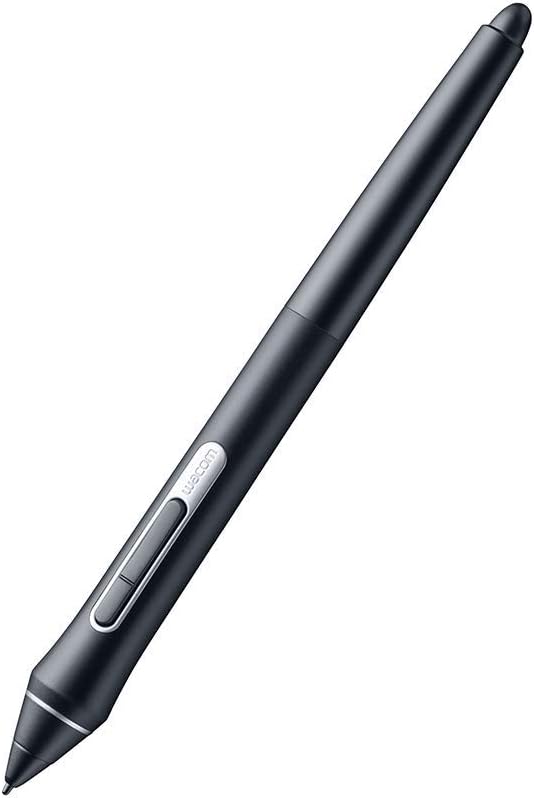
The Pro Pen 2 is a battery-free stylus with 8192 levels of pressure sensitivity and tilt recognition, providing a natural drawing experience. Hold the pen as you would a traditional pen or pencil.

3.2 ExpressKeys and Touch Ring
The Intuos Pro Small features 6 customizable ExpressKeys and a Touch Ring. These can be programmed to your favorite keyboard shortcuts, modifiers, or application-specific functions to streamline your workflow.
- เอ็กซ์เพรสคีย์: Use the Wacom Tablet Properties software to assign functions to each of the 6 ExpressKeys.
- Touch Ring: The Touch Ring allows for quick adjustments to brush size, canvas rotation, zooming, and cycling through layers. Customize its functions via the Wacom Tablet Properties.
3.3 ท่าทางสัมผัสหลายจุด
The tablet supports multi-touch gestures, allowing you to zoom, scroll, and navigate your artwork as easily as using a smartphone. Multi-touch can be enabled or disabled via a physical switch on the tablet or through the Wacom Tablet Properties.

4. การบำรุงรักษา
4.1 การทำความสะอาดแท็บเล็ต
To maintain optimal performance and appearance, regularly clean your Wacom Intuos Pro tablet:
- ใช้ผ้านุ่มไม่เป็นขุยเช็ดเบาๆampชุบด้วยน้ำหรือน้ำยาทำความสะอาดอ่อนๆ ที่ไม่กัดกร่อน
- Avoid harsh chemicals, solvents, or abrasive materials, as these can damage the tablet surface.
- Ensure the tablet is disconnected from power before cleaning.
4.2 การเปลี่ยนหัวปากกา
The Pro Pen 2 comes with several replacement nibs stored within the pen stand. Replace the nib when it shows signs of wear or if you desire a different drawing feel.
- Unscrew the bottom of the pen stand to access the replacement nibs and the nib removal tool.
- Gently pull the old nib straight out of the pen using the nib removal tool.
- ใส่ปลายปากกาใหม่เข้าไปในปากกาให้แน่นจนกระทั่งล็อคเข้าที่
5 การแก้ไขปัญหา
5.1 Pen or Touch Not Responding
- Ensure the tablet is properly connected via USB or Bluetooth.
- Check that the latest Wacom drivers are installed and your computer has been restarted.
- Verify that the multi-touch switch on the tablet is in the desired position (on/off).
- Test the pen on a different application or computer to isolate the issue.
5.2 ปัญหาการเชื่อมต่อบลูทูธ
- Ensure the tablet is fully charged.
- Remove the tablet from your computer's Bluetooth device list and re-pair it.
- Minimize interference by keeping other wireless devices away from the tablet and computer.
5.3 Driver Malfunctions
Some users report occasional driver issues. If your tablet behaves erratically:
- Disconnect the tablet, uninstall the Wacom drivers, restart your computer, then reinstall the latest drivers.
- Ensure no conflicting tablet drivers (from other brands) are installed on your system.
6. ข้อมูลจำเพาะ
| คุณสมบัติ | รายละเอียด |
|---|---|
| ยี่ห้อ | วาคอม |
| หมายเลขรุ่น | PTH460K0A |
| ขนาดสินค้า | 6.7 x 10.6 x 0.1 นิ้ว |
| น้ำหนักสินค้า | 15.8 ออนซ์ |
| สี | สีดำ |
| เทคโนโลยีการเชื่อมต่อ | บลูทูธ, USB-C |
| ความไวต่อแรงกด | 8192 ระดับ |
| ความเข้ากันได้ของระบบปฏิบัติการ | Windows 7 or later, Mac OS X 10.10 or later |
| แพลตฟอร์มฮาร์ดแวร์ | แมค, พีซี |
| แบตเตอรี่ | ต้องใช้แบตเตอรี่ลิเธียมโพลิเมอร์ 1 ก้อน (รวมอยู่ด้วย) |

7. อะไรอยู่ในกล่อง
- Wacom Intuos Pro Small Drawing Tablet
- ปากกา Wacom Pro Pen 2
- Pen Stand (includes 10 replacement nibs and nib removal tool)
- สาย USB-C
- คู่มือเริ่มต้นอย่างรวดเร็ว
8. การรับประกันและการสนับสนุน
For warranty information, please refer to the documentation included with your product or visit the official Wacom support website. Wacom provides technical support and resources to assist with any product-related inquiries or issues.
Wacom Support: wacom.com/support


