1. สินค้าหมดview
The JBL TUNE 110 In-Ear Headphones are designed to deliver JBL Pure Bass Sound in a lightweight, comfortable, and compact form factor. These wired headphones feature 9mm drivers for powerful audio reproduction and include a convenient one-button remote with a built-in microphone for easy control of music playback and calls. The tangle-free flat cable ensures hassle-free use and storage.

Image 1.1: The JBL TUNE 110 In-Ear Headphones in Blue, showcasinด้วยการออกแบบที่เพรียวบาง
2. อะไรอยู่ในกล่อง
Upon unboxing your JBL TUNE 110 In-Ear Headphones, you should find the following components:
- หูฟังอินเอียร์ JBL TUNE 110
- Multiple sizes of ear tips (typically Small, Medium, Large) to ensure a comfortable and secure fit.
- A carrying pouch for convenient storage and portability.
วิดีโอ 2.1: การประชุมอย่างเป็นทางการview of the JBL TUNE 110 In-Ear Headphones, demonstrating key features and components.
3. การตั้งค่า
Follow these steps to set up your JBL TUNE 110 In-Ear Headphones:
- เลือกจุกหูฟัง: Choose the ear tips that provide the most comfortable and secure fit for your ears. A good seal is crucial for optimal sound quality and bass performance. Gently attach them to the earbuds.
- การใส่หูฟัง: Carefully insert the earbuds into your ear canals. Ensure they are seated snugly.
- เชื่อมต่อกับอุปกรณ์: Plug the 3.5mm audio jack into the headphone port of your audio device (smartphone, tablet, laptop, etc.).

ภาพที่ 3.1: ด้านข้าง view of the JBL TUNE 110 earbud, illustrating its in-ear design.
4. คู่มือการใช้งาน
The JBL TUNE 110 features a convenient one-button remote for easy control:
- เล่น/หยุดเพลง: กดปุ่มหนึ่งครั้งเพื่อเล่นหรือหยุดเพลงชั่วคราว
- รับ/วางสาย: กดปุ่มหนึ่งครั้งเพื่อรับสายเรียกเข้าหรือวางสายสนทนา
- ปฏิเสธสาย: กดปุ่มค้างไว้ประมาณ 2 วินาทีเพื่อปฏิเสธสายเรียกเข้า
- เพลงถัดไป: กดปุ่มสองครั้งอย่างรวดเร็วเพื่อข้ามไปยังเพลงถัดไป
- แทร็กก่อนหน้า: กดปุ่มสามครั้งอย่างรวดเร็วเพื่อกลับไปยังแทร็กก่อนหน้า
- ผู้ช่วยเสียง: Press and hold the button for approximately 3 seconds to activate your device's voice assistant (if supported).
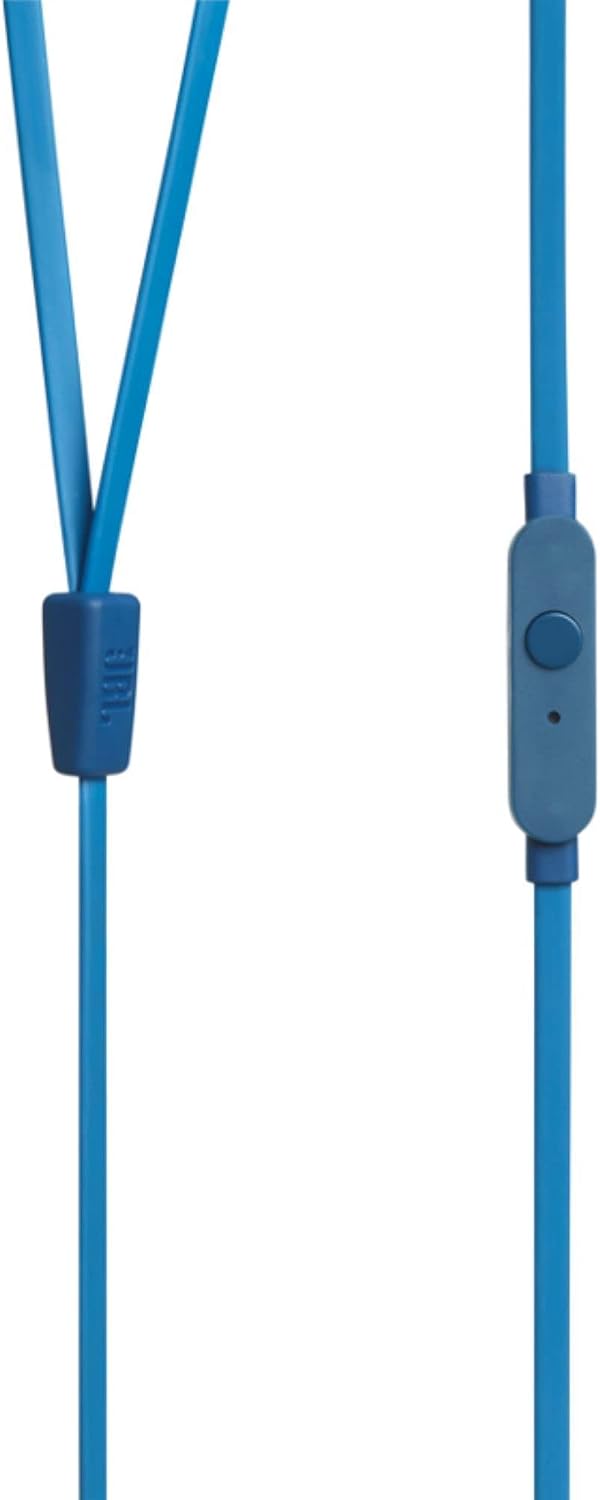
Image 4.1: Close-up of the one-button remote control and built-in microphone on the JBL TUNE 110 cable.
5. คุณสมบัติ
- เสียงเบส JBL Pure Bass: Experience powerful and clear bass, a signature of JBL audio.
- ไดรเวอร์ขนาด 9 มม.: Equipped with dynamic 9mm drivers for high-quality sound reproduction.
- One-Button Remote with Microphone: Seamlessly manage music playback and hands-free calls.
- สายแบนไม่พันกัน: Designed to prevent tangles, making the headphones easy to store and use.
- น้ำหนักเบาและสวมใส่สบาย: Ergonomically designed for extended listening comfort.
- ระบบตัดเสียงรบกวนแบบพาสซีฟ: The in-ear design provides a degree of passive noise isolation.
6. ข้อมูลจำเพาะ
| คุณสมบัติ | ข้อมูลจำเพาะ |
|---|---|
| ยี่ห้อ | เจบีแอล |
| ชื่อรุ่น | JBL TUNE 110 |
| หมายเลขรุ่น | JBLT110BLUAM |
| เทคโนโลยีการเชื่อมต่อ | มีสาย |
| แจ็คหูฟัง | แจ็ค 3.5 มม. |
| ขนาดไดร์เวอร์ | ไดรเวอร์ไดนามิกขนาด 9 มม. |
| อิมพีแดนซ์ | 16 โอห์ม |
| การควบคุมเสียงรบกวน | การยกเลิกเสียงรบกวนแบบพาสซีฟ |
| น้ำหนักสินค้า | 0.32 ออนซ์ (ประมาณ 9 กรัม) |
| ขนาดสินค้า | 2.36 x 1.18 x 6.89 นิ้ว |
| วัสดุ | พลาสติก |
| สี | สีฟ้า |
| คุณสมบัติสายเคเบิล | ยุ่งเหยิงฟรี |
7. การบำรุงรักษา
การดูแลรักษาอย่างถูกวิธีจะช่วยยืดอายุการใช้งานและประสิทธิภาพของหูฟังของคุณ:
- การทำความสะอาดจุกหู: Regularly remove the silicone ear tips and wash them with mild soap and water. Ensure they are completely dry before reattaching.
- การทำความสะอาดหูฟัง: Gently wipe the earbuds with a soft, dry cloth. Avoid using harsh chemicals or abrasive materials.
- การดูแลสายเคเบิล: Although the cable is tangle-free, avoid excessive pulling or sharp bends to prevent internal damage. When not in use, coil the cable neatly.
- พื้นที่จัดเก็บ: Store your headphones in the provided carrying pouch to protect them from dust, dirt, and physical damage.
8 การแก้ไขปัญหา
If you encounter any issues with your JBL TUNE 110 headphones, refer to the following common solutions:
- ไม่มีเสียง:
- ตรวจสอบให้แน่ใจว่าเสียบแจ็ค 3.5 มม. เข้ากับพอร์ตเสียงของอุปกรณ์อย่างแน่นหนาแล้ว
- ตรวจสอบระดับเสียงบนอุปกรณ์เสียงของคุณ
- Test the headphones with another audio device to rule out a device-specific issue.
- คุณภาพเสียงไม่ดี / ขาดเสียงเบส:
- Verify that the ear tips are correctly sized and provide a good seal in your ear canal.
- Ensure the ear tips are clean and free from debris.
- ไมโครโฟนไม่ทำงาน:
- ตรวจสอบให้แน่ใจว่าเสียบแจ็ค 3.5 มม. เข้าไปจนสุดแล้ว
- ตรวจสอบการตั้งค่าอินพุตเสียงของอุปกรณ์ของคุณเพื่อให้แน่ใจว่าได้เลือกไมโครโฟนภายนอก
- ทดสอบไมโครโฟนกับอุปกรณ์หรือแอปพลิเคชันอื่น
9. การรับประกันและการสนับสนุน
JBL products are manufactured to high standards and undergo rigorous quality control. For detailed warranty information, product registration, and technical support, please visit the official JBL website or contact your local JBL customer service center. Keep your proof of purchase for warranty claims.