Epson Home Cinema 5050UB - Take a Tour
This video provides a brief tour of the Epson Home Cinema 5050UB projector, showcasing its design and features. It offers a visual overview of the product for potential users.
แบบอย่าง: 5050UB | ยี่ห้อ: เอปสัน
The Epson Home Cinema 5050UB 4K PRO-UHD projector is designed to deliver a high-quality 4K home theater experience. It features advanced processing for resolution enhancement, color, and image processing, producing exceptional brightness, color accuracy, and image detail. This manual provides essential information for setting up, operating, and maintaining your projector to ensure optimal performance.
ตรวจสอบว่ามีรายการทั้งหมดรวมอยู่ในแพ็คเกจของคุณ:

The image above displays the projector and its accompanying accessories, ensuring you have everything needed for initial setup.
The Epson Home Cinema 5050UB is engineered for superior visual performance. Key features include:

The projector is capable of projecting images up to 120 inches or larger, providing a cinematic experience in your home. The diagram below illustrates various projection sizes based on distance.

Follow these steps to set up your Epson Home Cinema 5050UB projector:
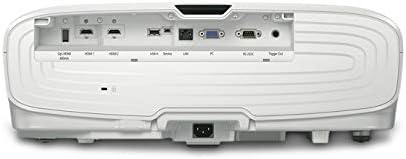
The rear panel provides multiple connectivity options for your home theater devices. Ensure all cables are securely connected.

This diagram illustrates the wide range of devices compatible with your projector and lists the available ports for connection.
Once the projector is set up, follow these steps for daily operation:
การบำรุงรักษาอย่างสม่ำเสมอจะช่วยให้โปรเจคเตอร์ของคุณมีอายุการใช้งานยาวนานและทำงานได้อย่างมีประสิทธิภาพสูงสุด:
หากคุณพบปัญหาเกี่ยวกับโปรเจคเตอร์ โปรดลองทำตามขั้นตอนการแก้ไขปัญหาทั่วไปต่อไปนี้:
For more detailed troubleshooting, refer to the comprehensive user manual or contact Epson customer support.
| ขนาดสินค้า | 17.7 x 20.4 x 7.5 นิ้ว |
| น้ำหนักสินค้า | 24.7 ปอนด์ |
| หมายเลขรุ่นสินค้า | V11H930020 |
| ยี่ห้อ | เอปสัน |
| เทคโนโลยีการเชื่อมต่อ | HDMI |
| ความละเอียดการแสดงผล | 4096 x 2160 |
| ผู้ผลิต | เอปสัน |
Epson offers a รับประกันจำกัด 1 ปี with full unit replacement for the Home Cinema 5050UB projector. Additionally, บริการสนับสนุนด้านเทคนิคฟรีตลอดอายุการใช้งาน is provided. For detailed warranty terms and to access support, please visit the official Epson webไซต์หรือดูเอกสารประกอบที่รวมอยู่ในผลิตภัณฑ์ของคุณ
This video provides a brief tour of the Epson Home Cinema 5050UB projector, showcasing its design and features. It offers a visual overview of the product for potential users.
 |
Epson Pro Cinema LS12000: การตั้งค่าและการปรับแต่งเบื้องต้นที่แนะนำ เรียนรู้วิธีปรับแต่งโปรเจคเตอร์ Epson Pro Cinema LS12000 ของคุณให้เหมาะสมที่สุดด้วยการตั้งค่าที่แนะนำง่ายๆ เหล่านี้สำหรับความสว่าง ความคมชัด ความคมชัด และรายละเอียด รวมถึงคำแนะนำการตั้งค่าทั่วไปด้วย |
 |
คู่มือการอัปเดตเฟิร์มแวร์โปรเจคเตอร์ Epson คำแนะนำครอบคลุมสำหรับการอัปเดตเฟิร์มแวร์บนโปรเจ็กเตอร์ Epson PowerLite Home Cinema 5030UB/5030UBe และ PowerLite Pro Cinema 4030/6030UB เพื่อให้มั่นใจถึงประสิทธิภาพและคุณสมบัติที่เหมาะสมที่สุด |
 |
คู่มือการอัปเดตเฟิร์มแวร์โปรเจคเตอร์ Epson สำหรับรุ่น PowerLite และ Pro Cinema คำแนะนำสำหรับการอัปเดตเฟิร์มแวร์บนโปรเจคเตอร์ Epson PowerLite Home Cinema 5030UB/5030UBe และ PowerLite Pro Cinema 4030/6030UB รวมถึงขั้นตอนการตรวจสอบเวอร์ชันปัจจุบันและการติดตั้งการอัปเดต |
 |
การรับประกันและประกาศสำหรับโปรเจคเตอร์ Epson เอกสารฉบับนี้สรุปประกาศจาก FCC ของสหรัฐอเมริกา และหน่วยงานด้านนวัตกรรม วิทยาศาสตร์ และการพัฒนาเศรษฐกิจของแคนาดา (ISED) รวมถึงการรับประกันแบบจำกัดระยะเวลาสามปีของโปรเจคเตอร์จาก Epson America, Inc. โดยระบุรายละเอียดเกี่ยวกับสิ่งที่ครอบคลุม การดำเนินการแก้ไขปัญหาของ Epson และสิ่งที่การรับประกันแบบจำกัดไม่ครอบคลุม รวมถึงขั้นตอนการระงับข้อพิพาทและการอนุญาโตตุลาการ |
 |
โปรเจ็กเตอร์ Epson Home Cinema 2200/2250: คู่มือการตั้งค่าอย่างรวดเร็วและการรับประกัน คู่มือฉบับสมบูรณ์สำหรับการตั้งค่าโปรเจคเตอร์ Epson Home Cinema 2200 หรือ 2250 ของคุณ ประกอบด้วยคำแนะนำทีละขั้นตอนสำหรับการตั้งค่าเริ่มต้น การเชื่อมต่ออุปกรณ์ การปรับคุณภาพของภาพ เป็นต้น viewการรับชมเนื้อหา 3 มิติ การใช้รีโมทคอนโทรล การแก้ไขปัญหาทั่วไป และการทำความเข้าใจเงื่อนไขการรับประกันสินค้า |
 |
คู่มือผู้ใช้โปรเจคเตอร์เลเซอร์ Epson LS800BATV/LS800WATV 4K คู่มือผู้ใช้ที่ครอบคลุมสำหรับโปรเจ็กเตอร์เลเซอร์ Epson LS800BATV และ LS800WATV 4K PRO-UHD ครอบคลุมการตั้งค่า คุณสมบัติ การใช้งาน การบำรุงรักษา และการแก้ไขปัญหา |